
Corsair K70 CORE
4.0Editor score
Pre-Lubed MLX Red Switches
Aluminum Top Plate
Magnetic Detachable Palm Rest
This guide compares ten top Corsair mechanical keyboards for gaming and typing, evaluating switches, layouts, RGB features, build quality, and performance to
Finding the perfect Corsair mechanical keyboard can transform your gaming and typing experience significantly. With so many models available, selecting the right one depends on your specific needs and preferences regarding layout, switches, and features.
We have carefully analyzed ten distinct Corsair mechanical keyboards to provide a comprehensive comparison. This list covers various form factors from full-size to compact TKL, ensuring you find a keyboard that fits your desk and workflow perfectly.
Each pick highlights key strengths and potential trade-offs to guide your decision-making process. Please note that pricing and availability may change over time, so check current listings before making your final purchase decision today.
4.0Editor score

4.5Editor score

3.8Editor score
Explore the detailed side-by-side comparison of all ten Corsair mechanical keyboards to understand their unique specifications, build materials, switch types, and special features at a glance.




The Corsair K100 RGB stands out as a premier gaming keyboard delivering exceptional performance through its advanced AXON Hyper-Processing Technology and OPX optical-mechanical switches.
We may earn a commission when you buy through this link, at no additional cost to you.
Its key strengths include the rapid 4000Hz hyper-polling rate and the smooth linear travel of the OPX switches which are rated for 150 million keystrokes ensuring longevity and speed.
While the price is significantly higher than average keyboards the investment pays off through superior build materials like the durable aluminum frame and high-quality PBT double-shot keycaps.
This keyboard is ideal for serious gamers and streamers seeking top-tier performance and customization options via iCUE software and integrated Elgato Stream Deck support for complex commands.
The AXON Hyper-Processing Technology ensures inputs are processed up to four times faster than traditional mechanical keyboards providing a competitive edge in fast-paced games.
Constructed with a robust aluminum frame and PBT keycaps this keyboard is built to withstand years of intense gaming use without showing signs of wear or key legend fading.
We may earn a commission when you buy through this link, at no additional cost to you.
The Corsair K70 CORE delivers a magnificent mechanical keyboard experience at an accessible price point making it an excellent choice for those seeking quality without breaking the bank.
We may earn a commission when you buy through this link, at no additional cost to you.
Its standout features include pre-lubricated MLX Red linear switches for smooth responsive keystrokes and two layers of sound dampening that create a pleasingly satisfying typing and gaming feel.
While the ABS double-shot keycaps are tough and resilient they may show wear over time compared to PBT alternatives though the robust aluminum top plate adds stability and style effectively.
This keyboard is perfect for gamers and typists looking for a reliable full-size board with essential features like a magnetic detachable palm rest and a multi-function media control dial.
The combination of sound dampening layers and pre-lubed switches reduces unwanted noise and vibration offering a more comfortable experience during long gaming or typing sessions.
Control volume and playback easily with the multi-function rotary dial and programmable media button ensuring you can adjust settings quickly without leaving your game or application.
We may earn a commission when you buy through this link, at no additional cost to you.
The Corsair Galleon 100 SD takes gaming keyboards to a new level by integrating a dynamic LCD screen and Elgato Stream Deck capabilities directly into the keyboard chassis.
We may earn a commission when you buy through this link, at no additional cost to you.
Its premium features include a 5-inch full-color display that shows system specs or Twitch channels and eight thousand hertz hyper-polling ensuring your inputs are registered instantly during competitive play.
While the price is high the convenience of controlling apps like Discord and Spotify without leaving your game justifies the cost for streamers and power users seeking ultimate desk efficiency.
This keyboard is best suited for enthusiasts who want a centralized control hub for their setup and are willing to invest in premium hardware with advanced customization software options available.
By consolidating Stream Deck functions and app controls into the keyboard you save desk space and reduce friction when switching tasks or adjusting settings during gameplay.
The 8000Hz polling rate and FlashTap SOCD handling provide ultra-responsive inputs and advanced movement techniques giving you a competitive edge in fast-paced online games.
We may earn a commission when you buy through this link, at no additional cost to you.
The Corsair Vanguard 96 offers a 96% layout that keeps it one hundred percent functional by integrating arrow keys and a tenkey pad into a super-compact frame roughly the size of a TKL.
We may earn a commission when you buy through this link, at no additional cost to you.
It features a vibrant full-color LCD screen on the top for displaying custom animations or system specs along with eight thousand hertz hyper-polling to maximize response times for in-game actions.
The tight key spacing might feel unusual at first but the benefit of having a full keyboard layout without taking up extra desk space outweighs this minor adjustment for many users effectively.
This keyboard is ideal for users who want a feature-rich gaming experience without sacrificing desk real estate and who enjoy personalizing their setup with integrated LCD screen visuals and shortcuts.
The 96% layout ensures you retain full functionality while freeing up significant desk space for wider mouse movements which is critical for competitive gaming setups and ergonomics.
With six programmable G-keys and Elgato Virtual Stream Deck integration you can map complex macros and create clickable shortcuts to streamline your workflow significantly.
We may earn a commission when you buy through this link, at no additional cost to you.
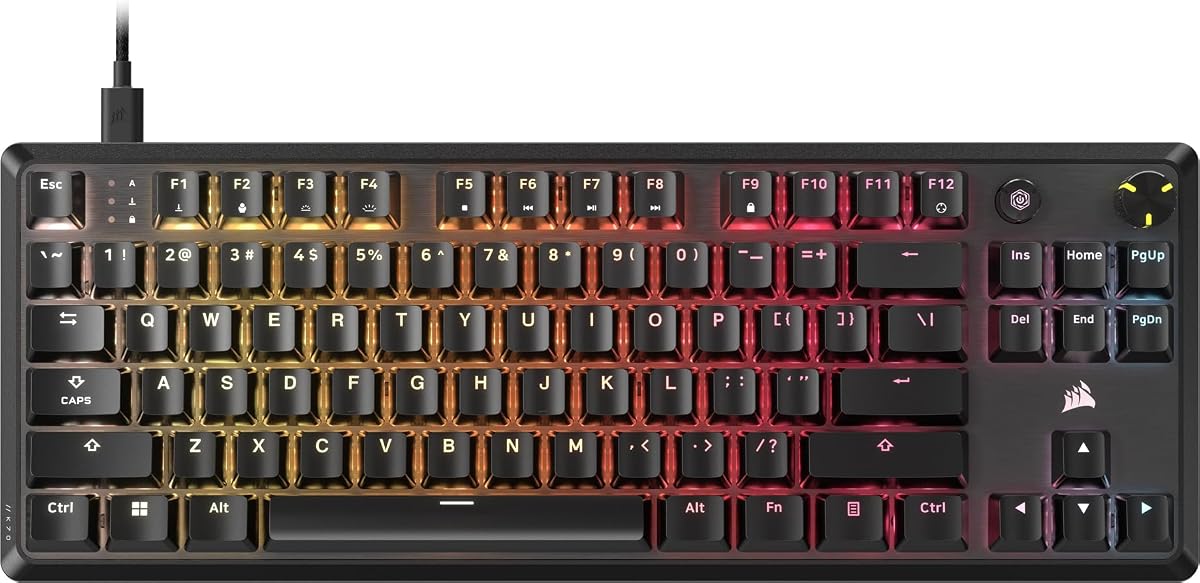
The Corsair K70 CORE TKL is a tenkeyless keyboard that fits perfectly in tight gaming setups by omitting the numpad to leave more room for sweeping mouse movements.
We may earn a commission when you buy through this link, at no additional cost to you.
It features pre-lubricated MLX Red v2 linear switches that deliver smooth responsive and stable keystrokes while two sound dampening layers made from premium foam temper unwanted pings and clacks.
The lack of a numeric keypad makes it less suitable for heavy data entry but for gamers who prioritize desk space and comfort this compact form factor is highly beneficial effectively.
This keyboard is recommended for gamers who want a reliable full-sized typing experience in a smaller footprint with added comfort from a media control dial and sturdy build quality.
Two layers of premium sound dampening foam and pre-lubricated stabilizers ensure that keystrokes sound pleasingly subdued rather than loud and disruptive during long sessions.
The multi-function rotary dial allows you to control volume and media easily without reaching for external controls ensuring uninterrupted focus on your games or tasks.
We may earn a commission when you buy through this link, at no additional cost to you.
This variant of the K70 CORE offers similar excellent qualities with a focus on onboard storage allowing you to save up to five profiles of customized settings and RGB lighting.
We may earn a commission when you buy through this link, at no additional cost to you.
Its key features include pre-lubricated CORSAIR Red linear mechanical switches that deliver smooth responsive keystrokes enhanced by two layers of sound dampening for satisfying gaming and typing.
While it lacks the included palm rest found in other models the ability to store settings directly on the board ensures your preferences are ready even when you move setups.
This keyboard is ideal for users who want a reliable full-size mechanical board with strong build quality and convenient profile management without paying for extras they do not need.
Storing up to five profiles onboard means you can switch between gaming and typing configurations instantly without needing to keep the iCUE software open on your PC.
The durable aluminum top plate provides a stable base that prevents flex during intense gaming ensuring a consistent typing feel over extended periods of daily use.
We may earn a commission when you buy through this link, at no additional cost to you.
The Corsair K55 RGB PRO brings dynamic RGB backlighting and essential gaming features to a budget-friendly package making it a great entry point for casual gamers.
We may earn a commission when you buy through this link, at no additional cost to you.
Its standout qualities include a dust and spill-resistant design rated IP42 which guards against accidents so your gameplay never has to stop even if you spill your drink.
While it uses membrane switches rather than mechanical ones it still offers six dedicated macro keys and a detachable palm rest that adds comfort for longer gaming sessions.
This keyboard is best for casual gamers or those on a strict budget who need reliable performance and basic customization without investing in a full mechanical keyboard setup.
The IP42-rated protection ensures the keyboard can withstand minor accidents allowing you to play with confidence without worrying about minor spills or dust accumulation.
With six dedicated macro keys and volume controls you can set up shortcuts for games and applications ensuring quick access to essential functions while gaming.
We may earn a commission when you buy through this link, at no additional cost to you.
The renewed version of the K70 CORE offers the same magnificent mechanical keyboard experience with a focus on value and the included palm rest not part of the package.
We may earn a commission when you buy through this link, at no additional cost to you.
It features pre-lubricated CORSAIR Red linear switches and a robust aluminum top plate ensuring you get the same stability and smooth keystrokes as the new version at a lower cost.
While the lack of a palm rest might be a minor inconvenience the high customer rating and significant savings make this a compelling choice for budget-conscious buyers seeking quality.
This keyboard is perfect for gamers who want a reliable full-size mechanical board but prefer to spend less and potentially add their own compatible wrist rest later on.
With a rating of 4.7 this renewed option indicates strong buyer satisfaction suggesting that the refurbishment process maintains the quality and performance of the original keyboard.
You retain the essential features like sound dampening media control and a durable build ensuring a premium typing experience without paying for full retail pricing.
We may earn a commission when you buy through this link, at no additional cost to you.
This renewed Vanguard 96 offers the optimized 96% layout with arrow keys and a tenkey pad in a super-compact frame while saving money compared to buying it new.
We may earn a commission when you buy through this link, at no additional cost to you.
It includes the vibrant full-color LCD screen and eight thousand hertz hyper-polling to maximize every millisecond for fast response times in gaming and streaming commands.
The lack of a wrist rest and note about iCUE support coming soon are minor trade-offs but the high rating and significant savings make this a great deal for buyers.
This keyboard is ideal for users who want a feature-rich compact mechanical keyboard with an LCD display but want to take advantage of a discounted renewed price point.
The 96% layout means you have all the standard keys without the bulk of a full-size board making it perfect for smaller desks without sacrificing functionality.
With FlashTap SOCD and eight thousand hertz polling you get professional-grade input responsiveness and movement techniques usually found in higher-end keyboards.
We may earn a commission when you buy through this link, at no additional cost to you.
The Corsair K60 RGB TKL is a tenkeyless keyboard that offers exclusive OPX optical-mechanical keyswitches providing hyper-fast input with smooth linear travel.
We may earn a commission when you buy through this link, at no additional cost to you.
Its key features include eight thousand hertz hyper-polling to transmit inputs faster and a durable brushed aluminum frame that delivers compact styling and rugged durability built to withstand a lifetime of gaming.
While the polycarbonate keycaps are lightweight they may not have the same texture as PBT alternatives but the detachable USB-C cable adds portability and easy cable management.
This keyboard is recommended for gamers who prioritize speed and portability in a compact layout without wanting to sacrifice the high-performance feel of optical mechanical switches.
The OPX switches offer a 1.0mm actuation distance and 150 million keystroke guarantee ensuring ultra-fast response times and long-term reliability for competitive play.
The tenkeyless size saves desktop space for better mouse control while the detachable USB-C cable enables quick setup and easy transport for LAN events or travel.
We may earn a commission when you buy through this link, at no additional cost to you.
Selecting the right mechanical keyboard requires evaluating several key factors to ensure it meets your gaming or typing needs effectively.
Corsair offers mechanical switches like MLX Red Linear and OPX Optical-Mechanical Linear switches determine the actuation force travel distance and tactile feedback you feel when pressing keys.
For rapid gaming responses consider linear switches like MLX Red or OPX which have short actuation distances and smooth travel without tactile bumps.
Layouts range from full-size with numeric keypads to tenkeyless and 96% compact models. Choose a layout that balances key availability with the available desk space you have.
If you use the numpad often go for full-size. If mouse movement is priority select TKL or 96% for more space and better ergonomics.
A sturdy aluminum top plate or frame adds durability and stability reducing unwanted movement during intense gaming. Keycaps vary between ABS and PBT which affects feel and longevity.
Prioritize keyboards with aluminum construction and PBT keycaps if you want a premium feel and long-term resistance to shine and wear.
Polling rate indicates how often the keyboard sends data to the computer. Higher rates like 8000Hz reduce input lag significantly compared to standard 1000Hz models.
Gamers seeking competitive edges should look for keyboards with high polling rates such as 4000Hz or 8000Hz to ensure instant response to your inputs.
Corsair's iCUE software allows deep customization of RGB lighting macro programming and onboard profile management. Some models also integrate with Elgato Stream Deck for app control.
Check if the keyboard supports iCUE for macro and lighting controls. If streaming is important look for models with built-in Stream Deck integration.
Ergonomics include features like detachable palm rests sound dampening layers and media controls. These elements reduce strain and improve the overall typing experience.
Select models with sound dampening and palm rests if you type or game for long hours to maintain comfort and reduce hand fatigue.
Prices vary widely based on features. Budget models like K55 RGB PRO offer basic functionality while premium models like K100 RGB or Galleon provide advanced specs.
Determine your budget range first. Sometimes renewed options provide high-end features at lower prices if you are willing to accept minor cosmetic conditions.
To get started plug the USB cable into your computer and install the Corsair iCUE software from the official website to enable full customization of RGB lighting and macros.
Regular cleaning with a soft brush or compressed air helps remove dust and debris between keycaps and maintain smooth switch performance over extended periods of daily use.
Store your preferred settings using onboard profile storage so they are available even without the software running and protect your keyboard from direct sunlight or spills to extend its lifespan.
Yes most Corsair mechanical keyboards like the K70 CORE and Vanguard 96 are excellent for typing due to their smooth switches sound dampening and durable keycaps that reduce noise and fatigue.
MLX switches are traditional mechanical switches that rely on physical contacts while OPX switches use optical sensors to detect keypresses offering faster response times and longer lifespan.
Yes Corsair keyboards work with Mac OS though some features like iCUE software may require specific drivers or compatibility checks. Most basic functions work without extra software.
Yes you can replace keycaps on most Corsair keyboards but ensure you get keycaps compatible with the stem type which is usually standard MX-style for mechanical models.
Onboard profiles are enabled by saving your settings through the iCUE software and selecting store profile on board which allows the keyboard to save configurations internally without needing PC.
Most modern Corsair mechanical keyboards feature full N-Key Rollover allowing multiple keys to be pressed simultaneously without ghosting ensuring accurate inputs during intense gaming scenarios.
Whether you choose the high-speed K100 RGB or the budget-friendly K70 CORE each keyboard delivers reliable performance tailored to specific user needs and gaming styles.
Prioritize factors like switch feel layout size and build quality to find a keyboard that not only looks great but also enhances your daily gaming and typing comfort.
Remember to check current prices and availability on Amazon before purchasing as costs may vary and renewed models might offer excellent value for savvy shoppers.