
Learning Resources Code & Go Robot Mouse
4.5Editor score
Screen-free coding practice
Designed for ages 4 plus
Builds critical thinking skills
This guide compares the top coding toys for kids in October 2026, evaluating screen-free options, robotics kits, and educational value for young learners.
Coding toys have revolutionized how children learn technology by turning abstract programming concepts into tangible, interactive play experiences that build logical thinking.
We evaluated leading educational kits based on ease of use, age appropriateness, and their ability to teach core computing principles like sequencing and loops effectively.
Each selection highlights unique features helping parents find the right starter tool while noting that availability and costs may shift across different online retailers over time.
4.5Editor score

4.1Editor score

4.6Editor score
This side-by-side comparison highlights the core specifications and educational focus of each top-rated robotics kit available for young learners this month.




The Thames & Kosmos My Robotic Pet stands out as a top choice for introducing kids to robotics through a unique chameleon design that responds to physical actions without screens.
We may earn a commission when you buy through this link, at no additional cost to you.
Its innovative engineering allows children to build a lifelike reptile that uses color sensors and infrared technology to react to gestures and environment changes in three distinct modes.
While assembly takes time and adult help for younger users, the reward is a durable learning tool that teaches real design problems and robotic components through hands-on play.
This kit is ideal for curious children aged eight and up who want to explore how nature inspires engineering while enjoying a screen-free educational experience that grows with their skills.
Kids learn how biological features like camouflage inspire robotic design through the chameleon's color matching capabilities and articulated joints.
Physical action cards replace software interfaces, making programming concepts tangible and accessible without needing tablets or computers to operate the robot.
We may earn a commission when you buy through this link, at no additional cost to you.
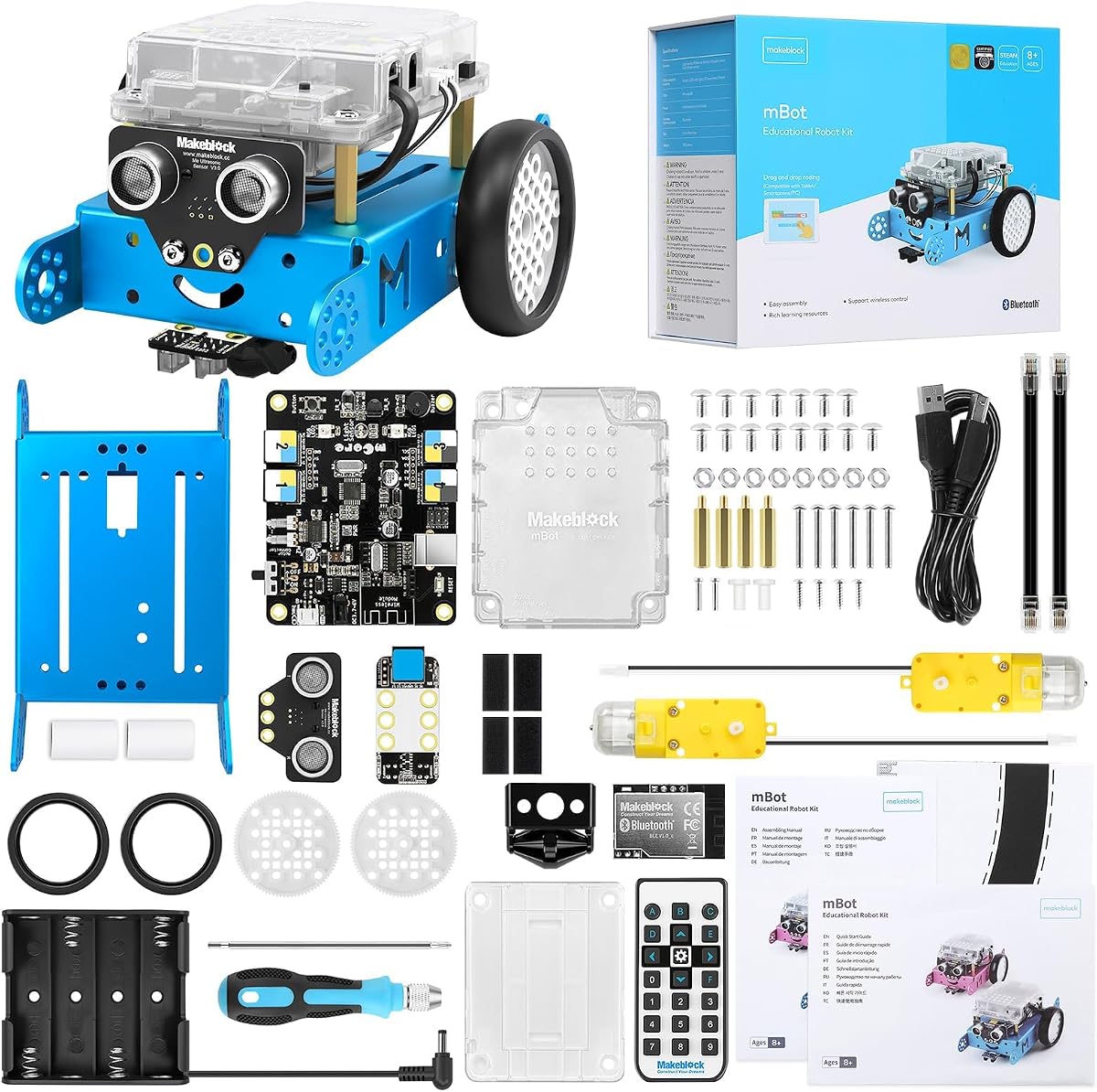
Makeblock mBot serves as an excellent entry-level coding robot that teaches electronics and programming through a simple build process appealing to kids eight to twelve years old.
We may earn a commission when you buy through this link, at no additional cost to you.
With clear instructions allowing assembly in fifteen minutes, children engage with machinery components and learn logic via interactive software that bridges Scratch and Arduino environments effectively.
Users should note that batteries are not included in the box, which adds a small extra cost but ensures parents can choose quality power sources for optimal performance.
This kit is perfect for budding engineers wanting a robust platform that supports add-ons and long-term projects while delivering a fun remote control experience out of the box.
The system connects to over one hundred electronic modules and hundreds of parts, allowing endless customization and compatibility with LEGO pieces for creative builds.
From basic commands to complex projects, matched coding cards and apps guide kids through programming steps so they gain confidence progressively without feeling overwhelmed.
We may earn a commission when you buy through this link, at no additional cost to you.
Sphero Mini packs robotics power into a ping pong-sized ball that fits easily in a pocket, making it ideal for coding practice anywhere without bulky equipment requirements.
We may earn a commission when you buy through this link, at no additional cost to you.
Powered by the Sphero Edu app, it lets beginners draw paths or write JavaScript, while the play app offers arcade games and obstacle courses using traffic cones included in the box.
While the battery lasts only one hour per charge, the quick recharge and compact nature mean kids can still get substantial learning value in short bursts throughout the day.
This is a great choice for families seeking a versatile starter robot that doubles as a game controller, encouraging creative problem-solving through movement and light feedback.
Beginners can use joystick, slingshot, or tilt modes to drive the ball, bridging physical play and coding concepts intuitively before moving to text-based programming.
Beyond coding, the robot inspires creativity in science and arts by showing how sensors and motors translate digital commands into physical motion in the real world.
We may earn a commission when you buy through this link, at no additional cost to you.
The Code & Go Robot Mouse offers an accessible entry point for toddlers and preschoolers to explore logic and sequencing through a friendly mouse that navigates custom-built mazes.
We may earn a commission when you buy through this link, at no additional cost to you.
With sixteen grid pieces and twenty two walls, children can create various challenges that teach direction and problem-solving using simple buttons instead of screens or tablets.
It requires AAA batteries which are not included, but the affordable price point makes it a low-risk investment for testing if coding play resonates with younger learners.
This set is ideal for parents looking for a tactile tool to foster critical thinking at home or in classroom STEM centers where small groups can rotate through activities.
Kids strengthen directional understanding by planning paths for the mouse, laying a foundation for complex coding concepts before they even learn to read code.
Double-sided activity cards provide structured challenges that grow in difficulty, ensuring the toy remains engaging as skills improve over time without needing new parts.
We may earn a commission when you buy through this link, at no additional cost to you.
Mech-5 challenges children to build a mechanical robot that performs physical tasks like kicking and lifting, emphasizing engineering principles alongside basic coding logic.
We may earn a commission when you buy through this link, at no additional cost to you.
Unlike pre-assembled toys, this kit requires multiple hours of assembly, teaching patience and attention to detail while ensuring kids truly understand how the internal components interact.
The detailed step-by-step instructions support independent work for those over ten, making it a rewarding project that transitions users from simple play to genuine technical learning.
Families should choose this if they want a deeper STEM experience where the process of building is just as educational as the final result, fostering future engineer mindsets.
Buttons snap onto a coding wheel to sequence actions, making abstract logic visible through physical gears that move and perform real-world mechanical tasks.
By designing and testing a machine that lifts and kicks, kids learn structural integrity and motion mechanics, key skills for advanced robotics and design fields.
We may earn a commission when you buy through this link, at no additional cost to you.
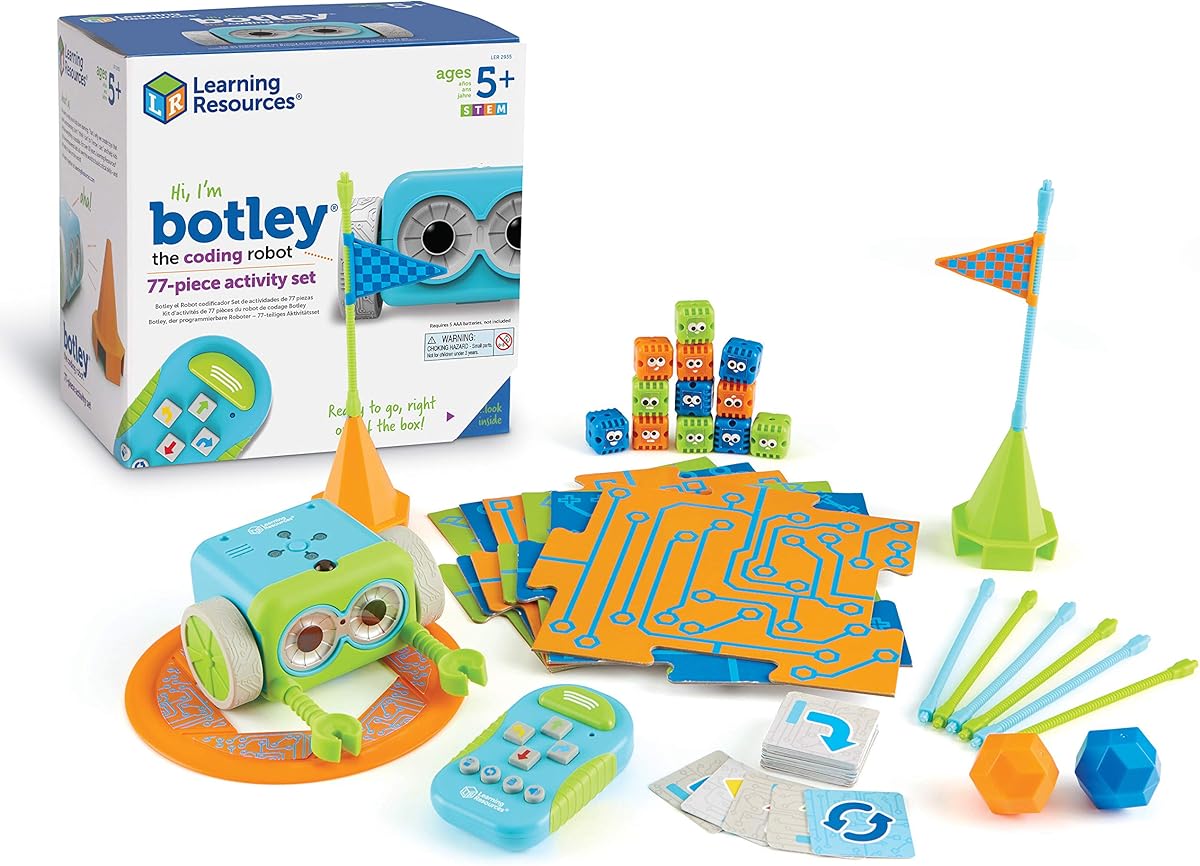
Botley is designed to teach early STEM skills through active, screen-free play that promotes critical thinking and problem-solving for children five and up in home settings.
We may earn a commission when you buy through this link, at no additional cost to you.
It features a remote programmer that sends commands without needing a phone, and it can detect objects, follow loops, and follow black lines, adding depth to simple sequencing tasks.
Setup requires a Phillips screwdriver and batteries not included, but once ready, the robot provides immediate play with seventy seven pieces including cards and obstacle tiles for variety.
This set is perfect for parents avoiding screen time while still wanting robust coding exposure, offering a balanced approach to logic and creativity with a charming robot companion.
Botley proves coding can happen offline, using buttons and visual cues to teach sequencing and cause-effect relationships without any digital device dependency.
Kids design paths with tiles and walls, using the robot's sensors to navigate challenges, which reinforces planning and adaptability in a fun physical context.
We may earn a commission when you buy through this link, at no additional cost to you.
Ozobot Evo introduces coding through color codes and Blockly, appealing to diverse learning styles while offering a wide range of skill levels from beginner to master.
We may earn a commission when you buy through this link, at no additional cost to you.
With access to over seven hundred free lessons covering STEAM and core subjects, it acts as a comprehensive educational tool that educators and parents can rely on for long-term growth.
The durable robot and zip case make it practical for classroom environments, though the initial investment is higher, the variety of content ensures it stays useful for years.
This kit suits those wanting a scalable solution that grows with children, providing both tactile play with markers and digital depth with online programming interfaces.
Drawing color codes with markers lets kids program without screens, making logic visible and editable, which is great for visual learners and collaborative play.
Hundreds of structured lessons ensure kids always have new challenges, preventing boredom and supporting systematic learning of computing concepts and problem-solving skills.
We may earn a commission when you buy through this link, at no additional cost to you.
Botley 2.0 builds on the original with enhanced features like object sensing and secret code combinations, providing deeper engagement for kids already comfortable with basic programming.
We may earn a commission when you buy through this link, at no additional cost to you.
The robot uses a simple remote to teach cause-and-effect, adding sounds and lights to make coding paths more immersive while allowing users to design complex multi-step routes.
With seventy eight pieces and stackable obstacles, it supports endless custom maze creation, making it a dynamic toy that evolves with a child's growing curiosity and skills.
Ideal for families upgrading from earlier models, this set offers richer functionality to keep learning exciting while maintaining the screen-free simplicity that makes coding accessible.
Lights and playful music give immediate feedback on code execution, reinforcing learning moments with joy and making the debugging process more intuitive for kids.
Open-ended building pieces let kids invent narratives around their robot's journey, blending coding with imaginative play for a holistic educational experience.
We may earn a commission when you buy through this link, at no additional cost to you.
Dash offers a premium robotics experience ready out of the box for ages six to eleven, using a suite of five apps to teach complex coding concepts through interactive challenges.
We may earn a commission when you buy through this link, at no additional cost to you.
With a five-hour battery life and voice command features, it provides sustained engagement without needing assembly, making it convenient for busy families and educational classrooms alike.
Though it lacks a camera and carries a higher price tag, the investment pays off through robust features and school adoption that ensures curriculum alignment and longevity.
This robot is best suited for those seeking a polished, long-term tool that balances ease of use with advanced learning potential for dedicated young coders.
Multiple apps like Blockly and Path offer tailored learning paths, allowing users to start simple and advance to complex variables and algorithms naturally.
Used in forty thousand schools, Dash has a proven track record in education, meaning lessons are tested and aligned with standard STEM learning goals.
We may earn a commission when you buy through this link, at no additional cost to you.
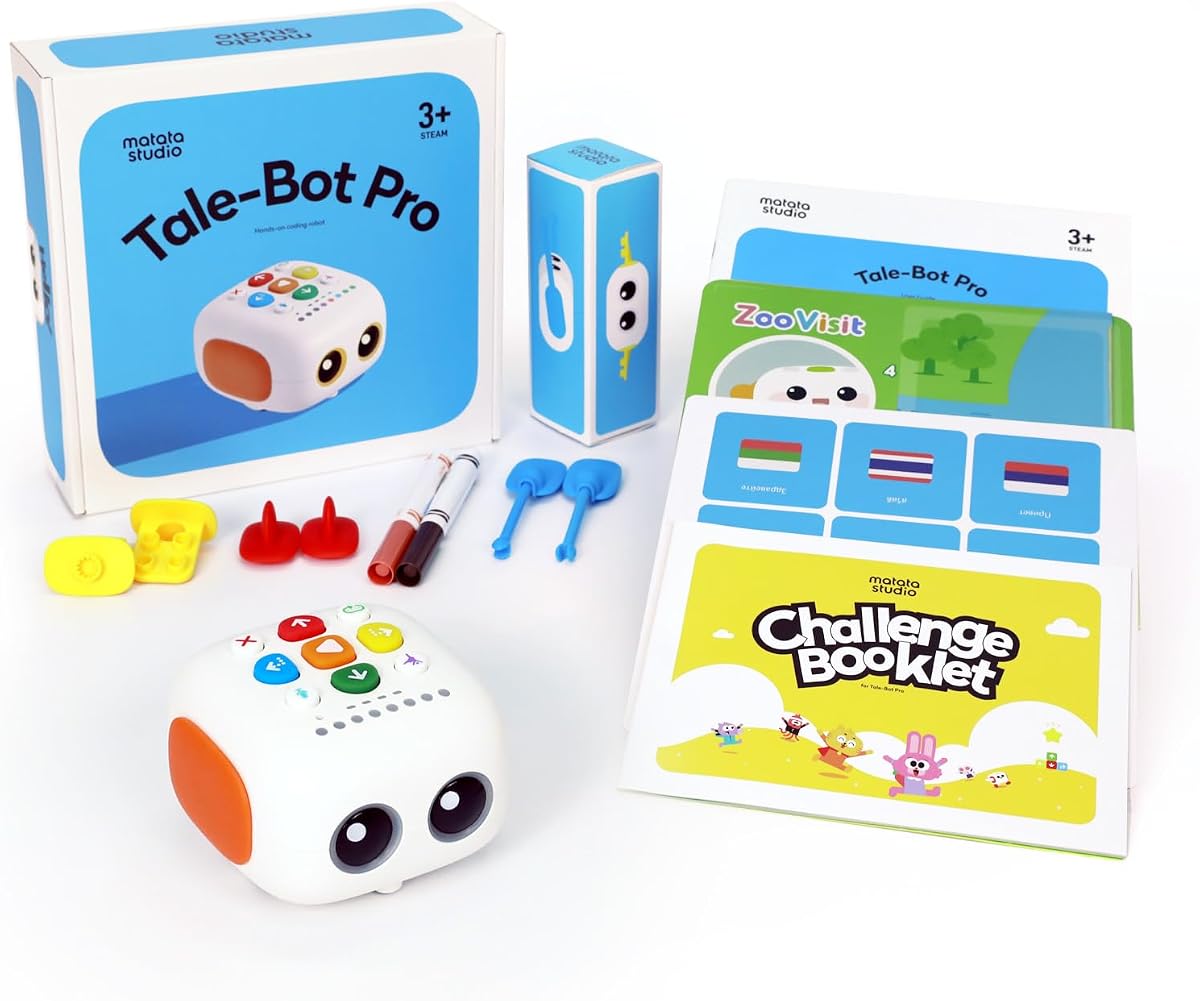
TaleBot Pro targets toddlers with a screen-free interface that blends coding basics with storytelling, helping children aged three to five learn sequences through songs and maps.
We may earn a commission when you buy through this link, at no additional cost to you.
It allows recording voice commands and tales, bringing imagination to life while introducing loops and logic in a way that feels natural to preschool learning styles.
Compatibility with LEGO blocks extends play possibilities, but optimal use may require additional activity boxes which are recommended for a richer experience beyond the base kit.
Families with young children will find this a safe, educational tool that fosters creativity and communication skills without exposing kids to digital screens during play.
By pairing movement with stories and songs, the robot helps kids build vocabulary and narrative skills alongside foundational programming logic naturally.
Touch-based controls and predictable responses make it accessible for children with autism, providing a structured environment for interaction and cognitive growth.
We may earn a commission when you buy through this link, at no additional cost to you.
Selecting the right coding toy depends on your child's age, learning style, and how much screen time you want to incorporate into their educational routine.
Coding toys vary widely in complexity, from simple button mice for toddlers to programmable robots requiring app use for teens. Always check the recommended age range to ensure the interface and concepts match your child's cognitive development level.
Choose a toy that grows with them, offering advanced features or add-ons so the investment remains useful as their skills improve.
Screen-free options use physical cards or buttons to teach logic, ideal for parents wanting to limit digital exposure. App-based systems offer deeper features and real-world programming languages but require a device and internet connection.
Consider your family's tech rules and whether you prefer tactile play or digital immersion before deciding which type suits your child's needs.
Some kits emphasize mechanical engineering, requiring building and assembly, while others focus on pure coding logic or language skills through storytelling. Identify which STEM area you want your child to explore most deeply.
A well-rounded selection often combines multiple disciplines like robotics and coding to provide a holistic educational experience that keeps learning engaging.
Building a robot can be part of the fun, teaching patience and fine motor skills, but some kids prefer to start coding immediately without hours of construction.
Look for kits that promise quick builds or come pre-assembled if your child has limited attention spans or if you want to minimize setup time.
Quality educational toys provide access to lesson plans, online communities, or video tutorials that help parents and kids troubleshoot issues and find new project ideas.
Robust support ensures that when a child gets stuck, there are resources to guide them forward, maintaining enthusiasm and confidence in their learning journey.
Many robots require specific batteries like AA or AAA, some of which may not be included, so factor in ongoing costs when budgeting for these toys.
Rechargeable models can save money long-term but might limit play time if the battery life is short, so check the battery specs carefully.
Some robots are closed systems, while others allow add-on packs or compatibility with LEGO bricks, allowing creative freedom to modify and upgrade the device over time.
Choosing a platform with open expansion possibilities extends the toy's lifespan and encourages more advanced experimentation as skills grow.
Prices range widely from under thirty dollars to near two hundred dollars, often reflecting complexity, build quality, and included accessories like mazes or markers.
Higher-priced models often offer more durable materials and broader learning capabilities, so weigh the cost against how long you expect the toy to remain engaging.
Always read the manual before starting to ensure you understand the specific coding logic and safety precautions for your chosen model. Check that batteries are installed correctly or charging ports are connected to avoid immediate issues.
Keep the robot's sensors and buttons clean from dust and debris using a soft cloth to prevent malfunction. If the toy includes maps or grids, store them flat to avoid creases that might confuse optical sensors.
When not in use, store the toy and its accessories in a designated box or container to prevent losing small parts like wheels or cards. This maintenance habit keeps the learning experience smooth and frustration-free.
Coding toys are designed for children as young as three years old, with simple button interfaces for preschoolers. More complex kits typically start around age eight when kids have the reading skills and focus for abstract logic.
Not all coding toys need devices. Some use physical cards or buttons, while others rely on apps. Choose based on your preference for screen time and whether your child wants a purely physical learning experience.
Many of these robots are used in schools because they align with STEM standards and offer group activity modes. They are durable enough for classroom rotation and come with teacher resources or lesson plans.
Build times vary significantly from fifteen minutes for simple kits to several hours for detailed mechanical models. Check the product description for estimated assembly time to plan accordingly.
Beginners usually start with drag-and-drop block coding. Advanced kits may introduce Python or JavaScript, helping kids transition to text-based coding as they progress through the curriculum.
Generally, they are safe, but small parts can be a choking hazard for younger children. Always supervise kids under three and ensure batteries are secured properly to avoid ingestion or leakage.
We highlighted ten exceptional options ranging from screen-free mice for toddlers to advanced programmable robots for teens, each offering unique ways to engage with technology and logic.
Prioritize age-appropriate features and educational depth to ensure the toy provides value as your child grows, balancing fun play with meaningful learning opportunities.
Remember that product availability and pricing may vary across retailers, so always verify current stock and conditions before making your final purchase decision.
