
Pulsar X2H Mini Wireless
4.2Editor score
High hump for claw stability
Dust proof optical switches
100 hour battery life
This guide compares ten top claw grip gaming mice for small hands, evaluating sensor performance, weight, ergonomics, and switch quality for competitive
Finding the right gaming mouse can significantly impact your performance and comfort during long sessions. For players with smaller hands, a claw grip style offers precision and control. This guide explores the best options available in the current market to help you find the perfect fit for your needs.
We have analyzed a wide range of models focusing on ergonomics, sensor accuracy, and build quality. Our comparison includes both wired and wireless options designed specifically to support the claw grip technique. Each product was evaluated based on user feedback and technical specifications to ensure reliability.
Each selection in this list highlights unique features that cater to different gaming styles and preferences. Whether you prioritize ultra-lightweight designs or advanced sensor technology, there is a suitable choice here. Please note that product availability and pricing can vary over time based on market conditions.
4.2Editor score

4.6Editor score

4.4Editor score
The following table provides a side by side overview of the top ten gaming mice selected for this guide. Each entry includes key specifications to help you quickly compare performance features and design elements across different brands and models.



The Lamzu Atlantis Mini Champion Edition stands out as a top tier choice for gamers seeking precision and comfort. With a 4.6 rating from users, it delivers exceptional performance in fast paced competitive environments. Its lightweight build and advanced sensor make it a strong candidate for serious players.
We may earn a commission when you buy through this link, at no additional cost to you.
This mouse features the Pixart PAW3950 sensor which supports up to 30000 DPI for accurate tracking. The optical switches provide a lifetime three times that of mechanical switches ensuring reliability over time. The Nordic 52840 MCU ensures fast response times and seamless wireless performance without delays.
While the price is higher than budget options the build quality justifies the investment. The symmetry design helps prevent finger cramps during long sessions. However availability may be limited due to high demand. Those willing to invest in quality will find this mouse rewarding.
Gamers with small hands who prioritize wireless freedom and top notch sensor technology should consider this model. It balances weight and durability effectively. If you want a mouse that supports aggressive claw grip styles comfortably this is a reliable recommendation for competitive play.
The PAW3950 sensor provides low latency tracking essential for precise aiming in shooters.
Optical switches reduce debounce delay and prevent double clicks for consistent inputs.
We may earn a commission when you buy through this link, at no additional cost to you.
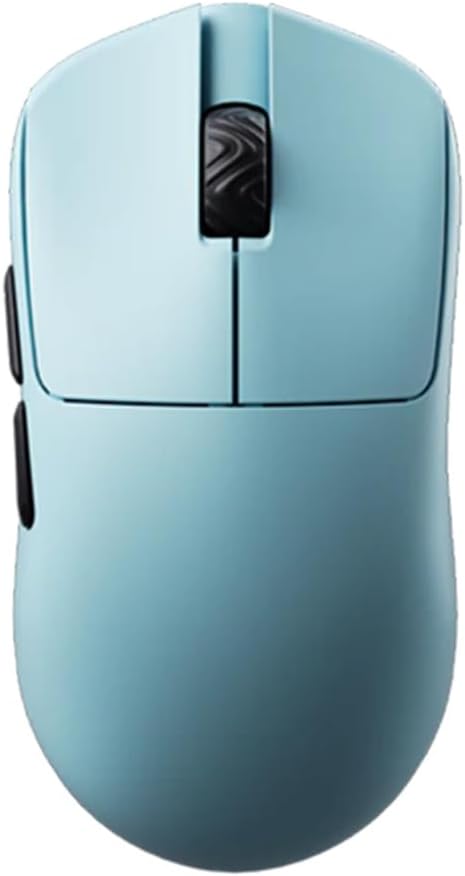
The Pulsar X2H Mini Wireless offers a refined experience for claw grip users needing extended battery life. Its higher hump provides extra support for the palm and fingers during intense gaming. The white finish adds a sleek aesthetic to the functional design.
We may earn a commission when you buy through this link, at no additional cost to you.
Featuring the PixArt PAW3395 sensor this mouse delivers 650 IPS speed and 50g acceleration. The internal structure ensures rigidity and consistent clicks without rattling. The Nordic MCU supports up to 100 hours of usage at a 1000Hz polling rate for responsive performance.
The sturdier structure compared to standard models reduces the risk of shell flex during hard clicking. Dust proof encoders enhance longevity of the scroll wheel. While the white shell requires care to avoid stains the performance is excellent for serious gamers seeking quality.
This model is ideal for those wanting a balance of ergonomic support and wireless convenience. The battery life is impressive for a lightweight gaming mouse. If you value build quality and long sessions without charging this mouse is a top contender for premium features.
The elevated hump offers a stable resting point for the hand during rapid movements.
Advanced MCU technology maximizes battery life ensuring fewer interruptions during play.
We may earn a commission when you buy through this link, at no additional cost to you.
The Gwolves Skoll Mini SK-S provides an accessible entry point for gamers wanting a lightweight claw grip mouse. Its 50 gram weight and honeycomb design make it easy to maneuver quickly. Users appreciate the small size which fits well in smaller hands.
We may earn a commission when you buy through this link, at no additional cost to you.
Equipped with the 3389 sensor it offers reliable tracking up to 16000 DPI. The PTFE skates ensure smooth gliding on various surfaces. A detachable cable allows for easier transport and reduces wear on the port during storage or travel scenarios.
While it lacks advanced wireless features its wired connection ensures zero latency. The honeycomb shell can trap dust but offers significant weight reduction. For budget conscious buyers looking for performance specs the Skoll Mini delivers strong value compared to more expensive alternatives.
This mouse is perfect for students or casual gamers who want light weight without breaking the bank. The ergonomic shape supports claw grip comfortably. If you prioritize mobility and cost efficiency over wireless convenience this is a smart purchase for your setup.
The reduced mass allows for quicker flicks and less strain on the wrist.
A detachable cable simplifies storage and protects the mouse during transport.
We may earn a commission when you buy through this link, at no additional cost to you.
The Pulsar X3 LHD is a rare find for left handed gamers seeking extreme lightness. Its hybrid ergonomic shape blends palm and claw comfort for a relaxed grip. With only 43 grams it feels nearly weightless while maintaining durability for daily use.
We may earn a commission when you buy through this link, at no additional cost to you.
The XS1 sensor offers 32000 DPI resolution and 750 IPS tracking speed for precision. Optical switches minimize double clicks for pinpoint responses during intense games. The dust proof structure with TTC Golden encoders ensures tactile feedback over long periods of use.
This mouse is significantly lighter than an egg which can be a game changer for speed. However finding it in stock is difficult due to high demand. The price reflects the specialized nature of the hardware. Lefties will find this a worth the effort to locate.
If you are a left handed player who needs precision and ultra low weight this is unmatched. The ergonomics support extended sessions comfortably. While it is hard to find and expensive the performance for claw grip users is outstanding for competitive gaming.
Designed specifically for left hand use it offers better symmetry than standard mice.
At 43 grams it reduces fatigue significantly during long play sessions.
We may earn a commission when you buy through this link, at no additional cost to you.
This renewed version of the Pulsar X2H Mini offers the same high performance at a lower cost. It features a higher hump and narrower waist which aids stability for aggressive claw grip. The internal structure ensures consistent clicks and smooth wheel rotations.
We may earn a commission when you buy through this link, at no additional cost to you.
The PixArt PAW3395 sensor includes Motion Sync Technology for accurate movement tracking. It supports 26000 DPI and 650 IPS speed for precision control. The Nordic MCU ensures efficient processing and up to 100 hours of usage when wireless versions are considered.
Optical switches reduce double click risks and improve consistency. The 4K polling ready feature allows for future upgrades in responsiveness. While renewed products vary in condition this model maintains core performance features. It is a great way to access premium specs for less.
Gamers on a budget should check this option for reliable performance. The shape supports small hands well. If you want high end sensor technology without the full price tag this is a solid choice for competitive gaming setups today.
Integrated Motion Sync ensures data is sent exactly when the poll occurs.
Renewed units offer a cost effective entry into high performance hardware.
We may earn a commission when you buy through this link, at no additional cost to you.
The Corsair IRONCLAW Wireless SE features a unique ergonomic shape for larger right handed users. It offers massive battery life and 10 programmable buttons for versatility. While intended for larger hands it shows what high battery life looks like in wireless mice.
We may earn a commission when you buy through this link, at no additional cost to you.
It uses the CORSAIR MARKSMAN sensor for precise tracking with surface calibration. The iCUE software allows deep customization of macros and lighting. RGB zones on the logo and grill add visual flair. The battery lasts over 500 hours on Bluetooth for long sessions.
However for small hands this mouse may be too large and heavy to use comfortably. The asymmetry favors palm grip more than claw. If you have larger hands or need many programmable buttons it is a strong option. Small hand users should look elsewhere for better fit.
This mouse is best for those prioritizing battery and software over portability. The design supports comfort for right handed players. If you need extensive customization and endurance this is a solid choice for desktop setups with large space.
Up to 532 hours on Bluetooth ensures weeks of use between charges.
iCUE software allows complex macros and lighting profiles for personalization.
We may earn a commission when you buy through this link, at no additional cost to you.
The V8 Gaming Mouse delivers an ultra lightweight experience at just 36 grams. Its symmetrical shape suits both claw and fingertip styles for versatility. The inclusion of an 8K dongle allows for high polling rates if your setup supports it.
We may earn a commission when you buy through this link, at no additional cost to you.
Powered by the PixArt PAW3950 chip it ensures accurate tracking and low latency. Kailh optical switches provide faster response and better durability than mechanical ones. The Nordic 52840 MCU handles efficient processing and stable wireless connection for daily use.
A web based driver simplifies settings adjustments without installing bulky software. However the driver options are less advanced than desktop apps. The bright yellow case stands out but may not suit all tastes. For pure performance and weight this mouse excels in testing.
This is an excellent choice for fast paced games requiring quick cursor movements. The lightweight build reduces fatigue during long sessions. If you want a mouse that is incredibly easy to move and supports high specs this is a strong option.
Adjust DPI and settings directly in the browser for quick changes.
Support for 8K dongle provides superior responsiveness if compatible.
We may earn a commission when you buy through this link, at no additional cost to you.
The Pulsar X2H Mini Wireless offers a refined experience for claw grip users needing extended battery life. Its higher hump provides extra support for the palm and fingers during intense gaming. The white finish adds a sleek aesthetic to the functional design.
We may earn a commission when you buy through this link, at no additional cost to you.
Featuring the PixArt PAW3395 sensor this mouse delivers 650 IPS speed and 50g acceleration. The internal structure ensures rigidity and consistent clicks without rattling. The Nordic MCU supports up to 100 hours of usage at a 1000Hz polling rate for responsive performance.
The sturdier structure compared to standard models reduces the risk of shell flex during hard clicking. Dust proof encoders enhance longevity of the scroll wheel. While the white shell requires care to avoid stains the performance is excellent for serious gamers seeking quality.
This model is ideal for those wanting a balance of ergonomic support and wireless convenience. The battery life is impressive for a lightweight gaming mouse. If you value build quality and long sessions without charging this mouse is a top contender for premium features.
The elevated hump offers a stable resting point for the hand during rapid movements.
Advanced MCU technology maximizes battery life ensuring fewer interruptions during play.
We may earn a commission when you buy through this link, at no additional cost to you.
The V6 Gaming Mouse offers a closed shell design that resists dust while staying light at 40 grams. Its concave buttons fit fingers naturally for better control during rapid clicks. The symmetrical shape allows it to support claw grip well for small hands.
We may earn a commission when you buy through this link, at no additional cost to you.
Equipped with the PixArt PAW3950 chip it delivers accurate tracking with no spin outs. The wireless connection is stable for competitive play without lag. Web based drivers make adjustments simple without extra software. The 8K dongle included adds flexibility for high polling rates.
Unlike honeycomb models this shell does not trap dust but adds slight weight. The buttons provide consistent positioning for accuracy. While the blue color is distinctive it may not match all aesthetics. Overall it balances durability and weight for many users.
This is a great pick for those who dislike holes but want lightness. It supports long sessions with low fatigue. If you need a reliable mouse that works for both claw and palm styles this is a solid option for daily use.
A solid shell prevents dust accumulation and maintains clean aesthetics.
Concave buttons align with fingers for consistent and reliable clicks.
We may earn a commission when you buy through this link, at no additional cost to you.
The BenQ Zowie S2-C is a specialized mouse designed for professional esports performance. It requires no drivers and is ready out of the box. The small size variant fits smaller hands comfortably while maintaining a symmetrical shape for claw grip comfort.
We may earn a commission when you buy through this link, at no additional cost to you.
It features a 3360 optical sensor with adjustable DPI levels up to 3200. The paracord cable reduces drag for smoother movement. The matte black finish provides a professional look. A 1 year warranty offers peace of mind for competitive players.
Without software you lose complex macro options but gain simplicity. The sensor is reliable with no spin outs or acceleration. The shape is optimized for both palm and claw grip styles. For those who prefer a plug and play setup this mouse is ideal.
This is perfect for pros who trust hardware over software configuration. The small size ensures precise control for small hands. If you value stability and simplicity in your gear this mouse delivers consistent results for FPS and competitive gaming.
Plug and play design ensures consistency across any PC without installation.
A paracord cable minimizes friction and allows natural movement.
We may earn a commission when you buy through this link, at no additional cost to you.
Choosing the right mouse involves balancing size, weight, and features to fit your specific grip style and hand dimensions.
Ensure the mouse matches your hand length and width. For claw grip, look for mice with a hump that supports the fingers and a shape that fits the palm. Small hands need a compact shell to prevent strain and improve control.
Look for a mouse that supports your hand without requiring extension or curling.
Lightweight mice under 60 grams reduce fatigue and allow faster movements. Claw grip benefits from a lighter build as it requires less effort to lift and aim. The shape should be symmetrical or optimized for the fingers to prevent slipping.
Opt for models under 60 grams with a shape that allows stable finger placement.
A high quality sensor ensures accurate tracking without spin outs or jitter. Look for sensors with high DPI and IPS ratings to support fast movements. Optical sensors often provide better consistency than older mechanical ones.
Choose a mouse with a proven sensor like PAW3950 or 3395 for reliability.
Optical switches prevent double clicking and offer faster response times. For competitive gaming, these switches last longer and provide tactile feedback. Mechanical switches are also fine but may wear out sooner under heavy use.
Optical switches are preferred for longevity and consistent actuation.
Decide between wired and wireless based on your needs. Wired mice offer zero latency and no charging, while wireless offers freedom of movement. Ensure the wireless dongle is reliable and supports the polling rate you need.
Wired for zero latency, wireless for freedom if quality is ensured.
Some users prefer driverless mice for simplicity while others want detailed macros. Check if the software allows DPI changes and button remapping. Web based drivers are convenient for quick changes without installation.
Evaluate software needs based on how much control you require over settings.
Look for mice with sturdy internal structures and dust proof encoders. The shell material should resist cracking during intense clicking sessions. High end models often include rubberized grips or durable coatings for longevity.
Prioritize mice with reinforced structures to ensure long term reliability.
Set a budget that fits your needs but do not compromise on core specs. A good warranty can save money if the mouse fails early. Compare value across brands to find the best features for your price range.
Balance cost with essential features and ensure a warranty covers defects.
Adjust your DPI settings to match your gameplay style and desk space. Lower DPI allows for precise aiming while higher DPI helps with quick turns. Test different levels to find the one that feels comfortable for your wrist and fingers.
Clean your mouse regularly to prevent dust buildup on sensors and buttons. Use a soft cloth to wipe down the shell and gently clean the feet to maintain smooth gliding. For honeycomb models, use compressed air to remove debris from holes.
Practice your claw grip posture to avoid strain during long sessions. Keep your wrist straight and your fingers curled gently over the mouse. Ensure your mouse pad is large enough to allow full arm movement without restrictions.
A good claw grip mouse for small hands typically features a compact size with a hump that supports the fingers. It should be lightweight to reduce fatigue and have a sensor that tracks accurately during fast movements. Comfortable button placement is also essential.
Yes, a lightweight mouse is generally better for claw grip as it requires less effort to lift and aim. It reduces wrist strain and allows for quicker flicks. Most claw users prefer models under 60 grams for optimal performance in competitive settings.
Not all mice require software. Some brands offer driverless models that work out of the box. However, software allows you to customize DPI and buttons for your preferences. Check the product details to see if installation is needed.
Yes, many symmetrical claw grip mice can also accommodate palm grip. If the mouse is not too small it can support resting the whole hand comfortably. It depends on the specific shape and your hand size.
Look for modern sensors like the PixArt PAW3395 or PAW3950. These offer high accuracy and low latency which are essential for gaming. Avoid older sensors as they may struggle with fast movements or uneven surfaces.
Yes, modern wireless mice are suitable for competitive gaming due to advancements in latency and battery life. Ensure you choose a model with a reliable connection and sufficient charging options. Many pros now use wireless for their setups.
You should clean your mouse every few weeks to prevent dust and dirt buildup. For honeycomb designs more frequent cleaning may be needed. Regular maintenance ensures smooth operation and extends the lifespan of the device.
Weight is important because lighter mice are easier to control and reduce strain on the wrist. For small hands, a heavy mouse can lead to fatigue quickly. A light build allows for more precise and effortless movements.
We explored ten excellent options ranging from ultra lightweight wireless models to reliable wired choices. Each mouse offers unique features that can enhance your gaming experience. Whether you prefer the Lamzu Atlantis Mini or the value of the V8 there is a fit for everyone.
Prioritize ergonomics and sensor quality when making your final decision. A mouse that feels natural in your hand will improve your performance more than extra features. Balance your budget with the performance you need to avoid buyer's remorse.
Remember to check current prices and stock before buying as availability can change. We hope this guide helps you find the perfect mouse for your small hands. Happy gaming and may your clicks always land true.