
Cooler Master Q300L V1
4.5Editor score
High airflow perforated design
Modular I/O panel placement
Compact Micro-ATX friendly
This guide compares the top ten cheap PC case options for 2026, evaluating airflow, build quality, and features to help you find the best budget-friendly
Finding a cheap PC case that does not compromise on quality is essential for budget builders. A good chassis protects your hardware, ensures proper airflow, and looks great on your desk without breaking the bank.
We compared ten top-rated models based on airflow, expansion options, included accessories, and overall value. Our analysis focuses on real-world performance and compatibility with modern components to guide your next build effectively.
Each pick highlights specific strengths for different needs, from compact setups to full tower rigs. Please note that prices fluctuate regularly, so check current listings before making your final purchasing decision for your new system.
4.5Editor score

4.8Editor score

4.7Editor score
This side-by-side comparison outlines the key specifications and unique selling points of each selected chassis to help you quickly identify which model fits your specific build requirements and budget constraints best.


The Lian Li V100-ATX stands out as the top choice for budget builders needing premium features. It carries a 4.8 rating and includes four pre-installed PWM fans plus an integrated ARGB strip.
We may earn a commission when you buy through this link, at no additional cost to you.
Its standout quality is the balance of airflow and aesthetics. The hydraulic bearing fans ensure quiet operation while the daisy-chain ARGB setup simplifies lighting control via motherboard software.
Trade-offs include the need for software to sync lights and a slightly higher weight due to steel construction. These are acceptable given the performance and visual impact provided.
Buyers seeking a complete aesthetic build should choose this case. It delivers high-end looks and thermal performance without the typical price premium found in similar tier products.
The perforated design supports high-end hardware with excellent intake capabilities for sustained gaming sessions.
Tool-less mounting and flexible routing channels help keep builds clean and professional looking easily.
We may earn a commission when you buy through this link, at no additional cost to you.
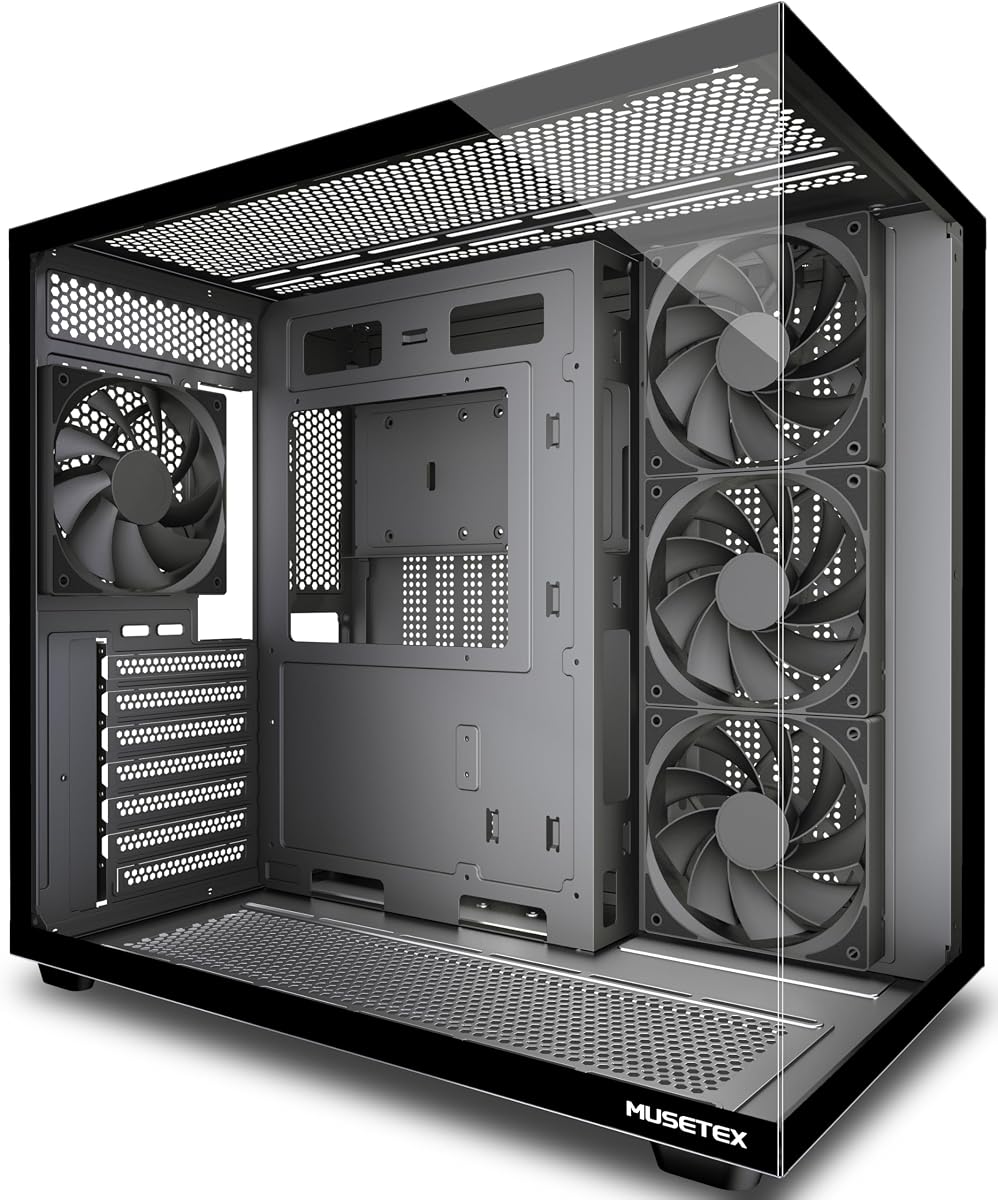
The MUSETEX Y6 offers a stunning 270 degree glass view at a competitive price. It holds a 4.7 rating and includes four non-LED fans with a dual chamber layout.
We may earn a commission when you buy through this link, at no additional cost to you.
Key strengths include the panoramic glass that showcases hardware beautifully and the addition of a Type-C port for modern peripherals. The dual chamber design aids thermal performance effectively.
Users should note the fans lack RGB lighting, requiring aftermarket additions for visual flair. Assembly needs care to avoid glass breaks, but the build quality justifies the effort.
Ideal for those prioritizing visual openness and connectivity over lighting. This case delivers a high-end look for less money than many competitors offer today.
The dual tempered glass panels provide a wider field of view than most standard cases on the market.
Type-C integration ensures your build stays compatible with the latest peripheral standards easily.
We may earn a commission when you buy through this link, at no additional cost to you.
The Cooler Master Q300L V1 is the top budget pick for compact systems. It holds a 4.5 rating and focuses on high airflow with a modular I/O panel.
We may earn a commission when you buy through this link, at no additional cost to you.
Key strengths include the ability to move the I/O panel to different positions for better cable routing. The open thermal design ensures components stay cool under load.
Trade-offs include limited compatibility to smaller motherboards and basic cable management features. These are acceptable given the size constraints and price efficiency.
This case is perfect for small form factor builds needing reliability. It delivers proven airflow performance and build quality without unnecessary expensive features.
Adjust the I/O panel position to fit your specific desk setup or routing needs easily.
The Micro-ATX design saves desk space while still fitting long graphics cards.
We may earn a commission when you buy through this link, at no additional cost to you.
The NZXT H5 Flow focuses on clean design and airflow in a compact package. It has a 4.6 rating and features ultra-fine mesh panels for dust control.
We may earn a commission when you buy through this link, at no additional cost to you.
Key strengths include the perforated PSU shroud for better intake and quiet fans for silent operation. The design keeps cables hidden for a neat look.
Trade-offs include minimal RGB options and fewer drive bays compared to larger towers. These fit the target audience seeking minimalism over extensive storage.
Buyers prioritizing quiet operation and a sleek look should choose this. It offers reliable cooling and quality construction in a manageable size.
The ultra-fine mesh creates a seamless look while maximizing airflow into the system.
Pre-installed quiet fans ensure the system runs silently even under load.
We may earn a commission when you buy through this link, at no additional cost to you.
The DARKROCK EC2 brings modern connectivity to budget builds with a Type-C port. It holds a 4.5 rating and features a mesh front for excellent airflow.
We may earn a commission when you buy through this link, at no additional cost to you.
Key strengths include the magnetic dust filters that are easy to remove for cleaning and the Type-C interface for modern peripherals. The front mesh aids cooling.
Trade-offs involve basic included accessories and fewer cable management hooks. These are minor issues given the price and feature set.
This case is ideal for users needing Type-C connectivity at a low price. It delivers functional design and good airflow for everyday use.
Magnetic dust filters on top and bottom simplify cleaning maintenance.
The mesh front panel ensures efficient air circulation for hot components.
We may earn a commission when you buy through this link, at no additional cost to you.
The FOIFKIN F300 offers a 270 degree panoramic glass view for maximum visibility. It has a 4.6 rating and comes with four pre-installed non-LED fans.
We may earn a commission when you buy through this link, at no additional cost to you.
Key strengths include the Type-C 3.0 port for speed and the wide viewing angle for showcasing hardware. The tool-less glass panels simplify access for maintenance.
Trade-offs include no RGB fans included and the need for regular glass cleaning. These are acceptable for those prioritizing looks over lighting.
Buyers wanting a wide view should select this model. It delivers a high-end appearance and solid features without the typical premium price.
The panoramic glass curtain wall provides a high-quality display platform for your components.
Internal space supports large GPUs and coolers for future-proofing your build.
We may earn a commission when you buy through this link, at no additional cost to you.
The Rosewill RWGC1 focuses on raw cooling performance with a mesh front and four PWM fans. It has a 4.5 rating and supports full-sized components.
We may earn a commission when you buy through this link, at no additional cost to you.
Key strengths include the superior air intake provided by the front panel and tool-free access to the glass side. Expandability is strong for various builds.
Trade-offs include a heavier weight and simple aesthetics. These do not impact function but may matter for portability and style.
This case is perfect for gamers prioritizing thermal performance. It delivers reliable cooling and room for expansion without high costs.
The airflow-focused mesh front panel delivers superior intake for cooling components.
Tool-free glass installation makes maintenance and component changes quick.
We may earn a commission when you buy through this link, at no additional cost to you.
The Zalman T6 stands out with optical drive bay support. It has a 4.3 rating and features a strong steel chassis for durability.
We may earn a commission when you buy through this link, at no additional cost to you.
Key strengths include the 5.25 inch bay for older devices and the durable steel construction that resists heat and corrosion. The patterned mesh aids airflow.
Trade-offs involve older aesthetics and lack of lighting. These suit workstation users prioritizing function over flashy design.
Buyers needing optical drives or rugged durability should choose this. It provides reliable performance and construction at a low cost.
High strength steel sheets withstand pressure and heat for longevity.
External bays support older drives that many modern cases omit.
We may earn a commission when you buy through this link, at no additional cost to you.
The ASUS A31 features a pillar-free glass design for a clean look. It has a 4.7 rating and supports BTF connectors for hidden cables.
We may earn a commission when you buy through this link, at no additional cost to you.
Key strengths include the unobstructed view of internals and the 8 degree angled base for better airflow. Hidden connectors keep builds pristine.
Trade-offs include a higher price and need for compatible parts. These are acceptable for builders seeking modern aesthetics and cable management.
Choose this for a centerpiece build with premium style. It delivers unique design and superior quality for those willing to invest.
The frameless glass panels offer a completely unobstructed view of your components.
BTF design conceals modular cables behind the motherboard for a sleek look.
We may earn a commission when you buy through this link, at no additional cost to you.
The GAMDIAS AURA GC1 provides a complete RGB package out of the box. It has a 4.4 rating and includes four ARGB fans with a mesh front.
We may earn a commission when you buy through this link, at no additional cost to you.
Key strengths include the built-in lighting for visual appeal and tool-free access for easy maintenance. The mesh front ensures adequate cooling for most users.
Trade-offs include basic fan quality requiring control software. These are minor given the price and included features.
Buyers seeking budget RGB should pick this model. It delivers a complete aesthetic and functional solution without expensive add-ons.
Four built-in ARGB fans provide instant visual customization without extra purchases.
Tool-free glass panel installation simplifies system access and cleaning.
We may earn a commission when you buy through this link, at no additional cost to you.
Selecting a budget chassis requires balancing features with build quality. This section breaks down the critical factors to evaluate before purchasing.
Always verify that the case supports your motherboard size whether ATX, Micro-ATX, or Mini-ITX. Most budget cases support ATX but check clearance for oversized boards.
Choose a case matching your board size to avoid installation issues.
Check maximum dimensions for graphics cards and CPU coolers. Modern GPUs often exceed 300mm and coolers can be tall enough to conflict with front fans.
Verify exact clearance limits against your hardware specs before buying.
Look for mesh panels or perforated designs to allow air intake. Cases with pre-installed fans save money and ensure baseline performance.
Prioritize airflow over solid panels to prevent thermal throttling.
Some cases include ARGB fans or controllers reducing extra costs. Others may lack basic screws or cable management tools.
Review contents to ensure you have everything needed for assembly.
Steel thickness and powder coating affect durability and noise. Thicker steel reduces vibration and better coating resists scratches.
Avoid extremely thin materials that compromise stability or longevity.
Look for wide channels hooks and straps to hide wires neatly. Good cable management improves airflow and aesthetics significantly.
Choose models with dedicated routing paths for cleaner builds.
Modern systems benefit from USB Type-C ports on the front panel. Ensure audio jacks and USB 3.0 are present for peripherals.
Select a case with ports matching your device needs.
Magnetic or removable filters on intake points reduce dust accumulation. This extends component life and lowers maintenance frequency.
Ensure filters cover major intake areas effectively.
Install components carefully ensuring you align standoffs and screws properly. Use the provided tools to secure panels without damaging glass.
Clean dust filters monthly using a soft brush or vacuum to maintain airflow. Dirty filters can lead to overheating and reduced performance.
Keep the case on a stable surface away from direct sunlight to prevent paint damage. Avoid blocking rear vents to ensure exhaust heat escapes properly.
Many budget cases use steel that provides sufficient durability for years of use. Focus on thickness and powder coating rather than just price to find reliable options.
Many budget options include 4 fans which is sufficient for most builds. Check the package contents to confirm before purchasing additional cooling.
No, cases designed for Micro-ATX typically do not fit standard ATX boards. Always match the case rating to your motherboard size for compatibility.
Most affordable mid-towers support easy upgrades with tool-less panels. Check clearance for new GPUs to ensure future compatibility with your case.
Budget models often lack premium finishes or advanced cable management. They focus on core functionality which is enough for most casual and gaming users.
Tempered glass used in budget cases meets safety standards for standard use. Handle panels carefully during installation to avoid accidental breakage.
The Lian Li V100-ATX and MUSETEX Y6 lead our list by balancing features and price. Both offer excellent airflow and modern designs that rival premium options.
Prioritize airflow and motherboard compatibility over flashy RGB lighting when building on a budget. A solid thermal foundation ensures system longevity and stable performance.
Prices change frequently so check current listings before ordering. These models provide the best value for budget builders seeking quality today.