
Captel MDL 200
Affordable captioned telephone option
Corded design for stability
Basic captioning functionality included
This guide compares the top captioned telephones for hearing impaired users, evaluating features like caption accuracy, amplification levels, and ease of use
Finding the right captioned telephone can transform daily communication for those with hearing loss. These devices combine voice audio with real-time text captions, ensuring no word is missed during important calls with family or doctors. Modern options include amplified sound, large displays, and intuitive controls tailored to seniors.
We evaluated ten leading models based on caption quality, sound amplification, user interface, and reliability. Our comparison considers factors like internet requirements, hearing aid compatibility, and additional features such as photo dialing or built-in answering machines. Each product was assessed for how well it supports clear and confident conversations at home.
Every pick in this list highlights specific strengths, from budget-friendly options to premium models with advanced captioning services. We detail key specifications, pros, and cons to help you decide which phone fits your unique needs. Please note that product availability and pricing may change over time, so check current details before purchasing.

4.3Editor score

4.3Editor score
The following table provides a side-by-side comparison of all ten products reviewed. It highlights key specifications such as amplification levels, caption capabilities, and special features to help you quickly identify the most suitable model for your hearing and communication requirements.




The Hamilton CapTel 2400iSPNBT stands out as a top-rated captioned telephone for those who need clarity during calls. With a 4.3 rating and real-time captions displayed on a large touchscreen, it turns everyday calls into confident conversations without missing words.
We may earn a commission when you buy through this link, at no additional cost to you.
This model offers up to 40dB of amplified sound gain, ensuring that incoming audio is loud and clear. You can choose between auto captions for full automation or assisted captions with live operator support. Additionally, the built-in answering machine displays voicemail captions directly on the screen for easy review.
While the device requires a high-speed internet connection for captioning, the service is free 24/7 for US residents. Some users may find the internet requirement a hurdle, but the benefit of having every word captioned in real time usually outweighs this minor setup step.
Ideal for seniors or individuals with hearing loss who want comprehensive communication support. If you need a reliable phone that combines amplification with visual text confirmation, the Hamilton CapTel is a highly recommended choice for clear connections at home.
The large touchscreen displays captions as you speak, so you never miss a word even if your hearing loss makes audio alone unclear.
This telephone is designed to work seamlessly with your hearing aids, ensuring smooth audio transmission without feedback or interference.
We may earn a commission when you buy through this link, at no additional cost to you.
The Geemarc Ampli550 is designed for hard-of-hearing individuals who need powerful sound rather than captions. It delivers up to 55dB of TrueSound amplification and a 95dB ringer with a flashing strobe to ensure you never miss an incoming call at home.
We may earn a commission when you buy through this link, at no additional cost to you.
Features like talking caller ID and talking keys make dialing accessible even for those with vision challenges. The extra-large keypad and emergency keys provide convenience and safety. Nine memory buttons allow quick access to frequently used numbers without searching through contacts.
While it lacks captioning, the focus on extreme volume and visual alerts makes it ideal for users who struggle to hear phone sounds. The price reflects these premium amplification features, making it a solid investment for those with severe hearing loss who rely on sound cues.
Choose this model if your primary need is loud, clear audio and visual call alerts. It is a great gift option for loved ones who prefer traditional landline functionality enhanced with accessibility features for easier daily use.
The combination of a 95dB ringer and flashing strobe ensures you receive every incoming call notice without relying on auditory cues alone.
Talking keys and caller ID announce numbers aloud, helping you confirm who is calling and which button to press before dialing.
We may earn a commission when you buy through this link, at no additional cost to you.
The Captel MDL 200 offers an affordable entry into captioned telephony for those on a budget. As a corded phone designed for the hearing impaired, it provides basic captioning functionality to help users follow conversations more easily without a complex setup.
We may earn a commission when you buy through this link, at no additional cost to you.
This model focuses on simplicity, making it accessible for seniors who might be intimidated by advanced technology. The corded design ensures a stable connection without relying on batteries or wireless signals. It is a straightforward solution for needing visual text support on calls.
While it does not include advanced features like large touchscreens or high amplification, it fulfills the core need of captioning for a lower cost. Users looking for a no-frills option can rely on this device to provide essential clarity during phone conversations at home.
Best suited for users who want captioning without paying a premium for extra bells and whistles. If you prioritize essential functionality and cost-effectiveness, the Captel MDL 200 is a practical choice to stay connected with loved ones effectively.
This phone provides the essential service of captioning calls at a budget-friendly price, making it accessible for those with financial constraints.
The corded design ensures reliability and ease of use, eliminating the need for charging or managing multiple handsets.
We may earn a commission when you buy through this link, at no additional cost to you.
The Clarity AltoPlus is a powerful amplified phone that meets TIA-4953 standards for mild to severe hearing loss. With up to 53dB of amplification and a Boost override feature, it ensures that everyone can hear incoming calls clearly without struggling with low volume.
We may earn a commission when you buy through this link, at no additional cost to you.
Ergonomically designed controls and a talking keypad assist users with arthritis or vision challenges. The outgoing speech amplification of 15dB helps your voice carry to the caller, making two-way conversations more balanced. A backlit screen with large font simplifies dialing and reading caller ID.
While it lacks captioning, the focus on certified amplification makes it a strong choice for those who need sound enhancement rather than text. The high gain settings might be too loud for sensitive ears, so adjusting levels is essential for comfort during daily use.
This model is ideal for users who prioritize sound quality and accessibility features over captioning. If you need a reliable phone that supports a range of hearing loss levels with clear outgoing and incoming audio, the AltoPlus is a highly capable option.
The phone meets TIA-4953 standards, ensuring it is tested and certified to work effectively for a wide range of hearing loss needs.
With 15dB outgoing amplification, your voice is clearer to the person on the other end, reducing the need to shout during calls.
We may earn a commission when you buy through this link, at no additional cost to you.
The Serene Innovations SI-CL-65 provides a cordless option for those who want to move around the home while making calls. It features HD audio to ensure voice clarity and includes a talking caller ID system to announce incoming calls without needing to look at the screen.
We may earn a commission when you buy through this link, at no additional cost to you.
This model is designed with seniors in mind, offering adjustable volume controls to accommodate different hearing levels. The cordless nature allows for mobility, which is useful for large homes. However, users must ensure the phone is charged to avoid missing calls.
Without captioning, it relies solely on sound quality and audio alerts. For those who prefer the freedom of a handheld handset and have adequate hearing to rely on audio alone, this device offers a practical solution. It is a good alternative to corded models for active users.
Consider this if mobility is your main priority over text-based clarity. It serves well for individuals who need a reliable phone that moves with them and offers clear audio cues during incoming calls.
The cordless design allows you to answer calls from any room in the house, providing flexibility that corded phones cannot match.
High-definition audio ensures that voices come through clearly, reducing the need to increase volume to uncomfortable levels.
We may earn a commission when you buy through this link, at no additional cost to you.
The VTech SN5147 combines the reliability of a corded base with the mobility of a cordless handset. This hybrid system is ideal for seniors who want a backup during power outages while still enjoying the convenience of a wireless phone for daily use.
We may earn a commission when you buy through this link, at no additional cost to you.
It includes a 90dB extra-loud ringer with a visual indicator, ensuring no calls are missed even in noisy environments. The photo dial feature lets you call family by touching their picture, simplifying the process for those who struggle with numbers. Robocall blocking adds an extra layer of privacy.
While it does not offer captioning, the combination of loud sound and visual cues covers many needs for hard-of-hearing users. Some users may find the initial programming slightly complex, but once set up, the speed dials and blocking features make it very efficient.
This phone is excellent for households needing both stationary and mobile options. If you want a dependable phone that can handle interruptions like power outages while offering modern features like photo dial, this VTech model is a strong contender.
The corded base ensures you can still make and receive calls even if the power goes out, providing peace of mind during emergencies.
The flashing visual indicator complements the loud ringer, ensuring you notice incoming calls even if your hearing is very limited.
We may earn a commission when you buy through this link, at no additional cost to you.
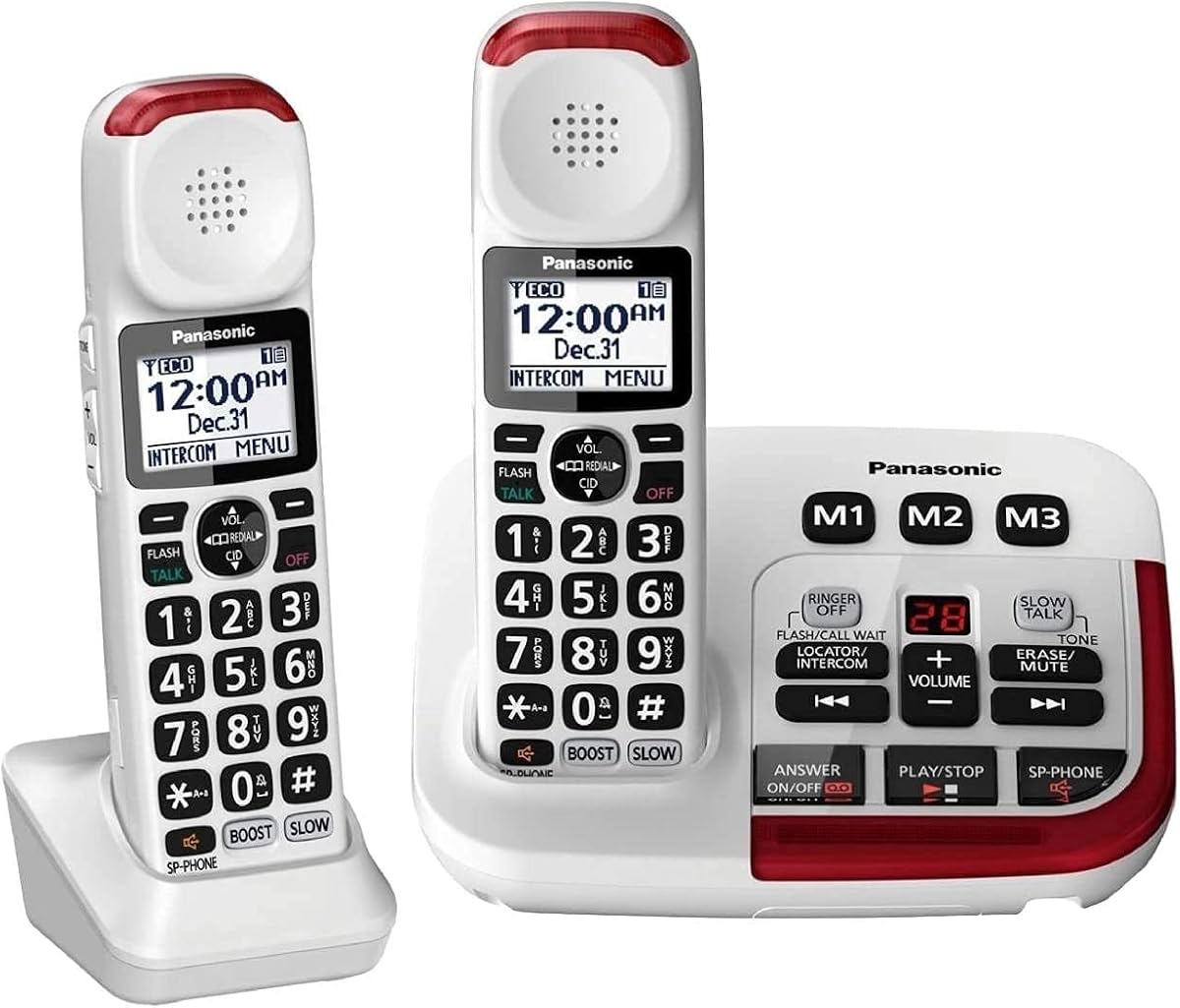
The Panasonic KX-TGM420W offers exceptional control over volume with a boost up to 40dB for clearer incoming voices. It includes noise reduction to suppress background interference and a Slow Talk feature that slows down speech for better comprehension without distortion.
We may earn a commission when you buy through this link, at no additional cost to you.
With two handsets included, this model is great for multi-person homes. The expandable design allows up to six handsets, providing flexibility for large families. Visual ring indicators on both base and handset ensure you are alerted to calls even in noisy rooms.
While it does not support captioning, the combination of Slow Talk and noise reduction helps users understand words that might otherwise be lost. The higher price reflects these advanced audio features and the convenience of having multiple handsets in the package.
Ideal for households needing multiple handsets with superior audio clarity. If you struggle to understand words in noisy environments or need adjustable volume for every caller, this Panasonic phone provides the tools to improve your listening experience significantly.
The Slow Talk function decelerates the caller's voice in real-time, helping you understand every word more clearly without raising the volume.
Built-in noise suppression filters out background static, making voices stand out more clearly during calls.
We may earn a commission when you buy through this link, at no additional cost to you.
The SWISSVOICE Big Button 3355 is tailored for seniors with both hearing and vision challenges. It features photo memory buttons that allow users to dial contacts by touching their picture, eliminating the need to read small numbers on a keypad.
We may earn a commission when you buy through this link, at no additional cost to you.
With an adjustable ringer up to 90dB and extra-large keys, this phone is easy to use for those with unsteady hands. It comes with both a corded base and an additional cordless handset, offering versatility for different parts of the home. The call block feature helps avoid unwanted numbers.
While the rating is lower than others, its focus on visual and tactile accessibility is unique. Users who struggle to see small digits will find the photo buttons particularly helpful. However, the lack of captioning means you still rely on audio cues for conversation clarity.
Best suited for individuals who need physical ease of use more than advanced audio features. If you want a phone that accommodates poor eyesight and unsteady hands while staying loud and clear, this Swissvoice model offers a user-friendly solution for seniors.
Photo buttons let you see who you are calling at a glance, making it easy to connect with family without reading names or numbers.
The oversized keys are easy to press and read, reducing errors and frustration for users with dexterity or vision challenges.
We may earn a commission when you buy through this link, at no additional cost to you.
This version of the Panasonic KX-TGM420W comes with two handsets, ideal for couples or homes needing multiple stations. It shares the same powerful volume booster and noise reduction features as the single handset version, ensuring clear communication across different rooms.
We may earn a commission when you buy through this link, at no additional cost to you.
The expandable design allows you to add up to six handsets total, making it scalable for larger families. Intercom functionality enables quick communication between phones without dialing, and the talking caller ID announces incoming numbers aloud. These features add convenience and security to daily use.
While it lacks captioning, the focus on audio quality and expandability makes it a versatile choice. The cost is higher than basic models, but the ability to cover multiple rooms with clear sound justifies the investment for many users with hearing challenges.
Ideal for households needing coverage in multiple rooms. If you want a system that grows with your needs and provides clear audio across all devices, this Panasonic set is a robust solution for keeping everyone connected easily.
You can add more handsets as your needs grow, ensuring every room has a reliable phone without replacing the base system.
Use the intercom to talk between handsets quickly, making it easy to reach family members without leaving your room.
We may earn a commission when you buy through this link, at no additional cost to you.
The Amplified 100dB Landline delivers extreme volume with a 100dB ringer and 80dB receiver gain, ensuring calls are heard even in noisy environments. It includes picture speed dial buttons that store contacts as photos, making it simple to reach loved ones with one touch.
We may earn a commission when you buy through this link, at no additional cost to you.
Hearing aid compatibility ensures smooth audio without feedback, while the LED flash alert provides a visual cue for incoming calls. The speakerphone functionality offers hands-free convenience, and the durable ABS body is built to withstand everyday use in high-traffic areas.
While it does not support captioning, its focus on maximum volume and visual alerts suits those with significant hearing loss. Some users may find the setup of photo memory slightly complex, but once configured, it simplifies dialing significantly for daily routines.
Best for users who need the loudest possible alerts. If your primary challenge is hearing the phone ring or the caller's voice, this model provides the high gain necessary to ensure you stay connected without missing important calls.
The 100dB ringer is among the loudest available, ensuring that even those with profound hearing loss can detect incoming calls.
The LED light flashes when a call comes in, offering a visual signal that is easy to see in low-light conditions.
We may earn a commission when you buy through this link, at no additional cost to you.
Selecting the right captioned telephone involves evaluating several key features that match your hearing loss level and lifestyle needs. This guide breaks down the most important factors to consider before making a purchase.
Captioned telephones provide real-time text captions displayed on a screen, ensuring you do not miss words. Check if the phone requires an internet connection for captions, as some models need Wi-Fi while others use landline connections. Ensure the captioning service is available in your region and that registration is not overly complex.
Look for auto or assisted captioning options to match your comfort level with technology. Models with free 24/7 captioning services are often preferred for reliability and cost savings over time.
Amplification is measured in decibels (dB), with most phones offering between 30dB and 50dB for clear incoming sound. Higher dB ratings are better for moderate to severe hearing loss, but ensure the volume is adjustable to prevent discomfort. Some models include outgoing speech amplification to make your voice clearer to callers.
Choose a phone with enough boost to make conversations effortless without distorting audio. Look for adjustable tone and volume controls to tailor sound to your specific hearing profile.
The user interface should be easy to navigate, especially for seniors or those with arthritis. Look for large buttons, backlit displays, and intuitive menus that do not require small steps to access settings. Touchscreens should be responsive and offer large fonts for easy reading.
Consider phones with talking keys or visual indicators if you struggle with small text. A simple layout reduces confusion and ensures you can dial numbers and access features quickly.
If you wear hearing aids, ensure the phone is compatible with T-coil or wireless technology to prevent feedback. Many modern phones support direct connection to hearing aids, improving audio quality without external accessories. Check the product specifications for compatibility statements to confirm this feature.
Look for neck loops or headset jacks that allow you to connect your aids directly. This integration helps maintain clarity while avoiding the discomfort of holding a phone too close to your ear.
Choose between corded or cordless models based on your mobility needs. Corded phones are reliable and work during power outages, while cordless phones offer freedom of movement around the house. Hybrid models combine both features, giving you the best of both worlds.
Cordless models require charging and may lose signal in large homes, so consider range and battery life. Ensure the base station provides clear connections to avoid static during calls.
Modern phones often include features like photo dialing, answering machines with voicemail captions, and caller ID alerts. These tools simplify daily communication and add convenience for busy households. Look for call blocking features to avoid unwanted robocalls and spam.
Prioritize features that match your daily routine. For example, a built-in answering machine saves time, while photo dialing helps those who struggle with remembering numbers.
Prices for captioned telephones vary widely, with budget options available under $100 and premium models exceeding $250. Determine your budget based on essential features you need versus optional extras. Always check for warranty coverage to protect your investment against defects.
Look for brands that offer strong customer support and easy returns. A good warranty ensures you can get help if the device fails or you encounter issues with setup.
Some captioned telephones come with access to support teams that assist with setup or troubleshooting. Check if the manufacturer provides resources like manuals or online guides tailored to seniors. This support is crucial for ensuring you can use the phone effectively without technical hurdles.
Consider whether the device requires a subscription for captioning services. While many are free, some advanced features may have recurring costs, so factor that into your budget before buying.
Start by connecting the phone to your landline and power source, ensuring all cables are secure. If your model requires internet for captions, connect it to your Wi-Fi network and follow the on-screen registration steps. Allow a few minutes for the system to initialize before making your first call.
Adjust the volume and tone settings to match your hearing needs using the buttons on the handset or the settings menu. If your phone supports photo dialing, save family numbers by attaching their photos to speed dial buttons. This makes reaching loved ones faster and easier during daily use.
Maintain your phone by keeping the screen and buttons clean and dust-free. Regularly check the battery if it is cordless, and store it on its charging cradle when not in use. Update any software or settings as recommended by the manufacturer to ensure optimal performance.
Most captioned telephones require an internet connection to display real-time text captions. Some models can operate as standard phones without internet, but the captioning feature will not work. If you do not have internet access, consider using a model that supports landline-based captioning services.
Yes, many modern captioned phones are designed to be compatible with hearing aids to prevent feedback and improve audio clarity. Look for models that explicitly state T-coil or wireless compatibility. You may also need to use a headset or neck loop for seamless connection.
Registration typically requires providing proof of hearing loss and personal information to the service provider. Follow the instructions on the phone's setup screen or the manufacturer's website. This process ensures you meet eligibility requirements for free or subsidized captioning access.
Corded models usually work during power outages as long as the landline service remains active. Cordless models depend on batteries, so ensure they are fully charged. Some models offer battery backup or can switch to corded mode for continued use.
With proper care, a captioned telephone can last several years before requiring replacement. Regular cleaning, avoiding physical damage, and updating software can extend its life. If the screen or buttons stop responding, you may need to contact support for repairs.
Most captioning services are currently available only for US residents. International users may need to use alternative tools like video calls with captions. Check with your provider to see if services can be extended to your location.
The top picks in this guide cover a wide range of needs, from high-quality captioning with the Hamilton CapTel to powerful sound with the Geemarc Ampli550. Choosing the right model depends on whether you prioritize text clarity, volume boost, or budget-friendly options for daily communication.
Consider your specific hearing loss level and whether you need extra features like photo dialing or multi-handset expandability. If you rely heavily on voice clarity, models with Slow Talk or noise reduction offer significant benefits. Prioritize ease of use to ensure you can operate the phone independently.
Remember that product details and prices may change over time, so always verify current availability before purchasing. Check reviews and warranty terms to ensure you are investing in a reliable device that will serve your communication needs for years to come.