
BOYI GMK67 White
4.5Editor score
65 percent compact layout
Gasket mounted typing feel
Hot swappable switch support
Explore our expert guide comparing the top barebones keyboards for customization featuring hot-swappable switches gasket mounts and RGB lighting for every
Barebones keyboards offer enthusiasts the freedom to build a custom mechanical experience from the ground up. These kits provide the essential PCB, case, and mounting system allowing you to choose switches keycaps and accessories that match your specific typing style and aesthetic goals without soldering requirements.
We evaluated ten leading barebones kits based on build quality connectivity options and customization potential. Our analysis covers gasket mounting systems hot-swap compatibility and software support to ensure you find a reliable foundation for your next mechanical keyboard build that delivers consistent performance and satisfying feedback.
Each pick in this guide highlights unique strengths from compact layouts to full-size configurations. You will see detailed breakdowns of features and real-world considerations for assembly. Prices and availability can change frequently so please verify current details on the product pages before making your final purchase decision for your setup.
4.5Editor score

4.8Editor score

4.4Editor score
The following comparison table outlines the core specifications and layout options for each barebones kit reviewed in this guide. Use this reference to quickly identify which keyboard matches your required features such as wireless connectivity size and mounting style before diving into the detailed analysis.


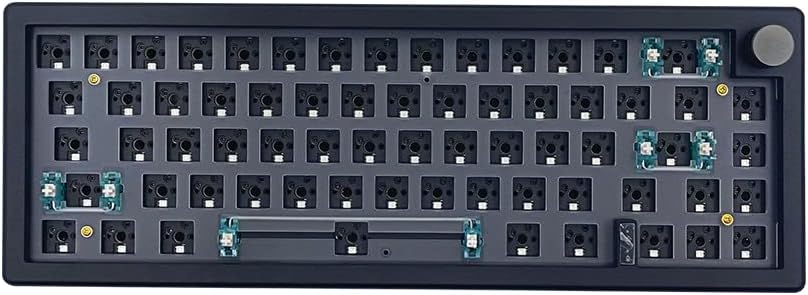


The GMK104 Barebones Kit in White stands out as a top contender for custom builders seeking a full-size solution. With a high user rating and comprehensive feature set it offers a premium foundation that balances functionality and aesthetics effectively for demanding environments.
We may earn a commission when you buy through this link, at no additional cost to you.
Its standout features include a smart display for real-time image updates and a metal knob for precise volume control. The triple mode connectivity allows seamless switching between Bluetooth 5.0 2.4GHz and wired Type-C while the gasket mounted design ensures a cushioned and silent typing experience.
While the price point is higher than entry-level options the value provided by the screen and knob integration justifies the investment for enthusiasts. The kit does not include switches but supports standard 3 pin and 5 pin mechanical switches making it versatile for various build styles.
This kit is ideal for users who want a complete DIY experience without compromising on connectivity or customization. The combination of full-size layout and advanced features makes it a reliable choice for both productivity and gaming setups across Windows and Mac systems.
The smart display allows you to update images and system information in real-time adding a unique interactive layer to your desk setup that standard kits lack.
Gasket mounting reduces vibration and cavity noise creating a softer and more consistent keystroke response that enhances comfort during long typing sessions.
We may earn a commission when you buy through this link, at no additional cost to you.
The BOYI GMK67 White is an excellent entry point for those looking to build a custom mechanical keyboard without spending a fortune. It delivers a solid 65 percent layout with gasket mounting and robust wireless connectivity that competes well with pricier options in the market.
We may earn a commission when you buy through this link, at no additional cost to you.
Key strengths include the 4000mAh battery that supports extended use across Bluetooth 5.0 2.4GHz and wired connections. The inclusion of a multifunction knob adds convenient multimedia control while the south-facing RGB LEDs provide vibrant lighting effects visible even with thick keycaps.
The main trade-off is the lack of support for optical or magnetic switches limiting compatibility to standard mechanical types. However for most users this does not impact daily usability as the hot-swap terminals handle standard 3 pin and 5 pin switches with ease for customization.
This kit is perfect for gamers and typists who value portability and battery life alongside customization. The preinstalled foam and polycarbonate plate ensure a refined sound profile right out of the box making it a strong choice for budget-conscious builders.
A large 4000mAh battery ensures you can work or game for long periods without constant recharging supporting seamless transitions between multiple devices.
Full VIA support allows you to remap keys and set macros to tailor the keyboard to your specific application needs efficiently and effectively.
We may earn a commission when you buy through this link, at no additional cost to you.
The GLORIOUS GMMK PRO 75 stands out as a premium option for builders who prioritize solid construction and modularity. Its CNC machined aluminum body offers exceptional durability and a heavy stable feel that reduces unwanted movement during intense typing or gaming sessions.
We may earn a commission when you buy through this link, at no additional cost to you.
Notable features include a modular design that allows easy replacement of the top frame rotary knob and cable. The 5 pin hotswap support gives you flexibility in switch selection while the included aluminum plate creates a consistent and solid typing experience that enthusiasts appreciate.
The frame is quite heavy at 3.3 pounds which may be a disadvantage for portable setups but benefits desktop use by anchoring the board firmly. Users should note that this is a frame-only kit meaning you must source switches and keycaps separately to complete the build.
This keyboard is best suited for users who want a high-quality base they can modify over time. The ability to swap plates and adjust foam layers lets you fine-tune the acoustic profile and tactile feedback to match your exact preferences and build style.
Solid aluminum construction provides unmatched scratch resistance and structural integrity ensuring your keyboard remains functional and looking new for years.
The modular gasket system and replaceable plates let you experiment with different internal configurations to achieve your ideal sound and feel.
We may earn a commission when you buy through this link, at no additional cost to you.
The M87 Kit Black focuses on delivering a quiet and efficient 75 percent mechanical experience for users who value a peaceful workspace. With built-in sound absorption foam and a gasket mount it minimizes clatter while maintaining responsiveness for work or gaming tasks.
We may earn a commission when you buy through this link, at no additional cost to you.
Its key strengths lie in the silent design and broad switch compatibility supporting both 3 pin and 5 pin MX style switches easily. The detachable USB-C cable adds portability and the full key anti-ghosting ensures smooth performance even during rapid multi-key inputs.
Users may find the software customization more basic compared to VIA supported kits which limits advanced macro creation. Additionally the lower rating suggests some inconsistency in quality control so checking return policies is advisable before purchasing for a custom build project.
This kit is a strong candidate for quiet office environments where minimal disturbance is required. The balanced layout and reliable hot-swap functionality make it a practical choice for those who want a streamlined build without excessive bells and whistles.
High-quality silencing pads absorb keystroke noise effectively allowing you to type vigorously without disturbing colleagues or roommates nearby.
The 75 percent layout retains essential function and arrow keys while saving desk space making it suitable for both laptops and desktops.
We may earn a commission when you buy through this link, at no additional cost to you.
The GMK104 Barebones in Black offers the same powerful features as the white variant but with a darker finish that better conceals dust and wear. It provides a full-size layout that is ideal for users who rely heavily on a numpad for data entry or productivity.
We may earn a commission when you buy through this link, at no additional cost to you.
Standout features include the integrated screen and metal knob which allow real-time image customization and precise volume adjustment. The gasket mounted structure ensures a silent cushioned typing feel while the hot-swap PCB supports both 3 pin and 5 pin switches for easy changes.
The screen can be a minor distraction for some users who prefer a minimalist look but adds value for those who enjoy dynamic visual content on their desk. The black coating offers better durability against daily wear compared to lighter colored options in this category.
This kit is well-suited for enterprise or home office environments where a full-size keyboard is necessary. The combination of premium materials and robust connectivity makes it a reliable tool for professionals who need consistent performance over long periods.
The full size layout ensures efficient data entry with a dedicated numpad making it perfect for accounting and administrative tasks.
Black coating resists scratches and visible dust accumulation helping your build maintain a clean and professional appearance over time.
We may earn a commission when you buy through this link, at no additional cost to you.
The M87 Kit White provides a clean and quiet 75 percent mechanical solution for those who prefer a lighter aesthetic on their desk. It shares the silent foam and gasket mount design of the black version but offers a fresh look that appeals to minimalists.
We may earn a commission when you buy through this link, at no additional cost to you.
Key features include high-quality silencing pads that reduce keystroke noise and a detachable USB-C cable for portability. The anti-ghosting technology ensures smooth gaming or typing performance even during intense multi-key scenarios across both Windows and Mac systems.
However this variant has a lower rating which may indicate variability in build quality or assembly consistency. Buyers should inspect the product carefully upon arrival to ensure all components meet expectations for a custom mechanical keyboard foundation.
This kit is best for users who want a compact silent board without spending much. The white finish pairs well with light keycaps and modern setups but the trade-off in quality perception means it is less robust than higher rated options.
The white finish matches light desks and keycaps creating a unified and bright visual setup that enhances your workspace look.
Silicone pads and foam work together to absorb sound ensuring a discreet typing experience even in shared workspaces.
We may earn a commission when you buy through this link, at no additional cost to you.
The BOYI GMK67 in Black delivers a compact 65 percent mechanical experience with a robust feature set for a reasonable price. It offers a reliable dark finish that is easier to maintain while still providing the same high-performance connectivity and customization as the white version.
We may earn a commission when you buy through this link, at no additional cost to you.
Features like the 4000mAh battery and triple mode connectivity ensure you stay connected across multiple devices without frequent charging. The gasket mount and south-facing RGB design provide a satisfying typing feel and vibrant lighting that stands out against the dark case.
As with the white variant this kit does not support optical switches which limits compatibility for some users seeking specific actuation speeds. However for standard mechanical builds the hot-swap terminals make it easy to install favorite switches without soldering.
This option is best for gamers and users who need a space-saving keyboard with wireless flexibility. The dark finish helps keep the setup looking clean while the included knob adds utility for media control during work or leisure sessions.
The black case complements dark setups and hides dust better than lighter options while still supporting full RGB customization.
Bluetooth 5.0 and 2.4GHz support provide stable wireless options for both gaming and office tasks without lag issues.
We may earn a commission when you buy through this link, at no additional cost to you.
The GMK87 Kit Black is a TKL option that prioritizes interactivity with a built-in TFT-LCD screen and metal volume knob. It aims to combine compact efficiency with high-end features for users who want a modern customizable desk setup without the full-size footprint.
We may earn a commission when you buy through this link, at no additional cost to you.
Key strengths include the interactive screen for real-time updates and triple mode connectivity for flexible device switching. The gasket mounted design reduces vibration and the hot-swappable PCB supports standard 3 pin and 5 pin mechanical switches for easy personalization.
The lower rating suggests some inconsistencies in manufacturing or software integration that may require patience during setup. Users should be prepared to adjust VIA settings and screen content to get the most out of the interactive features provided by this kit.
This kit is ideal for tech enthusiasts who want to experiment with dynamic displays on their desk. The TKL layout saves space while retaining arrow keys and function rows making it a practical choice for gaming and productivity alike.
The TFT-LCD screen lets you display images or system info directly on the board adding a unique interactive element to your desk.
The 87 key layout offers a balance between a full numpad and a compact design ideal for space constrained environments.
We may earn a commission when you buy through this link, at no additional cost to you.
The GMK108 Kit Black is a full-size barebones option designed for users who need a traditional layout with 108 keys. It focuses on software customization and connectivity ensuring you can program macros and switch modes easily for diverse computing tasks.
We may earn a commission when you buy through this link, at no additional cost to you.
Its primary strengths are VIA programmability and triple mode connectivity which allow deep key mapping and wireless flexibility. The gasket mounted structure ensures a consistent typing feel while the south-facing RGB provides vibrant backlighting visible even with taller keycaps.
The lack of a screen distinguishes it from premium kits with displays but keeps the cost lower and build simpler. Users should ensure their desk can accommodate the full footprint as the extra width is necessary for the numpad and standard layout.
This kit is best for office workers and gamers who rely on the numpad for daily workflows. The balance of wireless freedom and wired reliability makes it a practical tool for those who need robust performance without paying for extra features.
The full size layout with 108 keys ensures you have all the keys needed for data entry without sacrificing function keys.
VIA support allows detailed remapping and macros giving you full control over how the keyboard functions across different apps.
We may earn a commission when you buy through this link, at no additional cost to you.
The GLORIOUS GMMK 3 introduces a modular gasket system that allows users to tailor the typing feel with a building block design. It offers a unique approach to customization for those who want to experiment with stiffness and acoustic profile without buying a new board.
We may earn a commission when you buy through this link, at no additional cost to you.
Key features include dense sound dampening foam to reduce resonance and a programmable knob for media control via Glorious CORE software. The 5 pin hotswap support ensures wide switch compatibility while the aluminum plate adds stability to the 75 percent layout.
The lower rating suggests users may face challenges with assembly or software integration compared to more established kits. Additionally some may find the modular gasket system less intuitive than traditional gasket mounts requiring more trial and error for setup.
This kit is best for tinkerers who want to adjust the keyboard feel over time. The ability to swap gaskets and layers gives you precise control over the typing experience making it a flexible option for advanced users.
The modular gasket system lets you change stiffness and flex to suit your personal preference with simple adjustments.
Dense foam layers absorb unwanted vibrations ensuring a clean and precise sound for each keystroke.
We may earn a commission when you buy through this link, at no additional cost to you.
Selecting the right barebones keyboard requires understanding key features that affect typing feel and functionality. This section explains the essential factors to consider before making your purchase to ensure the build meets your specific needs.
The physical size of your keyboard dictates how much desk space you use and which keys are available. Compact layouts like 65 percent or 75 percent save room but remove function or numpad keys which may be necessary for certain workflows. Full-size boards offer maximum key coverage but require more space on your desk.
Choose a layout that matches your daily tasks and available workspace.
Mounting style significantly impacts the typing feel and sound of your keyboard. Gasket mounting uses foam pads to suspend the PCB reducing vibration and creating a softer and more consistent keystroke response. Top mount or tray mount options are more rigid but may transmit more sound and feel less premium.
Gasket mounted boards generally provide a more refined and comfortable typing experience.
Hot-swap sockets allow you to change switches without soldering giving you the freedom to test different tactile profiles. Ensure the PCB supports the pin count of your preferred switches most commonly 3 pin or 5 pin. Some kits also specify compatibility with optical or magnetic switches which may limit your choices if not supported.
Look for boards with clear hot-swap support for your desired switch type.
Modern barebones keyboards often support multiple connection modes including Bluetooth 5.0 2.4GHz wireless and wired Type-C. Multi-device support allows you to switch between devices easily which is useful for laptop and desktop setups. Wired connections provide the lowest latency while wireless adds flexibility for clean desk setups.
Prioritize triple-mode connectivity if you switch between multiple devices frequently.
Software support determines how easily you can customize your keymaps macros and lighting. VIA and QMK open source solutions offer deep customization and are compatible across different boards. Proprietary software may limit portability but can be easier to use. Check if the kit includes specific app support for your operating system.
Ensure the board supports open software standards if you want full control.
The case material and construction affect the durability and stability of your keyboard. Aluminum cases are heavier and more durable but increase the price. Plastic cases are lighter but may feel less premium. Internal foam and plate materials also influence sound and feel so check specifications for preinstalled dampening materials.
Aluminum or polycarbonate plates with preinstalled foam often yield better sound.
Extra features like rotary knobs or screens add functionality to your setup. A knob allows volume control or scrolling while a screen can display system info or custom images. However these features can increase the price and may not be necessary for all users. Consider if the utility aligns with your daily habits.
Assess whether features like knobs or screens justify the added cost for your needs.
Barebones keyboards vary widely in price based on features and build quality. Entry-level kits offer basic functionality while premium ones include advanced mounting and connectivity. Compare what is included like foam plates or cables to ensure you are getting fair value. Remember that you still need to buy switches and keycaps separately.
Factor in the cost of additional components when calculating total project budget.
Start by installing the switches into the PCB using the hot-swap sockets if supported. Push the switch in until it clicks into place and test each key for proper registration. This ensures your foundation is solid before adding keycaps and configuring software.
Use the provided software to remap keys and create macros. Most barebones kits support VIA or QMK which allow detailed customization. Learn the layer and modifier settings to maximize efficiency for your specific workflow and application usage.
Maintain your keyboard by keeping it clean and dust-free. Use compressed air to remove debris from under the switches and caps. Regularly check connections and cables to ensure stable performance and prolong the life of your custom build.
A barebones keyboard kit provides the essential components such as the case PCB and mounting system but excludes switches and keycaps. This allows you to choose every part of the tactile experience to match your preferences. It is the standard way enthusiasts build custom mechanical keyboards.
Most modern barebones kits feature hot-swap sockets that allow you to install switches without soldering. This makes customization and repair much easier for beginners. Always check the product details to confirm switch compatibility and hot-swap support before purchasing.
Yes many contemporary barebones kits offer Bluetooth or 2.4GHz wireless connectivity alongside wired options. This provides flexibility for multiple devices and a cleaner desk setup. Ensure the battery capacity matches your expected usage time for uninterrupted performance.
Gasket mounting uses foam to suspend the PCB reducing vibration and creating a softer feel. Top mount rigidly attaches the PCB to the case offering a firmer and more direct keystroke. Gasket mounts are generally preferred for comfort and sound isolation.
Many barebones kits are designed to work with both Windows and macOS systems. Check the product specifications to confirm key mapping and software compatibility. Some kits allow you to swap keycaps to match Mac layouts for better usability.
Select switches based on your preference for tactile feel and sound. Linear switches are smooth and quiet while tactile switches provide a bump and clicky switches are audible. Ensure the switch pin count matches your keyboard's hot-swap sockets for proper fit.
Assembling a barebones keyboard is straightforward for beginners with clear instructions. You typically install switches and plate foam before securing the case. Most kits include tools like switch pullers to make the process easier and more efficient.
Popular software options include VIA and QMK for open-source customization. These tools allow you to remap keys create macros and adjust lighting. Proprietary software may also be provided depending on the manufacturer and specific model.
We have reviewed ten top barebones keyboards offering diverse layouts and features for every type of builder. From the compact BOYI GMK67 to the full-size GMK104 there is a kit that fits your desk space and workflow needs perfectly.
Prioritize factors like mounting style and connectivity when making your decision to ensure long-term satisfaction. A well-chosen base makes it easier to experiment with switches and keycaps to refine your ultimate typing experience.
Remember to check current availability and pricing on the product pages before purchasing. Prices and stock can change frequently so verifying the latest details ensures you get the best value for your custom build.