
ASRock DeskMeet X300 Mini PC Barebone Kit
4.8Editor score
Supports AMD AM4 Socket CPUs
Includes 500W power supply
8 Liter compact form factor
This guide compares ten top barebone PCs with AMD processors for performance, connectivity, and expandability to help you choose the right mini system.
Barebone PCs with AMD processors offer a flexible foundation for building custom mini desktops. They provide high performance in a compact footprint while allowing users to select their own memory and storage components for tailored system configurations.
We evaluated ten leading models based on processor power, cooling efficiency, and port variety. Our analysis covers gaming potential, professional workloads, and home server capabilities to ensure a comprehensive overview of current market options.
Each selection highlights unique strengths such as OCuLink support or dual M.2 slots. Remember that component availability and specific configurations may shift over time so verifying current stock details is always recommended before finalizing your purchase decision.
4.8Editor score

4.0Editor score
4.1Editor score
The following comparison table provides a side-by-side overview of the ten selected mini PC barebone kits. It highlights key specifications to help you quickly identify which system aligns best with your specific computing needs.



The AOOSTAR MACO Mini PC stands out as a top contender in the barebone category. With a strong 4.0 rating from users, it delivers reliable performance for gaming and work. The inclusion of Ryzen 7 PRO architecture ensures it handles demanding tasks with ease.
We may earn a commission when you buy through this link, at no additional cost to you.
Its standout feature is the OCuLink port which allows external GPU connections with minimal latency. This is perfect for users wanting desktop-level graphics in a small box. The dual USB4 ports further enhance connectivity for high speed data and display needs.
While the lack of pre installed components requires some setup effort, the system allows full customization. Users may find the price higher than entry level models but the advanced features justify the cost for power users needing expandability.
This model is ideal for professionals or gamers who need a compact yet powerful base. It is strongly recommended for those planning to connect external storage or graphics cards for maximum flexibility.
The dedicated OCuLink port enables high bandwidth connections for external GPUs allowing significant graphical performance boosts without internal space constraints.
Dual 2.5G LAN ports support network redundancy or dual WAN setups which are crucial for advanced routing or home lab environments.
We may earn a commission when you buy through this link, at no additional cost to you.
The GEM12+ offers a robust platform with a 4.5 user rating reflecting its stable performance. It uses the Ryzen 7 PRO 8845HS chip which is efficient and powerful. This model is well suited for creative workloads requiring multiple displays.
We may earn a commission when you buy through this link, at no additional cost to you.
Its ability to drive four screens at 4K resolution is a major advantage for multitasking. The vapor chamber cooling helps maintain thermal stability even during intensive tasks. OCuLink support adds future proofing for external hardware.
Like other barebone units it requires you to buy your own components. This adds to the total cost but gives you control over quality. The BIOS modes allow you to balance noise and performance based on your environment.
It is a great choice for office environments or digital art studios. Users needing multiple monitors will find this system particularly effective for their workflow needs.
Support for four 4K displays makes this mini PC ideal for trading or monitoring setups where screen real estate is critical.
The vapor chamber design ensures heat is dissipated evenly preventing thermal throttling during long gaming or rendering sessions.
We may earn a commission when you buy through this link, at no additional cost to you.
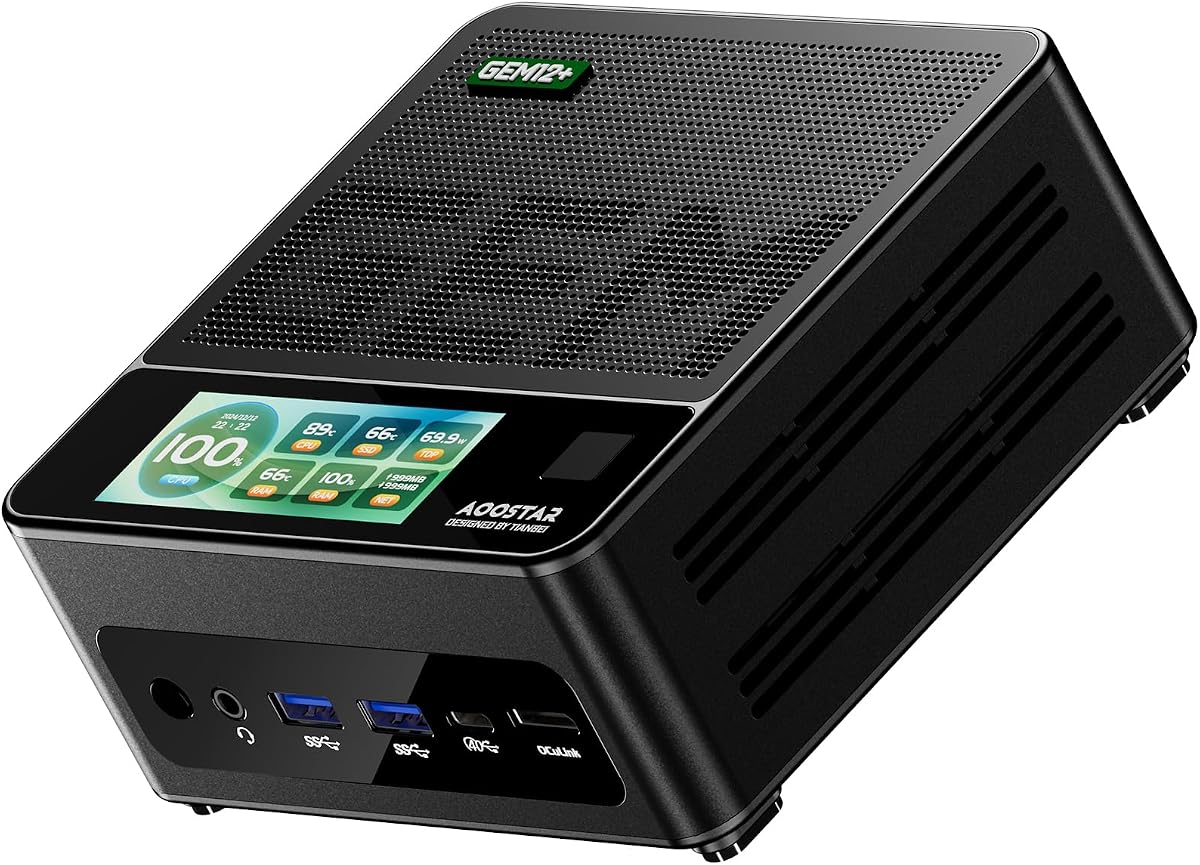
This premium variant enhances the standard GEM12+ with additional security and customization features. It holds a solid 4.1 rating from users who appreciate its advanced hardware. The fingerprint unlock adds a layer of convenience and security to daily use.
We may earn a commission when you buy through this link, at no additional cost to you.
The built-in display customization allows users to monitor system stats or show custom images. This unique feature sets it apart from typical mini PCs. The OCuLink port remains a key highlight for gaming expansion.
While it is one of the more expensive options the added features justify the cost for business users. The lack of pre-installed OS means you must bring your own software which adds setup time.
It is perfect for users who want a secure and highly customizable mini PC. The fingerprint sensor and display options make it stand out as a specialized device.
Built-in fingerprint recognition allows for quick secure access without needing to enter passwords each time you use the system.
The customizable screen lets users view real-time CPU and RAM usage or display personal branding on the device.
We may earn a commission when you buy through this link, at no additional cost to you.
The DeskMeet X300 earns its spot as a top budget choice with a 4.8 rating. It supports the widely used AM4 socket allowing for cost effective CPU upgrades. The inclusion of a power supply is a major advantage over other barebone kits.
We may earn a commission when you buy through this link, at no additional cost to you.
Its PCIe slot provides room for dedicated graphics cards which is rare in mini PCs. This makes it a powerful choice for gamers on a budget. The compact design saves desk space while delivering full desktop power.
Users must source their own CPU and RAM which adds to the initial effort. The older PCIe 3.0 standard may limit future GPU performance but is still capable for most modern titles.
This model is excellent for hobbyists or those repurposing existing AM4 components. It offers high value due to the included power supply and expansion options.
Support for AM4 sockets allows users to use existing CPUs or find affordable options on the secondary market easily.
The full PCIe x16 slot allows for discrete GPU installation making it versatile for gaming or compute tasks.
We may earn a commission when you buy through this link, at no additional cost to you.
The X1 Lite-255 brings competitive performance to the mini PC space with its Ryzen 7 255 processor. Users appreciate its integrated Radeon 780M graphics which handle light gaming well. It supports fast DDR5 memory for improved throughput.
We may earn a commission when you buy through this link, at no additional cost to you.
OCuLink support is included allowing for external GPU expansion in the future. The triple display output makes it useful for multi monitor workstations. USB4 connectivity ensures high speed data transfers for peripherals.
Some users have noted thermal limitations under sustained load which may require BIOS tuning. The rating reflects minor setup challenges but performance remains solid for the size. It is a good mid-range option.
It is best suited for general computing and light multimedia tasks. Users who value compact design and modern ports will find it a reliable choice for daily use.
Support for DDR5 memory provides faster data speeds compared to DDR4 improving overall system responsiveness and multitasking.
USB4 connectivity ensures high bandwidth data transfer and display support for next generation accessories and monitors.
We may earn a commission when you buy through this link, at no additional cost to you.
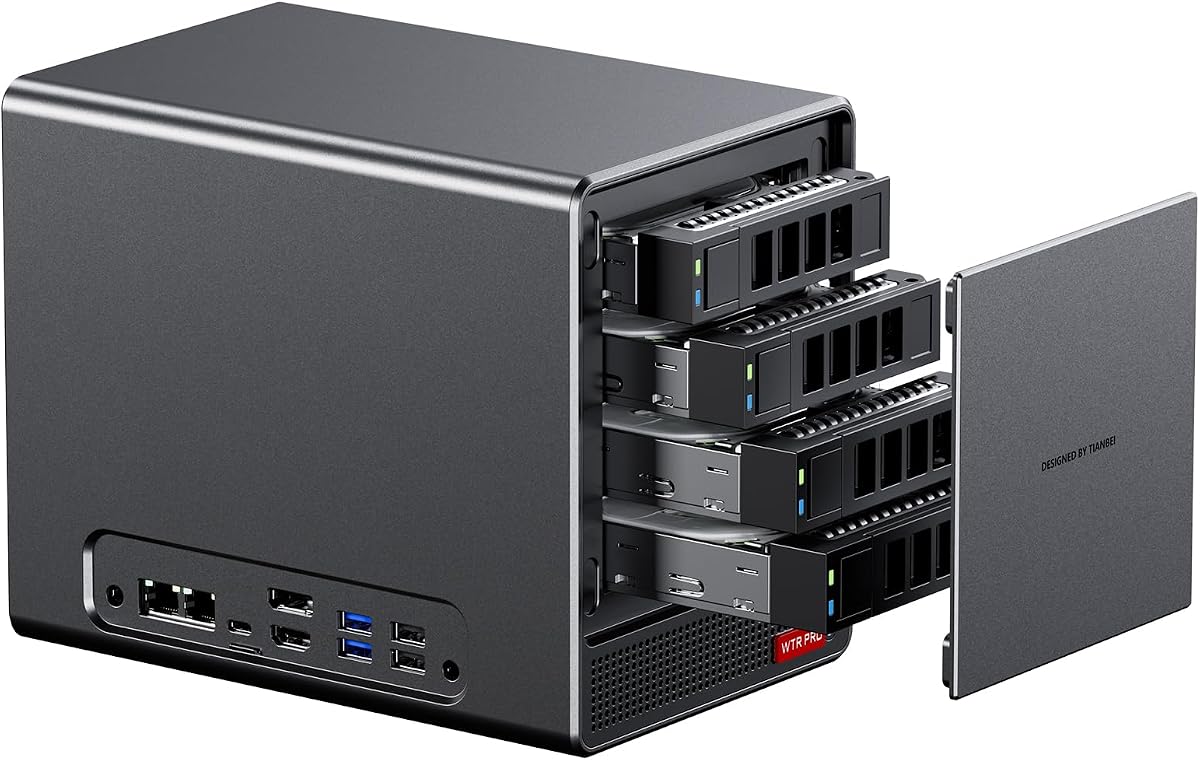
This unit is specialized for storage and server tasks with its four SATA drive bays. It supports large capacities making it ideal for home media centers. The 5825U CPU is efficient and runs cool during 24/7 operation.
We may earn a commission when you buy through this link, at no additional cost to you.
It offers flexible storage via M.2 NVMe slots alongside SATA drives. This mix allows for caching or OS installation alongside bulk storage. The cooling system ensures quiet operation which is vital for living spaces.
While it has strong media capabilities it is less suited for gaming compared to newer models. Users need to install the operating system and configure storage settings manually. It is a robust choice for servers.
It is perfect for users building a home NAS or media server. The drive bay layout simplifies maintenance and allows easy expansion of storage over time.
Four SATA bays and two M.2 slots allow for a mix of fast SSDs and high capacity HDDs in one compact chassis.
Low power consumption and intelligent fan control ensure the unit runs quietly and efficiently around the clock.
We may earn a commission when you buy through this link, at no additional cost to you.
The DeskMini X300 is known for its incredibly small footprint of just 1.92 liters. It supports AM4 CPUs allowing for flexible builds. With a 4.2 rating it is trusted for daily tasks and office use.
We may earn a commission when you buy through this link, at no additional cost to you.
It supports three displays which aids productivity in limited spaces. The 2.5G LAN port ensures fast network speeds for file transfers. This unit is designed for simplicity and efficiency in small form factor builds.
Users must purchase their own power supply and CPU which increases setup time. The lack of a PCIe slot limits it to integrated graphics. It is a clean and reliable option for basic needs.
It is best for users who need a tiny PC for office work. Its small size makes it perfect for mounting behind displays to save desk space.
The ultra compact design minimizes desk footprint making it ideal for workstations where space is at a premium.
Triple display support enables multiple monitors without cluttering the desk with large external boxes.
We may earn a commission when you buy through this link, at no additional cost to you.
This model features the new Ryzen AI 300 Series processor with dedicated NPU hardware. It represents a shift towards AI enhanced computing in mini PCs. The ultra thin chassis allows for flexible mounting options in modern setups.
We may earn a commission when you buy through this link, at no additional cost to you.
Wi-Fi 7 connectivity ensures the fastest wireless speeds available. The NPU can offload AI tasks improving efficiency. It is a high-end device designed for forward-looking applications and professional use.
It is priced higher than typical barebone kits reflecting its specialized features. Users should be prepared for a steep learning curve to utilize its full potential. It is a forward-thinking investment.
This unit is best for early adopters and professionals needing AI capabilities. Its compact design and advanced connectivity make it a standout for modern offices.
The XDNA2 NPU provides dedicated hardware for AI tasks improving performance for local language models and vision processing.
Wi-Fi 7 support ensures maximum wireless throughput and reduced latency for future wireless networks.
We may earn a commission when you buy through this link, at no additional cost to you.
This variant expands on the previous NAS model with two additional M.2 bays for total flexibility. It supports up to six drives total making it a powerhouse for storage. The dual 2.5G LAN supports high speed data transfers.
We may earn a commission when you buy through this link, at no additional cost to you.
It is designed for robust home servers or small business storage. The processor handles virtualization tasks well making it useful for multiple services. The chassis allows for effective cooling of multiple drives.
Users must configure the RAID and storage settings manually which requires technical knowledge. It is a specialized unit rather than a general purpose desktop. Setup time may be higher than standard PCs.
It is ideal for users needing significant storage capacity in a small box. The drive layout and dual LAN make it perfect for network storage applications.
Support for four SATA drives plus two NVMe drives allows for massive storage in a single compact enclosure.
Dual 2.5G LAN ports enable link aggregation or separate networks for optimized traffic management and speed.
We may earn a commission when you buy through this link, at no additional cost to you.
The PN54-S1 offers a sleek design with a focus on sustainability. It supports fast connectivity and easy upgrades with its tool-free chassis. This model is suited for general computing tasks and office environments.
We may earn a commission when you buy through this link, at no additional cost to you.
Wi-Fi 7 support ensures future wireless speeds without hardware changes. The compact size allows for placement in tight spaces. Users value the reliability and warranty support that comes with the brand.
As a barebone unit it requires you to add memory and storage first. This adds steps to the setup process but ensures you pick the right components. It is a solid choice for professionals.
It is best for users who prioritize design and connectivity. The eco-conscious build and easy maintenance make it a reliable option for office work.
Tool-free design allows quick access to internal components for easy upgrades without needing specialized tools.
Built with sustainable materials and efficient design this unit minimizes environmental impact while maintaining performance.
We may earn a commission when you buy through this link, at no additional cost to you.
Choosing the right barebone mini PC involves understanding your needs for performance, connectivity, and expansion. This guide outlines key factors to consider for selecting the ideal AMD system.
The processor generation determines performance and efficiency. Newer Ryzen series like the 8000 series offer better graphics and AI features compared to older 5000 series models.
Look for the latest Zen architecture to ensure long term software support and better task handling.
Barebone kits do not include memory so you must select DDR5 or DDR4 modules. Ensure the kit supports the speed you need such as 5600MHz for faster data transfer.
Double slot configurations provide better performance than single channel setups for multitasking.
Check for M.2 slots and SATA bays depending on your storage needs. Dual M.2 slots allow for high speed caching or dual OS setups without extra drives.
NAS focused models offer SATA bays for high capacity storage while general models rely on M.2.
Port selection is vital for connecting peripherals. Look for USB4 ports for high speed data and OCuLink if you plan to use external GPUs for gaming.
Dual LAN ports are beneficial for networking tasks and redundancy in professional setups.
Mini PCs run hot so cooling is a critical factor. Models with vapor chambers or dual fans sustain performance better than those with simple fan setups.
Efficient cooling ensures the processor does not throttle during heavy workloads like video rendering.
Check how many displays the system can drive. Some models support triple or quad 4K screens which is essential for multi monitor productivity setups.
Verify output types like HDMI or DisplayPort to match your monitor connections.
Dimensions vary from ultra thin 0.6L to larger 8L cases. Choose a size that fits your desk or wall mount requirements.
Smaller cases may limit internal cooling and expansion slots so balance size with features.
Some units include power supplies or have tool free access. This reduces initial setup costs and makes future upgrades easier for the user.
Check if the chassis allows easy access to RAM and storage slots without removing the entire device.
Install compatible RAM and storage components before powering on the system. Ensure the memory is firmly seated to prevent boot errors.
Connect your display and keyboard first to configure the BIOS settings and install the operating system.
Keep the vents clear of dust and debris to maintain optimal thermal performance and prevent overheating.
Most barebone kits do not include an operating system. You must purchase a license and install Windows or Linux yourself. Some sellers may include a key separately.
Most mini PCs do not fit standard graphics cards. However, models with OCuLink or PCIe slots support external GPUs. Check the specific port support before buying.
DDR5 offers faster speeds and bandwidth than DDR4. Newer processors support DDR5 which improves overall system performance for multitasking.
Yes, models with Ryzen 7 PRO and Radeon 780M graphics handle light gaming well. For AAA titles, use a model with external GPU support for better results.
Many models support up to two M.2 drives plus additional SATA drives. Capacity depends on the number of slots provided on the motherboard.
Yes, most modern AMD CPUs support virtualization. Ensure you install the OS that supports VMs and allocate resources properly in BIOS.
The AOOSTAR MACO and ASRock DeskMeet X300 stand out for their balance of performance and cost. These models cover most needs from office work to gaming.
Prioritize cooling and port selection to ensure your system meets future demands. External GPU support is a key feature for long term flexibility.
Verify component compatibility and current stock availability before purchasing to avoid delays. Prices may vary so compare options carefully.