
ASRock DeskMeet X300 Mini PC Barebone Kit
4.8Editor score
Supports AMD AM4 socket Ryzen processors
Compact 8 liter form factor design
Includes 500W power supply unit
Explore the top barebone desktop PC options for 2026, comparing performance, connectivity, and expandability to help you choose the right mini system for your
Barebone desktop PCs offer a unique balance of power and flexibility for users who want to customize their own systems without building a full tower. These compact units provide the essential chassis, motherboard, and cooling, leaving RAM, storage, and sometimes the CPU for you to install. This approach allows for tailored performance and cost savings.
To compile this list, we evaluated ten leading models based on processor support, connectivity options, expansion capabilities, and overall build quality. We looked at factors like thermal design, port selection, and compatibility with modern components to ensure each recommendation meets diverse professional and personal requirements.
Each pick in this guide highlights specific strengths, from gaming readiness to enterprise reliability. Note that product availability and specifications can change over time, so always verify the latest details before purchasing. Our goal is to provide a clear path to finding the ideal barebone system for your workflow.
4.8Editor score

4.0Editor score

5.0Editor score
This side-by-side comparison evaluates each barebone desktop PC on key specifications including processor compatibility, memory support, storage options, and connectivity ports. Use this table to quickly identify which model aligns with your performance needs and expansion plans.




The AOOSTAR MACO stands out as a top contender in the barebone desktop PC market. With a rating of 4.0 stars, it is praised for its powerful AMD Ryzen 7 PRO 8845HS CPU and comprehensive connectivity options that suit both gaming and professional workflows.
We may earn a commission when you buy through this link, at no additional cost to you.
Its standout feature is the OCuLink port, which allows for external GPU connections with minimal latency compared to USB4. This makes it a rare mini PC that can grow into a serious gaming machine. Additionally, dual USB4 ports support 8K outputs and 100W power delivery, offering exceptional versatility for multi-monitor setups.
While the cooling system is robust with a VC heat spreader and turbo fans, the barebone nature means you must source RAM and storage yourself. However, this customization allows you to select components that match your budget and performance goals exactly.
This model is ideal for power users who need a compact yet expandable system. Whether you are a content creator or a remote worker, its balance of processing power and future-proof connectivity makes it a strong recommendation for 2026.
OCuLink port provides 64Gbps bandwidth for external GPUs with minimal latency.
Dual 2.5G LAN and USB4 ports ensure fast transfers and multi-monitor support.
We may earn a commission when you buy through this link, at no additional cost to you.
The ASUS NUC 15 Pro Barebone Kit has achieved a perfect 5.0 rating from users who value reliability and cutting-edge wireless tech. It is powered by the latest Intel Core Ultra 5 225H processor, which brings strong AI capabilities and efficient performance to a compact chassis.
We may earn a commission when you buy through this link, at no additional cost to you.
This model excels in connectivity with Intel Wi-Fi 7, offering transfer rates up to 2.4 times faster than previous generations. The tool-less design makes installing RAM and storage straightforward, while support for four 4K displays via HDMI 2.1 and Thunderbolt 4 suits professional visual workflows.
Although it commands a higher price, the inclusion of rigorous torture testing and MIL-STD-810H certification ensures durability in demanding environments. The sync power-off feature also adds energy efficiency by shutting screens when the PC is idle.
Buyers seeking a premium, future-ready barebone PC will find this unit offers excellent longevity. Its combination of advanced networking and display flexibility makes it a top choice for enterprise and creative professionals.
Wi-Fi 7 ensures low latency and high throughput for seamless connectivity.
Support for four 4K displays enables efficient workspace management.
We may earn a commission when you buy through this link, at no additional cost to you.
The ASRock DeskMeet X300 Mini PC Barebone Kit earns a high 4.8 rating for its value and flexibility. It supports a wide range of AMD AM4 socket CPUs, allowing users to choose from performance-oriented Ryzen processors based on their specific needs and budget constraints.
We may earn a commission when you buy through this link, at no additional cost to you.
A key advantage of this kit is the inclusion of a 500W power supply, which saves buyers from purchasing a separate unit. The PCIe 3.0 x16 slot also allows for discrete graphics card installation, making it one of the few barebone units that can be transformed into a robust workstation or gaming machine.
While it uses DDR4 memory and has a larger 8-liter footprint, these trade-offs are acceptable for the price and expandability offered. The extensive USB ports and multiple display outputs ensure it remains versatile for various desktop configurations.
This model is perfect for budget-conscious builders who want maximum control over their system components. Whether upgrading an old setup or starting fresh, it provides a reliable foundation without breaking the bank.
Wide AMD AM4 CPU support allows you to pick the processor that fits your needs.
500W PSU included simplifies the building process and reduces total cost.
We may earn a commission when you buy through this link, at no additional cost to you.
This variant of the ASUS NUC 15 Pro Barebone Kit shares the same 5.0 rating and core specifications as its counterpart, focusing on future-proofing with the latest Intel Core Ultra 5 processor. It is designed for users who want a system that remains relevant for years to come.
We may earn a commission when you buy through this link, at no additional cost to you.
The integration of Wi-Fi 7 and Thunderbolt 4 ensures that this system can handle upcoming software and peripheral requirements without needing an upgrade. The 3Y warranty adds peace of mind, making it a safe investment for professional or commercial deployments.
Users should note that the CPU cooler is sold separately, which may increase the initial cost. However, the tool-less chassis makes assembly straightforward, and the sustainable packaging reflects a commitment to environmental responsibility.
For those prioritizing longevity and enterprise-grade support, this model offers the best combination of modern architecture and reliable service. It is a solid choice for organizations looking to standardize on a high-quality mini PC platform.
3Y warranty provides extensive coverage for business and professional use cases.
Sync power-off feature reduces energy consumption when displays are idle.
We may earn a commission when you buy through this link, at no additional cost to you.
The Cubi NUC AI+ Barebone Desktop brings high-end computing power to a compact 0.51L chassis. While its rating is N/A due to its newness, it promises exceptional performance with the Intel Core Ultra 9 386H processor designed for demanding AI and multitasking workloads.
We may earn a commission when you buy through this link, at no additional cost to you.
With dual DDR5 slots supporting up to 64GB of RAM and Copilot+ PC features, this system is built for modern productivity tools. The VESA mountable design allows it to be hidden behind monitors, making it ideal for retail or kiosk setups where space is tight.
The inclusion of a 3 Year Advance Replacement warranty adds significant value, ensuring minimal downtime for professional deployments. Its multi-display support via Thunderbolt 4 and HDMI makes it versatile for digital signage or complex office environments.
This model is best suited for users who need the absolute latest in AI processing within a tiny footprint. If you prioritize cutting-edge features and robust warranty support, the Cubi NUC AI+ is a compelling option.
Copilot+ PC features enable efficient AI tasks and smart system management.
VESA mountable design frees up desk space for other essentials.
We may earn a commission when you buy through this link, at no additional cost to you.
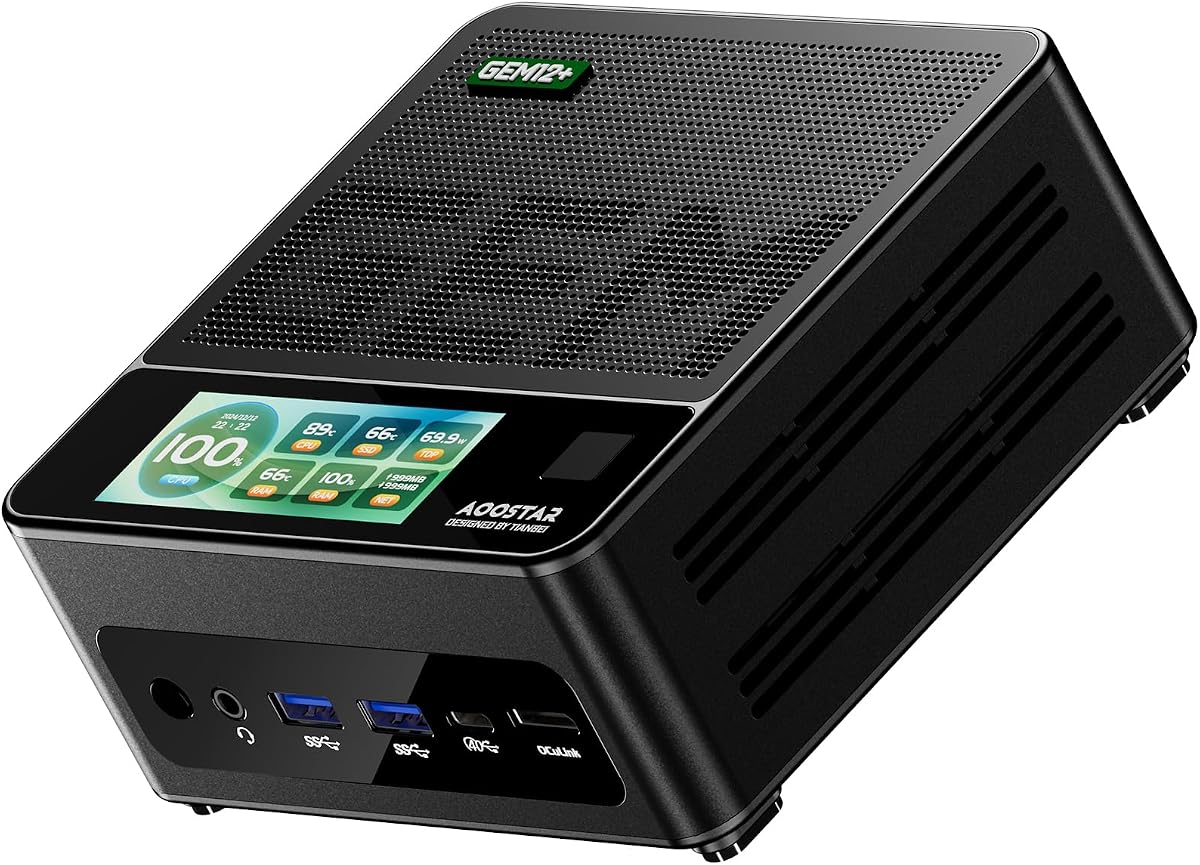
AOOSTAR GEM12+ Barebone Mini PC is a favorite among gamers for its high performance and thermal design. With a 4.5 rating, it leverages the AMD Ryzen 7 PRO 8845HS CPU and OCuLink connectivity to deliver a smooth experience for both integrated and external graphics.
We may earn a commission when you buy through this link, at no additional cost to you.
The Vapor Chamber cooling system ensures that the PC remains stable even under prolonged heavy loads. Three BIOS adjustable modes allow users to tailor power consumption and performance based on their specific needs, ranging from silent to performance-centric profiles.
While OCuLink provides a direct channel for external GPUs, users should note it does not support hot swapping, requiring a power cycle for safety. However, the rich interface suite supports four 4K displays, making it a strong candidate for professional multi-screen setups.
This model is ideal for gamers and creators who want a compact box that does not compromise on power. Its energy-saving VAT architecture also helps keep electricity costs manageable over time.
Vapor Chamber dissipates heat efficiently to maintain high performance during intense tasks.
Three BIOS modes let you balance power, noise, and performance easily.
We may earn a commission when you buy through this link, at no additional cost to you.
The AOOSTAR GEM12+ PRO Barebone Mini PC shares similar hardware to the standard GEM12+ but distinguishes itself with enhanced security features. With a 4.1 rating, it appeals to users who prioritize both gaming capability and data protection.
We may earn a commission when you buy through this link, at no additional cost to you.
Built-in fingerprint recognition simplifies login, offering a secure and password-free access method. This makes it suitable for office environments or shared spaces where quick, safe entry is essential. The customizable built-in display allows you to monitor system metrics in real time.
While the barebone design requires you to install RAM and storage, this gives you full control over your configuration. The vapor chamber cooling ensures the system runs cool even during extended use, extending its lifespan significantly.
If security and performance are your top priorities, this PRO model delivers a balanced solution. It combines advanced hardware with user-friendly features that make daily interactions smoother and safer.
Fingerprint recognition provides fast and secure system access without passwords.
Customizable display UI lets you track CPU and RAM usage dynamically.
We may earn a commission when you buy through this link, at no additional cost to you.
ASRock DeskMeet B760 Series 8L Compact Desktop Barebone Kit is a top-rated option for Intel enthusiasts seeking flexibility. With a 5.0 rating, it supports up to 14th Gen Intel Core processors and includes a robust 500W power supply for reliable operation.
We may earn a commission when you buy through this link, at no additional cost to you.
The PCIe 4.0 x16 slot makes it ready for modern discrete graphics cards up to 20cm, which is rare for small form factor kits. This expansion capability allows for significant upgrades over time, making it a versatile base for home theater or gaming PCs.
While the 8-liter size is slightly larger than traditional mini PCs, it still saves considerable space compared to full towers. Triple display outputs and multiple storage options ensure it meets diverse multimedia and storage requirements.
This kit is perfect for users who want Intel performance with upgrade potential. The included PSU and wireless-ready design simplify the build process, making it accessible even for less experienced DIYers.
PCIe 4.0 x16 slot supports high-performance discrete GPUs for demanding tasks.
Included 500W PSU ensures stable power for components without extra costs.
We may earn a commission when you buy through this link, at no additional cost to you.
The MSI Cubi 5 Barebone Mini PC targets office and light productivity workloads with its Intel Core 3-100U processor. While its rating is N/A, its features align well with standard business needs, offering efficiency and multi-display capabilities.
We may earn a commission when you buy through this link, at no additional cost to you.
Thunderbolt 4 support allows for single-cable docking and power delivery up to 100W, simplifying cable management. The external power switch adds convenience for users who frequently toggle the system on and off without reaching behind the unit.
Support for up to four displays via HDMI and Thunderbolt 4 boosts productivity by enabling large virtual workspaces. The 3 Year Advance Replacement warranty provides reliable support, which is critical for business continuity.
This model is ideal for administrative or educational settings where cost-effective, reliable computing is needed. Its compact size and easy maintenance make it a practical choice for organizations managing multiple units.
Thunderbolt 4 allows single-cable charging and display connections for desks.
External power switch ensures easy access for frequent power toggling.
We may earn a commission when you buy through this link, at no additional cost to you.
The ASUS NUC 16 Pro Barebone Kit brings enterprise-ready features to a compact chassis. With a 3.1 rating, it shows promise in specialized areas like industrial readiness and network security despite mixed user feedback.
We may earn a commission when you buy through this link, at no additional cost to you.
Support for Core Ultra 9 processors ensures it can handle heavy AI and inference workloads. Dual 2.5G LAN ports provide network redundancy and high throughput, essential for secure and reliable business operations.
The industrial design supports harsh environments and long-term deployments, making it suitable for factories or outdoor kiosks. Rich internal I/O options allow for easy expansion in IoT and automation scenarios.
This model is best for businesses that need a robust, secure, and long-lasting mini PC. While it may have initial setup considerations, its enterprise features and manageability tools offer significant value for large-scale deployments.
Dual 2.5G LAN ports ensure continuous connectivity for critical systems.
Designed for harsh environments with long-term deployment support.
We may earn a commission when you buy through this link, at no additional cost to you.
Selecting the right barebone desktop PC requires understanding your performance needs, expansion plans, and budget constraints. This guide outlines key factors to consider.
Ensure the barebone kit supports the processor generation you intend to use. Some units are fixed to specific sockets like AM4 or LGA1700, while others come with integrated CPUs. Check the official compatibility list before purchasing a CPU separately.
Always verify socket type and TDP limits to avoid overheating or incompatibility issues.
Look for the number and type of RAM slots. DDR5 offers better performance but costs more than DDR4. Similarly, check M.2 slot counts and PCIe generations for SSD speeds. Some kits allow up to 128GB RAM, others less.
Prioritize models with dual M.2 slots for RAID or expanded storage if you need large capacity.
Modern barebone PCs should offer USB4 or Thunderbolt 4 for fast data and video. OCuLink ports are valuable for external graphics. Also check for LAN speed, Wi-Fi version, and video outputs like HDMI 2.1.
Choose a unit with enough high-speed ports to match your peripheral and display requirements.
Compact units run hot under load, so cooling is critical. Vapor chambers or VC heat spreaders provide better dissipation than standard fans. Check reviews for noise levels and temperature stability during heavy use.
Ensure the case has adequate airflow and fan placement to maintain long-term reliability.
Some kits include a power supply, while others rely on external bricks. An internal 500W PSU simplifies setup but adds weight. If using an external adapter, confirm wattage and connector compatibility.
Always use the provided power adapter to ensure safe operation and warranty compliance.
A good barebone system allows future upgrades. Tool-less chassis designs make RAM and storage installation easy. Check if PCIe slots are available for GPU or capture cards if you plan to upgrade.
Prioritize units with access panels that do not require disassembly to service components.
Look for a warranty of at least three years. Advanced replacement options are valuable for business use. Manufacturer support responsiveness is key when troubleshooting hardware or BIOS issues.
Verify the warranty terms for self-installed components like RAM or storage to avoid voiding coverage.
Some kits offer Windows Pro keys or preloaded OS for convenience. BIOS features like fingerprint unlock, performance modes, and system monitoring add usability. Check if the BIOS supports headless boot for server setups.
Ensure the BIOS has necessary settings for virtualization and power management you may need.
Install compatible RAM and storage modules carefully. Align the notches correctly and press firmly until the clips click. Avoid touching the gold contacts to prevent static damage.
Connect your peripherals before powering on. Plug in monitors, keyboard, and mouse to the correct ports. Use high-quality cables for USB4 or HDMI to ensure stable display signals.
Update the BIOS to the latest version after setup. This ensures stability and support for newer hardware. Perform regular cleaning of fans to maintain airflow and cooling efficiency.
A barebone desktop PC is a partial computer kit that includes the case, motherboard, and cooling system but excludes key components like RAM, storage, and sometimes the CPU. It allows users to customize the build by choosing their own hardware.
Most barebone PCs do not include an operating system by default, though some models may offer a complimentary Windows key. You typically need to install your OS after adding storage and RAM.
It depends on the model. Some barebone kits have PCIe slots for internal GPUs, while others use external GPU ports like OCuLink or USB4. Always check the expansion specs before purchase.
Yes, many modern barebone PCs support powerful integrated graphics or external GPU connections, making them suitable for casual or even demanding gaming if configured correctly.
Barebone kits offer flexibility to choose components that fit your budget and performance needs. They often save money by allowing you to install your own parts without paying for unnecessary hardware.
Most barebone desktop PCs support multiple monitors through HDMI, DisplayPort, or USB4 ports. Some high-end models can handle up to four 4K displays simultaneously.
Check the motherboard specifications. Many modern mini PCs use DDR5 SO-DIMM for speed, while older or budget models may use DDR4. Ensure you buy the correct form factor and speed.
Yes, many models offer enterprise features like long warranties, security chips, and remote management. They are compact and reliable for office environments.
This guide has highlighted ten top barebone desktop PC options ranging from budget-friendly to premium enterprise solutions. Each model offers unique strengths in processing power, connectivity, and expandability to suit different needs.
When making your decision, prioritize processor compatibility and thermal design to ensure long-term stability. Look for features like OCuLink or Wi-Fi 7 if future-proofing is a priority for your workflow.
Remember to check the latest specifications and availability before purchasing. Barebone kits allow you to tailor your system perfectly, but verify component requirements to avoid compatibility issues.