
NetumScan USB 1D Barcode Scanner
4.4Editor score
Simple plug and play
Durable anti-shock design
Supports multiple 1D codes
This guide compares the top barcode scanners for library use, evaluating connectivity, battery life, and scanning accuracy for efficient inventory management.
Libraries rely on efficient systems to manage vast collections of books and materials. A reliable barcode scanner ensures quick check-ins and check-outs for patrons and staff alike. Choosing the right device can significantly reduce wait times and improve overall operational flow within any library setting.
We evaluated ten top-rated models based on connectivity options, battery endurance, and decoding accuracy. Our analysis focuses on devices that handle worn ISBN labels and support various operating systems seamlessly. Each product was selected for its ability to meet the specific demands of modern library environments.
Every pick below highlights key strengths and potential limitations to help you decide. We included wired and wireless options to suit different workflow preferences and budget constraints. Please note that availability and pricing may change frequently, so verify details before making a final purchase decision.
4.4Editor score

4.4Editor score
4.3Editor score
The following table provides a side-by-side comparison of all ten selected models. We highlight key specifications like connection type, battery capacity, and decoding capabilities to help you find the perfect match for your library's needs.




The NETUM Bluetooth Barcode Scanner stands out as our top pick for library environments due to its robust feature set and reliability. With a rating of 4.4 stars, it has proven itself among users who need consistent performance for daily inventory tasks. Its ability to connect via Bluetooth, 2.4G wireless, or wired USB gives staff the flexibility to work anywhere without being tethered to a desk.
We may earn a commission when you buy through this link, at no additional cost to you.
This device excels in scanning worn or damaged ISBN codes, which are common in library collections. The 2500 pixel CCD sensor ensures rapid decoding of 1D and stacked barcodes even when they are tightly spaced or printed on screens. For libraries operating across multiple stations, the 2600mAh battery provides enough power for continuous use throughout a busy day without needing a recharge.
While it does not support 2D QR codes, its programmable configuration allows users to customize prefixes or suffixes to match library cataloging systems. The storage mode is a critical feature for mobile librarians who need to sync data later when back in range. However, the initial setup requires scanning specific barcodes in the manual, which might take a few minutes to complete.
Librarians looking for a durable and versatile scanner will find this model highly effective. It is particularly suited for institutions that prioritize quiet operation and long battery life. By balancing connectivity options with scanning accuracy, the NETUM Bluetooth Barcode Scanner offers an excellent solution for modern library management needs.
Staff can switch between Bluetooth and wired modes to ensure uninterrupted scanning during circulation tasks.
The buzzer can be muted to prevent noise disturbances while scanning books in quiet reading areas.
We may earn a commission when you buy through this link, at no additional cost to you.
The NetumScan USB 1D Barcode Scanner is an excellent choice for libraries working with tight budgets. It delivers reliable performance without the complexity of wireless pairing or battery management. With a solid rating of 4.4 stars, it is known for its ability to read codes from both paper and computer screens efficiently. This makes it ideal for fixed desks where check-in and check-out processes are centralized.
We may earn a commission when you buy through this link, at no additional cost to you.
Its CCD imaging technology allows it to capture 1D codes quickly, even if they are smudged or reflective. The ergonomic design ensures comfortable use during long scanning sessions, while the anti-shock construction protects it from accidental drops. Libraries that do not require mobility will appreciate the stability and simplicity of a direct USB connection that eliminates battery anxiety.
Although it lacks wireless capabilities, the auto-induction mode reduces the need to constantly pull the trigger. This feature speeds up workflows when handling multiple items in succession. The device supports a wide range of 1D barcode types, including ISBN and ISSN, which are essential for book management. Users should note that it requires a physical cable connection, which may limit movement around the facility.
For small libraries or specific checkout stations, this scanner provides a cost-effective solution that does not compromise on core functionality. Its simplicity means less time spent on IT support and more time serving patrons. If your library needs a dependable workhorse for stationary tasks, the NetumScan USB 1D is a strong candidate to consider.
No drivers or software installation are needed to get this scanner up and running on most systems.
The ABS material construction withstands repeated drops, making it suitable for busy circulation desks.
We may earn a commission when you buy through this link, at no additional cost to you.
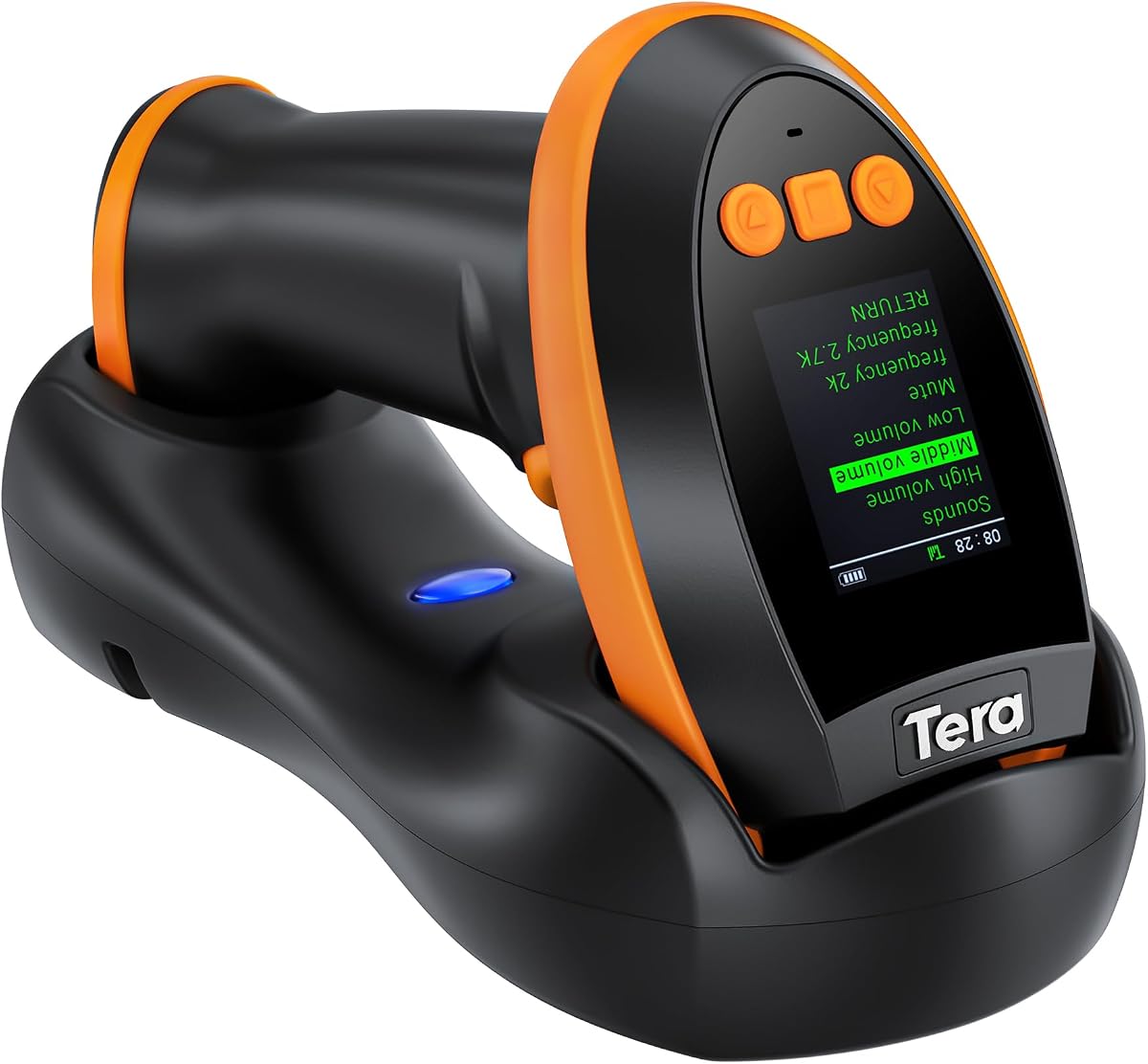
The Tera Barcode Scanner with Screen represents a premium option for libraries that need advanced capabilities like 2D QR scanning. It features a unique screen that allows users to adjust settings like language and volume directly on the device. This level of customization is rare at this price point and offers significant convenience for IT managers configuring devices for staff.
We may earn a commission when you buy through this link, at no additional cost to you.
Its CMOS imaging technology excels at reading high-density barcodes and challenging formats like PDF417 found on driver's licenses. This versatility is useful for libraries that also manage government document returns or special collections requiring QR verification. The included charging cradle simplifies battery management by allowing staff to dock the device easily when not in use.
The scanner supports Bluetooth, 2.4G wireless, and USB wired connections, ensuring it works in various network environments. While it is larger than mini models, the trade-off is a larger battery and more robust features. The screen reduces the need to consult manuals for changes, streamlining the user experience during busy hours. However, the bulk might be less ideal for those needing a pocket-sized scanner for quick roaming checks.
Libraries looking for a future-proof device that handles both traditional and modern code types will find this model valuable. It balances high-end functionality with user-friendly design elements. If your institution needs to scan QR codes and requires extensive configuration without software, this premium scanner is a top-tier choice.
Adjusting settings becomes intuitive with the on-device screen, removing the need for complex manual scanning steps.
The ability to read 2D codes ensures compatibility with a wider range of inventory labels and digital documents.
We may earn a commission when you buy through this link, at no additional cost to you.
The Eyoyo Mini 1D Bluetooth Barcode Scanner is designed for mobility and comfort. Weighing only 35 grams, it is easy to carry around a large library floor for inventory checks. This mini scanner supports Bluetooth, 2.4G wireless, and USB connections, making it adaptable to different library setups. Its vibration mode is particularly useful for staff who need silent feedback in quiet reading zones.
We may earn a commission when you buy through this link, at no additional cost to you.
Although it focuses on 1D codes, it handles most common formats with strong decoding capabilities. The 650mAh battery lasts up to 8 hours of continuous use, which is sufficient for daily shifts. Libraries that rely on staff moving between shelves will appreciate the lightweight design that reduces hand fatigue over long periods. It is an excellent choice for roaming inventory tasks.
One limitation is that it cannot scan codes from phone screens, which may limit some digital workflow options. Additionally, the battery capacity is smaller than some bulkier models, meaning it might need charging more often if usage is heavy. However, the auto-off feature helps extend standby time significantly when not in active use. This makes it a practical tool for intermittent scanning needs.
For librarians who value portability and silent operation, the Eyoyo Mini 1D offers a compelling package. Its combination of lightweight design and vibration feedback addresses specific pain points in library environments. If your workflow involves significant movement and requires a discreet scanning tool, this model is well-suited to your needs.
Vibration alerts ensure successful scans without creating noise that disturbs patrons in study areas.
The ultralight build reduces strain on the hand during long periods of continuous scanning.
We may earn a commission when you buy through this link, at no additional cost to you.
The Tera 5100 Purple scanner introduces a unique battery indicator light that helps staff avoid unexpected shutdowns. This feature is vital in libraries where scanning tasks cannot be interrupted. With a rating of 4.5 stars, it is highly regarded for its stability and build quality. The curved handle design provides a secure grip, making it comfortable to hold during repetitive scanning actions.
We may earn a commission when you buy through this link, at no additional cost to you.
Its IP54 protection ensures resistance against dust, which is common in older library stacks where paper dust accumulates. The wireless transmission reaches up to 328 feet in open environments, allowing staff to roam freely across large spaces. This range is excellent for libraries with large floors or those that require checking materials stored in distant areas without returning to a hub constantly.
While it is limited to 1D codes, it supports almost all standard types including ISBN and ISSN. The ability to read damaged and smudged barcodes adds to its reliability in real-world scenarios. Users should be aware that the purple color is specific to this model, which might not suit all aesthetic preferences but offers a distinct look. The combination of durability and range makes it a strong contender for large facilities.
For libraries prioritizing uninterrupted workflows and device longevity, the Tera 5100 offers peace of mind. The battery indicator removes guesswork about charging times, while the dust protection extends the device's lifespan. If you need a reliable wireless scanner that can handle environmental challenges, this model is a smart investment for your library.
The indicator light provides immediate feedback on power levels to prevent workflow interruptions.
IP54 technology protects internal components from dust found in book stacks and storage areas.
We may earn a commission when you buy through this link, at no additional cost to you.
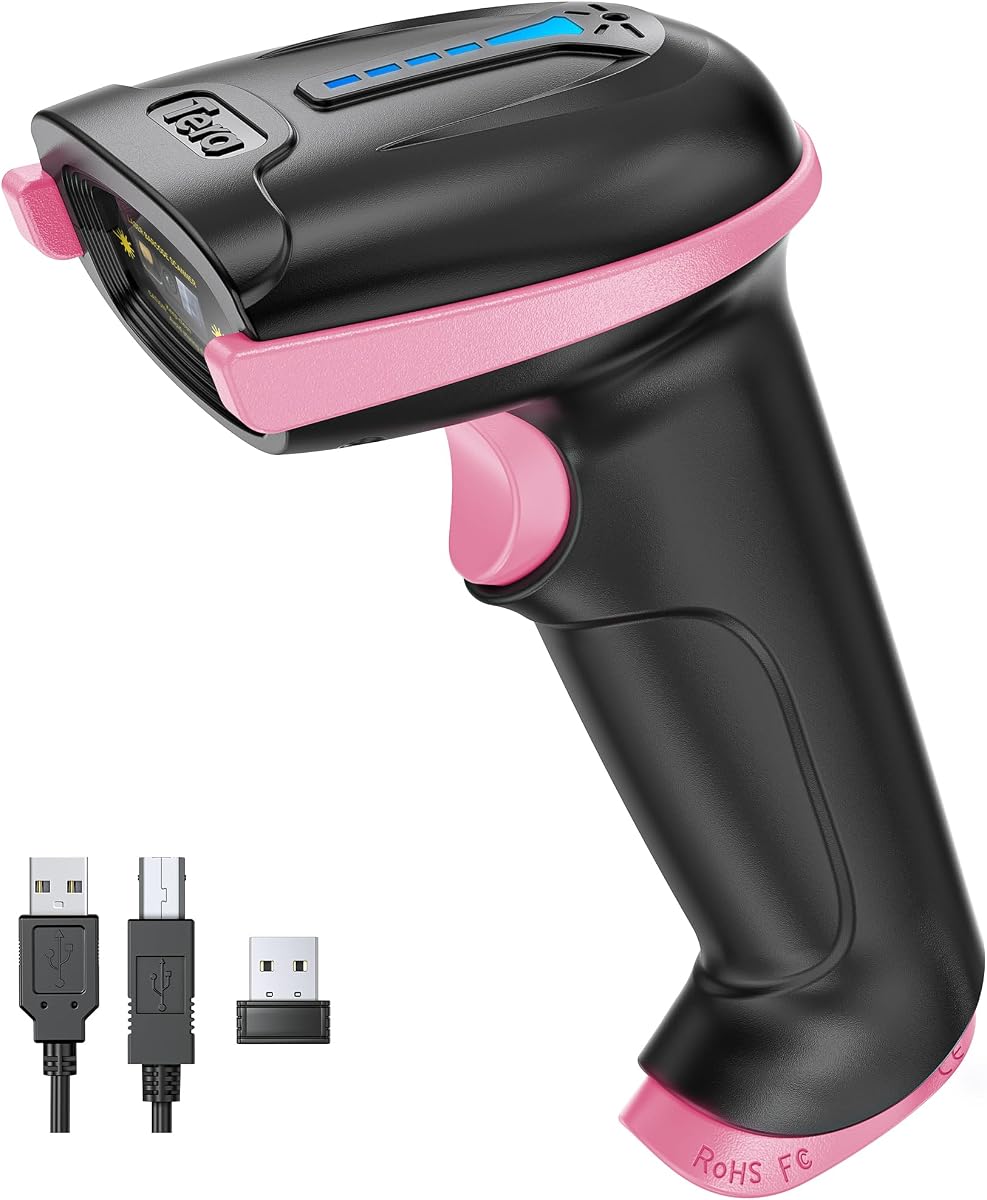
This pink variant of the Tera 5100 scanner shares the same robust features as the purple model but offers a distinct visual choice. It is designed to ensure staff can easily identify the device and avoid confusion in shared equipment areas. Like its counterpart, it includes a battery indicator light and IP54 dust protection, making it reliable for daily use in various library conditions. The ergonomic handle ensures comfort even during long shifts.
We may earn a commission when you buy through this link, at no additional cost to you.
Libraries with multiple staff members benefit from the distinct color and clear identification features. The wireless range and connectivity options are identical to the purple version, providing flexibility across different locations. While it is limited to 1D codes, its ability to read ISBN and other library-specific barcodes is highly accurate. It is a practical choice for teams that value both function and easy equipment tracking.
The design allows for a secure grip, reducing the chance of accidental drops which could damage equipment. Its resistance to dust and wear ensures it remains functional over years of use. The battery indicator eliminates the frustration of unexpected power failures during peak hours. This model is ideal for libraries that need a reliable workhorse without compromising on visibility and ease of use.
Choosing this color variant might seem minor, but it aids in quick identification during inventory checks or when handing over equipment between shifts. For organizations looking for a balance of durability and utility, the Tera 5100 Pink delivers consistent performance. It is a solid option for libraries that want to reduce downtime and keep operations running smoothly.
The pink color helps staff quickly identify the scanner among other tools on a crowded desk.
Shares all technical specifications with the purple model to ensure uniform performance across devices.
We may earn a commission when you buy through this link, at no additional cost to you.
The WoneNice USB Laser Barcode Scanner is a classic choice that relies on proven laser technology. It is perfect for libraries that need fast and straightforward scanning at a fixed point. With 200 scans per second, it handles high volumes of check-ins and check-outs efficiently. The visible laser source is bright and clear, aiding in precise targeting of codes on book spines and labels.
We may earn a commission when you buy through this link, at no additional cost to you.
Its plug-and-play setup means no software installation is required, which simplifies deployment across multiple terminals. Libraries can connect this device to any USB port and begin scanning immediately. The scanner supports a wide range of 1D codes and offers 300 configurable options for customization. This flexibility allows libraries to adapt the scanner to specific reporting or tracking needs without extra cost.
However, because it uses laser technology, it cannot read 2D QR codes or codes on phone screens. It is also wired, which limits movement to the length of the cable. For libraries that primarily deal with printed ISBN codes and have fixed stations, these limitations are acceptable. The durable 2-meter cable ensures it can reach various spots on a desk without strain.
This scanner is an ideal solution for high-throughput desks where speed and reliability are paramount. Its simplicity reduces maintenance needs and ensures consistent performance. If your library needs a dependable device for fixed circulation tasks and does not require mobility, the WoneNice USB Laser Scanner is a strong contender to consider.
The laser technology delivers fast scan rates ideal for peak hours with heavy patron traffic.
Simple USB connection allows for immediate use without requiring technical IT support.
We may earn a commission when you buy through this link, at no additional cost to you.
The Symcode Wireless Barcode Scanner is built for distance and flexibility. It offers an impressive transmission range of up to 400 meters in open air, making it suitable for large library buildings or outdoor events. The device includes offline storage mode, which allows staff to store up to 100,000 barcodes when out of range and sync later. This feature is perfect for inventory counts in areas with weak WiFi.
We may earn a commission when you buy through this link, at no additional cost to you.
It supports a network mode where multiple scanners can connect to one receiver, ideal for teams working simultaneously. The 2000mAh battery provides a long standby time, ensuring the device is ready when needed. With both wireless and wired options, it offers the versatility to adapt to different operational modes. This flexibility helps libraries optimize their workflow based on current staffing levels and needs.
While it is limited to 1D codes, the laser scanning ensures accurate reads of standard library barcodes. The setup is simple without software installation, reducing technical hurdles for staff. Users should note that the size is larger than pocket models due to the internal battery. However, the trade-off is a robust device capable of handling extensive scanning tasks over long periods without interruption.
For libraries with large footprints or those conducting frequent large-scale inventory audits, this scanner is an excellent tool. The ability to operate offline ensures no data is lost due to connectivity issues. If you need a scanner that can go the distance and keep working, the Symcode Wireless model is a reliable choice for your library operations.
Store scans temporarily to sync later, ensuring no data is lost in areas with weak wireless signals.
Supports multiple units connecting to one receiver, allowing teams to scan efficiently in parallel.
We may earn a commission when you buy through this link, at no additional cost to you.
The Eyoyo Pink Portable Mini 1D Bluetooth Scanner combines functionality with a distinctive design. It is lightweight and easy to handle, making it comfortable for long sessions. The pink color adds a pleasant aesthetic that can brighten up a dull desk environment. It supports Bluetooth, 2.4G wireless, and USB connections, ensuring it fits into various library technical infrastructures without compatibility issues.
We may earn a commission when you buy through this link, at no additional cost to you.
Staff can enjoy silent operation through vibration mode, which is essential in quiet library zones. The 650mAh battery provides enough power for daily tasks, though frequent users might need to recharge more often than with larger models. It handles most 1D codes efficiently, including damaged or reflective ones. This reliability ensures that scanning tasks are completed smoothly without constant retries or manual entry.
While it lacks the ability to read codes from screens, it is highly capable with physical labels. The volume adjustment feature allows users to tailor the feedback to their environment. If you work in a quiet study area, you can mute the sound completely. For outdoor or louder spaces, the sound provides clear confirmation. This flexibility makes it a practical tool for diverse settings.
Libraries looking for a compact and stylish option will find this scanner appealing. It is particularly useful for mobile tasks and temporary staffing. If you want a device that balances utility with a friendly look, the Eyoyo Pink Portable is a great choice to integrate into your library's toolkit for efficient inventory management.
Volume settings can be changed to suit quiet reading rooms or active circulation desks easily.
The pink color offers a unique look that can help distinguish equipment on a shared desk.
We may earn a commission when you buy through this link, at no additional cost to you.
The Barcode Scanner with Stand offers a unique solution for hands-free operations in libraries. The adjustable stand allows staff to place the scanner on a desk and scan items by moving them under the sensor. This setup is efficient for high-volume check-ins and allows staff to type or process other tasks simultaneously. It supports both 1D and 2D codes, adding versatility to its stationary design.
We may earn a commission when you buy through this link, at no additional cost to you.
Its auto-sensing mode detects codes automatically when placed within range, speeding up the workflow significantly. The device is simple to set up with a plug-and-play USB connection, requiring no drivers. Libraries with a fixed checkout counter will find this device ideal for reducing repetitive motion injuries. The CMOS sensor ensures accurate reading of various code types found on books and media.
While it does not offer wireless capabilities, the stand design compensates for mobility by enabling rapid stationary scanning. Users should ensure their desk has enough space for the stand and cable management. It is a practical tool for libraries focusing on efficiency at the front desk. The support for 2D codes makes it future-proof for potential digital integration needs.
If your library needs a dedicated station for quick item processing, this scanner provides a solid and ergonomic solution. It is particularly useful for handling large batches of returned books efficiently. For teams looking to streamline their checkout process without requiring staff to hold a scanner, this model is a valuable addition.
The stand allows for scanning without holding the device, reducing physical strain during busy shifts.
Support for 2D codes ensures compatibility with modern labels and digital inventory markers.
We may earn a commission when you buy through this link, at no additional cost to you.
Selecting the right barcode scanner requires understanding your library's specific workflow needs. Consider factors like connectivity, battery life, and the types of codes you handle to find a device that enhances your operations.
Libraries benefit from scanners that offer multiple connection types such as Bluetooth, 2.4G wireless, and USB wired. Bluetooth provides flexibility for mobile staff moving between shelves, while wired options offer stability for fixed checkout stations. Some models support all three, ensuring you can adapt to changing needs without buying new hardware.
Ensure the scanner supports the systems you already use like Windows or Mac OS to avoid compatibility issues.
For mobile operations, a long-lasting battery is critical. Look for models with batteries around 2000mAh or higher to last through a full day of scanning. Some scanners come with charging cradles that simplify the process and ensure devices are always ready. Others allow storage mode so you can sync data later if you are out of range.
Choose a device with a large battery capacity or convenient charging dock to minimize downtime during peak hours.
Decide if you need 1D only or 2D QR support. Most library books use 1D ISBN codes, so a CCD or laser scanner works well. However, if you handle media with QR codes or licenses, a CMOS scanner that supports 2D is necessary. The ability to read damaged codes is also important as library labels often get worn.
Verify that the scanner can read damaged or reflective codes to maintain accuracy with older books.
Library scanners are often dropped or moved around frequently, so durability is essential. Look for features like anti-shock covers or IP54 dust protection to extend the lifespan of the device. A sturdy build ensures the device remains functional even in high-traffic areas or dusty stacks.
Invest in a scanner with a protective design to reduce the frequency of replacements and maintenance costs.
Staff will use the scanner for hours, so comfort is key. Models with curved handles or lightweight designs reduce fatigue. Some offer adjustable volume or vibration feedback which is vital in quiet library spaces. Ergonomic features ensure staff can scan efficiently without physical strain.
Choose a model that feels comfortable in hand and offers silent feedback options for quiet environments.
A scanner that is easy to set up saves time and resources. Plug-and-play models reduce the need for IT support, while those with screens or clear manual instructions simplify programming. Ensure that you can easily adjust settings like prefixes or termination codes to match your library system.
Prioritize scanners with simple setup processes to allow staff to start using them quickly.
Libraries require quiet environments, so the ability to mute beeps or use vibration is a significant advantage. Some models allow full volume control or disable sound entirely while still providing feedback. This feature helps maintain a calm atmosphere for patrons while ensuring staff are aware of successful scans.
Select a scanner with mute or vibration features to avoid disturbing patrons in reading areas.
Budget considerations are important but should not compromise essential features. Higher-priced models often offer better battery life or advanced features like 2D support. Weigh the upfront cost against the device's reliability and lifespan to determine the best long-term value for your library.
Balance the upfront cost with expected durability and features to ensure you get the best value.
When setting up your scanner, read the manual to understand how to configure connection modes. For wireless models, use the provided USB receiver or pair via Bluetooth as instructed. Many devices have setting barcodes that must be scanned to activate specific features or connect to your system.
To maintain battery health, avoid leaving the device plugged in indefinitely if it does not support overcharging. Use charging cradles where available to ensure the battery is topped up consistently. If the scanner is not used for a while, store it in a dry place and charge it periodically to prevent battery drain.
Keep the scanner lens clean with a soft cloth to ensure accurate reading of barcodes. Dust and dirt can obstruct the sensor and cause scanning errors. Regular maintenance and gentle handling will extend the life of the device and ensure it continues to perform well over time.
The NETUM Bluetooth Barcode Scanner is highly recommended due to its versatility, long battery life, and ability to handle multiple connection modes. It supports quiet operation and durable design which suits library environments well. Its compatibility with various operating systems makes it easy to integrate into existing library systems.
Some models like the Tera Barcode Scanner with Screen support 2D QR codes in addition to standard 1D codes. However, many budget or laser scanners only read 1D codes. Check the product specifications carefully if you need to scan QR codes for digital documents or media.
Battery life varies by model and usage intensity but typically ranges from 8 hours to several days on a single charge. Models with larger batteries like the 2600mAh options can last over a month with moderate use. Charging cradles help keep devices ready for continuous operation.
Most barcode scanners work as plug-and-play devices requiring no additional software. They emulate keyboard input which works with standard applications like Word or Excel. However, some advanced features may require configuration via setting barcodes provided in the manual.
High-quality scanners with CCD or advanced CMOS sensors can read damaged or worn barcodes more effectively than basic models. Look for features specifically mentioning the ability to decode damaged or reflective codes to ensure reliability with older library books.
Vibration mode provides silent feedback that confirms a successful scan without making noise. This is essential in libraries where quiet is required. It allows staff to stay aware of their workflow without disturbing patrons studying or reading in the same area.
Wireless scanners with strong transmission ranges are very reliable for mobile library tasks. They allow staff to check out books anywhere without being tethered to a cable. Ensure your chosen model has a strong battery and range to avoid connectivity issues during busy times.
Use a soft lint-free cloth to wipe the lens and body gently. Avoid using harsh chemicals or abrasive materials that could scratch the sensor. Regular cleaning helps maintain scanning accuracy and extends the device's life by preventing dust buildup.
Choosing the right barcode scanner is vital for streamlining library operations and enhancing patron experience. Our top picks like the NETUM Bluetooth Scanner and Tera Premium models offer excellent reliability and features suited for modern library environments. Consider your specific needs regarding mobility and budget before making a final decision.
Prioritize devices that offer durable builds and long battery life to minimize downtime and maintenance. Quiet operation modes are also essential for maintaining a peaceful atmosphere in study areas. By selecting a scanner that fits your workflow, you can ensure efficient and effective inventory management.
Always check current availability and pricing before purchasing as these details change frequently. Verify that the device is compatible with your existing library software systems to avoid integration issues. With the right equipment, your library staff can focus more on serving patrons and managing collections.