
HP Smart Tank 5003
4.1Editor score
Three years ink included
Mess-free refill
Cartridge-free tank
High volume output
This guide compares the top ten AI printers for home and office, analyzing features like smart formatting, security, and ink efficiency to help you choose.
Finding the right printer today means looking beyond basic ink jets. AI printers now offer smart formatting, security, and efficiency that adapt to your workflow. These devices help save time and reduce waste while delivering professional quality results for every project you tackle daily.
We evaluated ten leading models based on real-world performance, connectivity, and smart features. Our analysis focuses on how each device handles documents, photos, and complex tasks. We compared speed, ease of use, and the value of included ink trials to build this comprehensive list.
Each pick shows distinct strengths for different needs, whether you run a home office or craft custom labels. Prices and availability change frequently, so always verify current offers before buying. This guide helps you navigate the options to find the smartest fit for your specific printing demands.
4.1Editor score

3.9Editor score

4.7Editor score
The table below compares all ten models side by side. Review each specification to find the device that matches your workflow needs and budget constraints effectively.



This printer balances performance and smart features for home offices. It holds a 3.9 rating from users who value its speed and AI formatting tools. The device handles business documents with precision while keeping ink delivery convenient through Instant Ink trials.
We may earn a commission when you buy through this link, at no additional cost to you.
Key strengths include AI that removes unwanted content from web pages and emails. You avoid wasting paper on awkward layouts. Dual band Wi-Fi resolves connection issues automatically. HP Wolf Essential Security protects your data from cyber threats effectively.
Trade-offs include blocking non HP chips through firmware updates. The 225 sheet tray may need frequent refills during heavy use. These issues are acceptable for most home users prioritizing quality and security over extreme volume.
Buy this if you need reliable color documents with smart formatting. It suits professionals who send invoices or reports regularly. The included trial saves money initially while you test performance in your workspace.
HP AI removes unwanted content from web pages ensuring only relevant text prints efficiently.
Dual band Wi-Fi detects and resolves connection issues automatically for seamless mobile printing.
We may earn a commission when you buy through this link, at no additional cost to you.
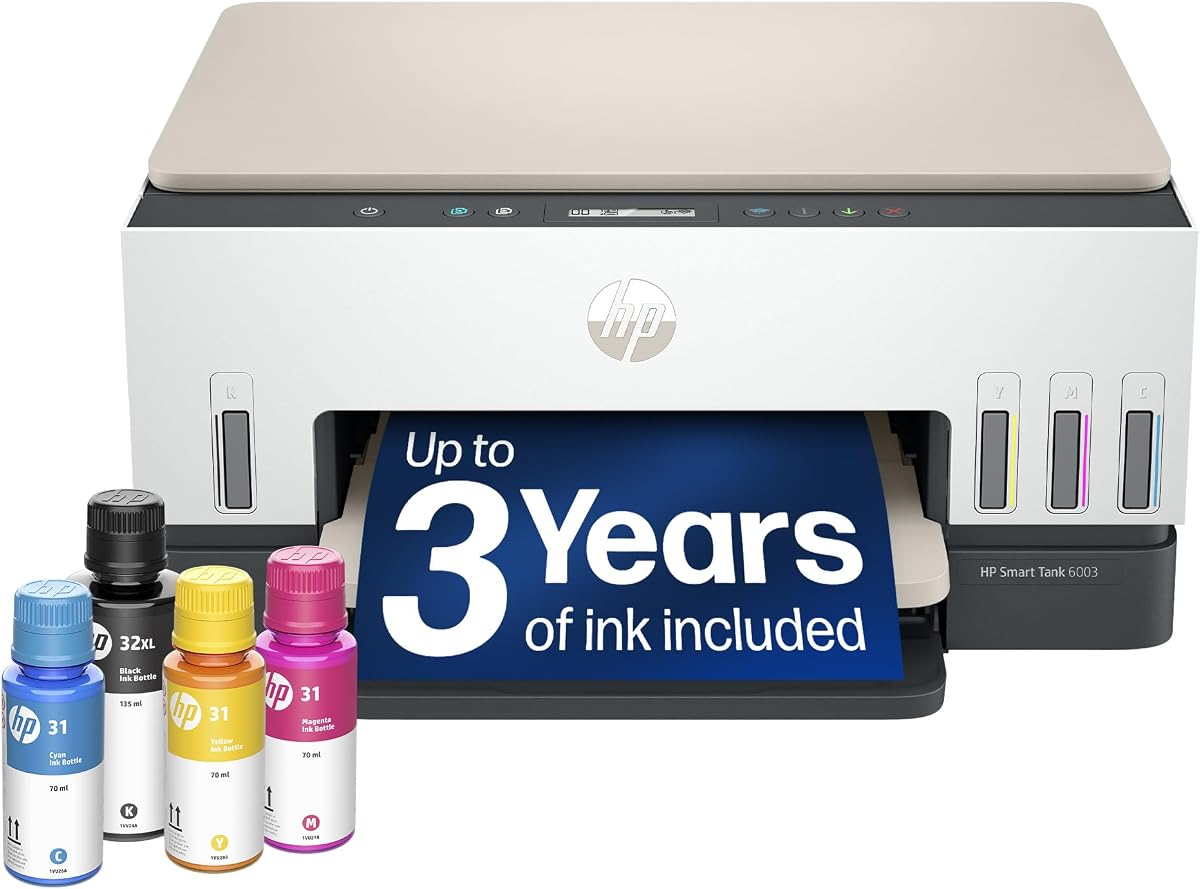
This model offers massive ink savings for high volume home printing. It holds a 4.1 rating from users who appreciate the refillable tank design. The device provides up to three years of ink right out of the box.
We may earn a commission when you buy through this link, at no additional cost to you.
Key strengths include mess-free bottle refills without squeezing or spilling. You avoid cartridge waste and reduce long term costs significantly. Borderless prints look great for photos or flyers created at home.
Trade-offs include lack of automatic document feeder for scanning. Color speeds are slower than office focused models. These limitations are acceptable for budget buyers needing simple copy and scan functions.
Buy this if you print many documents monthly and want low costs. It suits families with students or remote workers. The included ink ensures years of printing without extra expense.
Up to three years of HP ink is included reducing long term operating costs significantly.
Plug ink bottles into the tank and let them drain without squeezing or spilling.
We may earn a commission when you buy through this link, at no additional cost to you.
This 3D printer brings AI precision to professional grade printing. It holds a 4.7 rating from makers who value speed and reliability. The device prints up to 600 mm per second while maintaining sharp corners and accuracy.
We may earn a commission when you buy through this link, at no additional cost to you.
Key strengths include AI failure detection and automatic calibration in just fifteen minutes. Multi-color printing becomes seamless with the AMS 2 Pro. Filament drying up to 65 degrees Celsius keeps materials ready for flawless prints.
Trade-offs include higher initial cost and some setup learning. These issues are acceptable for users needing engineering grade results or custom prototyping. The speed saves time on complex projects.
Buy this if you create detailed models or prototypes regularly. It suits engineers or hobbyists wanting professional quality. The multi-color features unlock creative possibilities standard printers cannot match.
Active flowrate compensation and servo extruder ensure every layer stays sharp and smooth during fast prints.
AMS 2 Pro enables seamless multi-color printing with built-in filament drying at up to 65 degrees Celsius.
We may earn a commission when you buy through this link, at no additional cost to you.
This printer excels at everyday home documents and photos. It holds a 4.2 rating from users who value print quality. The device uses P3 technology to ensure colors look vibrant on paper matching screen output.
We may earn a commission when you buy through this link, at no additional cost to you.
Key strengths include True-to-Screen tech for accurate color reproduction. The 2.4 inch touchscreen navigates easily. AI optimizes web pages for clean printing without wasted sheets or awkward layouts.
Trade-offs include small 100 sheet tray capacity. Cost per page is higher than tank models. These issues are acceptable for casual users prioritizing photo quality over bulk volume.
Buy this if you print school homework and borderless photos often. It suits students or parents needing reliable home printing. The AI features simplify sending schoolwork or images to paper.
HP P3 technology ensures printed documents and photos look as vibrant as they do on your screen.
HP AI removes unwanted content from web pages so your prints show exactly the way you want.
We may earn a commission when you buy through this link, at no additional cost to you.
This printer offers robust features for busy professional offices. It holds a 4.0 rating from users who need speed and fax capabilities. The device prints up to 25 ppm black for efficient high volume document workflows.
We may earn a commission when you buy through this link, at no additional cost to you.
Key strengths include single-pass duplex scanning that saves time. The 4.3 inch touchscreen offers phone-like navigation. Wolf Pro Security bolsters network protection against cyber threats effectively.
Trade-offs include higher initial investment compared to home models. Chip restrictions apply through firmware updates. These issues are acceptable for businesses prioritizing speed and security over cost.
Buy this if you manage heavy document processing in a small office. It suits teams needing fax and scan without leaving desks. The large trays minimize downtime during peak work hours.
Single-pass duplex scanning reads both sides of documents quickly improving office workflow efficiency.
HP Wolf Pro Security helps keep your network protected from cyber threats during business operations.
We may earn a commission when you buy through this link, at no additional cost to you.
This model balances cost efficiency with essential office features. It holds a 3.9 rating from users seeking fax and ink tank benefits. The device includes up to three years of ink for high volume home office tasks.
We may earn a commission when you buy through this link, at no additional cost to you.
Key strengths include fax capabilities and auto document feeder for scanning. You avoid cartridge costs with refillable tanks. Magic touch control panel simplifies operation for family members or shared access.
Trade-offs include lower speed compared to laser models. Chip security features are less explicit than OfficeJet models. These limitations are acceptable for budget conscious buyers needing fax functions.
Buy this if you print and scan reports regularly at home. It suits small businesses needing fax without extra devices. The high yield ink keeps operational costs predictable and low.
Print copy scan and fax features in one device without needing additional hardware or cabling.
The intuitive control panel simplifies navigation for all users sharing the printer in a home office.
We may earn a commission when you buy through this link, at no additional cost to you.
This printer extends value with a full year of instant ink trial. It holds a 4.0 rating from users who appreciate the extended support. The device combines fax and print capabilities efficiently for home office setups.
We may earn a commission when you buy through this link, at no additional cost to you.
Key strengths include one year of ink delivery before fees start. AI optimizes email formatting for precision prints. Wolf Essential Security protects your network from cyber threats effectively.
Trade-offs include higher price point than standard models. Chip restrictions still apply via firmware. These issues are acceptable for users prioritizing long term ink savings and security.
Buy this if you want maximum ink trial savings before committing to subscriptions. It suits remote workers needing fax capabilities. The AI features save time on routine administrative tasks.
One year trial of Instant Ink included delivering ink to your door before you run out.
HP Wolf Essential Security bolsters security helping keep your network protected from cyber threats.
We may earn a commission when you buy through this link, at no additional cost to you.
This model offers high volume printing for shared home offices. It holds a 4.0 rating from users needing fax and ink tank benefits. The device includes up to three years of ink right out of the box.
We may earn a commission when you buy through this link, at no additional cost to you.
Key strengths include mess-free refill system saving time. You avoid cartridge waste with refillable tanks. Magic touch control panel simplifies daily operations for all users.
Trade-offs include lack of advanced security features like Wolf. Speed is slower than OfficeJet models. These limitations are acceptable for small offices prioritizing cost over raw speed.
Buy this if you share a printer in a home workspace. It suits small businesses needing fax without separate machines. The included ink ensures years of printing with minimal expense.
Replenish ink easily without squeezing or spilling using the easy access refill system.
Print photos and documents with full edge-to-edge coverage using borderless print support.
We may earn a commission when you buy through this link, at no additional cost to you.
This model is designed for reliable home printing tasks. It holds a 3.8 rating from users who value simplicity. The device includes up to three years of ink for high volume home documents.
We may earn a commission when you buy through this link, at no additional cost to you.
Key strengths include borderless printing for photos and flyers. Mobile wireless printing allows printing from smartphones easily. You avoid cartridge waste with refillable tank design.
Trade-offs include lack of fax capabilities for businesses. Input tray size is small for bulk printing. These limitations are acceptable for casual users prioritizing cost savings.
Buy this if you need reliable home printing with low costs. It suits students or small families needing quality photos. The included ink makes it ideal for starting home offices.
Create borderless prints that look professional for flyers or personal photo projects.
Stay connected with wireless and mobile printing for easy access from smartphones.
We may earn a commission when you buy through this link, at no additional cost to you.
This device merges printing and cutting for DIY crafts. It holds a 4.2 rating from creatives needing precision stickers. The device uses thermal dye-sublimation for vibrant colors and precise cutting.
We may earn a commission when you buy through this link, at no additional cost to you.
Key strengths include AI image extraction recognizing subjects automatically. The workflow integrates editing printing and cutting into one step. Four layer lamination ensures waterproof scratch-resistant stickers.
Trade-offs include specialized use for stickers not documents. Cost per print is higher than standard paper. These limitations are acceptable for hobbyists needing custom labels or gifts.
Buy this if you make custom stickers or journaling labels. It suits DIY crafters needing professional cuts. The AI tools make design accessible even without experience.
AI automatically recognizes and extracts subjects from photos for seamless printing and cutting.
Four layer thermal dye-sublimation creates waterproof and scratch-resistant stickers that last long.
We may earn a commission when you buy through this link, at no additional cost to you.
Selecting the right AI printer requires understanding specific features that match your daily needs. This section outlines key factors to consider before making your final decision.
Check pages per minute ratings especially for black text to ensure timely document completion. If you print reports daily aim for 20 ppm or higher to reduce waiting.
Prioritize models with higher ppm for busy offices and lower speeds for casual home users.
AI that optimizes web pages and emails saves paper by removing unwanted headers footers. Look for devices advertising this capability if you often print from browsers.
Choose printers with AI formatting to reduce waste and improve document clarity.
Decide between cartridge systems and refillable tanks based on your cost sensitivity. Tank models offer lower cost per page for high volume printing.
Opt for tanks if volume is high and cartridges if you print rarely to save upfront cost.
Reliable dual-band Wi-Fi ensures devices stay connected without manual intervention. Mobile apps should support printing scanning and faxing from smartphones seamlessly.
Ensure the printer supports dual-band Wi-Fi and has a robust mobile app for convenience.
Business printers should include Wolf Security or similar protections to safeguard sensitive data from cyber threats. This is critical for handling invoices or personal information.
Select models with built-in security features to protect your network effectively.
Larger input trays reduce the frequency of refills during peak printing times. Look for 225 sheets or more if you print continuously.
Higher tray capacity minimizes interruptions during bulk document production.
If you send physical faxes or scan multi-page documents, prioritize ADF and fax capabilities. Single-pass duplex scanning significantly reduces time spent on these tasks.
Confirm the presence of ADF and fax if you need these functions for office tasks.
Consider niche needs like sticker printing or 3D printing if your workflow requires specific outputs. AI tools for cutting or modeling add unique value beyond standard printing.
Evaluate if you need specialized outputs like stickers or 3D prints before choosing a standard inkjet.
Initialize your device by connecting it to your Wi-Fi network and installing the mobile app for remote access. Follow on-screen prompts to align print heads and calibrate settings for optimal output.
Monitor ink levels regularly to prevent head clogs by scheduling print tests weekly. Use original cartridges or approved refill tanks to ensure proper communication with the firmware.
Store paper in dry conditions to avoid jams and keep nozzles clean from dust buildup. Power down during storms and run cleaning cycles monthly for long term device health.
AI printers automatically remove unnecessary content from web pages and emails so you only print the essential text. They also optimize layouts to fit more information on a single page reducing total paper use.
Tank printers offer lower cost per page and can hold ink for months or years compared to cartridges. However they require more space and may have slower speeds than some office inkjets.
Instant Ink is a delivery service that sends new cartridges before your current ones run out. You pay based on pages printed rather than cartridge count saving money for heavy users.
Yes most models connect via dual-band Wi-Fi and have dedicated apps for printing scanning and faxing directly from smartphones. This ensures easy access without needing a computer.
Modern units include safety features like air filters to remove particles during high temperature melting. Proper ventilation ensures you can use these devices safely in enclosed spaces.
Manufacturers use firmware updates to maintain quality and support standards through original chips. This prevents damage from incompatible hardware and ensures consistent performance over time.
Many models support borderless printing for photos using P3 color technology. Ensure you select paper types rated for dye ink to prevent smearing.
No mobile apps and wireless connectivity allow full functionality directly from smartphones or tablets. Computers remain optional for large document management but not required for daily printing.
The HP OfficeJet Pro 8125 and Smart Tank 5003 offer excellent value for home offices needing speed and savings. For high volume tasks, the Tank 7603 provides massive yield with essential fax features.
Prioritize ink trial length and security features if you handle sensitive data regularly. Speed matters most for business users while photo quality takes precedence for home users.
Verify current pricing and stock levels before finalizing your purchase to secure the best available deal for your specific needs today.