
HP OmniBook 3 14 inch Next Gen AI PC
4.4Editor score
Snapdragon X Processor
41 hours battery life
2K OLED display
AI laptops are transforming how we work and create by integrating powerful neural processing units directly into the hardware. These devices offer faster performance, smarter assistants, and improved battery life for everyday tasks.
We evaluated ten top models based on processor power, display quality, and real-world AI capabilities. Our analysis focuses on specs like NPU performance, RAM capacity, and battery endurance to help you choose wisely.
Each pick highlights specific strengths such as gaming, business security, or portability. Keep in mind that product availability and pricing can shift frequently, so verify details before purchasing.
4.4Editor score

4.2Editor score

5.0Editor score
As an Amazon Associate we earn from qualifying purchases.
The following table provides a side-by-side comparison of all ten AI laptops selected for this guide. It highlights key specifications including processors, memory, storage, and display types to help you quickly identify the right fit for your needs.
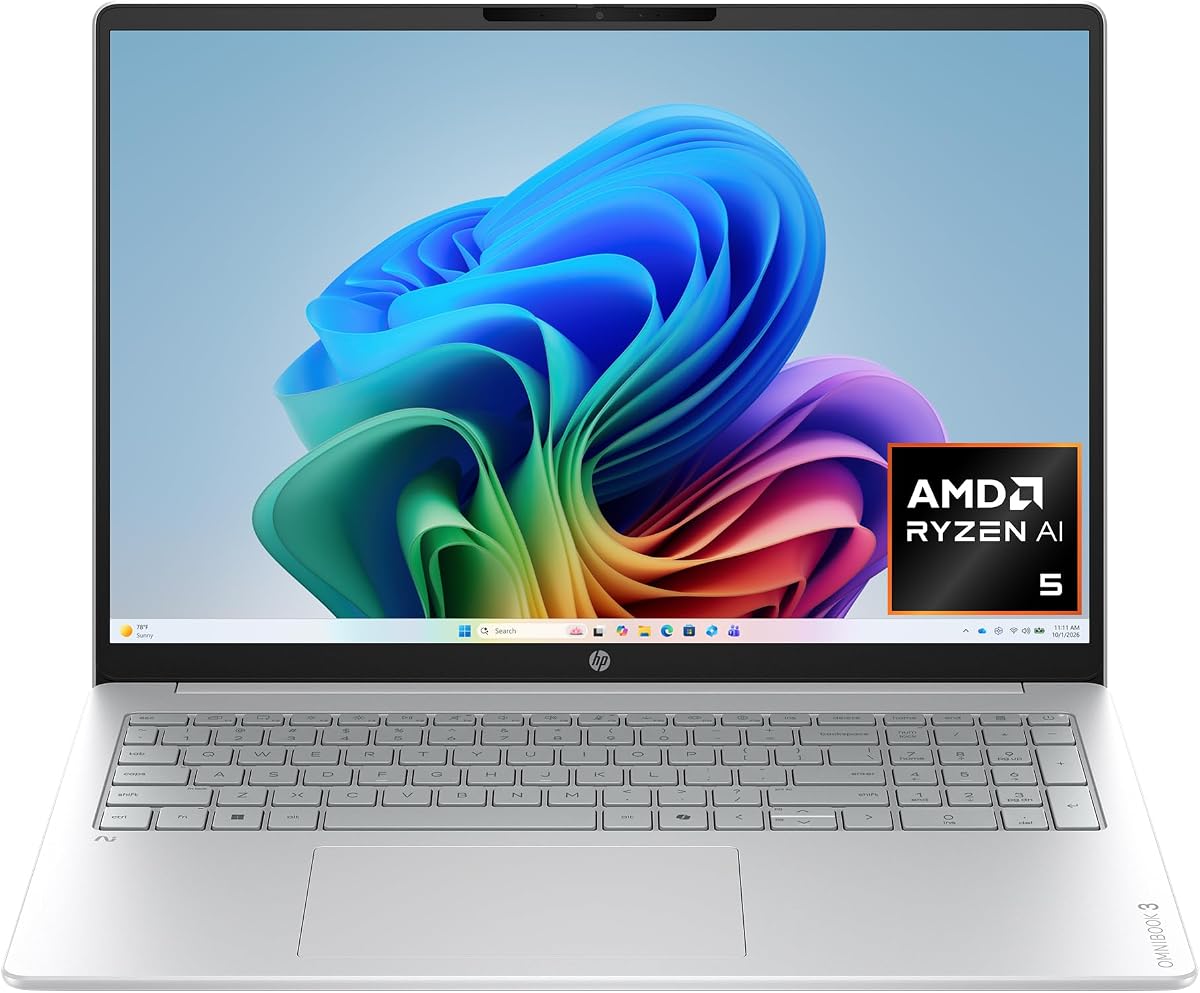


The HP OmniBook 5 16 inch Next Gen AI PC stands out as a top choice for users seeking efficiency and power. With a rating of 4.2, it combines the Snapdragon X processor with a stunning 2K OLED display to deliver a premium experience.
We may earn a commission when you buy through this link, at no additional cost to you.
Its standout feature is the incredible battery life, reaching up to 34 hours and 45 minutes. This makes it ideal for travelers or professionals who work away from outlets. The OLED screen provides rich colors and deep blacks, enhancing multimedia consumption and creative work.
While the storage is adequate for most, power users might prefer more space for large files. The integrated GPU is efficient but not designed for high-end gaming. These trade-offs are acceptable given the focus on productivity and battery endurance.
Buy this laptop if you prioritize long battery life and display quality. It is perfect for students and remote workers who need reliable AI features like Copilot+ without sacrificing portability.
The Snapdragon X processor optimizes power usage to provide all-day performance without needing a charger.
The 2K OLED display offers vibrant colors and high contrast for comfortable viewing in any lighting.
We may earn a commission when you buy through this link, at no additional cost to you.
The HP OmniBook 3 14 inch is an exceptional entry point into AI laptops. With a 4.4 rating, it offers high-end features like the Snapdragon X processor and OLED display at a budget-friendly price point.
We may earn a commission when you buy through this link, at no additional cost to you.
Its battery life is a major highlight, lasting up to 41 hours and 45 minutes. The OLED panel delivers rich visuals that are rare at this price. Copilot+ features ensure you stay productive with AI assistants.
The 256 GB SSD might fill up quickly if you store large files. The smaller screen size can limit multitasking efficiency. However, the cost savings and portability often outweigh these limitations.
Choose this model if you need a lightweight, long-lasting laptop for general tasks. It is perfect for students or casual users who want AI benefits without a high price tag.
You get premium AI capabilities and an OLED screen at a price point that rivals traditional budget laptops.
With over 40 hours of battery, you can work through multiple days without needing a charger.
We may earn a commission when you buy through this link, at no additional cost to you.
The ASUS Vivobook S16 earns a perfect 5.0 rating for its balanced blend of power and portability. It features the AMD Ryzen AI 9 465 processor and 32GB RAM, making it a powerhouse for creative and professional work.
We may earn a commission when you buy through this link, at no additional cost to you.
The WUXGA OLED display provides immersive visuals with deep blacks and vibrant colors. Its thin and light profile ensures you can carry it easily. Copilot+ PC features add advanced AI support for your daily tasks.
The battery life is good but falls short of the Snapdragon models. The premium price reflects its high-end specs. These minor drawbacks are acceptable for users needing top-tier performance and build quality.
This laptop is ideal for creative professionals and power users. If you value performance, RAM capacity, and screen quality, this is the best premium choice available in November 2026.
The Ryzen AI 9 processor and 32GB RAM handle heavy multitasking and creative applications with ease.
Its thin profile and OLED screen offer a luxurious user experience that rivals high-end workstations.
We may earn a commission when you buy through this link, at no additional cost to you.
This HP model is a top choice for those who value tactile control. Its 4.8 rating highlights its reliability. The 2K touchscreen makes navigation and creative work more engaging and direct.
We may earn a commission when you buy through this link, at no additional cost to you.
The AMD Ryzen AI 5 processor ensures smooth performance for daily tasks. Advanced noise reduction keeps video calls clear. Battery life is solid for a full workday plus more.
The processor is capable but not the most powerful. Graphics are suitable for casual use but not heavy gaming. These limitations are reasonable for a focus on productivity and connectivity.
Buy this if you want a versatile touchscreen laptop for work and study. It is excellent for teams needing clear communication and reliable performance on the go.
The 2K IPS touchscreen allows for natural interaction and precise control during creative or productivity tasks.
Advanced AI noise reduction filters out background sounds for professional conference calls and meetings.
We may earn a commission when you buy through this link, at no additional cost to you.
This HP model features a strong Intel Core Ultra 7 processor for reliable performance. A 4.5 rating suggests user satisfaction. The large 1TB SSD provides ample space for files and applications.
We may earn a commission when you buy through this link, at no additional cost to you.
The 16 touchscreen enhances interaction. Copilot AI supports smart workflows. Wi-Fi 6E ensures fast connectivity. The silver aluminum design looks premium and feels durable.
Battery specifics are less detailed than others. The display is not OLED. These are minor trade-offs for the storage and processor benefits. It is a solid choice for general use.
Select this if you need Intel performance and large storage. It is great for users who need a responsive touchscreen and reliable connectivity.
The 1TB SSD ensures you have plenty of space for large files, software, and media without clutter.
Powered by Intel Core Ultra 7, it handles multitasking and creative tasks with speed and efficiency.
We may earn a commission when you buy through this link, at no additional cost to you.
The HP OmniBook X offers a rare 3K OLED touchscreen in a 14-inch form factor. With a 4.3 rating, it balances screen quality and portability. The Intel Core Ultra 7 processor ensures strong performance.
We may earn a commission when you buy through this link, at no additional cost to you.
The 3K OLED display provides incredible detail. 24 GB RAM handles multitasking. Smart Sense optimizes performance based on activity. Battery life is impressive for a OLED model.
The price is higher due to display specs. Rating is good but not perfect. These factors are acceptable for display-centric users. It is a great choice for visual professionals.
Buy this if screen clarity is your priority. It is ideal for designers or creatives who need a bright, colorful, and sharp display.
The 3K OLED touchscreen offers deeper blacks and richer contrast for professional visual work.
Smart Sense AI optimizer adjusts fan and temperature automatically for comfort and efficiency.
We may earn a commission when you buy through this link, at no additional cost to you.
This Lenovo ThinkBook is built for professional use. With a 4.6 rating, it delivers security and performance. The 16-Core processor handles complex spreadsheets and apps effortlessly.
We may earn a commission when you buy through this link, at no additional cost to you.
Business readiness is key with Windows 11 Pro and fingerprint security. 32GB RAM and 1TB SSD ensure speed. Stable WiFi 6E keeps you connected. It acts as a mobile workstation.
The display is not OLED. Price is higher than consumer models. These are acceptable for security-focused users. It is perfect for corporate professionals.
Choose this for secure, high-performance business tasks. It is ideal for enterprises needing reliable data protection and multitasking.
Windows 11 Pro and fingerprint readers protect sensitive business data effectively.
32GB RAM and 1TB SSD eliminate lag when running multiple heavy applications.
We may earn a commission when you buy through this link, at no additional cost to you.
The Dell 16 Plus offers top-tier connectivity. With a 4.5 rating, it supports Wi-Fi 7 for future-proof speeds. Intel Core Ultra 9 provides strong AI acceleration.
We may earn a commission when you buy through this link, at no additional cost to you.
32GB memory and 1TB storage handle heavy tasks. Modern design ensures durability. Copilot+ features enhance productivity. Ports include Thunderbolt 4 for versatility.
Premium price may be a barrier. Home version limits some business features. These are minor trade-offs for performance. It suits power users needing fast connectivity.
Buy this if speed and AI features matter. It is ideal for professionals needing reliable future-proof Wi-Fi and high RAM.
Wi-Fi 7 ensures you have the fastest wireless speeds and bandwidth available today.
Intel Core Ultra 9 and 32GB RAM provide raw power for demanding workflows.
We may earn a commission when you buy through this link, at no additional cost to you.
This Acer model stands out with a 120Hz touchscreen. With a 4.2 rating, it blends gaming and productivity. Snapdragon X NPU ensures fast AI performance.
We may earn a commission when you buy through this link, at no additional cost to you.
120Hz display enhances visuals. Strong GPU helps creative apps. Wi-Fi 7 keeps you connected. It is versatile for media and work.
Some AI features are still in preview. Price is competitive. These are acceptable for the screen quality. It suits creatives and gamers.
Buy if you want a fast refresh screen. It is perfect for users needing smooth visuals and versatile connectivity.
The 120Hz touchscreen provides smooth and responsive interactions for media and games.
Built-in AI assistants help with video conferencing and productivity efficiently.
We may earn a commission when you buy through this link, at no additional cost to you.
The HP Omnibook 16 offers workstation power. A 4.6 rating confirms reliability. AMD Ryzen AI 7 with 50 TOPS NPU provides strong AI capabilities.
We may earn a commission when you buy through this link, at no additional cost to you.
32GB RAM and 1TB SSD handle large projects. 2K touchscreen adds control. Windows 11 Pro ensures security. Connectors support external displays.
Price is premium. Display is IPS. These are trade-offs for performance. It is ideal for pros needing RAM.
Buy this for heavy workloads. It suits enterprise users needing security and power.
Windows 11 Pro provides enterprise-grade security and management features.
32GB DDR5 RAM ensures smooth performance for heavy multitasking.
We may earn a commission when you buy through this link, at no additional cost to you.
Choosing an AI laptop requires evaluating hardware capabilities, display quality, and battery efficiency. This section covers key factors to ensure you select the best fit.
AI laptops rely on Neural Processing Units (NPUs) to handle local AI tasks efficiently. Look for processors like Snapdragon X or Core Ultra with high TOPS ratings for faster AI features.
Prioritize models with dedicated NPUs to ensure smooth performance without draining battery quickly.
Generous RAM is crucial for multitasking and running heavy AI applications. Aim for at least 16GB, with 32GB recommended for professional workloads.
Ensure sufficient SSD space for large files. 512GB is standard, but 1TB offers more future-proofing.
Displays significantly impact your daily experience. OLED panels offer deep blacks and vibrant colors, while IPS provides wide viewing angles.
Consider resolution and touch capabilities if you need interactive work or creative precision.
AI tasks can consume power. Look for models with efficient processors that support long battery life, ideally over 20 hours for travel.
Weight and size matter for mobility. A slim design ensures comfort on the go.
Modern connectivity like Wi-Fi 6E or Wi-Fi 7 ensures fast internet access. USB-C and Thunderbolt ports are vital for external displays and accessories.
Choose devices with versatile ports to avoid needing hubs for everyday tasks.
Security is key for business users. Features like fingerprint readers and Windows Hello provide safe access.
Professional operating systems offer better protection for sensitive data.
Check for Copilot+ PC features that enable on-device AI. These reduce reliance on cloud services for privacy and speed.
Ensure the OS supports the latest tools for productivity.
A well-built chassis ensures longevity. Look for materials that resist wear and tear.
Design should balance style with functionality for long-term use.
Start by setting up Windows 11 Pro or Home and ensuring all drivers for the AI features are installed correctly to utilize Copilot+ capabilities.
Regularly update your software and BIOS to maintain security patches and optimize performance for new AI features.
Keep the device clean and avoid extreme heat to prolong battery life. Use a cooling stand if working intensively.
An AI laptop includes a dedicated Neural Processing Unit (NPU) and advanced processors designed to run machine learning tasks locally. These features enable smarter assistants, faster performance, and better battery efficiency for modern workflows.
Yes, most AI laptops run Windows 11 Home or Pro. Windows 11 is optimized for on-device AI, offering features like Copilot and enhanced security that integrate seamlessly with the hardware.
Most AI laptops are designed for productivity, not high-end gaming. Integrated GPUs like Radeon 840M or Adreno support casual gaming, but serious gamers may need a dedicated graphics card.
Battery life varies by model and usage. Many top models claim 20 to 40 hours with standard tasks, thanks to efficient AI-optimized processors and power management systems.
16GB is sufficient for basic productivity. However, for heavy multitasking or professional workloads, 32GB is recommended to ensure smooth performance and future-proofing.
Copilot+ PC refers to laptops with high-end AI capabilities built into the OS. It allows for features like Recall and advanced image processing that run directly on the device without needing cloud connectivity.
Our top picks include the HP OmniBook 5 for efficiency, the HP OmniBook 3 for budget, and the ASUS Vivobook S16 for premium performance.
Prioritize battery life, RAM, and NPU speed to match your specific workflow needs whether for business or creative use.
Remember to check current availability and verify the exact model numbers before purchasing to ensure you get the latest AI features.