
ARCTIC P9 PWM PST
4.5Editor score
4-pin PWM speed control
High static pressure capability
Includes cable splitter feature
This guide compares the top 92mm case fans for quiet cooling and high performance across compact builds and specialized PC applications.
Finding the right airflow solution for compact builds requires careful selection of 92mm case fans. These small yet powerful units deliver essential cooling for tight spaces while maintaining low noise levels. Choosing the best option ensures optimal thermal performance without compromising on acoustic comfort.
We evaluated ten leading models based on bearing technology, PWM control, static pressure, and noise metrics. Each fan was analyzed for compatibility with small form factor cases, CPU coolers, and radiators. Our comparison highlights strengths in efficiency, durability, and installation versatility.
Each pick showcases detailed specifications, pros, cons, and real-world use cases to help you decide. Note that availability and pricing may fluctuate over time. Always verify current stock and offers before making your final purchase decision for your specific build needs.
4.5Editor score

4.8Editor score

4.8Editor score
The following table provides a side-by-side comparison of all ten selected 92mm case fans. It highlights key specifications including speed range, noise levels, and special features to help you identify the right fit for your system requirements.


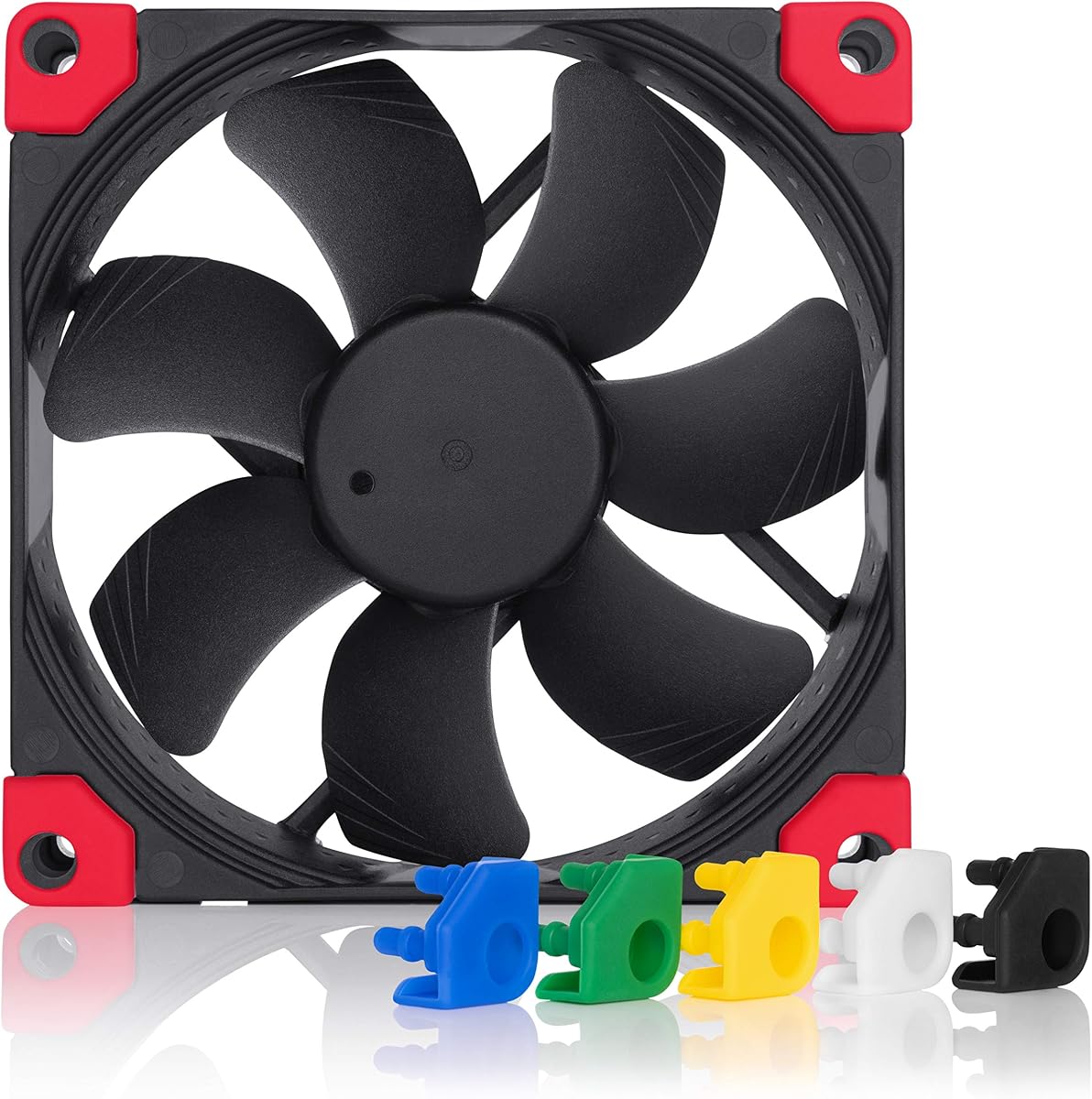


The Noctua NF-A9 PWM stands out as a premium choice for compact cooling needs. With a 4.8 rating, it delivers reliable performance through advanced acoustic frame design and flow acceleration channels. Its quiet operation makes it ideal for builds where noise control is critical.
We may earn a commission when you buy through this link, at no additional cost to you.
Key strengths include its award-winning A-series fan geometry and 4-pin PWM speed control. This allows automatic adjustment between 400 to 2000 RPM depending on system temperature. The inclusion of anti-vibration mounts and low-noise adaptors ensures flexible installation across various scenarios.
Trade-offs involve its standard 25mm thickness which may limit compatibility with ultra-tight spaces. Additionally the price reflects its premium materials compared to budget alternatives. These factors are acceptable given the longevity and consistent performance offered over time.
Buyers seeking high reliability for HTPC or ITX builds should consider this model. It excels on radiators and heat sinks due to balanced airflow and pressure. For silent enthusiasts prioritizing quality over cost it remains a top recommendation.
The frame integrates Flow Acceleration Channels to reduce turbulence. This results in smoother airflow and lower noise levels compared to standard fans.
4-pin PWM support enables seamless speed adjustment. The included Low-Noise Adaptor further lowers RPM for near-silent operation when needed.
We may earn a commission when you buy through this link, at no additional cost to you.
The ARCTIC P9 PWM PST offers exceptional value for those seeking performance on a budget. Rated at 4.5, it covers a wide RPM range from 200 to 3000. This flexibility supports both silent idle and aggressive cooling modes effectively.
We may earn a commission when you buy through this link, at no additional cost to you.
Its high static pressure ensures efficient cooling even against resistance like heat sinks. The alloy lubricant bearing reduces friction to maintain quiet operation at lower speeds. A built-in cable splitter simplifies wiring by daisy-chaining multiple fans.
While it lacks the refined finish of premium options it delivers strong utility. Noise increases slightly at top speeds but remains manageable. The cost efficiency makes it a practical choice for large or budget-sensitive builds.
Ideal for users needing multiple fans without breaking the bank. Its 0dB mode allows fan stop at idle. For general case ventilation and radiator support this model balances cost and functionality well.
Speeds vary infinitely between 200 and 3000 RPM. This allows precise thermal management across different usage scenarios.
A second 4-pin socket enables daisy-chaining. This simplifies cable management in compact PC chassis.
We may earn a commission when you buy through this link, at no additional cost to you.
The Noctua NF-A9x14 HS-PWM chromax.Black.swap is designed for low-profile applications requiring top-tier cooling. With a 4.8 rating it uses the renowned A-Series blade geometry to maintain performance in just 14mm of thickness. This makes it perfect for tight CPU coolers.
We may earn a commission when you buy through this link, at no additional cost to you.
It features HS-PWM control with a speed range from 500 to 2500 RPM. The chromax.black.swap edition provides a sleek black look with self-adhesive anti-vibration pads in multiple colors. These allow users to customize the fan to match their build aesthetics easily.
Trade-offs include the higher price and limited use cases where depth is not a concern. However for ITX builds or low-profile coolers it is unmatched. The trade-off is acceptable given the specialized fit and premium materials used.
Buyers needing slim fans for NH-L9 series coolers should choose this model. It supports semi-passive operation by stopping at 0% PWM. For stylish small form factor PCs this fan combines functionality with visual customization options.
The 14mm thickness fits low-profile CPU coolers. It maximizes airflow in constrained spaces.
Self-adhesive pads come in six colors. Users can swap them to match their system theme.
We may earn a commission when you buy through this link, at no additional cost to you.
The Noctua NF-A9x14 PWM offers similar slim performance without the chromax black edition. It features a 92x92x14mm design ideal for low-profile cases. The SSO2 bearing ensures minimal vibration and steady operation over its long lifespan.
We may earn a commission when you buy through this link, at no additional cost to you.
Performance focuses on efficient cooling through A-series blade geometry. It supports 4-pin PWM for automatic speed control. This balance of thickness and airflow makes it suitable for tight CPU cooler gaps or compact case layouts.
Trade-offs involve the cost which is comparable to premium models. Users seeking budget alternatives may find better value elsewhere. However for specific slim requirements it remains a reliable choice for enthusiasts prioritizing quality.
Buyers requiring thin fans for standard applications should consider this model. It fits well in ITX builds or low-profile heatsinks. For those not needing color swaps it provides solid performance at a standard premium price.
This bearing technology enhances durability. It minimizes noise and vibration during rotation.
14mm thickness allows clearance in tight spots. It avoids clearance issues with large heatsinks.
We may earn a commission when you buy through this link, at no additional cost to you.
The Thermalright TL-P9 provides a cost-effective option for 92mm cooling needs. With a 4.7 rating it features a 7-blade design optimized for heat dissipation. The S-FDB bearing ensures quiet operation while reducing noise levels effectively.
We may earn a commission when you buy through this link, at no additional cost to you.
It includes soft silicone feet to dampen vibration during rotation. Speed control works via 4PIN PWM interface for automatic adjustment. The fan fits standard 92mm mounting points and suits downward coolers or case ventilation.
Trade-offs include limited detailed documentation compared to major brands. Some users may prefer established reputations. Yet performance and build quality remain strong for the price. It suits budget builds needing reliable airflow without high cost.
Buyers needing a quiet fan for budget desktop PCs should consider this model. It balances performance and cost well. For standard case fans or CPU coolers it offers practical cooling with minimal noise.
The blade design boosts airflow efficiency. It helps maximize heat dissipation performance.
Soft feet reduce vibration friction. This keeps noise levels low during operation.
We may earn a commission when you buy through this link, at no additional cost to you.
The ARCTIC P9 Silent is a straightforward fan designed for quiet and efficient cooling. With a fixed speed of 1900 RPM it avoids the complexity of PWM headers. Its high static pressure ensures efficient airflow even against resistance.
We may earn a commission when you buy through this link, at no additional cost to you.
The bearing uses a special alloy lubricant to reduce friction. This maintains low noise levels while providing consistent cooling performance. It is ideal for users who prefer simplicity and reliability over programmable controls.
Trade-offs include the lack of dynamic speed adjustment. Users cannot lower speed via PWM during idle. For basic ventilation or low-noise builds this fixed approach remains practical and cost-effective.
Buyers needing a simple silent fan should consider this model. It works well on heat sinks and radiators. For users prioritizing ease of use over features it delivers solid performance at a low cost.
Fixed speed simplifies installation. No PWM header required for operation.
Optimized for radiators and sinks. It pushes air through resistance efficiently.
We may earn a commission when you buy through this link, at no additional cost to you.
The Noctua NF-A9 PWM chromax.Black.swap combines premium cooling with a sleek all-black look. With a 4.8 rating it delivers quiet airflow through the standard 92x92x25mm design. It includes swappable pads to match build aesthetics easily.
We may earn a commission when you buy through this link, at no additional cost to you.
It features the award-winning A-series fan geometry with Flow Acceleration Channels. The speed range runs from 400 to 2000 RPM for automatic control. This ensures efficient cooling without loud noise spikes under load.
Trade-offs include the higher cost and standard dimensions. However for black-themed builds it offers visual cohesion. The longevity and consistent performance justify the investment for enthusiasts.
Buyers seeking black fans without RGB should choose this model. It fits well in dark chassis and on radiators. For quiet custom builds prioritizing style and performance it remains a top choice.
The chromax edition blends into dark builds. It avoids distracting accents for clean aesthetics.
Pads come in multiple colors. Users can customize vibration dampeners to match themes.
We may earn a commission when you buy through this link, at no additional cost to you.
The TL-9015B CPU Cooler Fan delivers high performance in a slim 15mm profile. With a perfect 5.0 rating it reaches up to 2700 RPM for maximum cooling. It uses a 4pin PWM interface for automatic motherboard control.
We may earn a commission when you buy through this link, at no additional cost to you.
Airflow reaches 42.58 CFM to push air through heat sinks effectively. Vibration damping pads reduce friction for lower noise. The black finish and slim design suit compact desktop and CPU cooling scenarios well.
Trade-offs involve higher noise at top speeds and less known brand history. Yet performance remains strong for the price. It suits users needing thin fans with high speed without premium costs.
Buyers seeking 15mm slim fans should consider this model. It fits tight clearance spots and radiators. For those wanting high RPM and affordability it offers practical performance.
Maximum speed ensures strong airflow. It boosts cooling for high heat loads.
The 15mm thickness suits tight cases. It avoids clearance conflicts easily.
We may earn a commission when you buy through this link, at no additional cost to you.
The Noctua NF-A9 FLX provides a 3-pin Molex alternative for older or simplified systems. With a 4.7 rating it focuses on ultra-quiet operation up to 17.1 dB(A). Speed control uses Low-Noise Adaptors for fixed 1600, 1250, or 1050 RPM.
We may earn a commission when you buy through this link, at no additional cost to you.
It maintains premium quality with anti-vibration mounts and 150,000 hour MTTF. The A-series frame ensures smooth airflow. This model fits cases without PWM headers requiring simple connections.
Trade-offs include lack of dynamic PWM adjustment. However it simplifies installation. For quiet builds with 3-pin fans it offers reliable acoustic comfort.
Buyers needing 3-pin fans should consider this model. It ensures low noise and high durability. For systems without PWM support it delivers classic Noctua performance.
Works with older motherboards easily. No PWM header required for control.
Adaptors lower RPM and noise. It supports near-silent operation effectively.
We may earn a commission when you buy through this link, at no additional cost to you.
The ARCTIC P9 Max offers extreme performance with speeds reaching 4300 RPM. Rated at 4.6 it delivers 58.25 CFM airflow to cool demanding components. Fluid Dynamic Bearing ensures long service life with silent low-speed operation.
We may earn a commission when you buy through this link, at no additional cost to you.
Optimized for static pressure it pushes air through resistance efficiently. The 0dB Mode stops the fan at idle for silence. This flexibility suits high-performance small form factor systems needing strong airflow.
Trade-offs include high noise at maximum speeds and higher power usage. But for those seeking aggressive cooling it delivers. The price remains low compared to premium alternatives.
Buyers needing max airflow should consider this model. It fits radiators and high-heat scenarios. For those prioritizing raw performance it offers unmatched speed at a budget price.
Maximum speed delivers maximum airflow. It handles intense heat loads well.
Fan stops at 5% PWM. It allows silent operation during low loads.
We may earn a commission when you buy through this link, at no additional cost to you.
Selecting the right 92mm case fan involves balancing noise, airflow, size, and connector type. Understanding these factors ensures optimal performance for your specific case and thermal needs.
92mm fans often come in 14mm or 25mm thicknesses. Thin fans suit tight CPU coolers while standard thicknesses offer better airflow for cases.
Check your case clearance to ensure the fan fits without obstruction. Slim designs maximize compatibility but may reduce pressure.
Bearing types like SSO2, FDB, or alloy/lubricant affect lifespan and noise. High-quality bearings reduce friction and vibration over years.
Prioritize models with proven bearing systems for long-term reliability. Avoid cheap bearings that may degrade quickly.
4-pin PWM allows automatic speed control based on temperature. 3-pin models offer fixed speeds via adaptors. PWM ensures efficiency and quieter idle.
Ensure your motherboard supports PWM for dynamic cooling. Fixed fans simplify setup but limit flexibility.
Noise is measured in dB(A) and varies by speed. Lower RPM generally means quieter operation but less cooling. Look for anti-vibration mounts.
Choose fans with low noise profiles for HTPC or silent builds. Accept higher noise for performance priority.
Static pressure matters for radiators and heatsinks. Airflow suits open case ventilation. High-pressure fans push air through resistance.
Match the fan type to its application. Radiators benefit from pressure-focused models.
Most fans use 4-pin connectors for PWM compatibility. Some older systems may require 3-pin Molex or adaptors. Check headers before buying.
Adaptors can bridge mismatches. Ensure your power supply supports all fans.
Prices vary widely between budget and premium models. Budget options save cost but may lack features. Premium fans last longer.
Balance initial savings with long-term reliability. Consider warranty and return policies.
Some models include color-swappable pads or black finishes. Extras like cable splitters simplify wiring and organization.
Choose fans that match your build theme. Accessories add value for clean installs.
Install the fan securely using the provided screws or rubber mounts. Ensure the airflow direction matches your case intake or exhaust needs. Vibration pads reduce noise and protect the chassis.
Connect the fan to the correct motherboard header for speed control. If using PWM, ensure the BIOS supports it. Proper connection allows automatic adjustment based on thermal load.
Dust the fan blades and frame periodically to maintain performance. Clean dust with compressed air to avoid damaging bearings. Regular maintenance extends lifespan and reduces noise.
14mm fans are thinner to fit compact CPU coolers or tight cases. 25mm fans are standard and offer better airflow due to thicker blades. Choose based on your available clearance.
Not all 92mm fans support PWM. Many use 4-pin PWM for speed control. Older or budget models may use 3-pin connectors. Check the product description for connector type.
Noise varies by model and speed. Premium fans stay around 22 to 24 dB(A). Budget models may be slightly louder. Lower speeds reduce noise but also airflow.
Yes, especially models with high static pressure. Thin fans fit small radiators. Standard fans work on larger ones. Choose pressure-optimized fans for best cooling.
Yes, if the dimensions match. Check your cooler's mounting points. Use included screws and vibration mounts. Ensure airflow direction matches cooling needs.
MTTF means Mean Time To Failure. It indicates expected lifespan. Higher MTTF like 150,000 hours suggests long reliability. Prioritize higher MTTF for long builds.
Use vibration mounts or pads to reduce friction. Lower RPM via BIOS or PWM settings. Clean dust regularly. Choose models with low dB ratings.
Some brands offer RGB variants but not in this list. Check manufacturer sites for RGB options. Non-RGB fans focus on performance and quiet.
The ten models reviewed provide excellent solutions for quiet cooling in compact spaces. Whether needing slim profiles for low-profile CPU coolers or standard sizes for cases, there is a fit for every build type.
Prioritize bearing quality, noise levels, and connector compatibility when making your choice. High static pressure fans suit radiators while PWM control ensures efficient operation across usage scenarios.
Prices and availability may fluctuate, so verify current stock before purchasing. With careful selection, your 92mm fan will deliver reliable thermal performance and long-lasting durability.