
CENMATE Aluminum 8 Bay Hard Drive Enclosure with Cooling Fan
4.3Editor score
Supports 2.5 and 3.5 inch drives
Includes USB 3.0 A and C ports
Built in cooling fans for thermal management
Finding the right external storage solution is critical for modern workflows that demand high capacity and reliability. Eight bay hardware RAID enclosures provide a robust way to manage large volumes of data across multiple drives ensuring redundancy and performance for professionals and enthusiasts alike.
We evaluated ten top rated models based on connection speeds, build quality, cooling systems, and RAID flexibility. Our analysis focuses on real world performance and ease of use to help you identify the enclosure that best fits your specific storage needs and budget constraints.
Each selection in this list highlights distinct strengths ranging from budget friendly options to high performance Thunderbolt arrays. Remember that product availability and pricing fluctuate frequently so verify current details before making your final purchase decision for your critical data infrastructure.
4.3Editor score

5.0Editor score

3.7Editor score
As an Amazon Associate we earn from qualifying purchases.
The following table provides a side by side overview of the ten leading eight bay enclosure options available this year. Compare their interface types, supported drive sizes, and unique features to determine which model aligns best with your storage architecture requirements.

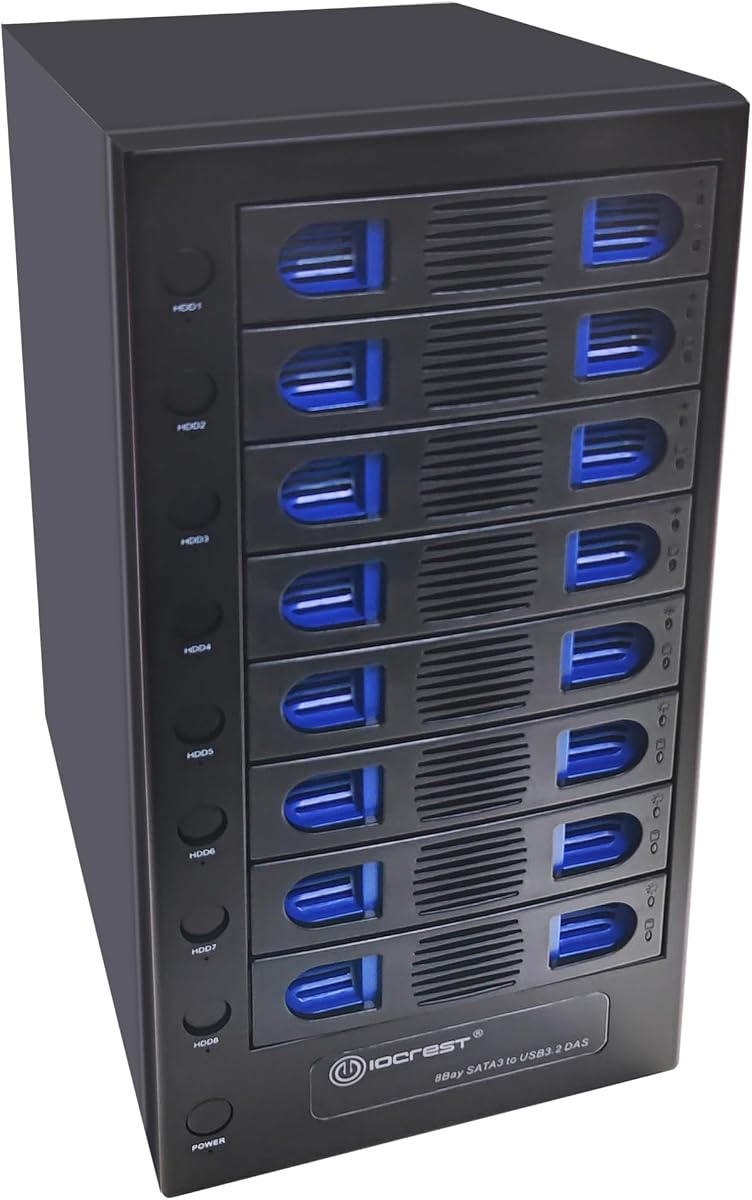


The CENMATE Aluminum 8 Bay Hard Drive RAID Enclosure offers a versatile solution for users needing hardware RAID capabilities without a full NAS setup. With a rating of 3.8 stars it delivers reliable performance for personal and enterprise use cases where data redundancy is essential.
We may earn a commission when you buy through this link, at no additional cost to you.
Its standout feature is the support for eight different RAID modes including RAID 0 1 5 10 and 50. This flexibility allows you to optimize for speed or redundancy depending on your workflow. The aluminum construction and dual fans help manage heat during sustained transfers.
Users should note that switching RAID modes requires specific power cycling steps which can be confusing. Also the fan noise might be distracting in quiet offices. These trade-offs are acceptable given the low cost and broad compatibility with SATA drives up to 20TB each.
This enclosure is ideal for home labs or small businesses needing affordable redundant storage. If you prioritize hardware RAID flexibility over silent operation this model provides excellent value for managing large media libraries or backup repositories securely.
The ability to switch between CLONE LARGE NORMAL and various RAID levels gives users control over data safety and performance.
Dual 2.9 inch fans ensure drives stay cool during heavy loads protecting your data from thermal throttling or failure.
We may earn a commission when you buy through this link, at no additional cost to you.
The SanDisk Professional G-RAID Shuttle is a top tier storage array designed for creative professionals handling massive 4K or 8K video projects. Its perfect 5.0 rating reflects exceptional build quality and performance that justifies the premium investment for mission critical work.
We may earn a commission when you buy through this link, at no additional cost to you.
This unit supports read speeds up to 1900MB/s and write speeds up to 2000MB/s via Thunderbolt 3. The removable Ultrastar drives allow for easy swapping between locations while maintaining data integrity through hardware RAID 5. It also powers your MacBook via USB-C.
While the cost is significant the reliability and speed are unmatched for studio environments. The large size requires dedicated desk space. These factors are acceptable for professionals who need guaranteed performance and portability for large scale media production.
Choose this array if you need fast reliable storage for on location shoots or studio editing. The combination of speed capacity and removable drives makes it a powerful tool for videographers and designers managing extensive media libraries.
Thunderbolt 3 connectivity ensures you can edit high resolution footage directly from the drive without lag.
Removable Ultrastar drives provide the durability needed for transport between different work environments safely.
We may earn a commission when you buy through this link, at no additional cost to you.
This CENMATE model focuses on being a Direct Attached Storage solution without hardware RAID overhead. With a 4.3 rating it offers a straightforward way to expand storage capacity quickly for users who prefer software RAID or simple file management.
We may earn a commission when you buy through this link, at no additional cost to you.
Hot swappable drives mean you can replace or add disks without powering down the enclosure. The aluminum chassis and fans keep temperatures stable. It supports daisy chaining to expand total capacity up to 480TB across three devices.
Lack of hardware RAID means you rely on your computer for data protection. The fan noise is similar to other models in this range. These are reasonable compromises for a device focused on capacity and ease of use rather than redundancy.
Ideal for users needing flexible expandable storage for backups or media libraries. If you handle your own software RAID this unit provides reliable connectivity and the convenience of hot swapping at a budget friendly price.
Replace drives on the fly to maintain workflow continuity without interrupting system uptime or processes.
Connect multiple units to scale your storage needs significantly without needing a complex server setup.
We may earn a commission when you buy through this link, at no additional cost to you.
The OWC ThunderBay 8 is a robust Thunderbolt enclosure designed to work seamlessly with Mac and Windows systems. Its 3.9 rating indicates solid reliability for users who need high speed connectivity without the complexity of NAS setups.
We may earn a commission when you buy through this link, at no additional cost to you.
It supports universal drive bays for both 2.5 and 3.5 inch SSDs or HDDs. Thunderbolt certification ensures fast data transfer and the ability to daisy chain up to six units. It comes with a Thunderbolt cable for immediate use.
Without hardware RAID you must manage redundancy via software. The price is higher than USB alternatives. These trade-offs are worth it for the speed and compatibility with high end workstations requiring direct fast storage access.
This enclosure suits creative professionals needing rapid storage access for large files. If you value Thunderbolt speed and universal drive compatibility OWC provides a reliable solution for expanding workstation storage efficiently.
Accepts any standard 2.5 or 3.5 inch drive giving you freedom to use existing hardware easily.
Thunderbolt 3 ensures minimal latency and maximum throughput for demanding editing and rendering tasks.
We may earn a commission when you buy through this link, at no additional cost to you.
This CENMATE model upgrades connectivity to USB 3.2 Gen 2 offering speeds up to 10Gbps for faster file transfers than standard USB 3.0. With a 4.1 rating it delivers efficient performance for users who need quick access to large drive volumes.
We may earn a commission when you buy through this link, at no additional cost to you.
Hot swappable drives allow seamless replacement without shutdown. The aluminum design and fans manage heat effectively. It supports daisy chaining to expand capacity across multiple units. Type-C interface ensures broad compatibility with modern laptops.
Max speed requires a Gen 2 port which older computers may lack. Fan noise is standard for this class. These factors are minor given the speed advantage and flexibility it offers for modern data management needs.
Best for users with compatible systems needing faster transfer rates than USB 3.0 provides. This unit balances speed cost and convenience effectively for expanding storage on workstations or editing rigs.
USB 3.2 Gen 2 ensures you move large files significantly faster than legacy USB interfaces.
Type-C connector works with most modern devices including those requiring adapters for older ports.
We may earn a commission when you buy through this link, at no additional cost to you.
This enclosure stands out with independent power switches for each drive allowing precise control over which disks are active. Its 4.3 rating reflects satisfaction with its smart fan system and flexible drive support for modern high capacity disks.
We may earn a commission when you buy through this link, at no additional cost to you.
USB 3.2 10Gbps ensures fast data rates. The smart fan adjusts speed based on temperature to balance noise and cooling. Tool less trays make swapping drives effortless. Independent switches help save power or isolate faulty drives quickly.
Lack of RAID limits redundancy to software solutions. Some plastic elements reduce premium feel. These are acceptable given the unique control features and high capacity support that benefit power users managing many drives.
Ideal for advanced users needing granular drive management and high speed transfers. The independent controls and smart cooling make this a practical choice for large scale file storage or media centers.
Turn off unused drives individually to reduce power consumption and heat output during lighter workloads.
Smart fan modes automatically adjust based on thermal readings to protect drives without excessive noise.
We may earn a commission when you buy through this link, at no additional cost to you.
The OWC ThunderBay Flex 8 combines storage with PCIe expansion making it a powerful dock for workstations. Its 3.7 rating reflects a specialized product that excels in connectivity and upgradeability rather than pure storage simplicity.
We may earn a commission when you buy through this link, at no additional cost to you.
It supports U.2 NVMe drives for exceptional speeds and includes SD card readers for quick media import. The PCIe x16 slot allows adding network cards or audio interfaces. Front USB ports add convenience for peripherals.
Setup can be complex for casual users. RAID is managed via software not hardware. These trade-offs are acceptable for professionals needing a multi function docking station that expands system capabilities beyond just storage.
This unit suits professionals wanting storage and hardware expansion in one box. If you need NVMe speeds and PCIe slots for capture cards this offers a comprehensive solution for high end creative workflows.
Combines storage card reading and PCIe expansion to reduce cable clutter and expand workstation features.
Top bays support emerging U.2 SSDs ensuring compatibility with next generation high speed storage drives.
We may earn a commission when you buy through this link, at no additional cost to you.
The QNAP TL-D810TC4-US is designed to expand storage for existing QNAP NAS systems seamlessly. With a 4.0 rating it provides reliable direct attached storage expansion without requiring a complete system overhaul or additional server costs.
We may earn a commission when you buy through this link, at no additional cost to you.
It features a Type-C port delivering up to 10Gbps for fast access. The JBOD configuration allows flexible drive management using QNAP utilities. Drive health monitoring helps maintain data integrity across the array.
Optimal performance is with QNAP NAS though it works with Windows and Mac. Limited to single connection reduces flexibility for non-QNAP users. These factors are acceptable given its targeted design for QNAP ecosystem expansion.
Choose this if you already use QNAP NAS and need quick capacity boosts. The integration and management tools make it a practical choice for maintaining consistent performance within your existing network storage setup.
Designed to expand QNAP NAS storage directly using native tools for simplified management and monitoring.
Free utility software allows monitoring of drive health and system status to prevent unexpected failures.
We may earn a commission when you buy through this link, at no additional cost to you.
This case is built for DIY enthusiasts assembling custom NAS servers. With a 4.0 rating it offers excellent flexibility for home media servers and small business backups where custom hardware choices matter.
We may earn a commission when you buy through this link, at no additional cost to you.
It supports Mini ITX and Micro ATX boards with dedicated cooling channels to separate drive and CPU heat. Hot swap bays make maintenance easy. Includes accessories for mounting drives and fans for a complete build.
Assembly requires technical skills and purchasing separate components. Not a plug and play device. These are standard for custom builds but may deter users seeking an immediate solution without setup complexity.
Perfect for tech savvy users wanting full control over hardware. If you plan to build a dedicated server this case provides the structural foundation and cooling needed for reliable long term operation.
Allows you to choose specific motherboard and components for tailored performance and energy efficiency.
Dual independent air channels prevent heat transfer between drives and motherboard ensuring stable operation.
We may earn a commission when you buy through this link, at no additional cost to you.
The ICY DOCK MB998SK-B is an internal drive cage designed to fit in a standard 5.25 inch bay. Its perfect 5.0 rating reflects high quality construction and reliable performance for server environments needing secure drive access.
We may earn a commission when you buy through this link, at no additional cost to you.
It supports 2.5 inch SATA and SAS drives with locking trays to secure drives in place. Full metal construction ensures durability. This unit is ideal for integrating eight drives into existing server chassis without external ports.
Not suitable for external use. Requires available 5.25 inch bay. These limitations are acceptable for its targeted use case in server racks where internal space is prioritized over external connectivity.
Best for system integrators building custom servers. If you need secure internal drive expansion with locking mechanisms this cage provides a robust and reliable solution for enterprise or lab environments.
Locking trays prevent accidental drive removal keeping your data secure during transport or maintenance.
Full metal construction withstands heavy use in server rooms ensuring longevity and consistent performance.
We may earn a commission when you buy through this link, at no additional cost to you.
Selecting the right enclosure requires understanding your needs for speed redundancy and compatibility. This guide covers key factors to consider before purchasing an eight bay RAID device.
The interface determines maximum data transfer rates. USB 3.0 offers up to 5Gbps suitable for general backups. USB 3.2 Gen 2 doubles this to 10Gbps for faster media editing. Thunderbolt 3 provides 40Gbps ideal for high-end workflows.
Choose the fastest interface your computer supports to avoid bottlenecks when handling large datasets or multiple streams.
Hardware RAID provides redundancy and performance without relying on your system. DAS is simpler but requires software RAID for safety. Consider if you need built-in redundancy or prefer managing it yourself.
Select hardware RAID if you want automatic protection and simplicity. Opt for DAS if you prefer flexibility or already have a NAS setup.
Most enclosures support both 2.5 and 3.5 inch drives. Verify the maximum capacity per drive since some units may not support the latest 20TB or 22TB disks. This affects your total storage potential.
Ensure your chosen enclosure explicitly supports the capacity of drives you plan to use to avoid compatibility issues.
Eight drives generate significant heat requiring active cooling. Look for models with variable fan speeds or smart thermal sensors. Noise levels can be high so consider your environment.
If you work in a quiet space prioritize models with quiet fans or manual control to balance cooling with comfort.
Hot swapping allows replacing drives without shutting down the system. This is crucial for uptime in production or server environments. Check if your unit supports this feature.
Prioritize hot swap support if you need continuous operation or expect to change drives frequently for maintenance or upgrades.
Metal enclosures dissipate heat better and protect drives from physical damage. Aluminum and steel offer durability. Plastic units may be lighter but less robust.
Invest in metal construction for long term reliability especially if the enclosure will be moved frequently or used in demanding environments.
Daisy chaining lets you connect multiple enclosures to expand capacity. Look for units with USB or Thunderbolt ports designed for chaining. This reduces need for extra cabling.
Choose daisy chain capable units if you plan to scale storage beyond eight drives in the future for flexibility.
Plug and play units require no driver installation. Tool free designs simplify drive installation. Read reviews for setup experiences to ensure smooth deployment.
Opt for plug and play with tool free trays to save time and reduce frustration during initial setup and drive replacement.
Always initialize the enclosure on a stable power source. Connect to your computer before powering on. If using RAID ensure you back up existing data since initializing often formats drives.
Monitor drive health regularly using manufacturer utilities. Replace drives showing warning signs promptly to maintain array integrity. Keep firmware updated for security and performance improvements.
Ensure adequate ventilation around the unit. Keep fans free of dust to prevent overheating. If noise becomes excessive check fan settings or consider moving to a less sensitive location.
Yes most eight bay enclosures support both 2.5 and 3.5 inch SATA SSDs. SSDs generate less heat and offer faster speeds. Just verify the enclosure supports the specific capacity of your SSDs.
RAID 0 offers maximum speed by splitting data across drives but has no redundancy. RAID 5 stripes data with parity allowing one drive failure without data loss. Choose RAID 5 for safety or RAID 0 for pure performance.
Most models listed are compatible with both macOS and Windows operating systems. Always check specific OS version requirements in the product details before purchasing to ensure full functionality.
Yes if the enclosure supports daisy chaining you can connect additional units. Otherwise you may need to upgrade drives individually. Check the product specs for expansion capabilities before buying.
Many enclosures include necessary cables like USB or Thunderbolt. If not use certified high speed cables to ensure performance. Using low quality cables may limit data transfer speeds.
Noise varies by model but most have fans around 40 to 50 decibels. Some offer manual fan control or quiet modes. Consider your workspace environment when selecting a unit.
Warranty terms differ by brand ranging from one to three years. Check the manufacturer details before purchasing. Some sellers offer extended warranty options for additional coverage.
Choosing the right enclosure depends on balancing speed capacity and budget. Options like the CENMATE Aluminum series offer affordable RAID features while premium units like the G-RAID Shuttle excel in professional workflows.
Prioritize interface speeds and drive compatibility based on your specific workload. Consider whether hardware RAID or direct storage meets your redundancy needs best.
Always check current availability and compatibility before purchase as product details may change. These options provide reliable foundations for your data storage and expansion needs.