
Revopoint MetroY Ultra
4.5Editor score
0.01mm single precision
90fps ultra-fast speed
Wireless Wi-Fi 6
3D scanning technology has evolved rapidly, offering professional-grade accuracy and speed for hobbyists and enterprises alike. Choosing the right device depends on your specific needs, from capturing tiny mechanical parts to scanning full human bodies with high fidelity and color detail.
This guide evaluates ten leading models based on precision, scanning speed, connectivity options, and software ecosystems. We analyzed technical specifications and user feedback to highlight devices that excel in industrial inspection, reverse engineering, and creative 3D printing workflows.
Each selection includes detailed insights into real-world performance, pros, cons, and ideal use cases. Please note that prices and availability fluctuate frequently, so verify current listings before purchasing to ensure you get the best value for your specific application.
4.5Editor score

5.0Editor score

3.2Editor score
As an Amazon Associate we earn from qualifying purchases.
This side-by-side comparison highlights key technical differences across all ten models to help you decide which scanner offers the right balance of precision, speed, and features for your unique workflow requirements.


The Creality Pika stands out as the top choice for users seeking professional-grade accuracy in a portable device. With a remarkable 0.03mm accuracy and dual scanning modes, it bridges the gap between handheld convenience and industrial precision.
We may earn a commission when you buy through this link, at no additional cost to you.
Its standout feature is the AI-powered body completion, which generates full 3D models from just face scans and photos in seconds. This, combined with marker-free scanning and direct export to major CAD formats, makes it incredibly versatile for designers and engineers.
While the price reflects its high-end capabilities, the inclusion of swappable batteries and outdoor scanning up to 110,000 lux ensures you can work anywhere without downtime. The only minor trade-off is the initial learning curve for calibration.
Buy this if you need a reliable, high-speed scanner for reverse engineering or detailed 3D printing. It offers unmatched flexibility for both small mechanical parts and large human body scans in a single compact unit.
The device fits in your palm and uses Wi-Fi 6 for cable-free operation, allowing seamless outdoor use with dual swappable batteries for extended sessions.
Built-in AI handles body completion and texture mapping, automating complex post-processing tasks that usually require hours of manual modeling work.
We may earn a commission when you buy through this link, at no additional cost to you.
The Revopoint POP 4 delivers industrial-grade accuracy with 0.03mm single-frame precision and NVIDIA GPU acceleration for smooth, fast scans. It is ideal for reverse engineering and applications requiring complex geometry.
We may earn a commission when you buy through this link, at no additional cost to you.
Its five scanning modes cover everything from deep holes to full-field structured light, while AI segmentation identifies target objects instantly. The integration of 3D Gaussian Splatting enables true-to-life photorealistic models for immersive experiences.
The scanner maintains reliability in outdoor conditions up to 100,000 lux, making it suitable for fieldwork. However, the advanced software requires time to master, and some high-end features are sold separately as paid add-ons.
Choose this model if you need top-tier precision for industrial inspection or detailed asset creation. It offers the most comprehensive toolset available for professional workflows requiring consistent, high-fidelity data.
Five distinct modes ensure versatility, handling challenging surfaces like reflective metals and dark objects without the need for spray or markers.
Live PC-to-phone streaming enables real-time preview and blind-spot detection, streamlining the workflow and reducing errors during the scanning process.
We may earn a commission when you buy through this link, at no additional cost to you.
The Revopoint INSPIRE 2 is designed for portability and outdoor use, featuring a lightweight 190g body and robust scanning performance in up to 20,000 lux. It balances accuracy with ease of use for hobbyists.
We may earn a commission when you buy through this link, at no additional cost to you.
Its dual scanning modules and optical zoom allow for detailed captures of small and medium objects, while the built-in RGB camera ensures realistic color mapping. The high-precision calibration board improves accuracy by 75% for reliable results.
Though it performs well in challenging environments, the battery life may limit long sessions without recharging. Additionally, advanced design tools are sold separately, which adds to the total cost for full professional utility.
This scanner is perfect for heritage preservation and product design on the go. Its combination of optical zoom and outdoor reliability makes it a strong contender for diverse, flexible scanning tasks.
The aerospace-grade aluminum front panel offers durability, while the lightweight build ensures comfort during extended handheld scanning sessions in varied environments.
True-to-life color capture syncs geometry with real-world textures, essential for applications requiring realistic visual representation like e-commerce or digital archiving.
We may earn a commission when you buy through this link, at no additional cost to you.
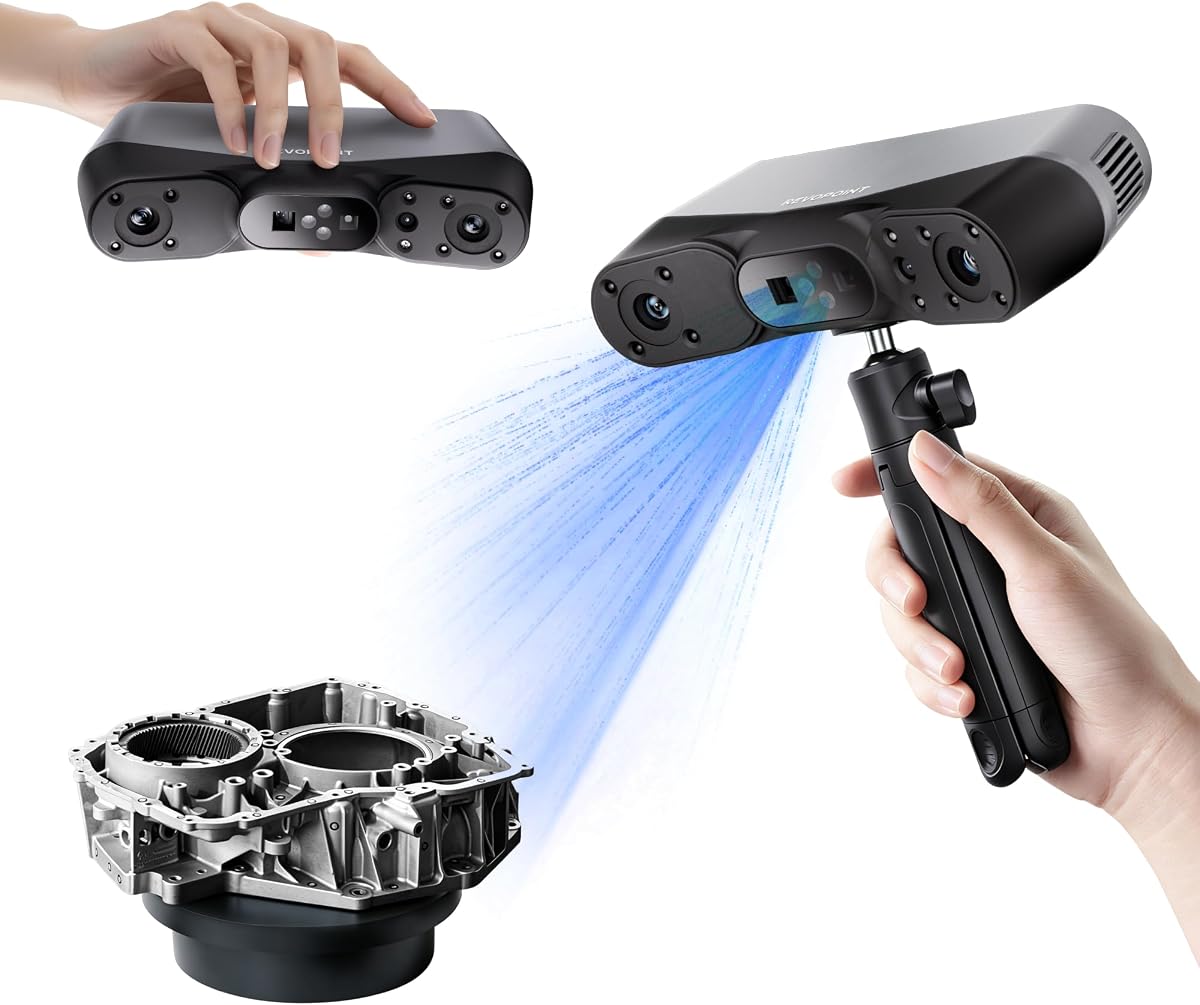
The Revopoint MetroY Ultra offers industry-leading 0.01mm precision, making it ideal for tight tolerance measurement and reverse engineering. Its fast 90fps speed ensures efficient capture of complex industrial parts.
We may earn a commission when you buy through this link, at no additional cost to you.
It eliminates the need for spray on dark or shiny surfaces, protecting delicate parts while saving prep time. The wireless Wi-Fi 6 connection and ergonomic battery grip enhance flexibility for mobile field work.
While the performance is exceptional, the price point and weight of the battery grip may deter casual users. However, for professional inspection environments where detail is critical, it delivers unmatched data quality.
Choose this if your work demands the highest accuracy for quality control or manufacturing. Its speed and precision set a new standard for professional handheld 3D scanning technology.
With single-frame precision up to 0.01mm, it captures intricate geometric details flawlessly, ensuring measurements meet rigorous manufacturing standards.
The 34-laser cross-line mode speeds up large-area scans significantly, reducing data acquisition time while maintaining high-quality output.
We may earn a commission when you buy through this link, at no additional cost to you.
The Revopoint MetroX Pro combines blue laser technology with four versatile scanning modes to handle various object sizes. It offers 0.02mm accuracy, ideal for precision modeling and industrial measurement.
We may earn a commission when you buy through this link, at no additional cost to you.
Its automatic turntable simplifies complex scans, capturing color-accurate data with the HD RGB camera. Three tracking modes ensure stable alignment for objects with rich details, making it great for prototyping.
The software ecosystem supports seamless export to industry formats, though some advanced measurement tools are sold separately. While not the cheapest option, its reliability and speed justify the investment for professionals.
This scanner excels for manufacturers needing consistent, high-quality scans for reverse engineering. It bridges the gap between hobbyist tools and industrial-grade equipment effectively.
Feature, marker, and global marker tracking allow flexible alignment, ensuring precise capture of complex shapes and flat surfaces alike.
One-click automated turntable scans reduce manual effort, allowing quick capture of objects with multiple angles for complete models.
We may earn a commission when you buy through this link, at no additional cost to you.
The 3DMakerpro Fox offers accessible medium-format scanning at an affordable price point. With 0.07mm accuracy, it provides reliable data for hobbyists and beginners entering the world of 3D printing.
We may earn a commission when you buy through this link, at no additional cost to you.
Its markerless AI tracking relocks onto scanned areas instantly, preventing the need to start over after interruptions. The integrated JMStudio software streamlines pre and post data processing into one seamless workflow.
While it lacks the extreme precision of high-end models, it delivers detailed enough results for most home projects. The main trade-off is that complex industrial applications may require more advanced tools.
Choose this for entry-level scanning needs where cost is a priority. It is an excellent starting point for those exploring 3D digitization without breaking the bank.
If you move too fast, the markerless AI relocks in seconds, ensuring continuity and reducing frustration during handheld scanning sessions.
JMStudio handles scanning, editing, and optimizing in one package, eliminating the need for multiple third-party tools for basic projects.
We may earn a commission when you buy through this link, at no additional cost to you.
The Creality Otter Lite delivers impressive 0.05mm accuracy and 30fps speed, making it a reliable choice for general-purpose scanning. Its quad-camera design covers a vast range from coins to cars.
We may earn a commission when you buy through this link, at no additional cost to you.
It captures vibrant, accurate colors using a built-in RGB camera and handles dark or metallic surfaces without spray. The eye-safe infrared technology allows safe face and full-body scans in minutes.
While the frame rate is lower than industrial models, it suits most prototyping and e-commerce needs. The optional stability handle adds cost but improves precision for extended use.
This model is ideal for artists and hobbyists needing realistic color data. Its broad range and easy-to-use software make it a versatile addition to any 3D workflow.
The quad-camera system captures from 0.8-inch details to 78-inch objects, offering unmatched versatility for different project sizes.
True-to-life color mapping brings models to life, essential for products needing visual fidelity like art pieces or collectibles.
We may earn a commission when you buy through this link, at no additional cost to you.
The Creality CR-Ferret SE features advanced one-shot imaging for anti-shake tracking, ensuring smooth results even with shaky hands. It is designed to help beginners capture realistic 3D models quickly.
We may earn a commission when you buy through this link, at no additional cost to you.
With 0.1mm accuracy and vivid textures, it handles black and metal objects easily. The flexible scanning range makes it suitable for medium to large objects without the need for additional markers.
However, software limitations and USB-only connectivity may restrict advanced users seeking wireless freedom. Despite this, it remains an accessible entry point for those starting with 3D scanning.
Buy this if you want a straightforward tool for home projects. Its anti-shake technology significantly increases success rates for newcomers without requiring expensive setups.
New one-shot imaging boosts tracking efficiency, allowing for error-free results even if your hand moves quickly during a scan.
Optimized for black or metal objects, it reduces prep time by eliminating the need for white powder or spray to create contrast.
We may earn a commission when you buy through this link, at no additional cost to you.
The Creality CR-Scan Ferret Pro adds wireless Wi-Fi 6 capability to the Ferret series, offering faster data transfer and greater mobility. It delivers 0.1mm accuracy with reliable anti-shake tracking.
We may earn a commission when you buy through this link, at no additional cost to you.
It supports iOS and Android devices, enabling seamless mobile scanning and preview. The optical technology works well outdoors, though highly reflective or transparent surfaces should be avoided for best results.
While it improves on the standard Ferret with wireless freedom, it still lacks the precision of industrial-grade models. However, it is a significant upgrade for those needing portability.
Choose this for projects requiring mobile flexibility. Its combination of wireless tech and ease of use makes it a practical tool for on-the-go 3D modeling.
Wi-Fi 6 ensures stable, efficient data transfer, enabling smoother workflows compared to older connection standards.
Support for iOS and Android allows you to view and manage scans directly on your smartphone or tablet easily.
We may earn a commission when you buy through this link, at no additional cost to you.
The Revopoint MIRACO Plus is an all-in-one portable scanner with integrated photogrammetric metrology, offering high-resolution capture of both small details and large objects. It runs on an 8-core processor with 32GB RAM.
We may earn a commission when you buy through this link, at no additional cost to you.
Its 6-inch flip screen and fast charging make it convenient for field use. The photogrammetric kit ensures high length accuracy for complex measurements, making it versatile for various professional applications.
While powerful, the 750g weight may feel heavy over long sessions. Additionally, the software is limited to x86_64 architecture, which could restrict compatibility with some macOS users.
This is perfect for engineers needing both scanning and metrology in one device. Its powerful hardware ensures smooth processing of large datasets without external computing needs.
With 32GB RAM and a 2.4GHz processor, it handles large scans efficiently, allowing capture of up to 10,000 frames.
Photogrammetric length accuracy of 0.02 mm ensures precise measurements for industrial inspection and product design tasks.
We may earn a commission when you buy through this link, at no additional cost to you.
Selecting the right 3D scanner requires balancing technical specifications against your specific workflow needs. This section covers key factors to ensure you invest in the right tool.
Accuracy determines how closely a scan matches the real object. For industrial parts requiring tight tolerances, look for 0.01mm to 0.03mm. For hobbies, 0.05mm to 0.1mm is often sufficient.
Prioritize high precision for engineering tasks to avoid costly fitting errors later.
Speed is measured in frames per second (FPS). Faster speeds like 90 FPS or 110 FPS reduce motion blur and increase efficiency, especially for moving objects or large scenes.
Choose a faster scanner if you need to capture dynamic or large objects quickly without compromising quality.
Determine the size of objects you typically scan. Some devices excel at small parts (10x10x10mm), while others cover large volumes (2x2x2m). Ensure the minimum and maximum capture areas match your needs.
Verify the capture range includes your target objects to avoid using multiple devices for different projects.
Shiny, dark, or reflective surfaces often require spray. Advanced models with blue laser or infrared can scan these directly, saving prep time and protecting delicate parts.
Invest in models with dual-mode technology if you frequently scan metals or dark plastics without preparation.
Wireless options like Wi-Fi 6 allow for mobile use, reducing cable clutter. Lightweight designs (under 300g) improve comfort for long sessions. Check battery life for fieldwork without power.
Look for Wi-Fi 6 and lightweight build if you need freedom from cables and long battery life.
Ensure the scanner works with your preferred software (Windows, macOS, mobile). Export formats like STL, OBJ, or PLY should be compatible with your 3D printing or CAD tools.
Confirm export formats align with your software stack to avoid extra conversion steps.
RGB cameras provide 24-bit color data, essential for visual fidelity. Some models offer auto-texture mapping to enhance realism. This is crucial for e-commerce, art, or heritage preservation.
If visual realism matters, choose a model with a high-resolution RGB camera and auto-texture mapping.
Consider long-term costs, including accessories, calibration boards, or paid add-on software. Entry-level units cost less but may lack advanced features. Premium devices offer high precision but at a higher price.
Plan for all included accessories and potential add-ons to understand the true total cost of ownership.
Start by calibrating your scanner using the provided board to ensure precision. This aligns internal sensors and improves accuracy across all scans. Follow the app's prompts for quick setup.
Keep the lens clean and free of dust. Store in a protective case when not in use to prevent scratches. Avoid extreme temperatures and moisture for long device longevity.
For large objects, use a turntable or markers for stability. Check your scan periodically via live preview to catch gaps early. This saves time by avoiding redoing the entire scan.
Yes, modern models like the Creality Pika and Revopoint POP 4 can directly scan dark and reflective surfaces using specialized laser or structured light technologies. This eliminates the need for messy sprays or powders, making the process cleaner and faster for users working with metal or dark materials.
Accuracy refers to how close a scan is to the real object's true dimensions, while resolution is the smallest detail the device can capture. High accuracy ensures correct sizing for engineering, whereas high resolution reveals fine textures and edges for visual quality.
Some models, like those with GPU acceleration, require a decent PC for optimal performance. However, many modern devices include onboard processing or lightweight apps that can handle scanning on tablets or phones, making them accessible for users with less powerful computers.
Yes, scanners like the Creality Pika and Revopoint POP 4 support full-body scanning. They use wide-angle capture modes and body completion AI to generate complete models from partial scans, making them ideal for fashion, art, and health applications.
Wireless scanning via Wi-Fi 6 is increasingly reliable for professional use, offering speeds close to wired connections. Devices like the Revopoint INSPIRE 2 and Creality CR-Scan Ferret Pro allow stable data transfer, giving you freedom to move around without cable restrictions.
Scan times vary by object size and complexity. Small parts might take under a minute, while large objects or full bodies may take 10 to 30 minutes. Faster frame rates like 110 FPS significantly reduce these times compared to older models.
Most manufacturers include free software like Revo Metro or JMStudio for basic editing and alignment. For advanced CAD conversions or reverse engineering, you might need paid add-ons, but the free tools cover most scanning and merging tasks.
Regular cleaning of the lens and protective storage are essential. Keep firmware updated for the best performance. Calibration boards should be used periodically to ensure accuracy remains high as the device ages.
The top picks like the Creality Pika and Revopoint MetroY Ultra offer unmatched precision and speed for professionals. For budget-conscious buyers, the 3DMakerpro Fox provides a solid entry point with reliable accuracy.
Prioritize accuracy, scanning speed, and software compatibility based on your primary use cases. Industrial applications demand tighter tolerances, while hobbyists may value ease of use and portability more than absolute precision.
Prices and availability change frequently, so always check current listings before purchasing. Ensure you have all necessary accessories like tripods or calibration boards included or purchased separately for a complete setup.