
SCRIB3D P1 3D Printing Pen with Display
4.4Editor score
Adjustable temperature settings
Includes starter filament kit
Stepless speed control
Discover the best 3D printing pens for kids in October 2026. This guide compares top models for safety, ease of use, and creative potential for young artists.
Finding the right 3D printing pens for kids can transform how children engage with creativity and STEM learning. These tools allow young artists to bring their drawings to life in three dimensions, fostering spatial awareness and fine motor skills without the complexity of traditional printers.
We evaluated ten top-rated models based on safety features, filament compatibility, ease of use, and included accessories. Our analysis focuses on pens designed specifically for younger users as well as versatile options that grow with their skills, ensuring a safe and enjoyable creative experience for every child.
Each pick highlights key strengths, potential limitations, and ideal use cases to help you make an informed decision. Prices and availability change frequently, so check the latest details before purchasing. This guide aims to simplify your search for the perfect creative tool for your young maker.
4.4Editor score
4.4Editor score
4.5Editor score
This side-by-side comparison highlights key specifications across all ten reviewed models to help you quickly identify which pen matches your child's skill level and your specific creative needs.


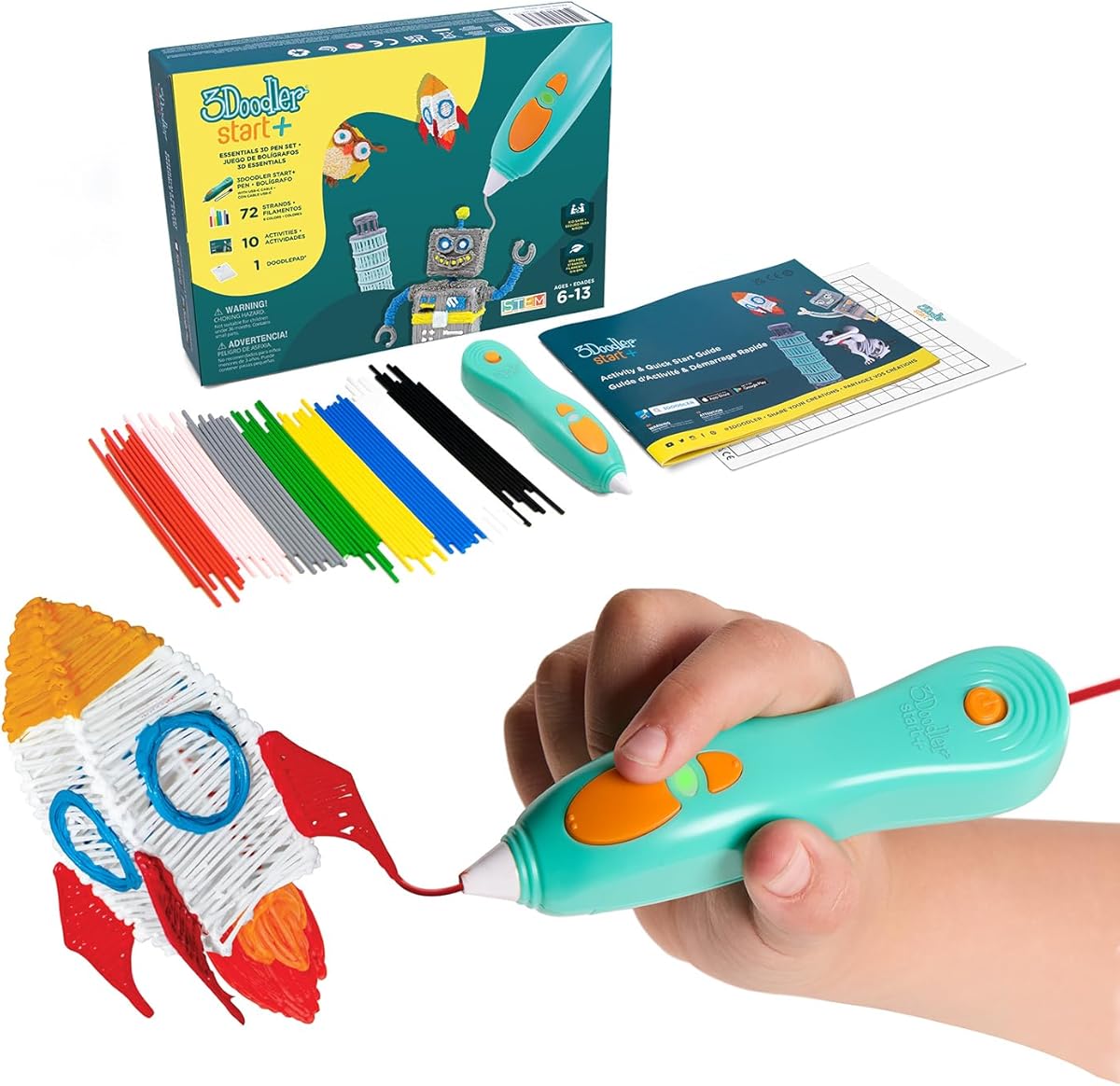
The 3Doodler Start+ Essentials set stands out as the safest option for younger children seeking 3D printing pens for kids. With a 4.4 rating, it eliminates burn risks entirely by removing hot parts, making it ideal for ages six and up.
We may earn a commission when you buy through this link, at no additional cost to you.
This kit excels in providing a complete creative package. It includes a DoodlePad, mixed-color plastics, and ten new stencils to guide projects. The upgraded experience features 50% more filament and faster charging, ensuring kids spend more time creating and less time waiting.
Trade-offs include a higher initial cost compared to some competitors and limited filament color variety outside the included bundle. These are acceptable given the enhanced safety features and educational value provided by the complete kit and activity guide.
Parents prioritizing safety and ease of use should choose this pen. It offers the perfect entry point for young artists to explore STEM concepts and creative design without parental supervision worries or safety hazards.
The pen nozzle and plastic can be touched with no burn risks, ensuring safe handling during creative sessions.
Children learn real-world connections to STEM concepts through tactile play, reducing screen time effectively.
We may earn a commission when you buy through this link, at no additional cost to you.
The SCRIB3D P1 offers exceptional value for families seeking affordable 3D printing pens for kids. With a 4.4 rating, it balances performance and cost effectively, featuring a display that helps users monitor temperature during creation.
We may earn a commission when you buy through this link, at no additional cost to you.
Its standout strength lies in its stepless speed slider, allowing optimal speed control for both intricate projects and faster infill work. The kit includes three starter colors of PLA plastic and a stencil guide, making it ready to use right out of the box.
Trade-offs involve a two to three-minute warm-up time and a slightly heavier build. These are minor inconveniences compared to the versatility and control it provides, especially for children interested in more complex designs.
Families on a budget should select this model for its combination of features and affordability. It remains suitable for beginners while offering enough control to grow with a child's developing skills.
Compatible with both PLA and ABS filaments, offering wider material options for diverse projects.
Simple plug-in setup and clear red light indicators make starting easy for first-time users.
We may earn a commission when you buy through this link, at no additional cost to you.
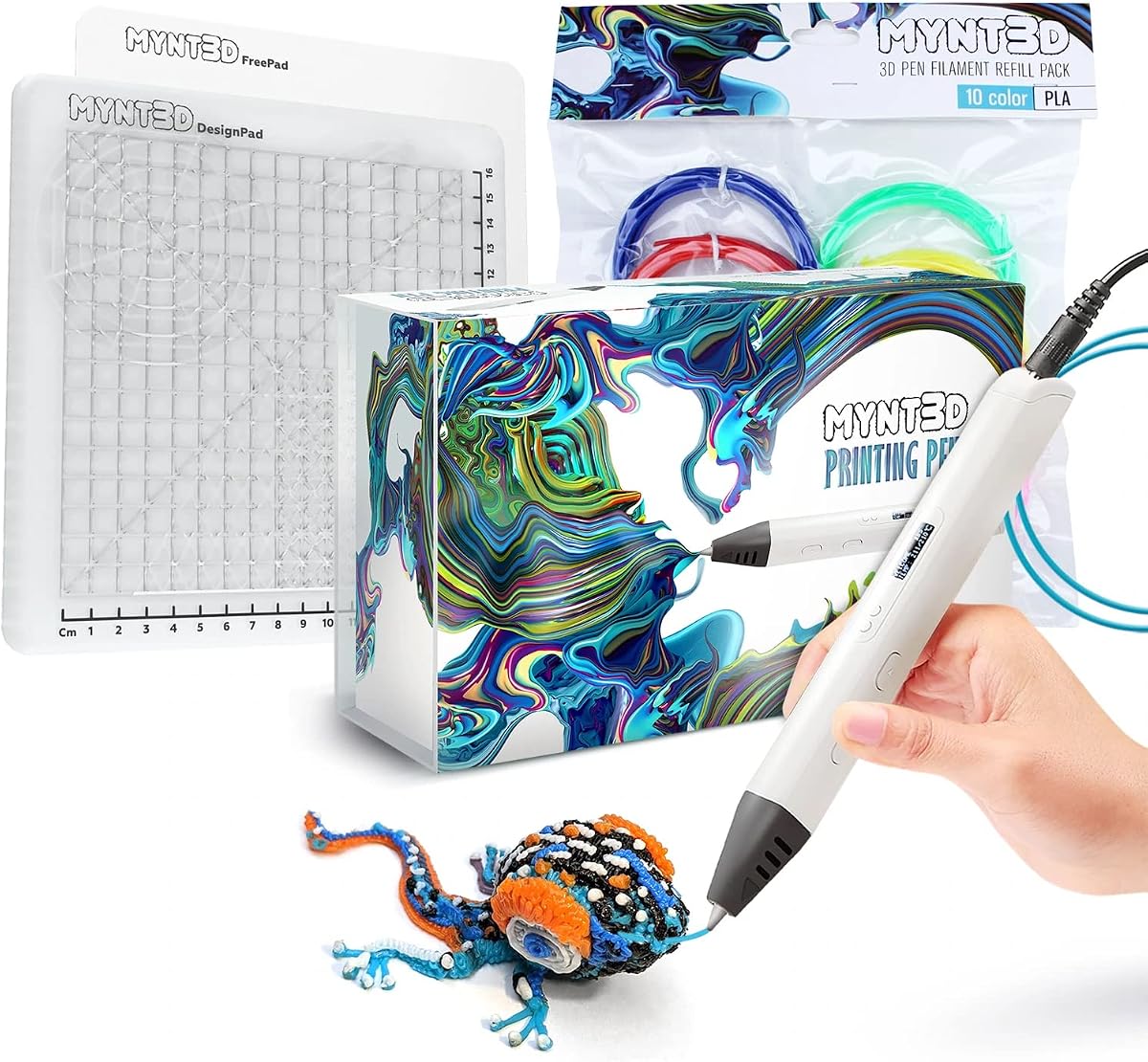
For advanced young artists, the MYNT3D Pro Kit delivers premium performance with a 4.5 rating. It includes everything needed to create like a pro, featuring an OLED display, DesignPad mat kit, and ten colors of PLA filament.
We may earn a commission when you buy through this link, at no additional cost to you.
This bundle stands out for its replaceable sealed nozzle design, ensuring clog-free operation over extended use. The DesignPad offers channels for perfect geometric shapes, while the FreePad supports tracing favorite patterns with ideal adhesion.
Trade-offs include the highest price point and a more complex interface compared to basic models. These are justified for serious creators who value precision and versatility in their 3D drawing projects.
Parents seeking a long-term investment for creative hobbies should choose this kit. It provides professional-grade tools that encourage growth and mastery in 3D design art.
Discrete temperature adjustability allows upgraded material options for specialized creative projects.
DesignPad mat kit enables perfect geometric shapes and ideal adhesion for tracing custom designs.
We may earn a commission when you buy through this link, at no additional cost to you.
The MYNT3D Professional 3D Pen brings imagination to life with a large OLED display. Rated 4.4, it allows precise monitoring of material temperature to achieve a wide variety of effects during drawing sessions.
We may earn a commission when you buy through this link, at no additional cost to you.
Its adjustable feed lets users regulate speed and flow for optimal material control. Temperature adjustability in one-degree increments from 140 to 230 degrees ensures fine-tuning for diverse artistic needs.
Trade-offs involve needing a steady hand for precise work and lacking a mat kit for guidance. These are acceptable for users prioritizing technical precision and temperature control over convenience accessories.
Technically inclined kids who value detailed control should select this pen. It offers the monitoring tools needed for sophisticated projects requiring exact temperature settings.
Temperature adjustability in 1-degree increments allows fine-tuning for optimal material effects.
Slim ergonomic pen shape ensures comfort during extended creative drawing sessions.
We may earn a commission when you buy through this link, at no additional cost to you.
The MYNT3D Super 3D Pen turns ordinary drawings into 3D works of art. Rated 4.3, it features an ultrasonic sealed nozzle that is nearly clog-proof and provides market-leading durability for regular use.
We may earn a commission when you buy through this link, at no additional cost to you.
This pen excels in flow regulation with a stepless speed slider allowing optimal control while drawing. It includes three colors of PLA plastic and offers 1.75mm ABS and PLA compatibility for versatile creative options.
Trade-offs include basic temperature controls and a standard color bundle compared to premium kits. These are acceptable given the durability and clog-free performance that ensures uninterrupted creative sessions.
Kids who need a reliable tool for frequent use should choose this model. Its durable design withstands regular handling and ensures consistent performance over time.
Ultrasonic sealed nozzle ensures market leading durability and nearly clog-proof performance.
Stepless speed slider lets you regulate flow for optimal control of material while drawing.
We may earn a commission when you buy through this link, at no additional cost to you.
The SCRIB3D Advanced Pen allows creators to build like a pro in 3D. Rated 4.3, it features a large LCD screen to monitor heat and ensure correct settings for smooth doodling experiences.
We may earn a commission when you buy through this link, at no additional cost to you.
Its soft touch surface and ergonomic design fit your hand comfortably for extended use. Eight speed options regulate flow for optimal control of line thickness while creating accurate and creative models.
Trade-offs involve manual filament loading and required warm-up time. These are minor limitations compared to the precision and comfort provided by the advanced screen and ergonomic features.
Creative kids focused on accurate model building should choose this pen. It offers the feedback and control needed for detailed 3D structures.
Large LCD screen helps monitor heat to ensure correct settings for smooth experiences.
Soft touch surface and ergonomic design ensure the most comfortable drawing experience.
We may earn a commission when you buy through this link, at no additional cost to you.
The MYNT3D Super 3D Pen + 10 Color PLA + DesignPad Mat Kit provides everything needed to create like a pro. Rated 4.4, it combines the reliable Super pen with generous filament and a design mat.
We may earn a commission when you buy through this link, at no additional cost to you.
This bundle excels with vacuum sealed PLA in ten colors including blue, green, red, and gold. The DesignPad double sided silicone drawing surface with channels lets you design perfect geometric shapes easily.
Trade-offs involve higher cost than the pen alone and initial setup time for the mat. These are acceptable for the variety and convenience of having all materials ready to use immediately.
Families wanting a complete creative solution should choose this kit. It simplifies the setup process and provides ample colors for diverse projects.
DesignPad channels let you design and create perfect geometric shapes with ease.
Highest quality vacuum sealed PLA ensures filament quality is maintained until use.
We may earn a commission when you buy through this link, at no additional cost to you.
The 3Doodler Flow offers reliable multi-functional compatibility for teens and creators. Rated 4.1, it works with 1.75 plastic filaments such as PLA, ABS, and wood, expanding creative possibilities significantly.
We may earn a commission when you buy through this link, at no additional cost to you.
An integrated LCD provides real-time temperature monitoring to ensure smooth printing. It is user-friendly with no complicated setups, allowing users to plug in, wait for heat, and start building 3D structures immediately.
Trade-offs include a target focus on teens rather than younger kids and a lower user rating. These are acceptable for older users seeking robust features and diverse material compatibility.
Teens and advanced creators should select this pen for its versatility and reliability. It provides the toolset needed for practical DIY tasks and creative exploration.
Compatible with 1.75 plastic filaments such as PLA, ABS, and wood for diverse projects.
Integrated LCD provides real-time temperature monitoring to ensure smooth 3D printing.
We may earn a commission when you buy through this link, at no additional cost to you.
The SCRIB3D P1 3D Printing Pen with Display Bundle provides a complete creative setup. It includes the pen with display plus a two-sided silicone mat for tracing, practice, and cleaner projects immediately.
We may earn a commission when you buy through this link, at no additional cost to you.
Its flexible practice surface features built-in shapes and patterns to help guide designs. This supports more consistent 3D pen work, making it easier for beginners to achieve consistent results.
Trade-offs involve the N/A rating and standard pen included compared to advanced kits. These are acceptable given the added value of the heat-resistant mat and comprehensive starter materials.
New users needing guidance should choose this bundle. The mat provides essential support for practicing and tracing designs effectively.
Built-in shapes and patterns help guide designs and support more consistent work.
Durable mat is easy to wipe clean and built to handle repeated creative sessions.
We may earn a commission when you buy through this link, at no additional cost to you.
The 3Doodler Start+ 3D Pen Set with All Refill Bags offers massive filament value. It includes the complete pen set plus over 1250 feet of additional plastic filament for endless 3D doodling fun.
We may earn a commission when you buy through this link, at no additional cost to you.
Compatible with the free 3Doodler app, it provides stencils and step-by-step instructions. The bundle ensures kids have all materials needed for months of creative play and STEM skill learning.
Trade-offs include the N/A rating and expensive total price point. These are acceptable for families wanting long-term supply without frequent repurchases.
Parents seeking long-term value should select this bundle. It ensures children have ample materials for sustained creative engagement.
Over 1250 feet of additional filament ensures long-lasting creative fun without shortages.
Compatible with free app providing stencils and instructions for guided learning.
We may earn a commission when you buy through this link, at no additional cost to you.
Selecting the right pen involves considering safety features, filament types, included accessories, and your child's skill level to ensure a safe and engaging creative experience.
Safety is the top priority when choosing 3D printing pens for kids. Look for models with no hot parts or cool-touch nozzles designed to eliminate burn risks during play. Pens with auto-sleep modes and child-friendly materials ensure that young users can create without supervision worries.
Prioritize pens explicitly labeled as child-safe with safe filament options to prevent overheating hazards.
Filament compatibility determines the range of materials you can use for projects. Most pens work with PLA, which is biodegradable and easy to use. Some advanced models support ABS or wood filaments for varied textures and durability.
Ensure the pen supports filament types that match your child's project needs and safety requirements.
Accessories like stencils, mats, and activity guides significantly enhance the user experience. Bundles with design pads help children create geometric shapes and clean projects more easily. Activity guides provide inspiration for new projects to keep kids engaged.
Look for kits that include mats and guides to maximize creative potential right out of the box.
Ease of use varies significantly between models and affects how quickly children can start creating. Pens with simple loading mechanisms and clear indicators for heating status reduce frustration. Stepless speed controls allow better precision for detailed work.
Choose pens with intuitive controls and quick heat-up times to keep young users motivated.
Durability is critical for pens that will see regular creative use from active children. Models with ultrasonic sealed nozzles are less prone to clogging and mechanical failures. Robust build quality ensures longevity despite frequent handling.
Select pens with sealed nozzle designs and durable build materials to withstand regular use.
Display features like OLED or LCD screens help users monitor temperature for optimal material flow. Real-time monitoring allows better control over extrusion and prevents material waste due to overheating.
Consider pens with displays if precise temperature control is important for your projects.
Portability matters if you plan to use the pen in different locations or while traveling. Lightweight pens and USB-C charging options make it easy to take creativity on the go. Compact sizes fit easily into bags for school projects.
Opt for lightweight models with USB-C charging if you need a portable creative tool.
Price ranges vary widely based on features and included accessories. Basic pens may cost less but lack extras like mats or large filament bundles. Higher-end models offer better durability and more materials.
Balance your budget with the value of included accessories to find the best overall deal.
To use a 3D printing pen, plug it into a power source and wait for the heating indicator to show readiness. Insert a filament strand into the back feed slot and press the feed button until plastic emerges from the nozzle.
Once warm, draw on a non-stick surface by holding the pen at a slight angle and pressing the extrusion button to release plastic. Move your hand steadily to build structures layer by layer allowing the material to cool and harden.
After use, retract remaining filament using the reverse button to prevent clogs. Store the pen in a cool dry place and clean the nozzle periodically with a soft cloth to maintain optimal performance.
Yes, many models are designed specifically for children aged six and up with no hot parts or cool-touch nozzles to eliminate burn risks. Always verify age recommendations and safety features when selecting a pen.
PLA filament is ideal for kids because it is biodegradable easy to use and melts at lower temperatures. It is safer and less prone to clogging compared to other materials.
Most pens take between two and three minutes to heat up before they are ready to use. Some models have faster heating capabilities but waiting for indicators is essential for optimal results.
Absolutely, many models are designed for both kids and adults offering versatile features for creative projects. Advanced settings support professional-level detailing and repair tasks.
No, 3D printing pens work independently without software or computer connections. They function similarly to drawing tools using physical buttons for control.
Clean the nozzle with a soft cloth after cooling and retract excess filament to prevent clogs. Use cleaning tools provided with the pen to clear any blocked material.
Yes, pens are designed for easy filament replacement using standard loading buttons. Just insert a new strand and feed it through the mechanism until it emerges.
The 3Doodler Start+ Essentials set leads as the safest option for young children while the SCRIB3D P1 offers exceptional value for budget-conscious buyers. The MYNT3D Pro Kit provides premium features for advanced creators seeking precision.
Prioritize safety features and included accessories when selecting a pen to ensure your child enjoys a smooth creative experience without frustration. Consider your child's skill level to choose the right balance of simplicity and control.
Prices and availability may change frequently so verify the latest details before purchasing. Use this guide as a reference to find the perfect 3D printing pen for kids that matches your family's needs.