
Anycubic Kobra 3 Camera
4.4Editor score
Affordable price point
DIY customizable frame
Wide printer compatibility
This guide compares the top 3D printer cameras for remote monitoring to help you choose the best model for real-time tracking and time-lapse recording.
Remote monitoring has become essential for modern 3D printing workflows. A good camera lets you track progress, catch failures early, and capture time-lapse videos without being near the machine.
We analyzed ten top-rated cameras from leading brands like Creality, Anycubic, and Flashforge. Each option offers unique features ranging from night vision to AI detection and app integration.
Every pick highlights key strengths, compatibility, and ease of use. Prices and availability can change frequently, so verify details on the product pages before making your final selection decision.
4.4Editor score

4.3Editor score

4.1Editor score
The following table provides a side-by-side overview of all ten cameras featured in this guide. Compare key specifications and compatibility to find the right fit for your specific printer model.



The Creality Official Nebula Camera stands out as a top choice for users seeking reliable remote monitoring. It offers strong performance in tracking print progress and generating time-lapse videos automatically.
We may earn a commission when you buy through this link, at no additional cost to you.
Its 1080p resolution ensures clear visuals, while the built-in 940nm infrared light allows for effective night monitoring. Users appreciate the ease of connecting via USB and controlling the feed through the Creality Cloud app.
The main trade-off is its reliance on specific Creality ecosystem components. While it works well with compatible printers like the Ender 3 V3 KE, it may not integrate as seamlessly with third-party machines.
Anyone looking for a robust solution for Creality printers will find this camera a worthwhile investment. It balances ease of use with essential features like anomaly detection and remote control effectively.
Connecting the camera is straightforward, requiring just a cable insertion and app download. Users can start monitoring their prints almost immediately without complex configuration steps.
The embedded system captures layer images automatically, creating videos without manual input. This feature saves time and provides a professional record of the printing process.
We may earn a commission when you buy through this link, at no additional cost to you.
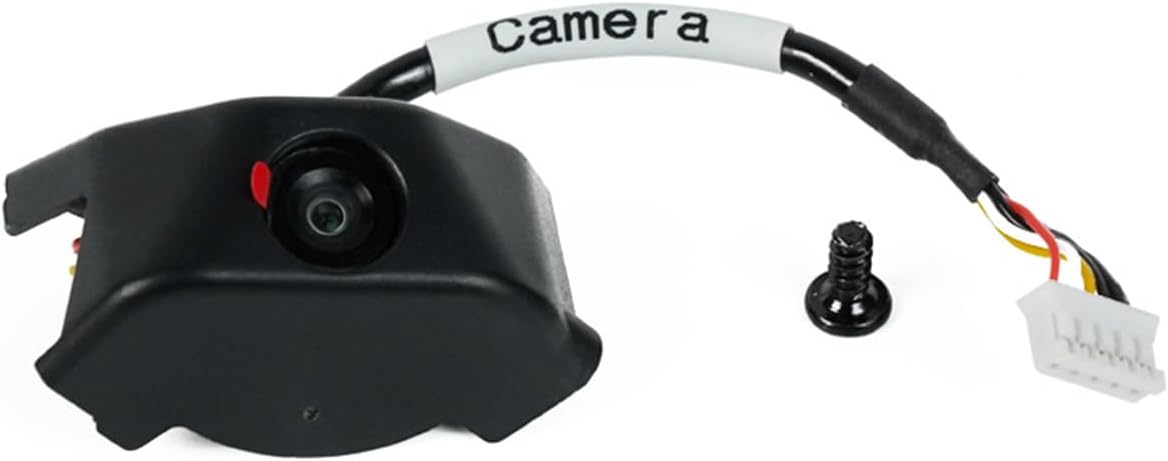
The Anycubic Kobra 3 camera offers an excellent balance of cost and functionality. Its standout feature is the replaceable frame, allowing users to customize the look of their setup.
We may earn a commission when you buy through this link, at no additional cost to you.
Real-time monitoring via the Anycubic app helps users catch issues like filament jams quickly. The ultra-clear resolution ensures that detailed views of the print bed are available at all times.
While the DIY frame adds fun, it requires some manual assembly. Additionally, compatibility is primarily focused on Anycubic Kobra series and Klipper printers, which might limit broader use.
For owners of Kobra printers on a budget, this is a highly recommended option. It provides essential monitoring features without the high cost of premium branded accessories.
The replaceable frame allows users to design unique enclosures. This adds a personal touch to the printer and encourages creativity in the 3D printing community.
Using the Anycubic app, users can view status anywhere. This connectivity is vital for remote workers who need to keep an eye on their prints while away.
We may earn a commission when you buy through this link, at no additional cost to you.
The Official Original FLASHFORGE AD5M Camera Smart Kit is tailored for users with the Adventurer 5M series. It provides a polished experience with specific design integration.
We may earn a commission when you buy through this link, at no additional cost to you.
Users can monitor prints remotely via the Flash Maker APP or PC browser. The kit also supports recording printing processes, which is ideal for sharing progress or reviewing errors.
The main limitation is its specialized nature. It works best with AD5M and AD5X models, so owners of other printers will not benefit from the same seamless integration.
For those invested in the Flashforge ecosystem, this kit offers reliable performance. The ability to record and share videos adds significant value to the printing workflow.
The Flash Maker app provides specific controls for the AD5M camera. This dedicated support ensures smoother operation compared to generic solutions.
Recording the entire print process helps users archive their work. This feature is particularly useful for portfolio building or debugging complex prints.
We may earn a commission when you buy through this link, at no additional cost to you.
This variant of the Creality Nebula Camera emphasizes night vision capabilities. It is designed to maintain clarity even in low-light environments over 24-hour monitoring periods.
We may earn a commission when you buy through this link, at no additional cost to you.
The 1080p resolution provides detailed views, and the manual focus knob allows users to adjust the lens for optimal sharpness. This level of control is beneficial for detailed prints.
However, the focus must be adjusted manually which requires some effort. Compatibility is still restricted to specific Creality pads and Ender models, limiting broader use.
Users needing constant night monitoring will find this version highly effective. The combination of HD quality and infrared light ensures that failures are caught at any hour.
The 940nm infrared fill light keeps the view clear in the dark. This feature is critical for long overnight prints that need supervision without disrupting sleep.
The manual focus knob gives users precise control over image sharpness. This allows for customization based on the specific printer geometry and camera angle.
We may earn a commission when you buy through this link, at no additional cost to you.
This kit simplifies remote control for Flashforge users. It is designed to integrate smoothly with the 5M series, making it easy to manage prints from a distance.
We may earn a commission when you buy through this link, at no additional cost to you.
The Flash Maker App allows users to view and control the printer remotely. This flexibility is essential for preventing waste when issues occur during unattended printing.
Installation is straightforward, with all components included for a quick start. However, its utility is strictly tied to Flashforge hardware, limiting general-purpose use.
Owners of the Adventurer 5M will appreciate the reliability and ease of use. It offers a hassle-free way to monitor prints without complex configurations.
Controlling the printer remotely helps manage the workflow efficiently. Users can pause or check status without needing to be in the same room.
The design prioritizes simplicity, avoiding complex steps. This allows users to start monitoring their prints almost immediately after unpacking the kit.
We may earn a commission when you buy through this link, at no additional cost to you.
The Anycubic Kobra 3 camera focuses on real-time monitoring and ease of assembly. It ensures that users can view their prints accurately at any time.
We may earn a commission when you buy through this link, at no additional cost to you.
Using the Anycubic app, the print status is accessible remotely. This is vital for identifying problems like layer adhesion issues quickly to save material and time.
Assembly is quick, taking only minutes to connect via USB. Support services are also strong, offering lifetime technical assistance to help users resolve any issues.
For Kobra owners, this camera provides a reliable link to their printers. The combination of DIY options and strong support makes it a solid choice for hobbyists.
Remote monitoring helps catch errors before they ruin a print. This early detection is crucial for saving filament and avoiding wasted time on failed jobs.
Lifetime technical support and 24/7 service provide peace of mind. Users can get professional help whenever they encounter setup or usage challenges.
We may earn a commission when you buy through this link, at no additional cost to you.
The Creality K1 AI Camera is specifically designed for the K1 printer series. It ensures that the camera fits perfectly and integrates well with the printer's system.
We may earn a commission when you buy through this link, at no additional cost to you.
The 1080P resolution ensures clear visuals for detailed monitoring. Logging into the Creality Cloud account allows automatic generation of time-lapse videos after printing is complete.
The setup is effortless, utilizing a reserved camera interface on the printer. This convenience enhances the overall user experience significantly for K1 owners.
Anyone using a K1 model will find this camera a natural extension of their device. It simplifies monitoring and capturing the printing process with minimal effort.
The reserved interface on the K1 printer simplifies installation. Users do not need to struggle with mounts or cables, making setup quick and clean.
Logging into the cloud account enables advanced features like video generation. This centralized management helps users keep their print history organized and accessible.
We may earn a commission when you buy through this link, at no additional cost to you.
This version highlights anomaly detection and real-time monitoring capabilities. The system can detect printing errors and pause the process to avoid material waste.
We may earn a commission when you buy through this link, at no additional cost to you.
Users can connect via USB and control the feed through the Creality Cloud app. The manual focus lens ensures that images remain sharp throughout the print cycle.
The ability to pause automatically is a significant safety feature. It adds a layer of protection that many other budget cameras lack, reducing the risk of total failure.
Owners looking for active error prevention should consider this camera. Its balance of clarity and intelligent features makes it a robust tool for reliable printing.
The camera actively watches for issues like filament jams. If an anomaly is detected, the system pauses the print to save filament and prevent damage.
Using a standard USB port makes connecting to the printer simple. This avoids proprietary connectors and ensures a stable physical link for data transfer.
We may earn a commission when you buy through this link, at no additional cost to you.
This camera features advanced spaghetti detection, helping to identify tangled filament early. It is designed for 24-hour monitoring to ensure print success throughout the day and night.
We may earn a commission when you buy through this link, at no additional cost to you.
The time-lapse feature allows users to visualize the entire process efficiently. Manual focus adjustments help ensure that the images remain clear and detailed.
While spaghetti detection is useful, it requires calibration to work best. Compatibility is limited to specific Creality models which is a consideration for users with other machines.
For those needing advanced safety features, this camera offers strong value. The combination of detection and recording helps users maintain high success rates.
Detecting tangled filament early saves significant material. This feature acts as an extra layer of protection against one of the most common printing errors.
Capturing the whole process provides a clear record. This helps users evaluate print quality and share results with the community easily.
We may earn a commission when you buy through this link, at no additional cost to you.
The Flashforge Camera Kit provides a straightforward way to monitor the Adventurer 5M. It allows users to record video files and export them via USB drive.
We may earn a commission when you buy through this link, at no additional cost to you.
The longer cable ensures that installation inside the printer is a breeze. This physical flexibility helps users position the camera optimally for a clear view.
As an official accessory, it offers reliability with the printer hardware. However, it lacks advanced app features compared to some third-party or newer solutions.
For simple and effective monitoring with basic recording needs, this kit is a solid choice. It ensures that users can keep track of prints efficiently.
Exporting video files to a USB drive keeps data accessible. This allows users to review prints later without relying solely on app storage.
The extended cable length simplifies routing and mounting. This reduces stress on connections and makes it easier to find the best viewing angle.
We may earn a commission when you buy through this link, at no additional cost to you.
Choosing the right camera involves considering compatibility, features, and ease of use. This guide breaks down the key factors to help you make an informed decision.
The most critical factor is whether the camera works with your specific printer model. Some cameras are designed for specific ecosystems like Creality or Flashforge, while others offer wider support.
Check the product specifications to ensure the camera connects directly to your machine without needing complex adapters or firmware changes.
High-definition video is essential for identifying small failures like stringing or layer shifts. Look for at least 1080p resolution to ensure that details are visible on your screen.
Better resolution helps you catch problems early, saving time and material on failed prints.
If you print overnight, night vision is a valuable feature. Cameras with infrared lights allow you to monitor prints in low-light conditions without disturbing the room or the printer.
This feature ensures that your prints remain visible even when ambient light is turned off.
Most cameras require a smartphone or web app for remote monitoring. Evaluate the app's features to see if it allows pause commands and clear status updates.
A well-designed app simplifies managing multiple printers from different locations effectively.
Time-lapse recording allows you to create videos of your printing process automatically. This can be a fun way to showcase your work to others or review your progress later.
Some cameras handle this automatically, while others might require manual settings for activation.
A camera that is difficult to install may discourage regular use. Look for models that offer clear instructions, standard USB connections, and flexible mounting options.
Easy setup ensures that you can start monitoring your prints immediately after purchase without frustration.
Advanced models may include AI detection to identify tangled filament. This feature can pause the printer automatically to prevent damage or wasted material.
If you often have filament issues, this safety net can be a valuable addition to your workflow.
The camera should be robust enough to withstand the environment near a 3D printer. Check for features like heat resistance and stable mounting points.
A durable camera ensures long-term performance without needing frequent replacements.
Begin by connecting the camera to your printer's USB port. Ensure the cable is secure and not interfering with moving parts of the print bed.
Download the associated app on your smartphone or computer. Follow the prompts to connect the camera to your WiFi network for remote access.
Adjust the camera angle and focus before starting a print. Make sure the lens is clean to capture clear images throughout the process.
Most cameras do not require a subscription. Basic monitoring features are typically included for free. However, some advanced cloud services might charge for premium storage or features.
You can use a generic camera, but it may lack specific integration like pause commands or time-lapse generation. Dedicated 3D camera apps offer better control over the printer interface.
No, the camera itself does not affect the physical quality of the print. However, it helps you monitor and catch errors that would otherwise ruin the quality.
Night vision is not strictly necessary but is highly recommended if you print during the night. It ensures visibility in dark rooms without needing to turn on bright lights.
Most cameras connect via a standard USB port. Simply plug the cable into the printer and the camera, then follow the app setup instructions to finalize the connection.
If the WiFi drops, remote monitoring will be lost until it reconnects. Some cameras store local data or continue to function locally without interrupting the print process.
Remote monitoring is a game-changer for 3D printing efficiency. The top picks in this guide offer reliable solutions for tracking progress and capturing memories of your prints.
Prioritize features that match your workflow. If you need night vision or automatic time-lapse, choose a model that excels in those specific areas.
Always check the latest pricing and availability before buying. Prices can change frequently, so verifying details ensures you get the best value for your investment.