
CyberPower AVRG900LCD
4.6Editor score
Affordable price
Automatic voltage regulation
Data line protection
This guide compares the top battery backup for gaming laptop options including UPS and inverters to help you choose the right power protection for your setup.
Gaming laptops require stable power to avoid data loss and hardware damage during unexpected outages. A reliable battery backup ensures your sessions continue smoothly without interruptions or corrupted files.
We evaluated ten top-rated power solutions based on capacity, outlet count, waveform type, and smart features. Each option balances performance and protection to suit different gaming needs and budgets effectively.
Every pick highlights key strengths and trade-offs to help you decide quickly. Prices fluctuate frequently so check current listings before purchasing to ensure you get the best value available today.
4.6Editor score

4.5Editor score

4.7Editor score
The following table compares all ten products across key specifications to help you quickly identify the best fit for your gaming laptop and peripheral needs.




The CyberPower CP1500PFCLCD stands out as the top choice for gamers seeking reliable power protection. With a 1500VA rating and pure sine wave output, it ensures your gaming laptop and peripherals receive clean power even during outages.
We may earn a commission when you buy through this link, at no additional cost to you.
Its ten outlets provide ample space for your laptop, monitor, speakers, and router. The color LCD panel offers real-time insights into battery health and load conditions, helping you anticipate maintenance needs before they become critical.
While it is pricier than basic models, the pure sine wave technology protects sensitive electronics like graphics cards and power supplies from potential harm. The connected equipment guarantee adds peace of mind for high value gaming rigs.
If you demand maximum compatibility and performance for your gaming setup, this unit delivers. It is ideal for stationary desks where space allows for its size and budget supports premium features.
Active PFC power supplies in gaming laptops require pure sine wave to avoid overheating or shutdowns. This unit guarantees compatibility with modern high efficiency power designs.
Six outlets provide battery backup while four offer surge protection only. This distinction helps you prioritize critical devices like your laptop while keeping peripherals safe from spikes.
We may earn a commission when you buy through this link, at no additional cost to you.
For gamers on a tight budget, the CyberPower AVRG900LCD offers solid protection without breaking the bank. Its 900VA capacity suits moderate setups with a laptop and one or two peripherals effectively.
We may earn a commission when you buy through this link, at no additional cost to you.
The automatic voltage regulation corrects minor power fluctuations without draining the battery, extending its lifespan. Data line protection adds a layer of security for network connections that might carry surges.
Simulated sine wave may not support all active PFC supplies but works well for standard laptop adapters. The trade off is acceptable for casual gamers prioritizing cost savings over premium power quality.
This unit is perfect for entry level gaming stations or secondary rooms. It provides essential backup and surge protection at a fraction of the cost of higher end models.
Its affordable price makes backup accessible for every gamer. You get reliable protection without investing heavily in features you may not need for basic setups.
AVR technology helps preserve battery life by stabilizing input voltage. This means less frequent battery cycling and longer overall unit lifespan for daily use.
We may earn a commission when you buy through this link, at no additional cost to you.
The CyberPower BRG1500AVRLCD2 leads with premium features including a rare five year warranty. This long coverage reflects confidence in build quality and durability for demanding gaming environments.
We may earn a commission when you buy through this link, at no additional cost to you.
Its twelve outlets offer unmatched flexibility for multi monitor setups and extensive peripheral gear. The color LCD panel delivers intuitive visual feedback on power status and battery life at a glance.
Automatic voltage regulation ensures stable power without unnecessary battery use. While the price is higher, the extended warranty and outlet count justify the investment for serious gamers.
Choose this model if you plan to keep your unit for years and need maximum connectivity. It balances performance, protection, and peace of mind better than most alternatives.
A five year warranty is uncommon in this category. It reduces long term risk and provides superior customer support for your power protection investment.
Twelve outlets accommodate complex gaming desks with ease. You can connect multiple screens and devices without needing additional power strips or adapters.
We may earn a commission when you buy through this link, at no additional cost to you.
The CyberPower CP1500AVRLCD3 offers robust capacity at a competitive price. Its 1500VA rating supports high wattage laptops and gaming monitors without strain during brief outages.
We may earn a commission when you buy through this link, at no additional cost to you.
The color LCD panel provides clear monitoring of power conditions and battery status. Combined with USB charging ports, it keeps mobile devices charged even when main power is lost.
Simulated sine wave works for most laptop adapters but may limit compatibility with specialized equipment. For general gaming use, this is a practical trade off given its strong performance.
This unit fits well in home gaming setups needing reliable backup. It balances essential features and cost effectively for users who want more than basic protection.
The color LCD screen makes it easy to track power status. You can quickly identify issues like low battery or overloads without reading technical logs.
Ten outlets allow you to power multiple devices securely. Six receive full backup while four offer surge protection for less critical peripherals like printers.
We may earn a commission when you buy through this link, at no additional cost to you.
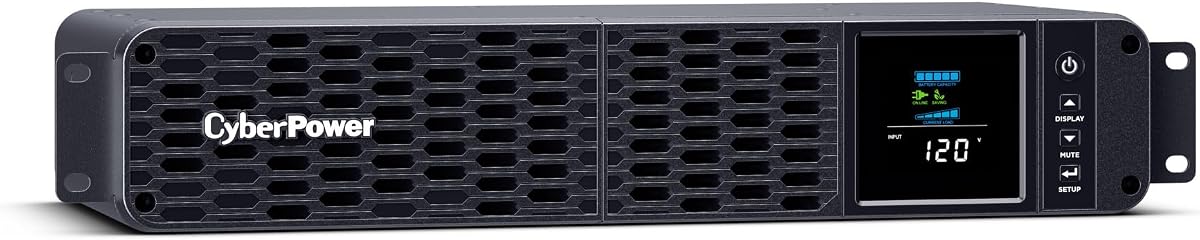
Designed for compact or rack installations, the CyberPower CP1500PFCRM2U saves space without sacrificing power quality. Its pure sine wave output ensures compatibility with modern active PFC laptop power supplies.
We may earn a commission when you buy through this link, at no additional cost to you.
The short depth design fits shallow cabinets or desk mounts easily. Eight outlets provide enough connectivity for most gaming setups while maintaining a clean professional look.
While more expensive and specialized, it excels in space constrained environments. The rackmount feature allows vertical integration into server racks or media centers seamlessly.
Opt for this model if you need a tidy setup with high quality power. It suits advanced users optimizing desk real estate without compromising on performance.
The short depth design frees up valuable desk space. This makes it ideal for smaller gaming areas where every inch counts for comfort and organization.
Pure sine wave ensures clean energy delivery. This prevents potential interference or efficiency issues that can arise with modified waveforms in sensitive electronics.
We may earn a commission when you buy through this link, at no additional cost to you.
The CyberPower EC850LCD focuses on energy efficiency with ECO mode outlets. When your laptop sleeps, connected peripherals turn off automatically reducing wasted power and energy costs.
We may earn a commission when you buy through this link, at no additional cost to you.
Twelve outlets offer generous connectivity at a budget friendly price. The LCD display keeps you informed of battery health and power status during daily use.
While it lacks USB ports and has lower capacity than premium units, its eco features stand out. It suits gamers conscious about environmental impact and ongoing energy bills.
Select this model for cost effective power saving. It is a smart choice for those who want automatic energy management alongside reliable backup protection.
ECO mode detects when devices are off and cuts power to peripherals. This reduces phantom load and lowers electricity usage when you are not gaming.
With twelve outlets you can connect every device you own. This eliminates the need for extra power strips and keeps your desk organized and tidy.
We may earn a commission when you buy through this link, at no additional cost to you.
The CyberPower CP1500AVRT delivers high capacity protection with a straightforward design. Its 1500VA rating ensures your gaming laptop and monitors stay powered during short outages reliably.
We may earn a commission when you buy through this link, at no additional cost to you.
Ten outlets provide plenty of connectivity while LED status lights offer quick visual feedback on power and battery status. The automatic voltage regulation stabilizes input without draining the battery.
Lacking an LCD screen means less detailed monitoring but simplifies operation. It suits users who prefer essential features over complex interfaces and data readouts.
This model is a practical choice for those needing strong backup. It balances capacity and functionality well for everyday gaming without unnecessary complexity or cost.
LED lights show power and battery status at a glance. This avoids the complexity of digital screens for users who just need basic operational feedback.
Automatic voltage regulation corrects fluctuations automatically. This reduces battery usage during minor outages keeping more charge available for actual blackouts.
We may earn a commission when you buy through this link, at no additional cost to you.
The APC Back-UPS Series offers a modular approach with two units totaling ten outlets. This flexibility lets you distribute power across different zones of your gaming setup conveniently.
We may earn a commission when you buy through this link, at no additional cost to you.
User replaceable batteries extend the lifespan of the system without needing a full replacement. USB charging ports ensure your devices stay powered even during long term power issues.
Split capacity may require planning for high load devices. However, the brand reputation for reliability makes it a trustworthy option for critical gaming equipment.
Choose this if you want scalable power protection. It suits setups needing distributed backup rather than a single centralized unit with high concentration of outlets.
User replaceable batteries mean you can maintain the system easily. This extends the life of your investment without purchasing a whole new unit when old batteries degrade.
Two units allow you to place backup where needed. You can dedicate one to your desk and another to networking gear for comprehensive coverage.
We may earn a commission when you buy through this link, at no additional cost to you.
This 3500W inverter converts DC power to AC allowing you to run high power laptops from external battery systems. It is ideal for gaming in vehicles or remote locations with DC sources.
We may earn a commission when you buy through this link, at no additional cost to you.
Pure sine wave output ensures safe power for sensitive electronics. The LED display and cooling fans provide real time monitoring and temperature control during intense usage sessions.
Lacking an internal battery means you must connect it to a separate DC source. This limits convenience but offers high versatility for off grid or mobile setups.
Select this for mobile gaming or emergency scenarios. It delivers high power on the go if you already have a compatible DC battery bank available.
With 3500W capacity it handles demanding loads easily. This supports gaming laptops and monitors simultaneously without risk of overloading the inverter.
Its compact portable design fits in tool boxes or vehicle armrests. This makes it easy to transport and set up wherever you need gaming power.
We may earn a commission when you buy through this link, at no additional cost to you.
Similar to its counterpart this inverter adds a smart screen for enhanced monitoring. It converts DC power to AC enabling high performance gaming on battery power outside traditional grids.
We may earn a commission when you buy through this link, at no additional cost to you.
Pure sine wave ensures compatibility with modern gaming gear. Cooling fans keep it running efficiently even under heavy loads typical during intense gaming sessions.
It requires an external DC battery to function which adds setup complexity. However, the smart screen offers better control and safety alerts for professional or advanced users.
Pick this for smart mobile power solutions. It suits those who need high wattage output and better monitoring while gaming from a vehicle or off grid location.
The smart screen provides detailed status information. This helps you monitor load and voltage levels precisely during critical usage.
Dual intelligent cooling fans maintain optimal temperature. This extends the device life and ensures stable performance under high load.
We may earn a commission when you buy through this link, at no additional cost to you.
Selecting the right power backup requires evaluating capacity, waveform, outlets, and smart features to match your specific gaming hardware and usage patterns.
Capacity determines how much equipment the unit can support during an outage. Gaming laptops with high end GPUs often draw significant power so check the watt rating carefully.
Ensure the VA rating exceeds your total device load to allow enough runtime for safe shutdown or continued gameplay.
Pure sine wave outputs clean power identical to utility sources and is safest for active PFC power supplies in modern laptops. Modified or simulated sine wave may work but risks overheating or incompatibility.
Invest in pure sine wave to protect sensitive gaming hardware and ensure warranty compliance from manufacturer standards.
Most setups need multiple outlets for the laptop monitor speakers and network gear. A higher outlet count provides flexibility without requiring extra power strips.
Look for a mix of battery backed and surge only outlets to balance protection and cost across your entire setup.
UPS units rely on internal batteries that degrade over two to five years. User replaceable designs let you maintain the system affordably without buying new hardware.
Confirm availability of replacement batteries and ease of swap before purchasing to avoid disposal waste and extra costs.
LCD screens provide real time status of battery life and load conditions. Smart software lets you monitor and manage power remotely from your gaming PC.
These features help avoid unexpected shutdowns and allow proactive battery maintenance for long term reliability.
Stationary setups benefit from rackmount or compact designs that save desk space. Portable inverters suit mobile gaming but require external DC sources.
Choose a form factor that fits your desk layout and usage scenario whether fixed at home or on the move.
Longer warranties indicate manufacturer confidence and reduce repair risk. Premium units often include extended guarantees covering both the battery and connected equipment.
Check what is covered in the warranty terms to understand protection limits for your hardware investment.
UL listed units meet strict safety standards for electrical components. This reduces fire risk and ensures compliance with local building codes and insurance policies.
Always verify third party safety certifications to guarantee the product has been tested for reliable operation.
Place the unit on a flat stable surface near your gaming desk and plug your laptop into a battery backed outlet for maximum protection during outages.
Connect essential devices like monitors and routers while peripherals like printers can use surge only outlets to conserve battery power during critical events.
Test the unit every three months by unplugging it to confirm backup works. Replace batteries every three years to maintain optimal performance and reliability.
Yes, gaming laptops with active PFC power supplies require pure sine wave output to avoid overheating and ensure stability. Modified sine wave units may cause compatibility issues or reduce battery life. Invest in pure sine wave for long term safety and performance of your hardware.
Runtime depends on total connected load and battery health. Typical units provide 10 to 30 minutes at half load. This is enough time to save files and shut down safely. For longer sessions choose higher capacity models for extended support.
Absolutely. Most gaming monitors require minimal power so connecting them to a UPS ensures they stay on when your laptop does. This prevents disconnection from online games and maintains session integrity.
Only if you need space efficiency or professional setups. Rackmount units save desk space and allow vertical integration. For standard home gaming, standard tower models are simpler and more cost effective.
Most units have a rear access panel for battery swap. Disconnect power and open the panel to remove the old pack. Connect the new battery and reset the system. Always follow the manufacturer instructions to avoid damage.
Yes all listed models include surge protection for connected equipment. They safeguard against power spikes from lightning or grid fluctuations. Ensure both your laptop and peripherals are plugged into protected outlets.
We recommend the CyberPower CP1500PFCLCD as the top choice for pure sine wave protection and reliable performance across gaming setups.
Prioritize capacity and waveform compatibility to ensure your high performance hardware stays safe and operational during unexpected power failures.
Prices fluctuate so verify current listings and features before purchase to get the best value for your gaming investment today.