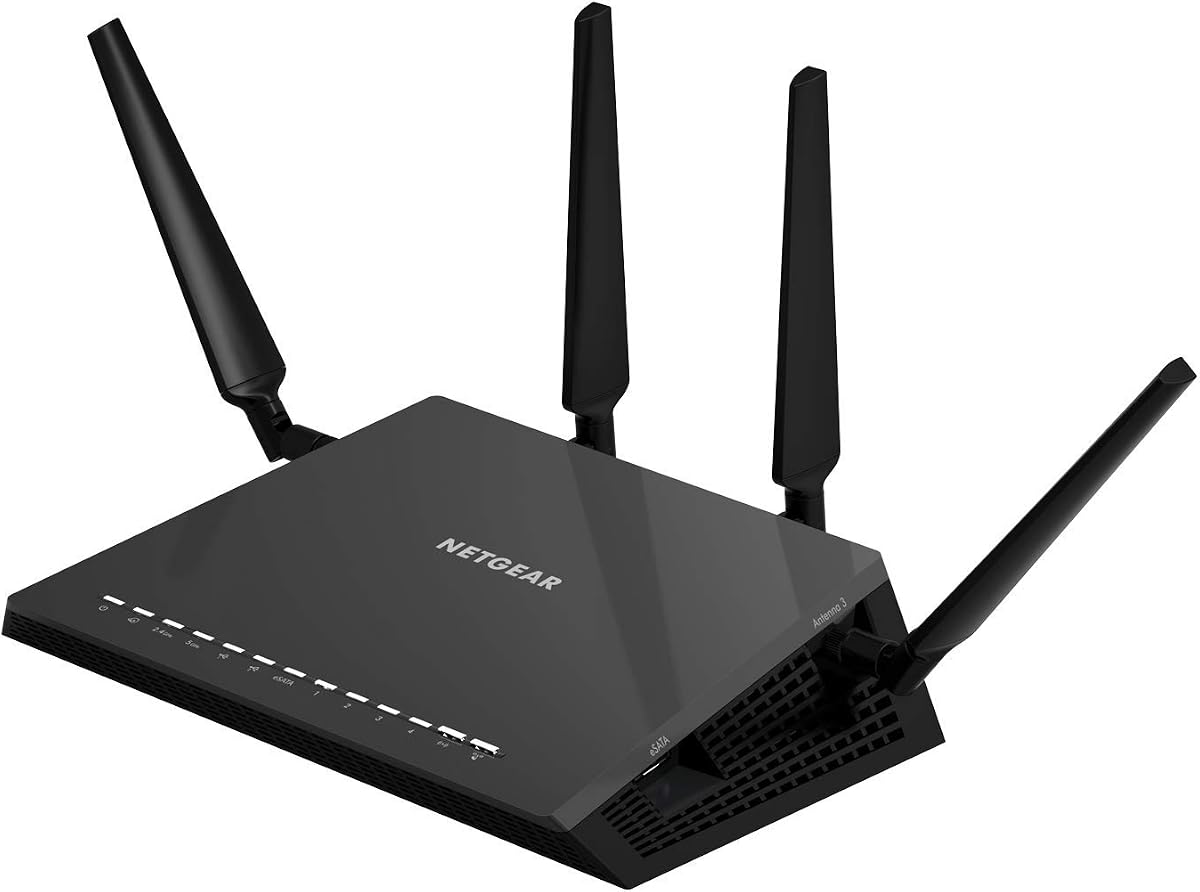
NETGEAR Nighthawk X4S Smart WiFi Router (R7800)
4.4Editor score
Up to 2500 sq ft coverage
1.7GHz dual core processor
Multiple USB ports
Explore our expert guide comparing the top AC2600 WiFi routers for speed, coverage, and security to help you choose the right network device for your home
Finding a reliable wireless network solution is essential for modern homes that rely on streaming, gaming, and remote work. An AC2600 WiFi router offers high-speed dual band connectivity to handle multiple devices simultaneously without lag or dropped connections.
We have evaluated leading models based on performance metrics, coverage area, security features, and user feedback to create this comprehensive list. Our analysis focuses on real world capabilities rather than just marketing claims to ensure you get accurate information.
Each pick highlights specific strengths such as budget friendliness, premium gaming features, or mesh compatibility to match different household requirements. Please note that product availability and pricing may change over time so verify details before purchasing.
4.4Editor score
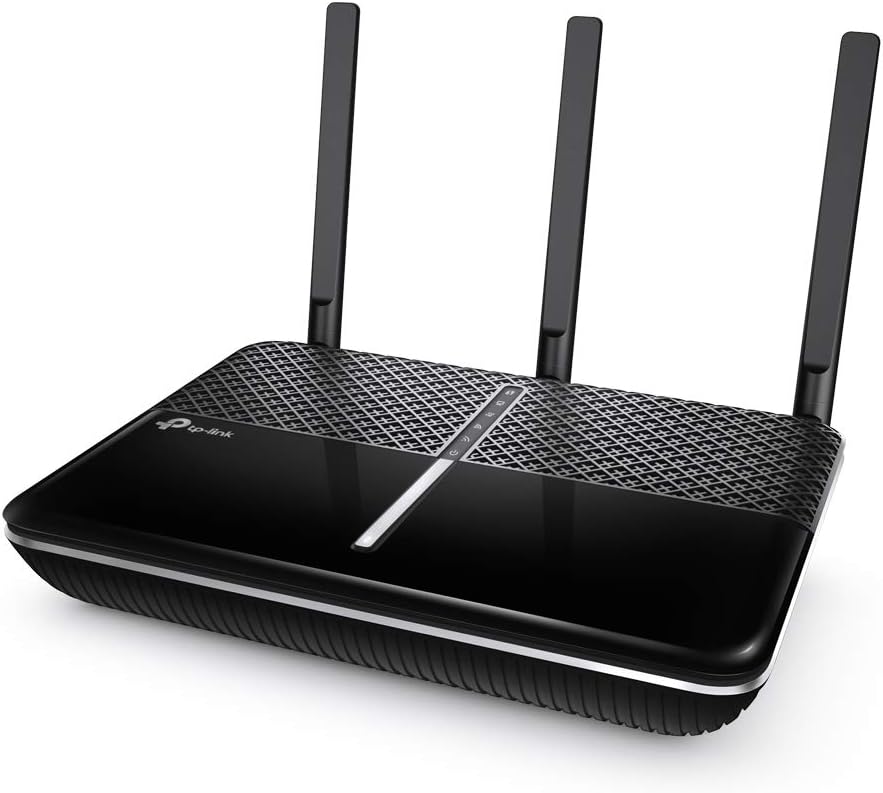
4.5Editor score

4.3Editor score
This side by side comparison highlights key specifications and features across all ten selected AC2600 WiFi routers to help you make an informed decision based on your specific network requirements.


The TP-Link Archer A10 stands out as a top choice for home networks requiring reliable AC2600 performance. With a 4.5 star rating from users it delivers consistent speeds and coverage for most households.
We may earn a commission when you buy through this link, at no additional cost to you.
Its MU-MIMO technology ensures multiple devices stream simultaneously without bandwidth contention. Beamforming directs signals to connected devices enhancing range and stability throughout the home environment.
While the web interface is functional it lacks some advanced customization options found in premium models. Additionally the absence of USB ports limits local storage sharing capabilities compared to competitors.
This router is ideal for families needing secure remote access and strong WiFi without breaking the budget. Its compatibility with Alexa adds convenience for voice controlled network management.
The built-in VPN server allows secure remote access to your home network via the internet ensuring privacy when working away from home.
Works with Amazon Alexa to let you turn on or off guest WiFi with simple voice commands for added convenience.
We may earn a commission when you buy through this link, at no additional cost to you.
The NETGEAR Nighthawk X4S R7800 offers premium AC2600 performance with extensive coverage for large homes. Its 4.4 star rating reflects strong reliability and user satisfaction across diverse usage scenarios.
We may earn a commission when you buy through this link, at no additional cost to you.
Equipped with a 1.7GHz dual core processor it handles heavy traffic and multiple devices with ease. Dynamic QoS prioritizes traffic ensuring lag free gaming and smooth streaming even during peak usage times.
The inclusion of USB 3.0 and eSATA ports allows for flexible local storage sharing which is rare in this category. However the higher price and complex interface may deter casual users seeking simplicity.
This router is best suited for power users and gamers who need maximum speed and control. Its ability to connect up to 45 devices makes it a robust choice for smart home ecosystems.
Get up to 2500 square feet wireless coverage ensuring every room stays connected without dead zones or signal drops.
Use 2 x 3.0 USB and 1 x eSATA ports to share storage drives and printers with any connected device easily.
We may earn a commission when you buy through this link, at no additional cost to you.
The TP-Link AXE75 brings advanced WiFi 6E capabilities at an accessible price point making it a standout budget option. With a 4.3 star rating it balances modern performance with cost effectiveness effectively.
We may earn a commission when you buy through this link, at no additional cost to you.
Its tri-band design includes a dedicated 6 GHz band providing more bandwidth and near-zero latency for gaming and video calls. This future proofing ensures compatibility with newer devices for years to come.
EasyMesh compatibility allows network expansion as your needs grow without replacing the main unit. While full benefits require 6GHz capable devices the investment pays off in speed and capacity.
Ideal for tech savvy users wanting modern standards without premium costs it handles multiple devices efficiently. The VPN client and server support adds layers of security for remote access needs.
The 6 GHz band brings more bandwidth faster speeds and near-zero latency for more responsive gaming and video chatting.
EasyMesh-compatible lets you extend network range by adding routers extenders or powerline adapters for a seamless whole-home connection.
We may earn a commission when you buy through this link, at no additional cost to you.
The D-Link DIR-2640 focuses on family safety with enhanced parental controls that allow detailed device management. A 4.1 star rating indicates reliable performance though some users report minor software inconsistencies.
We may earn a commission when you buy through this link, at no additional cost to you.
Its dual core processor accelerates applications and threads ensuring smooth network throughput. You can create profiles for each person to control internet access times which is vital for managing screen time.
The D-Link WiFi App simplifies setup and management making it accessible for non technical users. However some reviews note occasional app crashes or delays in pushing settings to the router.
This model is perfect for households prioritizing child safety and ease of use over raw speed. The mesh capability ensures you can expand coverage as needed without replacing the core device.
Create a profile for each person then associate devices to control when and how they access the network safely.
Reliable Gigabit Wired Performance lets you connect four devices for strong minimal latency connections perfect for smart TVs.
We may earn a commission when you buy through this link, at no additional cost to you.
The NETGEAR Nighthawk R7450 is designed to handle high bandwidth activities like gaming and 4K streaming efficiently. With a 4.3 star rating users praise its stability and ability to manage network traffic smoothly.
We may earn a commission when you buy through this link, at no additional cost to you.
Advanced QoS allows you to prioritize gaming traffic for lag-free performance. MU-MIMO ensures simultaneous data streaming to multiple devices without degrading speeds during peak usage times.
Its dual core processor boosts both wireless and wired performance ensuring smooth WAN-to-LAN data transfer. The lack of USB ports limits media sharing options but does not impact core routing functions.
Ideal for gamers who need consistent low latency connections this router delivers strong reliability. Its range amplifiers and external antennas ensure signals reach distant rooms effectively.
Advanced QoS ensures lag-free gaming and smoother streaming by prioritizing critical traffic types over background processes.
Dual-core processor boosts wireless wired and WAN-to-LAN performance ensuring efficient data flow throughout the network.
We may earn a commission when you buy through this link, at no additional cost to you.
The ASUS Blue Cave offers comprehensive network security with AiProtection powered by Trend Micro at no extra cost. A 3.9 star rating reflects mixed experiences but strong security and performance in key areas.
We may earn a commission when you buy through this link, at no additional cost to you.
Its commercial-grade security blocks external threats to protect connected devices automatically. Intel WiFi Technology enhances throughput ensuring speeds up to 2600 Mbps across dual bands effectively.
Alexa and Echo integration allows voice commands for network control making daily usage convenient. The unique design helps with heat dissipation but the web UI feels older compared to newer models.
Best for security-conscious users who want lifetime protection without subscription fees. AiMesh compatibility ensures you can add more routers easily to expand coverage across larger homes.
Commercial-grade network security with AiProtection blocks external threats to protect all connected devices permanently.
Alexa and Echo integration allows you to control your home network using simple voice commands easily.
We may earn a commission when you buy through this link, at no additional cost to you.
The NETGEAR Nighthawk RS90 brings WiFi 7 technology to handle ultra high speed internet plans efficiently. A 4.3 star rating shows users appreciate its speed and capacity for modern smart homes.
We may earn a commission when you buy through this link, at no additional cost to you.
With up to 3.6 Gbps speed it supports streaming and gaming without bottlenecks even with 50 devices connected. MU-MIMO and OFDMA allow simultaneous data transmission reducing latency significantly.
The 2.5 Gigabit WAN port unlocks multi-gig internet plans ensuring you can utilize full ISP speeds. This router requires existing modems and might need bridge mode configuration on some combos.
Ideal for those with gigabit+ plans seeking future-proof performance. While costly it offers unmatched speed and security features included out of the box.
Plug your modem into the 2.5 Gig WAN port to unlock multi-gig internet plans for maximum download speed.
Delivers up to 2000 sq ft of coverage ensuring every room stays connected even with walls and floors.
We may earn a commission when you buy through this link, at no additional cost to you.
The NETGEAR Nighthawk R6700AX is a solid mid-range option bringing WiFi 6 benefits to smaller homes. A 4.2 star rating confirms its reliability for streaming and video calls without lag.
We may earn a commission when you buy through this link, at no additional cost to you.
It delivers speeds up to 1.8 Gbps across bands ensuring smooth performance for 20 connected devices. Backward compatibility with WiFi 5 means older devices connect seamlessly without issues.
WPA3 encryption adds robust security features enabled out of the box for free. The Nighthawk app makes setup easy but advanced settings are less flexible than premium models.
Perfect for apartments or small homes needing faster WiFi than older routers provide. Its balance of price and performance makes it a safe choice for most users.
Covers up to 1500 sq ft for up to 20 connected devices without slowing down each other.
WPA3 encryption and automatic firmware updates keep devices and data protected without any extra subscription.
We may earn a commission when you buy through this link, at no additional cost to you.
The NETGEAR Nighthawk Pro Gaming XR500 is built specifically for competitive gamers needing minimal latency. With a 4.3 star rating even renewed units perform reliably for demanding online sessions.
We may earn a commission when you buy through this link, at no additional cost to you.
Geo-filtering connects you to the closest servers reducing ping spikes and jitters significantly. Advanced QoS bypasses congestion ensuring your gaming traffic gets priority over other network activity.
Its dual core processor network efficiency minimizes lag spikes during critical moments. While renewed units come with specific warranty terms they offer significant savings over brand new hardware.
Best for serious gamers who need consistent low ping connections. The dedicated express lane for gaming traffic ensures responsive gameplay even when others use the internet.
Use geo-filtering to connect to the closest servers and players so you can respond and dominate matches faster.
Minimize ping and maximize performance with four 1-Gigabit Ethernet ports for lag-free wired connectivity.
We may earn a commission when you buy through this link, at no additional cost to you.
The TP-Link Archer C2600 offers essential AC2600 performance for households that need straightforward networking. A 3.8 star rating suggests it works well for basic needs but may lack advanced features.
We may earn a commission when you buy through this link, at no additional cost to you.
High-speed Wi-Fi during heavy traffic usage is supported by a 1.4GHz dual-core processor. Four dual band antennas with high-powered amplifiers ensure solid signal strength throughout the home.
Parental controls let you set time limits keeping children safe online. The 2-year warranty and 24/7 technical support provide peace of mind if issues arise during setup.
This model fits users wanting reliable basic WiFi without complex apps. While it scores lower on reliability it remains a viable option for smaller homes needing budget connectivity.
Send targeted Wi-Fi signal to individual devices with beamforming for better performance and range.
Set time limits and keep children safe with easy-to-use parental controls directly from the router.
We may earn a commission when you buy through this link, at no additional cost to you.
Choosing the right AC2600 router depends on your home size device count and specific network needs such as gaming or security.
Coverage is critical for ensuring every room receives a strong signal without dead zones. Look for routers with external antennas and beamforming technology which direct signals toward devices rather than broadcasting blindly.
Measure your home square footage and choose a model that exceeds it slightly to handle walls or interference effectively.
Modern homes have dozens of smart devices that compete for bandwidth simultaneously. AC2600 routers support many connections but MU-MIMO technology ensures data streams go to devices simultaneously without contention.
If you have over 20 devices prioritize models with higher device capacity ratings to maintain consistent speeds.
A powerful dual-core processor handles traffic management encryption and multiple simultaneous requests efficiently. Weak processors can cause lag spikes even if raw wireless speeds are high.
Always check the CPU speed and architecture in specs to ensure the router can handle heavy loads without slowdown.
Network security protects sensitive data from external threats. Look for built-in firewall capabilities automatic firmware updates and encryption standards like WPA3.
Some models offer additional subscription security services so choose one that fits your long term safety needs.
If you manage internet access for children check for robust parental control tools. These should allow device profiles scheduling and content filtering.
Easy-to-use apps for parental controls make it simpler to manage restrictions without logging into complex web interfaces.
Consider wired connections for gaming consoles or smart TVs that need stability. Gigabit Ethernet ports are essential for fast local transfers.
USB ports allow storage sharing but if you do not need media servers you can save money by choosing models without them.
WiFi standards evolve so a router supporting newer features ensures longevity. While AC2600 is current newer WiFi 6 or 6E models might be better long-term investments.
Check if the model supports firmware updates that add features or security patches to extend its usable life.
Place your router in a central open location away from thick walls or metal objects to maximize signal range. Elevating it on a shelf helps signals spread horizontally across your home.
Regularly update firmware through the admin interface to patch security vulnerabilities and improve stability. Most modern routers allow automatic updates so enable that feature for protection.
Reboot your router once a month to clear cached data and reset connections for better performance. This simple step often resolves minor lag or connectivity issues.
AC2600 refers to the combined maximum wireless speed across two bands. It usually means 800 Mbps on 2.4GHz and 1733 Mbps on 5GHz adding up to 2600 Mbps total theoretical speed.
Yes AC2600 routers offer enough bandwidth for multiple 4K streams simultaneously. The 5GHz band specifically supports high-speed streaming without buffering even with other devices online.
Yes you need a separate modem or gateway to connect to your internet service provider. These routers connect to the modem via Ethernet and share the connection wirelessly.
MU-MIMO allows the router to communicate with multiple devices at the same time. This prevents bandwidth bottlenecks when many devices stream or download content simultaneously.
Most routers have a built-in parental control section in the app or web interface. You create profiles for devices or users set time limits and filter content directly there.
Some models like the Archer A10 include VPN servers allowing secure remote access. Others require you to set up a client separately for encryption on connected devices.
Our top picks cover various needs from budget-friendly options to premium gaming and security-focused solutions. The TP-Link Archer A10 offers the best balance of performance and ease of use for most households.
Prioritize coverage area and device capacity when selecting a router to ensure stable connections. Security features and parental controls are vital for families protecting their digital environment.
Always verify current pricing and compatibility with your ISP before purchasing. Tech deals change frequently so check for active promotions before finalizing your choice.