
Thermalright TL-C12C-S X5
4.7Editor score
Silent S-FDB bearing
17 ARGB light modes
High air flow cooling
This guide compares the top 10 addressable RGB fans for PC cases, CPU coolers, and radiators based on performance, noise levels, and lighting quality.
Addressable RGB fans are essential for modern PC builds that need efficient cooling and stunning visual effects. They synchronize with your motherboard to display vibrant colors while keeping temperatures low. Choosing the right model involves balancing airflow, noise, and lighting features for your specific case.
We analyzed ten highly rated models from trusted brands like Thermalright, Corsair, and Arctic. Each option offers unique benefits such as daisy chaining, reverse blades, or premium bearings. Our comparison focuses on real world performance metrics and user feedback to ensure reliable recommendations for your setup.
Each pick below highlights key specifications and ideal use cases to help you decide. Whether you need budget friendly packs or high end infinity mirrors, this list covers diverse needs. Prices and availability change frequently so check current details before purchasing your next cooling upgrade.
4.7Editor score

4.6Editor score
4.8Editor score
This table provides a side-by-side view of all ten products including their key specifications and ratings to help you compare performance and features quickly.




The Thermalright TL-C12C-S X5 offers exceptional value for builders needing multiple fans without breaking the bank. With a strong rating, it delivers reliable cooling and smooth lighting synchronization. This pack is perfect for case cooling setups where budget is a priority.
We may earn a commission when you buy through this link, at no additional cost to you.
Its S-FDB bearings ensure minimal noise while maintaining up to 1550 RPM. The atomized ARGB blades create a soft glow that matches coolers well. PWM control allows automatic speed adjustments based on motherboard temperature inputs.
While it lacks premium features like reverse blades or high static pressure, the trade-off is acceptable for standard case intake and exhaust. The included cables simplify wiring for five fans in a single setup.
Budget-conscious users seeking silent cooling and decent RGB effects should prioritize this option. It balances performance and cost effectively for mainstream PC builds.
S-FDB bearings reduce vibration noise for a quieter PC experience during gaming or work.
Purchasing a five-pack ensures you have enough fans for a full case build at a low cost.
We may earn a commission when you buy through this link, at no additional cost to you.
The CORSAIR RS120 ARGB stands out as a top choice for builders wanting easy installation and high performance. Its triple pack supports daisy-chain connections to reduce cable clutter. The Magnetic Dome Bearing ensures durability and quiet operation.
We may earn a commission when you buy through this link, at no additional cost to you.
AirGuide Technology directs airflow precisely toward hot components, improving radiator and heatsink cooling. It supports up to 2100 RPM for strong air volume. Eight LEDs per fan provide bright customizable lighting via motherboard software.
While it costs more than entry options, the enhanced airflow and streamlined wiring justify the price. Compatible motherboards are needed for ARGB sync but setup is simple once connected.
Users seeking high speed cooling with neat cable management should choose this model. It balances premium features with practical design for most gaming systems.
Anti-vortex vanes concentrate airflow on components like radiators for better cooling efficiency.
Connect multiple fans with one connector to simplify cable routing inside your PC case.
We may earn a commission when you buy through this link, at no additional cost to you.
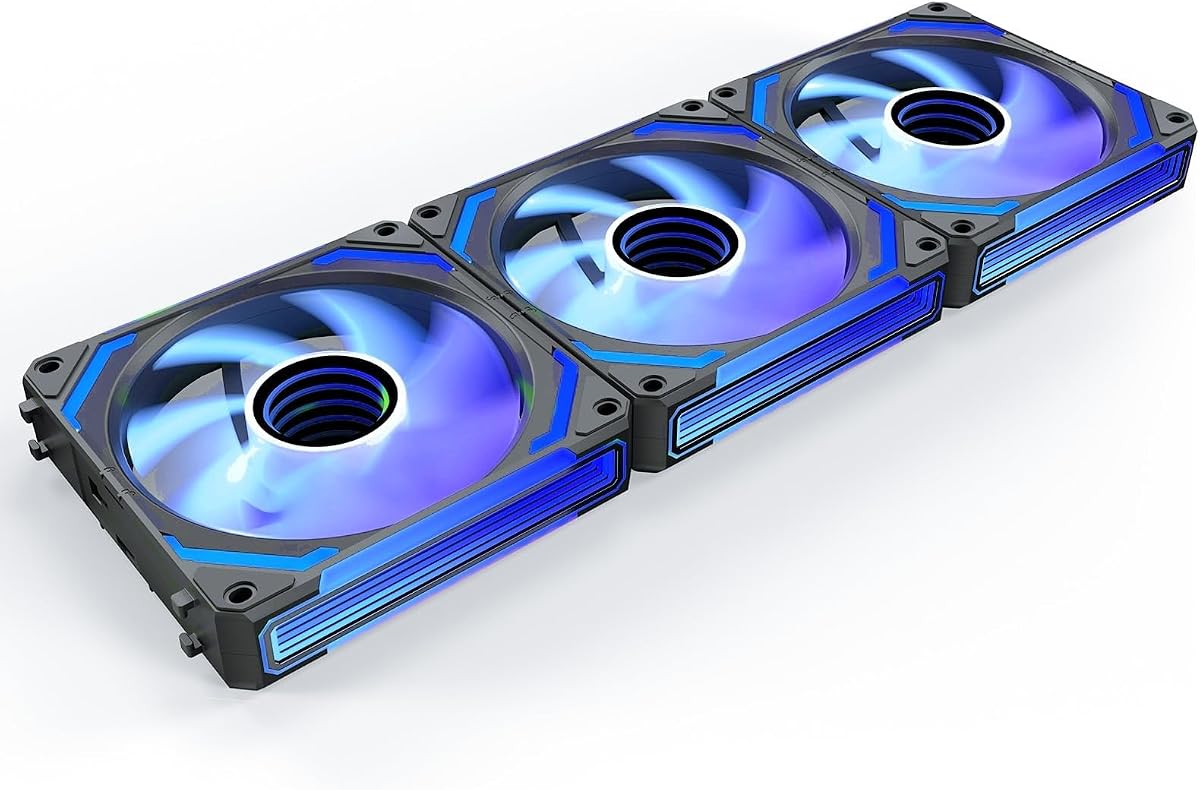
The AsiaHorse COSMIQ delivers a premium experience with its infinity mirror RGB lighting. This triple pack uses reverse blades to ensure lights are visible from the front. Music sync adds dynamic effects for immersive builds.
We may earn a commission when you buy through this link, at no additional cost to you.
It reaches 2000 RPM for strong cooling performance with 68.5 CFM. The FDB bearing keeps noise low even at full speed. Daisy chain wiring maintains a tidy interior while supporting custom controller options.
The unique lighting and reverse design justify the higher cost for aesthetic focused users. It is ideal for cases where visual impact is as important as cooling capacity.
High-end builders wanting unique lighting and reverse airflow should invest in this model. It offers a complete solution for show-case PC upgrades.
Deep layered lighting creates a luxurious look that enhances the build appeal significantly.
Reverse blades allow intake fans to display RGB without obstruction from frame cables.
We may earn a commission when you buy through this link, at no additional cost to you.
The ARCTIC P12 Pro A-RGB focuses on high static pressure for dense radiators and restricted airflow. Its speed adjusts up to 3000 RPM for powerful cooling. Fluid Dynamic Bearings ensure smooth operation with minimal noise.
We may earn a commission when you buy through this link, at no additional cost to you.
Precision manufacturing reduces vibrations for a quieter run. The redesigned blades balance performance with low noise especially at low speeds. PWM control stops fans completely under low temperature loads.
While it comes as a single fan, its performance is exceptional for demanding cooling needs. The focus on pressure makes it superior for water cooling setups with thick radiators.
Users prioritizing radiator performance over quantity should choose this model. It offers premium airflow quality for demanding thermal management.
Optimized to push air through restrictive radiator fins for maximum heat dissipation.
Automatic balancing minimizes gaps for smooth running and extended reliability.
We may earn a commission when you buy through this link, at no additional cost to you.
The Thermaltake CT120 EX ARGB simplifies wiring with its MagForce 2.0 magnetic daisy chain. This triple pack supports 5V motherboard sync for 16.8 million colors. Hydraulic bearings ensure silent and reliable long term operation.
We may earn a commission when you buy through this link, at no additional cost to you.
Anti-vibration mounting systems reduce noise transmission. Nine LEDs per fan allow vivid lighting across the case. The magnetic design reduces cables needed for multiple fan connections.
This model is ideal for users who want neat cable management without specialized hubs. It balances visual flair with cooling performance for standard cases.
Builders looking for magnetic connections and strong ARGB should select this pack. It offers ease of use and vibrant visuals.
Connectors lock magnetically to save ports and reduce clutter in the build.
Embedded mounts absorb shock for a quieter system during high fan speeds.
We may earn a commission when you buy through this link, at no additional cost to you.
This 6 Pack includes both forward and reverse fans to simplify case airflow design. Each fan contains 28 ARGB LEDs for superior brightness. The hub combines PWM and ARGB control into one unit for easier setup.
We may earn a commission when you buy through this link, at no additional cost to you.
Reverse fans are optimized for bottom or side intake positions maintaining visual consistency. The three sided prism design adds depth to the lighting. Intelligent PWM control adjusts speed based on temperature.
While it has slightly lower ratings, it offers unique reverse fan utility for balanced builds. The controller reduces cable mess but adds one more component to manage.
Users wanting reverse blades with a hub should consider this pack. It covers intake and exhaust needs in one box.
Includes reverse fans to ensure lighting remains visible on intake slots.
Combined hub manages PWM speeds and lighting effects from a single point.
We may earn a commission when you buy through this link, at no additional cost to you.
The Thermalright TL-C12C-S X3 offers a smaller 3-pack version for limited builds. It shares the same silent S-FDB bearings and lighting quality as the 5-pack. PWM control maintains optimal speeds without manual intervention.
We may earn a commission when you buy through this link, at no additional cost to you.
This option is suitable for users needing three intake or exhaust spots specifically. The soft ARGB blades reflect light effectively for a clean aesthetic. It fits standard cases well.
While cables are shorter than some models, the reliability remains consistent for Thermalright fans. It is a straightforward choice for smaller builds.
Users needing a compact 3-pack with trusted performance should choose this. It balances budget and quality effectively for standard needs.
S-FDB bearings maintain quiet operation and extended fan life over time.
Speed adjusts automatically via PWM for energy efficiency and cooling balance.
We may earn a commission when you buy through this link, at no additional cost to you.
This Thermalright TL-C12C-S X5 variant focuses on CPU cooler and case synergy. It provides strong airflow and minimal noise with S-FDB bearings. The lighting matches standard coolers for cohesive visual appeal.
We may earn a commission when you buy through this link, at no additional cost to you.
Users get five fans with PWM temperature control for variable speeds. It handles both dry heat removal and high CPU temps. The cable length supports series control easily.
While similar to other Thermalright fans, this version ensures consistent cooling across a setup. It is ideal for balanced builds needing multiple points.
Builders prioritizing cooling synergy over lighting effects should pick this pack. It provides reliability for standard PC thermal needs.
Designed to complement CPU coolers for efficient overall system cooling.
Long cables allow multiple fans to connect via PWM series control.
We may earn a commission when you buy through this link, at no additional cost to you.
The Thermaltake CT120 ARGB provides a simple 2-pack with high RPM potential. Its seven blade design optimizes airflow volume. Daisy chain design reduces cables for easier setup in smaller cases.
We may earn a commission when you buy through this link, at no additional cost to you.
Hydraulic bearings ensure durability and noise reduction. Anti-vibration mounts help quiet the system. This pack suits users needing two fans for intake or exhaust.
While quantity is limited, the 2000 RPM allows aggressive cooling. It fits well in basic builds needing a quick upgrade.
Users needing a compact 2-pack with solid performance should consider this. It offers practical performance for straightforward cooling.
Optimized blades increase airflow efficiency and pressure for better cooling.
Daisy chain reduces wiring steps for faster installation of two fans.
We may earn a commission when you buy through this link, at no additional cost to you.
The Thermaltake LE120 ARGB comes with a PWM splitter to simplify installation. It delivers 66.1 CFM airflow for consistent cooling. Hydraulic bearings keep noise low during daily use.
We may earn a commission when you buy through this link, at no additional cost to you.
Nine LEDs per fan offer vivid lighting effects. Daisy chain cables maintain neat routing inside cases. This triple pack is a reliable choice for standard replacements.
Its high rating reflects stable performance and ease of use. It suits users wanting dependable fans without complex features.
Builders needing reliable fans with included splitters should select this pack. It provides consistent airflow and lighting quality.
A 3-way splitter reduces wiring complexity for quick setup.
66.1 CFM ensures steady cooling across cases without noise.
We may earn a commission when you buy through this link, at no additional cost to you.
Selecting the right fans requires considering airflow, noise, compatibility and lighting features to match your PC case and cooling needs.
Airflow measured in CFM determines how much air moves through your case for general ventilation. Static pressure measured in mm-H2O is vital for pushing air through radiators or dense filters. High pressure fans work best on liquid coolers while high airflow suits open cases.
Choose high pressure for radiators and high airflow for open case setups.
Noise measured in dBA affects your comfort during gaming or work. Look for fans with bearings like FDB or hydraulic to reduce friction noise. Lower dBA ratings are better for silent builds while higher RPM fans may be louder.
Prioritize bearings that reduce vibration for quieter operation.
Addressable RGB LEDs allow individual pixel control for advanced effects. Check if the fan supports 5V 3-pin headers or 12V 4-pin standards. More LEDs and diffused blades create softer light while direct LED hubs may look harsh.
Ensure the lighting standard matches your motherboard to sync colors properly.
Bearings determine the lifespan and smoothness of fan rotation. Fluid Dynamic and magnetic bearings offer long life and less noise compared to basic sleeve bearings. High quality bearings extend reliability in continuous high speed use.
Opt for FDB or magnetic bearings for long-term silent reliability.
Daisy chain support allows connecting multiple fans to one controller to reduce cables. This simplifies routing and prevents clutter inside the case. Look for magnetic connectors or dedicated chain cables to maximize efficiency.
Use daisy chain setups to minimize cable clutter in tight cases.
Check fan size compatibility such as 120mm or 140mm for your case slots. Ensure headers match PWM for speed and RGB for lighting. Some packs include controllers to ensure compatibility with older motherboards.
Verify fan dimensions and header types before purchasing to avoid issues.
Reverse blades allow intake fans to display RGB from the front without obstruction. They balance aesthetics and airflow when placed on the front of cases. Standard fans show the frame on intake while reverse fans show the blades.
Choose reverse fans for intake positions if you want visible lighting.
Some packs include hubs to manage PWM and lighting separately. Controllers allow manual adjustments without software or motherboard support. They help reduce cable clutter but add another internal component.
Use controllers for lighting control if your motherboard lacks ARGB support.
Install fans with the airflow direction arrows facing inward for intake and outward for exhaust. Connect PWM cables to motherboard fan headers for speed control and RGB to 5V pins for lighting.
Ensure all cables are routed behind the motherboard tray using zip ties to avoid obstruction. Secure fans with screws or spring mounts to reduce vibration noise over time.
Regularly clean dust from blades and frames using compressed air to maintain cooling efficiency. Update lighting software to enable advanced features and ensure smooth synchronization.
PWM fans control speed via motherboard signals for cooling efficiency while ARGB fans add addressable lighting. Most modern fans support both for speed and color control simultaneously.
Yes you need a motherboard with a 5V 3-pin ARGB header. Some cases include controllers for systems without native motherboard support.
You can mix brands but lighting sync might fail if headers differ. Stick to one brand for lighting effects to avoid software conflicts.
Reverse fans show the blades instead of the frame when installed as intake. This maintains visual consistency with exhaust fans on the rear.
Most cases need three fans for balanced intake and exhaust. Two front intake and one rear exhaust work for most setups.
RGB fans use slightly more power due to LEDs but it is negligible. The impact on power supply requirements is minimal.
The top three picks for Thermalright and Corsair and AsiaHorse offer the best balance of performance and aesthetics. Each delivers unique strengths for different case layouts and priorities.
Prioritize noise levels and cooling performance when selecting your final models. Aesthetic features like reverse blades or infinity mirrors should not overshadow thermal needs.
Prices and availability change so verify current details on Amazon before purchasing. Check reviews and support policies to ensure reliable long term use.