
Omada SG3452
4.3Editor score
L2+ Smart Managed
Static Routing Support
Standalone Management Options
This guide compares the top 48 Port Gigabit Managed Switch models for performance, security, and manageability to help you choose the right network hardware.
Selecting the right network hardware is crucial for maintaining high performance and security in modern business environments. A reliable 48 Port Gigabit Managed Switch provides the bandwidth and control needed for growing organizations. These devices enable administrators to segment traffic, prioritize critical applications, and monitor network health effectively.
To compile this list, we evaluated each switch based on its management capabilities, security features, port configuration, and overall reliability. We considered factors like fanless design, PoE support, and integration with cloud management platforms. Our goal is to highlight models that offer the best balance of functionality and ease of use for various deployment scenarios.
Each pick in this guide showcases specific strengths such as advanced routing, centralized control, or energy efficiency. We have organized the products to help you find the ideal solution for your specific infrastructure needs. Please note that availability and specifications can change, so verifying current details before purchasing is always recommended.
4.3Editor score

4.7Editor score
4.4Editor score
The following table provides a side-by-side comparison of all ten models reviewed in this guide. It highlights key specifications and features to help you quickly identify which switch aligns best with your networking requirements.


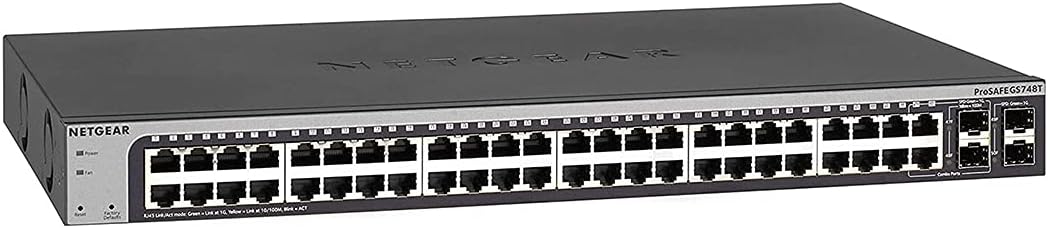


The TP-Link SG2452LP stands out as the top choice for organizations needing a robust and manageable network solution. With a high user rating, this switch delivers reliable performance across various environments. Its integration with the Omada platform offers centralized control that simplifies network administration significantly.
We may earn a commission when you buy through this link, at no additional cost to you.
One of its key strengths is the Omada Cloud Management Platform which allows for remote configuration and monitoring. This feature is ideal for multi-site deployments where consistent policies are essential. Additionally, the fanless design ensures silent operation, making it suitable for office spaces or conference rooms where noise is a concern.
While it offers extensive security features like 802.1X and ACLs, setting them up requires some technical knowledge. The learning curve might be steep for users unfamiliar with network administration. However, once configured, these features provide a strong defense against common network threats and unauthorized access.
This switch is best suited for businesses that value scalability and centralized management. If you are looking for a switch that can grow with your network and offer peace of mind through strong security, the SG2452LP is an excellent investment.
The Omada Cloud Management Platform enables you to manage your network from anywhere, ensuring consistent policies across all sites.
The passive cooling design eliminates fan noise, creating a quieter environment for offices and sensitive areas.
We may earn a commission when you buy through this link, at no additional cost to you.
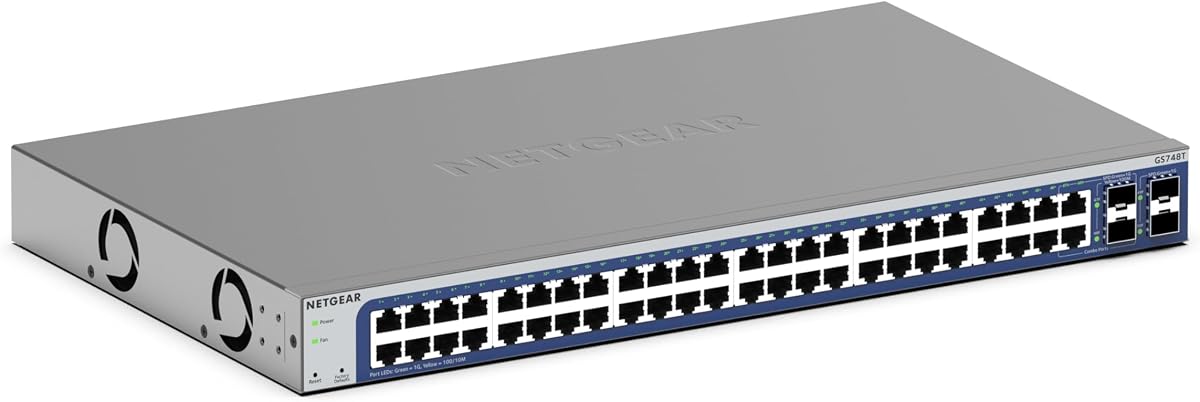
The NETGEAR GS748T is a powerful option for those needing high-speed connectivity and fiber optic capabilities. It features 48 gigabit ports alongside 4 SFP ports, allowing for flexible network expansion. The smart managed interface provides a balance between ease of use and advanced control.
We may earn a commission when you buy through this link, at no additional cost to you.
Its inclusion of NETGEAR Insight allows for remote management, which is a significant advantage for distributed networks. The compact metal design supports both desktop and rack mounting, offering versatile installation options. Energy efficiency is also a priority, reducing power consumption without sacrificing performance.
Some users might find the smart managed features less comprehensive compared to fully managed switches. The interface is straightforward but may lack some advanced routing options found in higher-end models. However, for most small to medium businesses, the provided features are sufficient.
This switch is ideal for businesses that require fiber connectivity and remote management. If you need to expand your network with fiber optics and want a reliable management tool, the GS748T is a strong contender.
The 4 SFP ports enable seamless integration with fiber optic networks, providing high-speed uplinks and extended range.
NETGEAR Insight allows you to monitor and manage your network from anywhere, simplifying administration tasks.
We may earn a commission when you buy through this link, at no additional cost to you.
The Omada SG3452 offers excellent value with its L2+ features and SDN compatibility. It provides a robust set of tools for network segmentation and routing without a high cost. The switch supports both standalone and integrated management, offering flexibility for different network architectures.
We may earn a commission when you buy through this link, at no additional cost to you.
One of its standout features is the static routing capability which helps optimize internal traffic flow. This is particularly useful for networks that need to segment traffic efficiently. The integration with the Omada SDN platform allows for a unified management experience across various devices.
However, to fully utilize its features, users must ensure their controllers are equipped with SDN firmware. This requirement might add a layer of complexity to the initial setup. Despite this, the switch remains a cost-effective choice for many small to medium businesses.
This model is perfect for users looking for advanced features at a budget-friendly price. If you need static routing and SDN integration without breaking the bank, the SG3452 is a highly recommended option.
L2+ static routing helps route internal traffic efficiently, improving network performance and reducing congestion.
Compatibility with Omada SDN allows for centralized control and streamlined network management across multiple sites.
We may earn a commission when you buy through this link, at no additional cost to you.
This version of the NETGEAR GS748T is notable for its lifetime limited hardware warranty, providing long-term security for your investment. It comes with comprehensive support including 24/7 chat with experts, ensuring help is available when needed. The switch is designed for quiet operation, suitable for noise-sensitive environments.
We may earn a commission when you buy through this link, at no additional cost to you.
The smart software interface offers a user-friendly experience for managing network settings. It supports both desktop and rack mounting, making it versatile for different setups. The inclusion of SFP ports adds some flexibility for uplinks, though it is limited compared to other models.
While the warranty is a strong selling point, the smart managed features may not satisfy users needing deep customization. The interface is intuitive but lacks some advanced controls found in fully managed switches. Still, for reliability and support, it is a solid choice.
This switch is best for businesses prioritizing warranty and support. If long-term reliability and accessible customer service are your main concerns, this model provides peace of mind and consistent performance.
The lifetime limited hardware warranty ensures long-term protection, covering defects and failures for the life of the product.
Access to 24/7 expert chat means you can get assistance anytime, reducing downtime and troubleshooting time.
We may earn a commission when you buy through this link, at no additional cost to you.
The TP-Link TL-SG3452P is an excellent choice for networks requiring extensive PoE capabilities. With a 384W power budget, it can support numerous devices like access points and IP cameras. The auto-recovery feature ensures that connected devices reboot automatically if they freeze, reducing maintenance.
We may earn a commission when you buy through this link, at no additional cost to you.
Integration with the Omada SDN platform allows for centralized management and advanced features. The switch supports IPv6 and static routing, making it future-proof for evolving network needs. Its reliability is underscored by a high user rating and robust build quality.
While the PoE budget is generous, the switch can generate heat which may require good ventilation. The rack depth is limited, which might be a consideration for deep server racks. However, these are minor trade-offs for the functionality it provides.
This switch is ideal for businesses deploying many PoE devices. If you need a reliable and feature-rich PoE switch that integrates well with modern network platforms, the TL-SG3452P is a top recommendation.
PoE auto recovery automatically reboots connected devices that freeze, ensuring continuous operation without manual intervention.
Omada SDN integration provides a unified management experience, simplifying network administration across multiple devices.
We may earn a commission when you buy through this link, at no additional cost to you.
The NETGEAR GS348 is a straightforward solution for networks that do not require advanced management. It offers 48 gigabit ports in a plug-and-play format, eliminating the need for configuration. The fanless design ensures silent operation, which is beneficial for quiet environments.
We may earn a commission when you buy through this link, at no additional cost to you.
Its energy efficiency aligns with modern environmental standards, reducing power consumption without compromising speed. The compact metal design supports both desktop and rack mounting, offering installation flexibility. It is a reliable choice for simple network expansions.
Since it is unmanaged, you cannot segment traffic or prioritize bandwidth. This limitation makes it unsuitable for complex networks needing detailed control. However, for straightforward connectivity needs, it performs exceptionally well.
This switch is best for users needing simple and reliable connectivity. If you want a reliable network expansion without any setup, the GS348 is an ideal choice.
The unmanaged design allows for immediate setup without any configuration, making it perfect for quick deployments.
The fanless design ensures silent performance, making it suitable for environments where noise is a concern.
We may earn a commission when you buy through this link, at no additional cost to you.
This renewed version of the NETGEAR GS748T offers a cost-effective way to access enterprise-grade features. It includes the same 48 gigabit ports and SFP capabilities as the new model, allowing for flexible network expansion. The lifetime protection provides additional assurance for your investment.
We may earn a commission when you buy through this link, at no additional cost to you.
The ProSAFE lifetime protection ensures that the device remains covered for its lifespan, though warranty terms may vary for renewed items. It supports the same smart managed interface, making it easy to configure and manage. This is a great option for budget-conscious businesses.
However, as a renewed item, there is a risk of wear and tear. The absence of a standard warranty means you rely on the specific renewal terms provided. Despite this, the functionality remains intact for most users.
This switch is ideal for those looking to save money without sacrificing features. If you need a reliable managed switch and are comfortable with renewed hardware, this is a great option.
The renewed status offers significant savings while retaining the core functionality of the full-featured GS748T.
ProSAFE lifetime protection adds a layer of security to your purchase, ensuring long-term support and coverage.
We may earn a commission when you buy through this link, at no additional cost to you.
The UBIQUITI EdgeSwitch is designed for high-throughput performance with a switching capacity of 140 Gbps. It features 48 gigabit ports and additional SFP ports for uplinks. The non-blocking architecture ensures that all ports can operate at full speed simultaneously.
We may earn a commission when you buy through this link, at no additional cost to you.
Its DC input option allows for redundancy or standalone power, which is useful in data centers. The compact design supports rack or wall mounting, fitting well in various setups. Despite its performance, it is a managed switch with limited advanced features compared to enterprise models.
The lack of PoE and advanced routing means it is best suited for simple high-speed connectivity. Users looking for deep customization may find the management interface too basic. However, for raw performance, it stands out.
This switch is perfect for users needing high speed and reliability. If you require a switch that can handle heavy traffic without bottlenecks, the EdgeSwitch is an excellent choice.
The non-blocking switching performance ensures that all ports can run at full speed without congestion, ideal for high-demand networks.
The DC input option provides power redundancy or standalone power, enhancing reliability in critical setups.
We may earn a commission when you buy through this link, at no additional cost to you.
The YuanLey L3 Switch offers advanced routing capabilities with its L3 management features. It includes 6 10G SFP+ ports, providing high-speed uplinks for modern networks. The 460W PoE budget supports many devices, making it versatile for diverse deployments.
We may earn a commission when you buy through this link, at no additional cost to you.
Its fanless design ensures silent operation, which is beneficial for office environments. The switch supports VLAN, QoS, and ACL, giving you granular control over traffic and security. Despite being from a less known brand, it delivers solid performance.
However, the setup can be complex for beginners. The documentation may not be as comprehensive as larger brands. Additionally, brand recognition might impact support responsiveness. Still, for the features offered, it is a great value.
This switch is ideal for users needing L3 features on a budget. If you want advanced routing and high-speed uplinks without a premium price, the YuanLey L3 Switch is a strong contender.
L3 management allows for static and dynamic routing, helping to optimize traffic flow and reduce congestion.
The 6 10G SFP+ ports provide high-speed uplinks, ensuring your network can handle demanding data transfer needs.
We may earn a commission when you buy through this link, at no additional cost to you.
The NETGEAR GS348TPv2 is a robust option for networks requiring PoE and smart management. With 48 PoE ports and a 380W power budget, it can support many devices. The smart interface offers a balance of ease of use and control.
We may earn a commission when you buy through this link, at no additional cost to you.
Its compact metal design supports both desktop and rack mounting, providing installation flexibility. The inclusion of SFP ports allows for fiber connectivity, adding scalability. Energy efficiency ensures lower power consumption and operational costs.
While the management interface is user-friendly, it lacks some advanced routing features. The cost is higher compared to unmanaged or basic managed switches. However, for reliability and PoE support, it delivers strong value.
This switch is best for businesses needing a reliable PoE switch. If you want managed capabilities with extensive PoE support, the GS348TPv2 is a great choice.
The 380W power budget supports high-power devices like cameras and access points, making it versatile for diverse deployments.
The smart interface provides easy-to-use managed control, allowing for secure setup and access monitoring.
We may earn a commission when you buy through this link, at no additional cost to you.
Choosing the right switch involves considering several critical factors to ensure it meets your network needs.
Managed switches provide control over traffic, security, and VLANs. Unmanaged switches are plug-and-play with limited control. Choose managed for flexibility and security.
For complex networks, a managed switch is essential to optimize performance and security.
PoE switches supply power to devices like cameras and access points. Ensure the total budget meets your device needs. A higher budget offers more flexibility.
Verify the PoE budget to support all connected devices without overloading the system.
Gigabit ports provide fast connectivity for most devices. SFP ports enable fiber optic uplinks for longer distances. Consider your uplink needs carefully.
Include SFP ports if you need high-speed fiber connections for scalability.
A user-friendly interface simplifies configuration. Some offer cloud management for remote control. Evaluate ease of use for your team.
Prioritize interfaces that match your team's technical expertise and management style.
Security features like 802.1X and ACLs protect your network. Strong security prevents unauthorized access. Ensure the switch supports necessary protocols.
Invest in a switch with robust security to safeguard sensitive data.
Fanless designs are quieter and ideal for offices. Rack mounting is standard for server rooms. Consider where the switch will be installed.
Choose a design that fits your physical space and noise requirements.
Ensure the switch can grow with your network. Look for stacking or easy expansion options. Future-proofing prevents early replacement.
Select a switch that can handle future growth without major upgrades.
Reliable support and warranty protect your investment. Lifetime warranties offer long-term security. Check support availability and terms.
Prioritize models with comprehensive support to ensure quick issue resolution.
Begin by placing the switch in a well-ventilated area. Proper airflow prevents overheating and ensures longevity. Avoid enclosing it in tight spaces.
Configure your network settings via the web interface or CLI. Set up VLANs and security features according to your needs. Save configurations to prevent data loss.
Regularly update the firmware to patch vulnerabilities. Monitor network traffic to identify any anomalies. Perform periodic restarts to clear cache and improve performance.
Managed switches allow configuration of settings like VLANs and security, offering more control. Unmanaged switches are plug-and-play with no configuration options. Managed switches are better for complex networks needing traffic optimization.
You need a PoE switch if you plan to power devices like IP cameras or access points over Ethernet. It simplifies installation by eliminating separate power cables. If you have such devices, a PoE switch is essential.
It depends on your network needs. At least two SFP ports are useful for uplinks. If you have multiple fiber connections, more ports provide better flexibility for scaling.
Fanless design means the switch uses passive cooling without fans. It results in silent operation, making it ideal for quiet environments like offices or classrooms. It also reduces maintenance needs.
You can use a managed switch in an unmanaged mode initially, but full features require configuration. It allows basic connectivity out of the box. Configuration unlocks advanced security and traffic management.
Enable strong passwords and update firmware regularly. Use security features like 802.1X and ACLs. Limit access to the management interface to trusted networks.
A well-maintained switch can last five to ten years. Regular updates and proper ventilation extend its life. Investing in quality hardware with strong warranty helps ensure longevity.
Yes, you can mix brands, but management features may not integrate seamlessly. Ensure they support standard protocols like VLANs and STP. Consistent protocols prevent compatibility issues.
We have reviewed ten excellent options ranging from budget-friendly models to high-performance switches. Each offers unique features tailored to different business needs and requirements. Choose based on your specific management and expansion goals.
Prioritize key factors like security, PoE budget, and management interface. Ensure the switch supports your current and future network demands. A well-chosen switch improves reliability and performance.
Always verify current specifications and pricing before purchasing. Networks evolve, and keeping your hardware up to date is crucial. This guide provides a solid starting point for your decision.