
Calibrite Display Plus HL
4.0Editor score
Measures 10000 nits
Advanced HL sensor
Profiler software included
This guide compares the top ten colorimeters for monitor calibration to help photographers and creators find the right tool for accurate color workflows.
Accurate color is essential for professionals who edit photos or videos. A good colorimeter ensures your screen matches real world output. It helps avoid costly mistakes in print or digital delivery.
We evaluated ten top rated tools based on sensor accuracy and software features. Each device supports modern display technologies like OLED and Mini LED. Our list covers options for beginners and advanced colorists.
Each pick highlights key strengths and ideal use cases for creators. Prices and availability may change so check the latest offers before buying. Trust these tools to maintain consistent results over time.
4.0Editor score

4.0Editor score

5.0Editor score
This side by side comparison highlights the key specifications of all ten devices. Use it to quickly find the tool that fits your display type and workflow needs.



The Calibrite Display 123 is a top choice for creators who need reliable color accuracy without complexity. It holds a strong rating and is designed to make calibration fast and approachable for photographers and designers.
We may earn a commission when you buy through this link, at no additional cost to you.
Its easy 1 2 3 workflow simplifies the process by guiding users through each step. The USB C connection ensures modern compatibility while the compact body allows easy storage. It supports up to two displays for matching color across your workspace.
While it lacks an ambient light sensor, the built-in before and after check lets you instantly verify improvements. This trade-off keeps the device affordable and straightforward for those who prioritize ease of use over advanced settings.
Buy this if you want a trusted tool to trust your screen colors. It is ideal for photographers and creatives who need consistent results without spending hours on complex settings.
The guided software reduces setup time so you can focus on editing instead of tweaking settings.
Matching color across two screens ensures a unified look for your creative projects and client reviews.
We may earn a commission when you buy through this link, at no additional cost to you.
The Calibrite Display Plus HL stands out for its ability to calibrate super bright displays up to 10000 nits. It earns high marks among video editors and colorists who need precise control over HDR workflows and professional monitors.
We may earn a commission when you buy through this link, at no additional cost to you.
Its advanced HL sensor ensures accurate measurements for Mini LED and OLED screens. The included PROFILER software offers deep control over gamma white point and contrast. Validation tools help you trust your results before final delivery.
The device requires a USB adapter which may be slightly inconvenient. However the superior performance on bright screens makes it worth the extra cost for professionals working in high dynamic range environments.
Choose this tool if you work with XDR or Mini LED panels. It delivers the accuracy needed for broadcast standards and consistent grading across complex video pipelines.
Measure up to 10000 nits to maintain clean blacks and reliable highlights in your HDR projects.
Advanced modes let you customize patch sets and presets for team workflows and custom color profiles.
We may earn a commission when you buy through this link, at no additional cost to you.
This kit combines the Display 123 colorimeter with the ColorChecker Passport Video 2 for a full color management system. With a perfect rating it is ideal for hybrid shooters who need consistent color from capture to final edit.
We may earn a commission when you buy through this link, at no additional cost to you.
The Display 123 handles screen profiling while the ColorChecker ensures accurate white balance and exposure on set. It reduces trial and error corrections and helps maintain professional results across different lighting conditions.
While great for video and photo teams the price is higher than a colorimeter alone. Still the added value of camera profiling makes it a smart investment for creators working in both mediums.
Buy this kit if you manage color across cameras and monitors. It simplifies your workflow and ensures consistency whether you are shooting photos or filming video projects.
Match your cameras and monitors to eliminate color shifts between production and post production stages.
Use the ColorChecker to verify exposure and white balance instantly for consistent footage in mixed lighting.
We may earn a commission when you buy through this link, at no additional cost to you.
The Datacolor Spyder Monitor Calibrator is designed for today's digital workflows with features like DevicePreview that simulate how your photos look on other devices. It works quickly and calibrates modern screens including OLED and Mini LED.
We may earn a commission when you buy through this link, at no additional cost to you.
Its ambient light sensor adjusts your screen brightness based on room conditions to maintain consistency. The fast setup ensures you spend less time calibrating and more time creating. It is suitable for both novices and professionals.
It lacks the advanced controls of higher end tools but offers enough power for most users. The new software features make it a compelling option for those who want modern convenience over manual tweaking.
Pick this if you need fast reliable calibration for mixed device viewing. It is great for freelancers and creatives who want confidence in how their work appears on client devices.
DevicePreview simulates different screens so you can anticipate how your edits look on various customer devices.
The light sensor adjusts your display brightness to match ambient changes for consistent viewing in any room.
We may earn a commission when you buy through this link, at no additional cost to you.
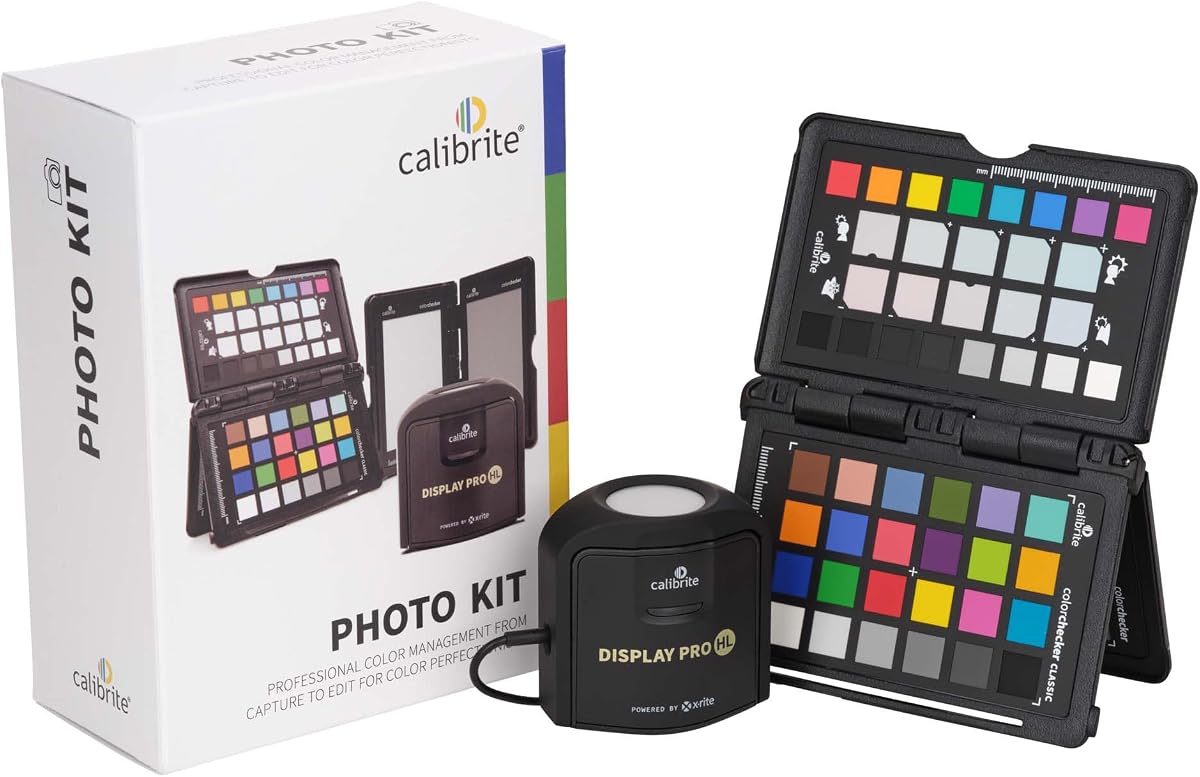
The Calibrite Photo Kit combines a high performance display calibrator with a color checker for accurate camera profiling. It is built for photographers who want a reliable capture to edit process without color guesswork.
We may earn a commission when you buy through this link, at no additional cost to you.
Display Pro HL handles modern panels like Mini LED and OLED while the ColorChecker enables custom RAW profiles. This ensures your edits on screen match the final output whether printed or on digital devices.
Setting up custom profiles may take longer than standard presets but the accuracy payoff is worth it. It is an investment for pros who need consistency across different locations and lighting conditions.
Choose this kit if you shoot RAW and edit professionally. It gives you full control over color from the moment you press the shutter to final client delivery.
Profile both your camera and monitor to ensure color consistency from the shoot through the final edit.
Calibrate modern high brightness screens to maintain accurate tones and contrast in your photos.
We may earn a commission when you buy through this link, at no additional cost to you.
The Calibrite ColorChecker Display Pro is designed for high repeatability across display types. It features a rotatable diffuser arm and a tripod mount which makes it uniquely suited for projector profiling and large venue setups.
We may earn a commission when you buy through this link, at no additional cost to you.
Powered by proven technology it works with industry standard software for consistent results. The optical design ensures your measurements stay reliable over time. It is a solid choice for users who need long term stability.
It does not support the newest HDR displays but excels in standard workflows. The physical design offers practical benefits that other colorimeters lack for specific use cases like presentations.
Buy this if you work with projectors or need consistent measurements. It is reliable for professionals who prioritize repeatable results over new sensor features.
The rotatable arm and tripod mount make it easy to measure projectors and ambient light in large spaces.
Use i1Profiler or ccProfiler for familiar workflows and shared presets across your team.
We may earn a commission when you buy through this link, at no additional cost to you.
The Datacolor Spyder5PRO is built for serious photographers and designers who need their on screen edits to match prints. It uses room light monitoring to ensure your monitor brightness stays optimal for viewing detail.
We may earn a commission when you buy through this link, at no additional cost to you.
Its calibration takes only five minutes and includes a before and after evaluation using your own images. The display analysis feature helps compare multiple monitors to keep your workspace consistent.
While it lacks support for modern HDR screens its focus on print matching makes it valuable for traditional workflows. It is a reliable choice for those who still rely heavily on physical print proofing.
Choose this if print accuracy is your top priority. It helps you avoid costly print errors by ensuring your screen shows exactly what will come out of the printer.
Monitor brightness adjusts for room light so your prints match your edits more closely.
Use your own photos to compare before and after results for instant confidence in calibration.
We may earn a commission when you buy through this link, at no additional cost to you.
The ASUS ProArt CaliContrO MCA02 is designed for ASUS monitor users who want seamless hardware and software calibration. It features high luminance support and integrates directly with your system for precise control.
We may earn a commission when you buy through this link, at no additional cost to you.
It includes a 5-way navigator for OSD control and an integrated dial for software shortcuts. This makes it a unique tool for those already in the ASUS ecosystem looking for a unified experience.
Customer feedback indicates some usability challenges which affect its rating. However the hardware calibration ensures consistent results that software alone cannot achieve over long periods.
Buy this if you use ASUS ProArt monitors and want tight integration. It offers advanced control for those who need consistent accuracy on high brightness screens.
Direct hardware control keeps your monitor color consistent without relying solely on software ICC profiles.
ASUS Dial shortcuts speed up creative software tasks making your workflow more efficient.
We may earn a commission when you buy through this link, at no additional cost to you.
The Datacolor Spyder4Pro is a classic tool that introduced many features still used today. It uses a full-spectrum sensor and automated calibration to ensure reliable color for desktop and laptop displays.
We may earn a commission when you buy through this link, at no additional cost to you.
Its ReCAL feature lets you quickly recalibrate to compensate for changes over time. The double-shielded filters improve accuracy significantly compared to earlier models. It remains a solid choice for basic needs.
Because it is an older model it does not support modern Mini LED or HDR screens. If you need a simple affordable tool for standard monitors it still performs well.
Pick this for basic calibration tasks on older screens. It is great for users who want a proven tool without needing the latest display technologies.
Use ReCAL to restore accuracy quickly when your screen drifts over time without a full process.
Decades of updates make this a stable choice for standard monitors in office or home setups.
We may earn a commission when you buy through this link, at no additional cost to you.
The Datacolor Spyder X Pro is ideal for first-time users who want professional accuracy without complexity. Its lens-based color engine provides precise color and the wizard makes the setup simple and fast.
We may earn a commission when you buy through this link, at no additional cost to you.
It includes room-light monitoring and SpyderProof comparison to help you trust your results. You can calibrate multiple monitors easily. This makes it a top choice for those stepping into color management.
It lacks the advanced automation of newer models but delivers solid performance for the price. It is a safe bet for freelancers who need better accuracy than default settings provide.
Choose this if you are new to calibration or need a reliable budget-friendly tool. It ensures your images look accurate and professional from day one.
The wizard guides you through targets and settings so you can calibrate confidently without prior knowledge.
SpyderProof shows your before and after photos to confirm color accuracy improvements instantly.
We may earn a commission when you buy through this link, at no additional cost to you.
Choosing the right colorimeter depends on your display type and workflow needs. This guide covers the main factors to consider.
Modern displays like OLED and Mini LED require sensors that can handle high brightness and contrast. Standard sensors may not measure accurately on super bright screens.
Check if the device supports your monitor type before buying.
Accurate sensors ensure your measurements match industry standards. Look for devices with proven repeatability and calibration stability over time.
Higher accuracy prevents costly errors in print or client work.
Good software guides you through the process and provides advanced controls. Features like preset targets and comparison tools save time.
Choose software that matches your skill level and needs.
Light sensors adjust your screen based on room brightness. This keeps colors consistent even when lighting changes during the day.
It is useful for creatives working in changing environments.
Professionals often use multiple monitors. Ensure the tool can calibrate more than one screen for uniform color.
Matching displays avoids confusion and ensures consistent results.
Compact designs are easier to carry between studios. Small devices fit easily in bags for field work.
Consider size if you travel often for shoots.
Some tools include camera profiling or video standards. This helps create a complete system from capture to edit.
Look for bundles if you work with both cameras and monitors.
More features often mean higher costs. Decide if advanced controls are worth the investment for your projects.
Beginners can start with affordable tools and upgrade later.
Warm up your monitor for at least thirty minutes before calibration. This ensures the display has stabilized for accurate measurements.
Place the colorimeter flat against the screen without blocking ambient light. Keep the sensor clean and store it in its pouch to avoid damage.
Recalibrate your monitor every few months. Display performance drifts over time so regular checks maintain color accuracy.
Monitors lose accuracy over time due to aging panels. A colorimeter ensures colors match what you see on screen to your final output. This prevents costly errors in print or delivery.
Recalibrate every three to six months. High use environments may need monthly checks. Regular calibration keeps color consistent across your workflow.
Not all devices support every display type. Newer OLED or HDR screens need specific sensors. Check specs to confirm compatibility before buying.
Hardware calibration adjusts the monitor itself for stable results. Software adds an ICC profile to the OS. Hardware is more consistent for professional work.
It is useful if your lighting changes. It helps adjust brightness so your screen matches the room. This reduces eye strain and improves consistency.
Yes most modern colorimeters support multiple displays. This ensures color consistency across your entire workspace for efficient editing.
Look for tools with intuitive guides and advanced controls. Many devices include software like Calibrite or Spyder. Choose what fits your skill level.
Yes accurate monitors ensure your edits match broadcast standards. This helps viewers see content correctly across different devices and screens.
The top picks offer reliable tools for photographers and video editors. The Display 123 provides ease while the Display Plus HL handles HDR screens.
Prioritize support for your display type and workflow needs. Consider bundles like the Creator Kit for full color control.
Prices and availability change so check current offers before buying. These tools ensure your work looks professional on every screen.