
AceGamer Hypershadow D4 2.4G Wireless Controller
4.1Editor score
TMR Joysticks
4 Macro Back Paddles
Micro-switch shoulder buttons
This guide compares the top 10 controllers with back paddles for PC gaming, evaluating customization, performance, and comfort for competitive and casual
Finding the right controller with back paddles for PC gaming can transform your experience by offering faster reactions and more intuitive control. These devices allow you to keep your thumbs on the sticks while accessing essential actions, which is crucial for competitive play and immersive sessions.
We have evaluated ten leading models based on build quality, customization options, and compatibility with various PC setups. Each product offers unique features like remappable buttons, anti-drift technology, and ergonomic designs to help you find the perfect match for your gaming style.
Each pick in this list highlights specific strengths and ideal use cases to guide your decision-making process. Please note that availability and features may change over time, so always verify the latest specifications before making your final selection.
4.1Editor score
4.3Editor score

3.8Editor score
The following table provides a side-by-side comparison of all ten controllers featured in this guide, highlighting their key specifications and unique attributes to help you make an informed choice.


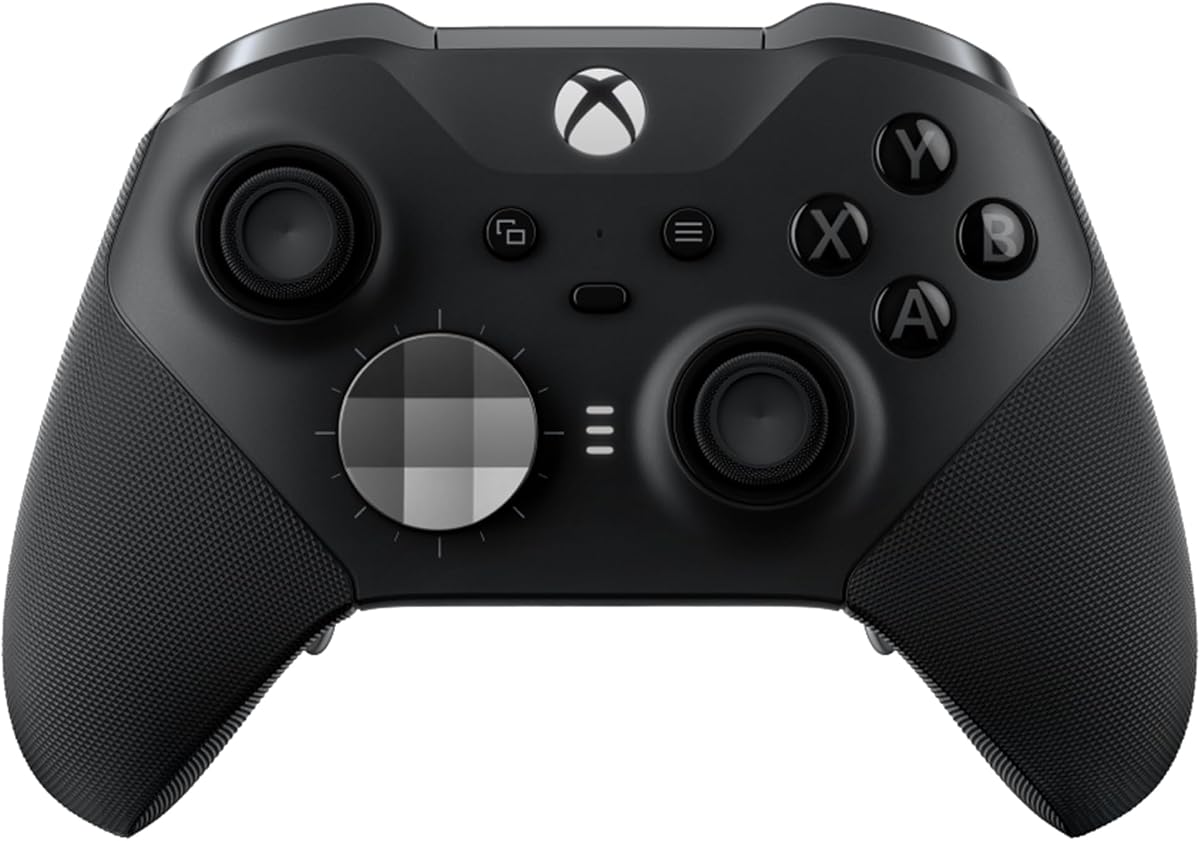
The Xbox Wireless Gaming Controller Elite Series 2 stands out as a top-tier option for PC gamers seeking precision and durability. It features adjustable tension thumbsticks and hair trigger locks that significantly enhance control during competitive sessions.
We may earn a commission when you buy through this link, at no additional cost to you.
Its interchangeable components allow you to swap thumbstick toppers, D-pads, and paddles to suit your preferred style. The ability to save and switch between three custom profiles on the fly makes it versatile for different games and setups.
While it comes at a higher cost, the build quality and long battery life justify the investment for serious players. The wrap-around rubberized grips ensure comfort even during extended play periods without causing hand fatigue.
This controller is ideal for gamers who want a pro-level experience with extensive customization options. It works seamlessly across Xbox Series X|S, Xbox One, and Windows PC, making it a robust choice for multi-platform users.
Adjustable tension thumbsticks let you fine-tune resistance for better accuracy and consistency in every match.
Built with refined components and durable materials, it is designed to withstand intense gaming sessions over time.
We may earn a commission when you buy through this link, at no additional cost to you.
The SCUF ENVISION PRO WIRELESS V2 is designed specifically for PC gamers who need advanced customization and reliable performance. Its anti-drift Hall effect thumbsticks ensure longevity and consistent input accuracy.
We may earn a commission when you buy through this link, at no additional cost to you.
Four rear remappable paddles keep your thumbs on the sticks for faster reactions, while five fully remappable G-Keys allow for advanced macros. The OMRON mechanical button switches operate like mouse clicks for instant activations.
Although it is priced for PC-only use, the integration with Corsair iCUE adds significant value for users already invested in that ecosystem. The design focuses on keeping your fingers in natural positions with side-mounted SAX buttons.
This controller is best suited for PC enthusiasts who want deep macro capabilities and reliable mechanical switches. Its focus on PC exclusivity means it might not be ideal for those needing multi-console support.
OMRON mechanical button switches provide a tactile click feel similar to a mouse for precise and instant game actions.
Five remappable G-Keys enable complex macro setups that streamline complex in-game commands and actions.
We may earn a commission when you buy through this link, at no additional cost to you.
The AceGamer Hypershadow D4 offers an impressive range of features at a budget-friendly price, making it accessible to a wide audience. It supports multiple platforms including PS4, Switch, PC, and mobile devices via Bluetooth or 2.4G receiver.
We may earn a commission when you buy through this link, at no additional cost to you.
It features TMR Joysticks that eliminate drift and provide precise control with a 4,096-level sampling rate. The dual-mode trigger system allows switching between micro-switch for rapid-fire and Hall-effect linear mode for smooth throttle control.
Four macro back paddles and turbo modes enhance gameplay speed and efficiency. However, note that it requires an initial wired connection to unlock the device and is not compatible with Xbox consoles.
This controller is a great choice for gamers looking for versatile multi-platform support without spending a fortune. The inclusion of 5-motor vibration adds immersive feedback, though the setup process requires careful attention to the instructions.
Tunnel magnetoresistance (TMR) Joysticks offer a lifespan of up to 5 million operations while preventing drift issues.
Switch between micro-switch mode for rapid-fire or Hall-effect mode for precise throttle control based on game needs.
We may earn a commission when you buy through this link, at no additional cost to you.
The SCUF VALOR PRO Wireless is designed to deliver faster gameplay with four rear paddles and instant triggers that eliminate trigger pull. On PC, it activates a 1k Hz polling rate for lightning-fast inputs to ensure competitive advantage.
We may earn a commission when you buy through this link, at no additional cost to you.
It utilizes anti-drift TMR Thumbsticks and a wraparound bumper design for ultimate comfort and grip. The audio control system lets you change volume levels on the fly without pausing your game, adding to the seamless experience.
Customization is key here with swappable faceplates and thumbsticks to match your personal style. The controller supports low-latency wireless, Bluetooth, or wired connections to maintain stable performance during intense sessions.
This model is well-suited for Xbox and PC gamers who value responsive input and audio convenience. Its focus on performance and customization makes it a strong contender despite a moderate rating in some user reviews.
A 1k Hz polling rate on PC ensures your inputs are registered with minimal delay for faster reaction times.
Dedicated audio controls allow you to adjust volume levels during gameplay without needing to navigate menus.
We may earn a commission when you buy through this link, at no additional cost to you.
The SCUF ENVISION Wired V2 focuses on stability and precision for PC gamers who prefer a wired connection. It features anti-drift Hall effect thumbsticks and four rear remappable paddles to keep thumbs on sticks for faster reactions.
We may earn a commission when you buy through this link, at no additional cost to you.
Five fully remappable G-Keys support advanced macros and integrate with Corsair iCUE. The OMRON mechanical button switches provide instant activations similar to a mouse click for precise input registration.
Side-mounted SAX buttons are designed to fit the natural placement of your fingers, enhancing configurability. The wired design ensures no latency issues, which is critical for competitive PC gaming environments.
This controller is ideal for gamers who prioritize reliability and deep macro integration over wireless freedom. Its PC-only focus means it is tailored specifically for the PC ecosystem without console compromises.
A wired connection eliminates wireless interference, ensuring consistent and low-latency input during critical moments.
Five G-Keys allow for complex macro scripting that enhances efficiency in strategy or simulation games.
We may earn a commission when you buy through this link, at no additional cost to you.
The SCUF ENVISION PRO Wireless V2 offers the same core features as the wired version but adds wireless convenience for PC gamers. It includes anti-drift Hall effect thumbsticks and four rear remappable paddles for consistent control.
We may earn a commission when you buy through this link, at no additional cost to you.
Five remappable G-Keys integrate with Corsair iCUE for advanced macros while OMRON switches ensure instant activations. The wireless capability allows you to play without cable restrictions, keeping your setup clean and organized.
Side-mounted SAX buttons provide additional configurability fitting naturally under your fingers for easier access. This model maintains the focus on PC-specific features that appeal to enthusiasts using high-end PC setups.
It is a solid choice for those seeking wireless flexibility without sacrificing precision or macro capabilities. The design is tailored specifically for PC gamers who prioritize performance and integration with existing software ecosystems.
Wireless connectivity provides a clean desk setup while maintaining low latency through optimized transmission technology.
Hall effect thumbsticks and OMRON switches combine to deliver precise, durable, and drift-free input performance.
We may earn a commission when you buy through this link, at no additional cost to you.
The SCUF ENVISION V1 Wired PC Gaming Controller offers robust features for PC enthusiasts, especially those within the Corsair ecosystem. It features four rear remappable paddles and five fully remappable G-Keys for advanced macros.
We may earn a commission when you buy through this link, at no additional cost to you.
Its RGB light strip integrates with Corsair iCUE allowing you to match lighting across your gaming station. OMRON mechanical button switches operate like a mouse click for instant activations providing reliable input registration.
Note that iCUE is required in the initial setup but you can choose to play without it running afterward. The wired design ensures zero latency while maintaining consistent power for the RGB features.
This controller is ideal for users who want to synchronize their hardware aesthetics and performance through software. It balances customization with stability, making it a reliable choice for long gaming sessions on PC.
Corsair iCUE integration allows you to sync controller lighting with other compatible peripherals for a cohesive look.
OMRON mechanical switches provide the tactile feel and speed of a mouse click for precise game control.
We may earn a commission when you buy through this link, at no additional cost to you.
The HyperX Clutch Gladiate is an officially licensed Xbox controller that offers a solid balance of comfort and functionality. While it does not feature dedicated back paddles, it includes programmable rear buttons that serve a similar purpose for faster access.
We may earn a commission when you buy through this link, at no additional cost to you.
Dual trigger locks allow you to set positions for short pulls or longer finesse actions enhancing your control in various game genres. Dual rumble motors provide immersive feedback so you feel every shot or hit vividly.
Textured grips ensure you keep a firm grasp on the game situation, while the 3.5mm headset port allows convenient audio routing. The detachable USB-C cable makes storage easy and prevents damage from snags.
This controller is a great option for Xbox and PC gamers who prioritize ergonomics and ease of use over complex macros. Its build quality and licensed compatibility make it a trustworthy choice for regular gaming sessions.
Dual trigger locks let you customize the trigger travel distance to suit different game genres and preferences.
Dual rumble motors deliver powerful haptic feedback that enhances immersion in action and racing games.
We may earn a commission when you buy through this link, at no additional cost to you.
The SCUF ENVISION PRO Wireless V1 brings proven features to PC gamers with its four rear remappable paddles and instant triggers. It supports five fully remappable G-Keys for advanced macros and integrates with Corsair iCUE for deep customization.
We may earn a commission when you buy through this link, at no additional cost to you.
Corsair SlipStream wireless connectivity ensures ultra-fast speeds for a lag-free experience during competitive play. Side-mounted SAX buttons fit the natural placement of your fingers offering additional configurability beyond standard buttons.
OMRON mechanical button switches operate like a mouse click for instant activations and reliable feedback. While it is a previous generation model, it still holds its ground in terms of performance and software support.
This controller is suitable for those who prefer established wireless technology and macro integration. Its focus on PC performance and compatibility with existing Corsair setups makes it a viable option for dedicated PC gamers.
Corsair SlipStream wireless delivers ultra-fast connectivity to minimize latency for competitive and reactive gameplay.
OMRON mechanical switches ensure every input registers instantly for faster reaction times in high-stakes games.
We may earn a commission when you buy through this link, at no additional cost to you.
The GameSir Tarantula 8K PC Wired Esports Controller is designed for pro-level performance with an 8000Hz polling rate over wired connection. It features Gen-2 TMR sticks that use magnetic technology to eliminate physical contact and drift.
We may earn a commission when you buy through this link, at no additional cost to you.
Dual-mode trigger stops let you switch between Hall Effect analog triggers and Micro switch triggers for precision or instant response. Built-in 6-axis gyroscope enhances aiming accuracy and fine control offering greater flexibility for immersive gameplay.
It includes two lockable back buttons and five extra front buttons supporting up to 32-step macro recording. The GameSir Connect software allows full customization of performance, button mapping, and macros for competitive-level control.
This controller is an excellent choice for competitive PC gamers who need ultra-fast polling and precise mechanical feedback. Its focus on wired reliability and customization ensures it meets the demands of esports and high-intensity gaming.
An 8000Hz polling rate ensures every input is registered with esports-grade precision and minimal delay.
Dual-mode triggers let you choose between smooth analog control or instant micro switch responses based on game needs.
We may earn a commission when you buy through this link, at no additional cost to you.
Choosing the right controller with back paddles for PC gaming involves evaluating several key factors to ensure optimal performance and comfort.
Ensure the controller works seamlessly with your PC setup and any other platforms you use. Some models are PC-only while others support multi-platform use which can be crucial for versatile gamers.
Check connectivity options like USB-C wired Bluetooth or 2.4G wireless to match your PC capabilities and reduce latency issues.
Look for controllers offering remappable back paddles that allow you to assign essential actions without moving your thumbs. Some provide multiple paddle sizes or shapes for better ergonomic fit.
More paddles give you greater flexibility to map complex commands but consider if you need that level of access for your preferred games.
Hall effect and TMR thumbsticks are designed to prevent drift over time ensuring consistent control. These technologies use magnetic sensing rather than physical contact to wear down.
Adjustable tension thumbsticks allow you to fine-tune resistance based on your preference for accuracy versus speed in different game genres.
Micro-switch or OMRON switches provide instant activations similar to a mouse click which is vital for fast-paced gaming. They offer tactile feedback that confirms input registration.
Traditional rubber buttons may feel softer but can wear out faster. Mechanical switches tend to be more durable and offer a crisper response.
Dual-mode triggers or hair trigger locks let you switch between short rapid inputs for shooters and long smooth travel for racing games. This adaptability enhances performance across various game types.
Hall Effect analog triggers deliver linear control while micro-switch triggers provide instant on/off response. Choose based on whether you need precision or speed more.
Comfortable grips and wraparound bumpers reduce hand fatigue during extended play sessions. Textured surfaces help maintain a firm grip without slipping.
Consider the weight and size of the controller to ensure it fits your hand comfortably. A controller that is too light or heavy can impact precision over long periods.
Controllers with dedicated software allow deep customization of button mapping and macro recording. Features like Corsair iCUE integration offer additional ecosystem control.
Check if the controller saves profiles internally or requires software to run. Internal storage means you can switch setups without extra apps active on PC.
A durable controller made with quality materials withstands intense daily use without degradation. Look for reinforced internal components and high-quality external housing.
Long-term durability is key for controllers used frequently. High-quality switches and magnetic thumbsticks often contribute to a longer lifespan than standard parts.
Start by charging the controller fully if it uses a battery and pair it via Bluetooth or wireless receiver. Follow the manufacturer's instructions to unlock specific modes if required for first-time use.
Use the provided software to map your buttons and configure macro settings. Save profiles on the controller if possible to switch between games quickly without reconfiguring each time.
Keep the controller clean by wiping it with a soft dry cloth and storing it in a safe place when not in use. Avoid exposing it to excessive heat or moisture to maintain long-term performance.
Yes they are versatile enough for most genres but excel in competitive shooters and racing games. The paddles allow you to access actions like jumping or reloading without taking thumbs off the sticks improving reaction times significantly.
Basic functions work without software but full customization features like remapping and macros often require specific apps. Some controllers store profiles internally so you do not need software running permanently.
Hall effect thumbsticks use magnetic sensing instead of physical contacts to detect position. This prevents wear and drift over time offering more consistent and accurate input throughout the controller's lifespan.
Some controllers support multi-platform use including Xbox and Switch but others are PC-only. Check the product specifications to ensure compatibility with all devices you intend to use the controller with.
Micro-switch triggers provide instant on/off activation similar to a mouse click which is ideal for rapid-fire actions. They eliminate the analog travel distance allowing faster input execution in competitive shooters.
Turn off the controller when not in use and avoid leaving it on for extended periods. Using wired mode when available or adjusting vibration settings can also help conserve battery power during gameplay.
The Xbox Wireless Gaming Controller Elite Series 2 remains a top choice for its comprehensive customization and durability. The AceGamer Hypershadow D4 offers great value for multi-platform users seeking advanced features at a lower price.
Prioritize controllers that match your primary play style whether that is competitive precision or casual comfort. Consider factors like button switches, thumbstick technology, and software integration to find the perfect fit.
Keep in mind that availability and features may evolve so always verify the latest specs before purchasing. With the right controller, you can elevate your PC gaming experience significantly.