
Square Reader for magstripe (USB-C)
4.6Editor score
Plug and play USB-C design
Accepts major credit and debit cards
Next business day fund deposit
This guide compares the top credit card swipers for businesses, covering USB readers, mobile terminals, and secure EMV devices to help you choose the right
Selecting the right credit card swiper is crucial for any business aiming to streamline transactions and enhance customer satisfaction. Modern payment terminals range from simple USB readers to advanced mobile POS systems, each offering unique features tailored to different operational needs.
Our team evaluated ten leading models based on compatibility, build quality, and transaction speed. We analyzed user feedback, technical specifications, and integration capabilities to ensure each recommendation meets rigorous standards for reliability and performance in diverse environments.
Each pick highlights specific strengths and ideal use cases to help you make an informed decision. While the options below represent strong performers, remember that pricing and availability can fluctuate, so verify current details before finalizing your purchase.
4.6Editor score

4.2Editor score

4.5Editor score
Below is a side-by-side comparison of the top credit card swipers available this month, highlighting key specifications and unique features to help you identify the best fit for your business needs.



The MSR90 USB reader stands out as a versatile solution for businesses needing reliable magnetic stripe processing. With a solid 4.2 rating from users, it delivers consistent performance for various card formats including ISO7811 and AAMVA standards.
We may earn a commission when you buy through this link, at no additional cost to you.
Its bi-directional reading capability ensures high accuracy even with scratched or worn cards, reducing failed transactions significantly. The device requires no drivers, functioning as a simple keyboard emulation that works seamlessly across Windows and Mac operating systems.
While it lacks modern chip or contactless capabilities, its robust build and straightforward setup make it an excellent choice for low-volume or legacy POS environments. The LED indicator provides immediate visual feedback on connection and swipe status, simplifying troubleshooting.
This model is ideal for retailers or service providers who prioritize ease of use and durability over advanced features. It remains a top pick for businesses needing a dependable entry-level magstripe reader without unnecessary complexity or cost.
The ability to read cards in both directions minimizes wear on the swipe slot and increases success rates for damaged magnetic stripes.
No software installation is required, allowing immediate use with any USB port capable of receiving keyboard input for data entry.
We may earn a commission when you buy through this link, at no additional cost to you.
Square's magstripe reader offers an incredibly low barrier to entry for small businesses looking to accept card payments digitally. Boasting a high 4.6 rating, users appreciate its seamless integration with the free Square Point of Sale app.
We may earn a commission when you buy through this link, at no additional cost to you.
The USB-C connector ensures compatibility with modern smartphones and tablets, making it perfect for mobile vendors or pop-up shops. Funds typically arrive the next business day, providing quick access to revenue without hidden fees or long-term commitments.
While it lacks chip or NFC support, the simplicity of setup and the ability to send digital receipts directly to customers enhance the overall checkout experience. Its compact design fits easily in a pocket or drawer for on-the-go sales.
For startups or side hustlers needing immediate payment processing without upfront hardware costs, this reader is unmatched. It balances affordability with reliable performance, making it the best budget choice in our lineup.
Designed specifically for smartphones, it transforms any mobile device into a complete point of sale system with minimal setup.
Transactions settle quickly, ensuring businesses have access to their earnings within one business day after the sale is processed.
We may earn a commission when you buy through this link, at no additional cost to you.
The Square Terminal represents a full-featured point of sale system designed to handle all aspects of the checkout process. With a 4.5 rating, it delivers a professional experience by integrating payments, receipts, and inventory tracking into one sleek device.
We may earn a commission when you buy through this link, at no additional cost to you.
Its ability to process chip cards in just two seconds ensures quick transactions, while the built-in battery allows for all-day cordless operation. This makes it ideal for busy counters or retail environments where reliability and speed are critical for customer satisfaction.
Although it comes at a higher price point, the elimination of peripheral hardware like separate printers or card readers justifies the cost. The device supports all major card types and offers a unified interface that simplifies daily operations for staff.
For established businesses seeking a professional, self-contained solution, the Square Terminal is the top premium choice. It combines robust features with ease of use, ensuring a smooth transaction experience for both merchants and customers.
Designed to last through peak business hours, the built-in battery ensures continuous operation without needing to be plugged into power constantly.
The internal thermal printer allows customers to receive physical receipts immediately, reducing clutter and keeping the counter organized.
We may earn a commission when you buy through this link, at no additional cost to you.
This USB magnetic stripe reader is a practical tool for businesses integrating card data into existing POS or record-keeping software. Users rate it at 4.2, citing its ability to handle various card formats like ISO7811 and AAMVA effectively.
We may earn a commission when you buy through this link, at no additional cost to you.
It supports both high and low coercivity cards, ensuring compatibility with a wide range of loyalty cards, IDs, and credit cards. The device connects via USB and emulates a keyboard, allowing seamless data entry into text fields or specialized software.
While it lacks modern EMV capabilities, its straightforward design and broad compatibility make it useful for administrative tasks or simple checkout processes. The red LED indicator provides clear visual confirmation during connection and card swiping.
Ideal for small offices or retail setups needing basic card reading, this model offers reliable performance without unnecessary complexity. It is a solid choice for those prioritizing compatibility with legacy systems over advanced payment features.
Supports multiple card types including drivers licenses and membership cards, making it versatile beyond standard credit card transactions.
Data enters directly as text into any active field, simplifying integration with spreadsheet or database applications without custom drivers.
We may earn a commission when you buy through this link, at no additional cost to you.
The ETEKJOY USB reader offers a flexible solution for fixed POS stations where a longer cord provides better reach. With a 4.3 rating, users appreciate its robust cable length and compact design that fits comfortably on crowded countertops.
We may earn a commission when you buy through this link, at no additional cost to you.
It includes two screw holes for secure installation, ensuring the device stays in place during high-volume swiping. The LED indicator provides immediate status feedback, helping staff quickly identify connection issues or successful swipes.
Supporting multiple card formats and working across Windows and Mac systems, it offers broad compatibility for various software setups. Its keyboard emulation interface ensures it works with common tools like Excel and Word for data entry tasks.
For small retailers needing a reliable, permanent mounting solution, this reader is a strong contender. It balances functionality with ease of use, making it a practical choice for fixed checkout stations.
The 145cm USB cord provides ample length to position the reader conveniently without restricting movement at the checkout counter.
Screw holes allow for permanent attachment, preventing accidental displacement during busy business hours.
We may earn a commission when you buy through this link, at no additional cost to you.
This two-pack of POSMATE readers provides a cost-effective solution for businesses needing multiple reading points. Rated 4.1 by users, these mini readers are designed for basic transaction processing across various lanes or registers.
We may earn a commission when you buy through this link, at no additional cost to you.
Each unit comes with a 5ft cable, offering flexibility in placement within a workstation. They support high and low coercivity cards, covering credit cards, gift cards, and driver licenses without requiring complex setup.
While the lack of encryption limits compliance options, the straightforward design makes them suitable for low-risk environments. The USB interface ensures easy connection to computers running standard POS software or database applications.
For small businesses needing a backup or secondary reader, this bundle offers excellent value. It provides the basics of card reading at a budget-friendly price, ideal for expanding checkout capabilities.
Purchasing a set allows for immediate redundancy or multi-transaction processing, reducing downtime during peak hours.
The USB connection ensures immediate recognition by operating systems without additional driver installations.
We may earn a commission when you buy through this link, at no additional cost to you.
The SumUp Plus reader bridges the gap between traditional card reading and modern contactless payments. With a 3.8 rating, it appeals to users seeking a mobile-first solution that supports both swipes and taps via NFC.
We may earn a commission when you buy through this link, at no additional cost to you.
Its Bluetooth connection allows for wire-free transactions, giving merchants the freedom to move around their venue while processing payments. The device works exclusively with the SumUp app, simplifying the checkout flow for on-the-go businesses.
While connectivity can occasionally falter, the convenience of contactless support makes it a valuable tool for modern transactions. The app provides detailed sales tracking and receipt management, helping businesses stay organized without extra hardware.
For mobile vendors who prioritize contactless transactions and portability, this reader is a strong option. It offers a straightforward path to accepting digital payments with minimal investment.
NFC technology enables tap-to-pay for cards and wallets, accelerating checkout speed and meeting customer expectations.
Bluetooth connectivity allows the device to be used away from the computer, offering greater mobility at the point of sale.
We may earn a commission when you buy through this link, at no additional cost to you.
The PAX S300 v2 is a comprehensive payment terminal designed for high-volume retail environments requiring advanced security. With a 3.9 rating, it delivers enterprise-grade performance through its EMV and contactless capabilities.
We may earn a commission when you buy through this link, at no additional cost to you.
Featuring a large color touch screen and loudspeaker, it enhances user interaction during transactions. The device supports both Ethernet and RS232 connectivity, ensuring seamless integration into existing store networks or legacy systems.
While setup can be technical, the built-in PIN pad and encryption standards protect sensitive customer data effectively. Its robust construction ensures durability, making it suitable for demanding daily use in busy stores.
For businesses prioritizing security and comprehensive transaction processing, this terminal is a top-tier choice. It combines modern features with industrial reliability, meeting the needs of large retailers.
Adherence to PCI PTS 3.x and SRED standards ensures transaction data is encrypted to protect against fraud and data theft.
Support for both Ethernet and RS232 allows flexible installation in various store layouts and network setups.
We may earn a commission when you buy through this link, at no additional cost to you.
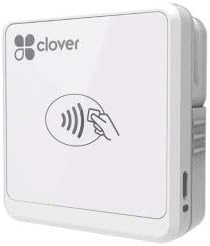
Clover Go provides a flexible payment option for businesses wanting to accept contactless and chip cards without complex account setups. Rated 4.0, it appeals to mobile sellers needing a straightforward device that works with both iOS and Android.
We may earn a commission when you buy through this link, at no additional cost to you.
The ability to process EMV chip cards ensures compatibility with modern banking standards, reducing fraud risk for merchants. Since it does not require a dedicated merchant account, it simplifies the onboarding process for small business owners.
While stock availability is limited, the device offers a reliable path to accepting modern payment types. Its compact size fits easily in a bag or counter drawer, making it convenient for portable sales scenarios.
For those looking for a simple way to accept chip and contactless payments, this reader is a practical choice. It balances ease of use with essential functionality for growing businesses.
No need for a separate merchant account simplifies onboarding, allowing immediate acceptance of modern card payments.
Support for both iOS and Android devices ensures businesses can choose their preferred mobile ecosystem without restriction.
We may earn a commission when you buy through this link, at no additional cost to you.
The Dejavoo QD2 offers a robust wireless solution for businesses needing to process payments securely from any location. While rated N/A due to limited reviews, its technical specs highlight a powerful mobile terminal capable of EMV and NFC transactions.
We may earn a commission when you buy through this link, at no additional cost to you.
Featuring a 2.4-inch color LCD and significant memory, it supports complex transaction processing and data storage without requiring a constant network connection. The device operates independently with built-in battery power for long shifts.
However, users must establish a SwyftPAY account before shipping, adding a step to the setup process. This requirement makes it better suited for businesses committed to a specific processor rather than those seeking open options.
For those needing a fully standalone mobile terminal, the QD2 delivers reliability and performance. It is a strong option for businesses requiring secure, wireless transaction processing in diverse environments.
Built-in battery and wireless capabilities allow transactions to occur anywhere without tethering to a computer.
Ample memory ensures the terminal can store transaction logs and process complex card formats efficiently.
We may earn a commission when you buy through this link, at no additional cost to you.
Choosing the right payment hardware depends on your business model and transaction volume. Below are key factors to consider before making a purchase.
Connectivity determines how the reader interfaces with your system. USB readers plug directly into computers, while Bluetooth models pair with smartphones for mobility. Ensure your devices have compatible ports or support the required wireless protocols.
Select a connection method that matches your device ecosystem to avoid compatibility issues during setup.
Modern transactions often require support for chip cards and contactless payments. While some basic readers only support magnetic stripes, advanced terminals handle EMV and NFC. Verify that your chosen device meets current banking security standards.
Prioritize devices that support EMV and NFC to ensure compliance and security for cardholders.
Your reader must communicate seamlessly with your existing POS or accounting software. Some hardware requires proprietary apps, while others work universally. Check documentation to confirm compatibility with your operational tools before buying.
Confirm the device works with your current software stack to ensure smooth workflow integration.
Businesses in busy environments need hardware that withstands frequent use. Look for models rated for high swipe counts or with rugged housings. A durable device reduces the risk of failure during peak business hours.
Choose rugged models with high durability ratings for busy retail or outdoor service environments.
Beyond the initial purchase price, consider transaction fees and maintenance costs. Some providers bundle hardware with processing contracts, while others offer standalone devices. Calculate the total cost over time to avoid unexpected expenses.
Evaluate total cost including fees rather than just the sticker price to budget effectively.
Protecting customer data is non-negotiable in payment processing. Ensure your device meets PCI DSS standards and offers end-to-end encryption. Secure hardware minimizes liability risks associated with data breaches or fraud.
Ensure compliance with PCI DSS standards to protect sensitive cardholder information effectively.
If you sell at events or deliver services on-site, portability is key. Mobile readers should be compact and battery-powered. A portable solution enhances convenience and allows you to accept payments anywhere.
Opt for compact, battery-powered readers if you need to accept payments outside a fixed location.
Technical issues can disrupt sales if you lack support. Look for brands offering responsive customer service and documentation. Access to troubleshooting guides or support teams ensures quick resolution when problems arise.
Select brands with reliable support resources to minimize downtime during technical issues.
First, connect the reader to your computer or device using the recommended cable or wireless pairing process. Ensure your software is installed and configured to recognize the hardware before attempting any transactions.
Swipe or insert cards smoothly without applying excessive force. For magnetic stripe readers, ensure the card is clean and the swipe is consistent to prevent read errors. Clean the swiping mechanism regularly with a soft cloth to remove debris.
Store the device in a dry, cool place when not in use to protect internal components. Regularly update firmware if applicable to maintain security standards. Follow manufacturer guidelines for maintenance to extend the lifespan of your payment hardware.
Most modern readers support major credit and debit cards, but older models may only read magnetic stripes. Check if the device supports EMV chip and contactless payments to ensure broad compatibility. Some specialized cards require specific reader capabilities.
Security depends on the model and encryption standards. Advanced devices encrypt data to comply with PCI DSS standards. Avoid unencrypted readers for sensitive data to minimize fraud risk. Always verify security certifications before purchasing.
Yes, mobile readers connect via Bluetooth or USB-C to smartphones and tablets. These devices allow payments to be processed without a traditional PC. Ensure your mobile device is compatible with the required app.
Magstripe readers read the magnetic strip on the back of a card, while chip readers process embedded microchips. Chip technology offers higher security and is now standard for most transactions. Choose a device that supports both for maximum utility.
Some standalone readers require a merchant account to process transactions through a bank. Others, like Square readers, provide processing within their ecosystem without a separate account. Review product requirements carefully before buying.
Use a soft, dry cloth to wipe the exterior and swipe slot. Avoid liquids that could damage internal components. Regular cleaning prevents dust buildup and ensures smooth card insertion. Refer to the manual for specific maintenance instructions.
We reviewed ten top models ranging from budget-friendly USB readers to premium all-in-one POS systems. Whether you need basic swiping or advanced EMV capabilities, there is a suitable option for your business needs.
Prioritize security, compatibility, and ease of use when selecting hardware. Ensure the device integrates well with your workflow and meets current industry standards for transaction processing.
Always check current pricing and availability before purchasing as costs may vary. Selecting the right tool ensures efficient, secure payment processing for your business.