
AULA S99
4.2Editor score
Affordable membrane design
Multi-device connectivity
Ergonomic foldable stand
This guide compares the top creamy keyboards for typing and gaming, evaluating sound quality, build materials, connectivity, and customization options for
Creamy keyboards have become a staple for enthusiasts who value smooth typing experiences and satisfying sound profiles. These devices blend ergonomic design with premium materials to reduce noise while maintaining responsiveness for work and play.
We evaluated ten top models based on switch quality, gasket mounting, connectivity options, and overall build integrity. Each pick offers unique features like hot-swap support, tri-mode connections, and custom RGB lighting to suit diverse user needs.
Every review highlights standout strengths and potential trade-offs to help you find the perfect fit. Prices and availability change frequently, so check current listings before purchasing to ensure you get the best value available today.
4.2Editor score

4.8Editor score

4.5Editor score
The following table provides a side-by-side overview of all ten selected creamy keyboards. Compare key specifications like layout, connectivity, switch type, and special features to quickly identify which model aligns with your specific requirements.


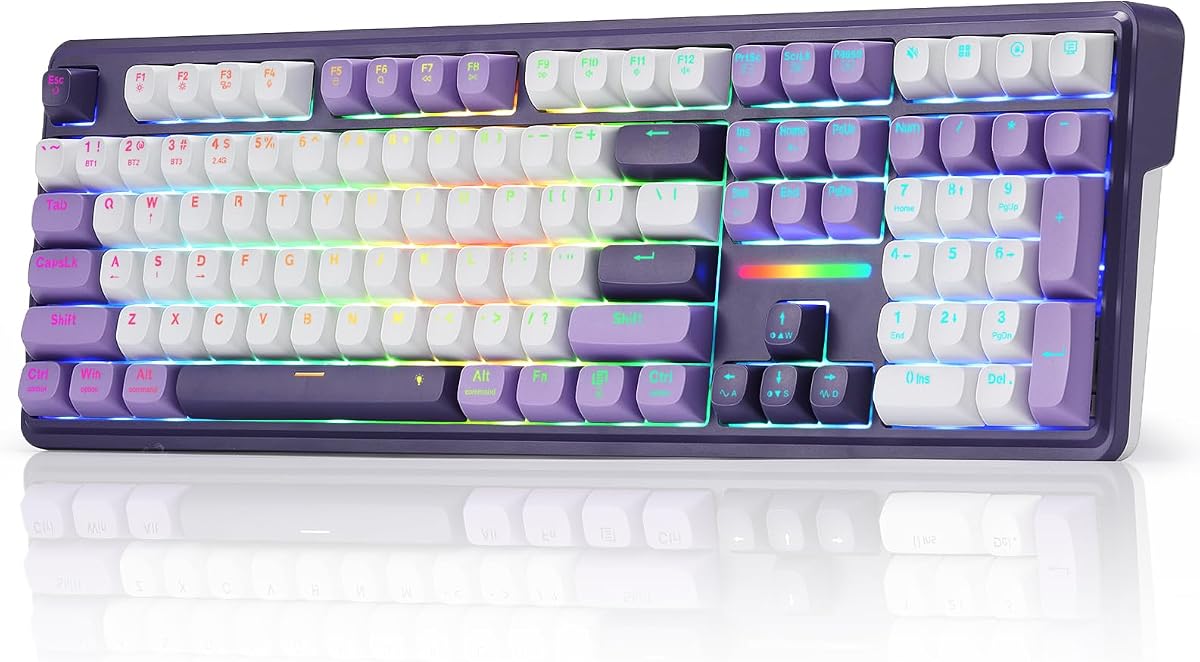


The YUNZII B98 PRO stands out as a premium choice for those seeking a truly creamy typing experience. With its gasket mount structure and pre-lubed switches, it delivers a smooth, consistent feel that enthusiasts love. The 96% layout preserves essential keys while saving desk space, making it ideal for productivity and gaming alike.
We may earn a commission when you buy through this link, at no additional cost to you.
Its tri-mode connectivity allows seamless switching between up to five devices via Bluetooth, 2.4GHz, or USB-C. The massive 8000mAh battery ensures days of use without charging. QMK/VIA support provides deep customization for macros, layers, and RGB, offering flexibility that few rivals can match.
While the price is higher, the build quality justifies the investment. The only trade-off is the learning curve for firmware customization, but default settings work well out of the box. The dual knob options add a unique personal touch to your desk setup.
If you want a keyboard that excels in sound, feel, and connectivity, this is the top recommendation. It suits professionals and gamers who value high-end features and long-term durability over budget constraints.
Five layers of filling and gasket mounting eliminate hollow echoes, ensuring a solid thocky sound on every keystroke.
Open-source QMK/VIA firmware lets you remap keys, create macros, and design intricate RGB patterns without limits.
We may earn a commission when you buy through this link, at no additional cost to you.
The AULA F75 offers a balanced entry into wireless mechanical keyboards with a focus on smooth typing. Its hot-swappable base and pre-lubed switches provide a creamy feel right out of the box. The 75% layout keeps essential keys while freeing up space for mouse movement.
We may earn a commission when you buy through this link, at no additional cost to you.
Tri-mode connectivity ensures you can connect multiple devices and switch effortlessly. The 4000mAh battery supports extended sessions without frequent charging. RGB lighting adds visual flair with adjustable effects, making it suitable for gaming setups or office desks.
While the software isn't as advanced as premium options, it covers essential customization like macros and lighting. The build is solid for the price but lacks the heavy feel of higher-end boards. Overall, it delivers reliable performance for most users.
This keyboard is perfect for those wanting wireless flexibility without breaking the bank. It works well for students, gamers, and professionals who need a compact, responsive keyboard with modern connectivity.
Connect via Bluetooth 5.0, 2.4GHz, or USB-C to switch between devices instantly without re-pairing.
Pre-lubed linear switches and stabilizers ensure every keystroke is fluid and consistent for long typing sessions.
We may earn a commission when you buy through this link, at no additional cost to you.
The HUO JI E-Yooso delivers a premium feel at an affordable price with its gasket structure. Five layers of sound-absorbing foams reduce noise by 40%, creating a pleasant typing environment. The 99-key layout balances functionality and desk space effectively.
We may earn a commission when you buy through this link, at no additional cost to you.
Wired USB-C connectivity ensures zero lag, making it ideal for competitive gaming. Hot-swap support lets you upgrade switches easily without soldering. RGB backlighting offers 15 effects and color options to match your setup's aesthetic.
While lacking wireless features, the stability of a wired connection benefits gamers. The foams and gasket provide a solid feel despite the budget price. It's a strong choice for those prioritizing typing quality over portability.
This model is best for users who want a quiet, responsive keyboard for work or gaming without spending extra on wireless tech. It's a great starting point for custom keyboard enthusiasts on a budget.
Integrated foams and gasket mounting dampen vibrations to reduce hollow sounds and improve typing clarity.
Full N-key rollover and anti-ghosting ensure accurate response during intense gaming sessions.
We may earn a commission when you buy through this link, at no additional cost to you.
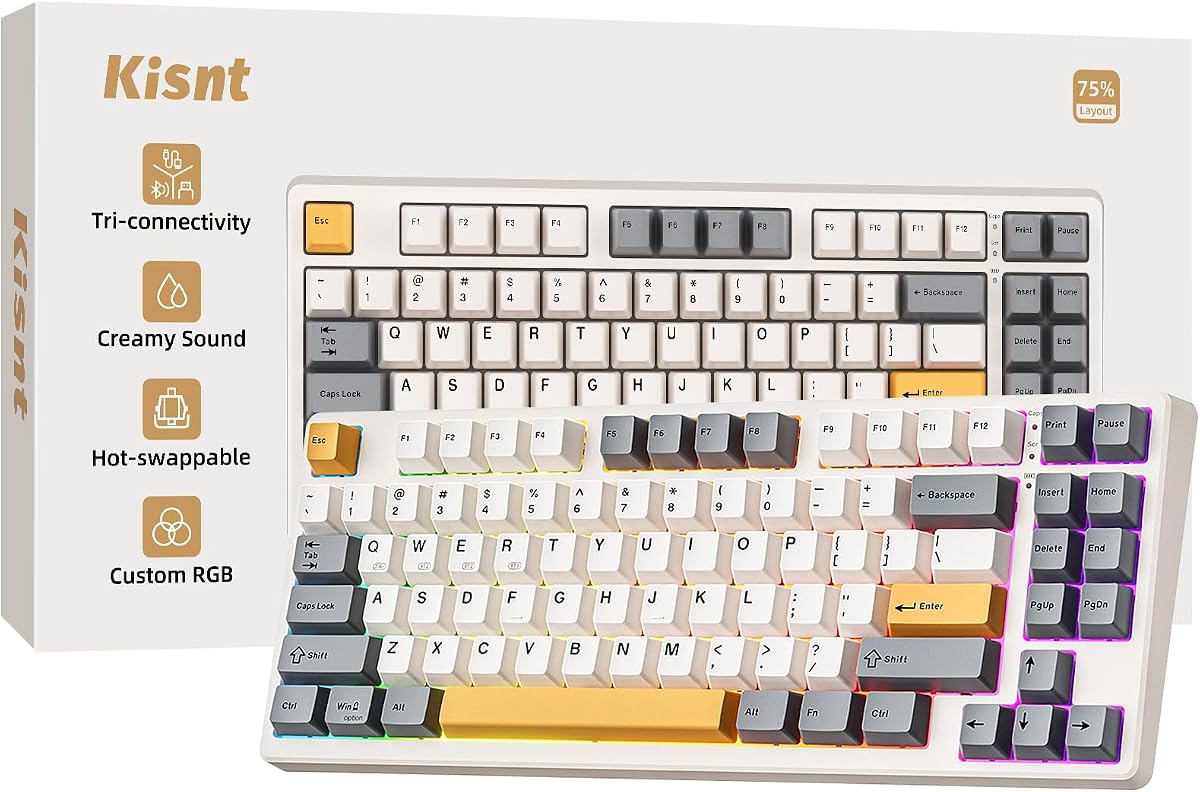
The Kisnt KN85 offers a compact 75% layout that retains essential keys while saving 25% of desk space. Gasket mounting and linear switches produce a smooth, thocky sound ideal for shared offices. Its tri-mode connectivity supports seamless switching across multiple devices.
We may earn a commission when you buy through this link, at no additional cost to you.
The 4000mAh battery ensures stable performance, and the keyboard can be used while charging via wired mode. RGB backlighting creates a warm ambient glow, and software customization allows macro programming for productivity. The 2-year warranty adds peace of mind.
While the driver is Windows-only, essential settings work via shortcuts. Removing the numpad may frustrate some users, but it's a trade-off for portability. The sound dampening delivers a premium experience at a competitive price point.
This keyboard is perfect for minimalists and remote workers needing a portable yet high-quality typing experience. It suits those who value desk space and sound quality over full-size functionality.
The 75% layout removes the numpad to free up room for mouse movement without sacrificing arrow or function keys.
Gasket mount absorbs harsh vibrations for a mellow ASMR-like tone that reduces disturbance in quiet spaces.
We may earn a commission when you buy through this link, at no additional cost to you.
The Redragon K745 PRO offers a full-size layout with 108 keys, including four dedicated hotkeys for shortcuts. Gasket mounting provides a soft, cushioned feel that reduces fatigue. The see-through PBT keycaps allow vibrant RGB lighting without sacrificing durability.
We may earn a commission when you buy through this link, at no additional cost to you.
Tri-mode connectivity enables quick switching between devices without re-pairing, ideal for multitasking. The socket supports 3-pin and 5-pin switches for easy customization. Full anti-ghosting ensures accurate inputs during rapid combos in games.
While it takes up more desk space, the extra keys and hotkeys boost productivity. The build feels sturdy and professional, though software setup is needed for deeper customization. It's a robust choice for traditionalists.
This keyboard suits users needing a full numpad and shortcuts without compromising on wireless flexibility. It's ideal for office work and gaming where every key counts.
Four extra hotkeys allow quick access to mute, calculator, and desktop functions for faster workflow efficiency.
Translucent PBT keycaps resist grease and shine while showcasing clean RGB effects over time.
We may earn a commission when you buy through this link, at no additional cost to you.
The SOLAKAKA A99 Pro features a unique LCD screen displaying date, time, and battery status for quick reference. A metal knob allows intuitive control over volume and lighting modes. Gasket structure with five cushioning layers ensures a soft, creamy feel.
We may earn a commission when you buy through this link, at no additional cost to you.
Tri-mode connectivity supports up to five devices with smooth switching. South-facing LEDs enhance RGB light transmission, and side lights add extra flair. Hot-swap compatibility simplifies upgrades without soldering.
Web driver setup is accessible via wired connection for macros and key mapping. The battery offers decent life, though side lighting can drain it faster. The combination of visuals and sound makes it stand out.
This keyboard is best for tech-savvy users wanting modern features and aesthetics. It suits those who value on-device info and easy customization without external software downloads.
Real-time data like system connection and battery level appears on a screen for effortless keyboard management.
Rotate or press the knob to adjust settings like volume or brightness without needing complex key combinations.
We may earn a commission when you buy through this link, at no additional cost to you.
The AULA 99 Key offers a vibrant pink design for users prioritizing aesthetics. It features a 99-key layout with a number pad, ideal for productivity. Tri-mode wireless connectivity ensures flexible use across devices with smooth switching.
We may earn a commission when you buy through this link, at no additional cost to you.
Macro customization allows programming complex actions, and a dual-mode knob controls volume and lighting. RGB backlighting supports 16 million colors for a personalized desk vibe. An ergonomic foldable stand supports comfortable typing angles.
As a membrane keyboard, it lacks the tactile feedback of mechanical switches but remains budget-friendly. The sound is quieter and less satisfying for enthusiasts. However, it serves well for casual users who value looks and price.
This model suits those wanting a stylish keyboard without spending much. It's ideal for students or casual gamers who prioritize design over switch quality or customization.
A pink color scheme and dual-mode rotary knob create a visually appealing setup for personal spaces.
Bluetooth, 2.4GHz, and USB-C modes ensure compatibility with various devices and usage scenarios.
We may earn a commission when you buy through this link, at no additional cost to you.
The AULA F75 in White & Blue offers similar specs to the brown version with a distinct look. It supports tri-mode connectivity for up to five devices with reliable switching. Hot-swap base and pre-lubed reaper switches deliver a smooth, creamy sound.
We may earn a commission when you buy through this link, at no additional cost to you.
RGB lighting includes 16 effects and music rhythm modes for immersive gaming. A multi-function knob adjusts volume or brightness based on mode. Compact 75% design saves space while retaining arrow keys essential for gaming.
Performance matches other F75 units with strong battery life and responsive keys. The driver unlocks macro potential for better efficiency. While reaper switches are specific, the base allows future upgrades if desired.
This variant suits users who prefer this color scheme but want the same high performance. It's a solid pick for gamers and typists seeking wireless reliability and customization.
Sixteen lighting effects and music rhythms synchronize with gameplay or work sessions for a vibrant atmosphere.
Adjust brightness or switch effects via the knob without leaving the game for uninterrupted focus.
We may earn a commission when you buy through this link, at no additional cost to you.
The Redragon K768 PRO features a massive 8000mAh battery for days of use without charging. A single knob manages brightness and media, simplifying control. Gasket covers provide a soft, cushioned typing feel suitable for extended sessions.
We may earn a commission when you buy through this link, at no additional cost to you.
Tri-mode connectivity ensures seamless switching between devices. Fade-resistant PBT keycaps maintain texture and color longer than ABS. RGB lighting adjusts easily for ambiance or focus needs during work and play.
The compact 100-key layout retains necessary keys while saving space. While switch options are limited, the performance is reliable. The battery life and simplicity make it stand out for long-term use.
This keyboard is perfect for travelers and remote workers needing reliability without frequent charges. It suits users prioritizing convenience and build quality over advanced customization.
An 8000mAh cell supports weeks of use between charges, ideal for long workdays or travel.
One knob adjusts lighting and media playback without memorizing multiple key combinations.
We may earn a commission when you buy through this link, at no additional cost to you.
The AULA S99 is a budget-friendly wireless keyboard with a 96% layout that includes a numpad. Dual-mode connectivity via Bluetooth and 2.4GHz ensures compatibility with various devices. A dual-mode knob adjusts volume and lighting easily.
We may earn a commission when you buy through this link, at no additional cost to you.
Macro programming supports complex actions for productivity or gaming. A foldable two-stage stand offers ergonomic angle adjustments. RGB lighting provides customizable effects for a personalized desk setup.
As a membrane keyboard, it lacks mechanical switch feedback but offers a quiet experience. The build is basic yet functional for everyday tasks. It's a practical entry point for wireless keyboards.
This model suits budget-conscious users needing wireless flexibility without premium features. It's ideal for office work or casual use where tactile feedback isn't critical.
A foldable stand lets you tilt the keyboard for better wrist alignment during long typing sessions.
Bluetooth and 2.4GHz options connect seamlessly to phones, tablets, and computers for versatile setups.
We may earn a commission when you buy through this link, at no additional cost to you.
Choosing the right creamy keyboard depends on several key factors that affect typing feel, sound, and functionality.
Mechanical switches define the tactile feedback and sound. Linear switches provide the smoothest, creamiest keystrokes without bump clicks. Pre-lubed options further reduce friction for a buttery feel.
Look for hot-swap compatibility if you want to upgrade switches later.
Full-size keyboards include a numpad, while compact layouts like 75% save desk space. Choose based on your need for number input versus portability.
75% or 96% layouts offer the best balance of function and space.
Tri-mode keyboards support Bluetooth, 2.4GHz, and wired USB-C for flexible device switching. Ensure battery life matches your usage habits for uninterrupted wireless performance.
Prioritize Bluetooth 5.0 for better range and connectivity.
Gasket mounting reduces harsh vibrations and creates a softer typing experience. Combined with sound-dampening foams, it eliminates hollow echoes effectively.
Select models with five-layer filling for optimal sound dampening.
Look for full-key programmable support and software for macros and RGB control. QMK/VIA compatibility offers deeper customization for power users.
Ensure the software supports your operating system for full functionality.
PBT keycaps resist oil and wear better than ABS. Double-shot PBT ensures legends won't fade over time.
Choose PBT for long-lasting texture and durability.
Metal knobs and reinforced cases add stability and premium feel. Check for ergonomic stands or adjustable angles to reduce wrist strain.
Sturdier materials improve longevity and overall satisfaction.
Good warranties protect against defects. Some brands offer 2-year coverage and responsive support teams.
Confirm warranty details before purchasing to avoid future hassles.
Clean your keyboard regularly using a soft brush and air blower to remove dust from keycaps. Use a slightly damp microfiber cloth for surface cleaning without moisture reaching the electronics.
For wireless models, keep batteries charged and avoid extreme temperatures. Store them in dry places when not in use to prevent internal corrosion or battery degradation.
Update firmware when available to ensure optimal performance and feature access. Avoid using chemical sprays directly on keys and instead clean around them carefully.
A creamy feel comes from pre-lubed linear switches that reduce friction. Gasket mounting and foam layers dampen vibrations to eliminate hollow sounds. This combination creates a smooth, consistent typing experience.
Mechanical keyboards offer faster response and better durability due to individual switches. They allow customization for gaming macros. Membrane keyboards are quieter but less precise for intense gaming.
Most premium models include hot-swap bases supporting 3 or 5-pin switches. This lets you replace switches without soldering. Always verify compatibility before buying replacement switches.
Most creamy keyboards support both Mac and Windows via multi-device switching. Ensure models include compatible drivers. Some require firmware updates for full Mac key mapping.
Wireless models typically last 5 to 10 hours on a single charge with lighting on. Larger batteries offer extended uptime. Turn off RGB to maximize battery life for work use.
Yes, gasket mounting reduces vibrations and improves typing comfort. They provide a more satisfying feel than rigid boards. For frequent typing, the ergonomic benefits justify the added cost.
Remove keycaps gently with a puller and wash with mild soap. Dry completely before reattaching to prevent electrical damage. Regular cleaning preserves smooth switching and aesthetics.
A 96% layout keeps number keys while saving desk space. It supports efficient data entry without needing a full numpad. This layout balances productivity and workspace comfort.
The YUNZII B98 PRO leads with premium features, while AULA F75 offers great value. Kisnt and Redragon provide excellent compact and full-size alternatives for different needs.
Prioritize switch quality, gasket mounting, and connectivity that fit your daily workflow. Balance your budget with must-have features like wireless and hot-swap support for best results.
Check current listings for any price changes or stock updates. This guide helps you find a keyboard that delivers smooth typing and lasting satisfaction.