
GETPALS Wireless Charger iPhone Charging Station for Apple Multiple Devices
4.2Editor score
Foldable portable design for travel
Safe charging with LED indicators
Compatible with many iPhone models
Discover the top 10 charging docks for multiple Apple devices reviewed for reliability speed and compatibility with iPhone, Apple Watch and AirPods in October
Managing multiple devices often leads to messy cable piles and outlet shortages on your desk or nightstand. A dedicated charging dock simplifies your routine by organizing power delivery for your phone, watch, and earbuds in one sleek station.
We compared ten real-world charging solutions based on port count, wireless efficiency, safety features, and build quality. Each product was evaluated for its ability to handle the latest Apple models without compromising charging speed or safety standards.
Each pick below highlights key strengths and trade-offs to help you find the right match for your setup. Please note that prices and availability change frequently so check current listings before making your final purchase decision.
4.2Editor score

4.2Editor score

4.6Editor score
The following table provides a side-by-side comparison of the ten selected charging docks to help you quickly identify key differences in port count, wireless support, and unique features tailored to your needs.
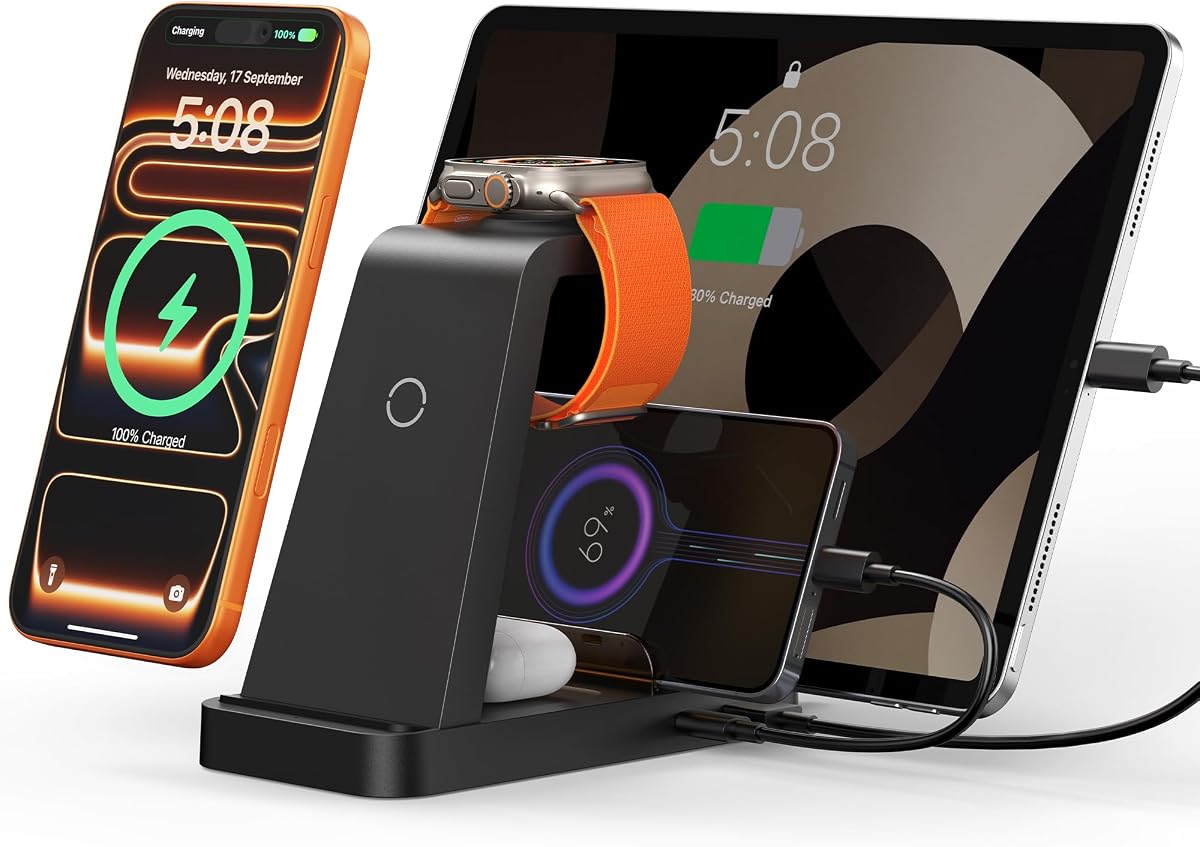


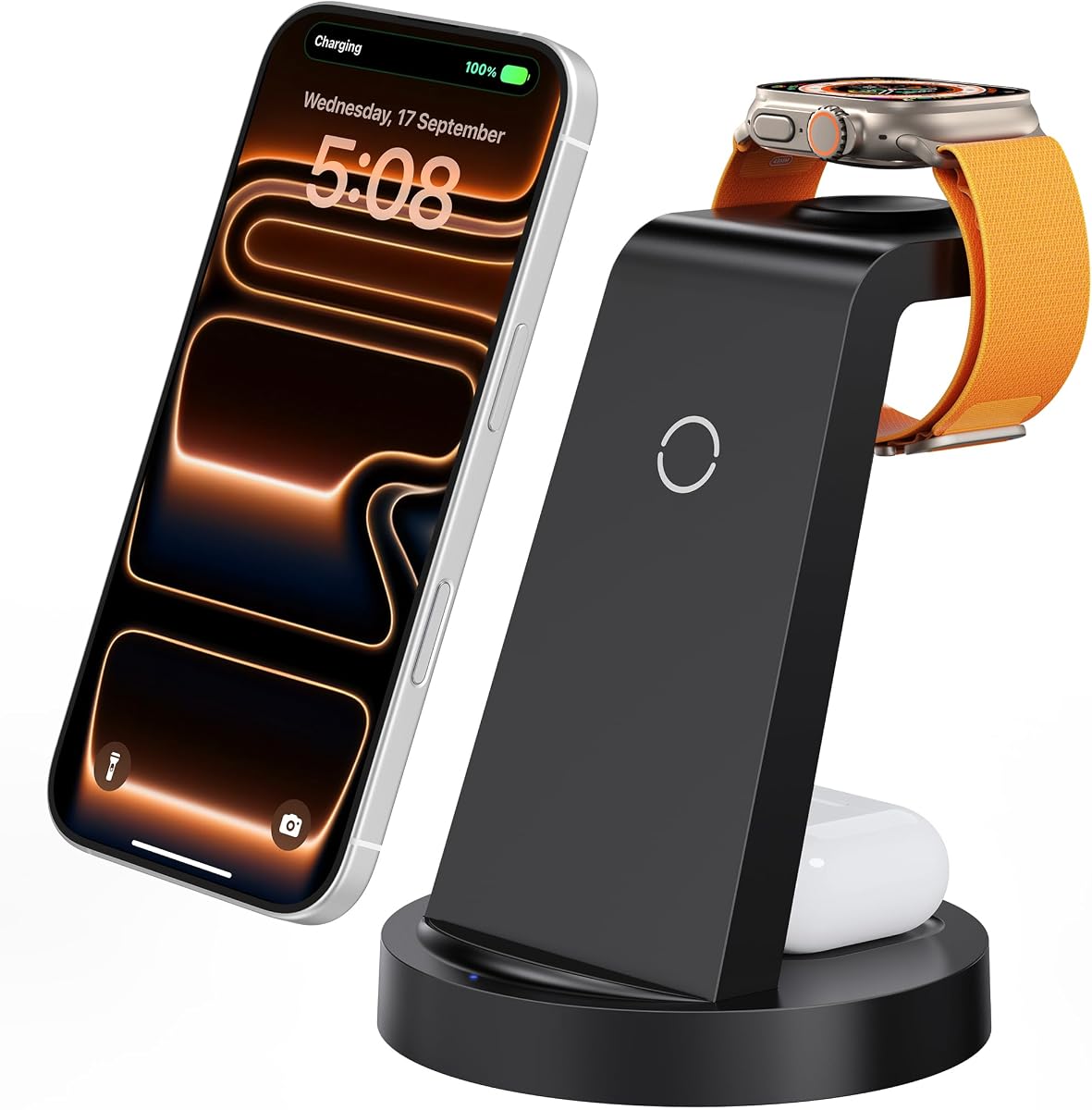


The GETPALS Wireless Charger is a budget-friendly option that delivers reliable power to your iPhone, Apple Watch, and AirPods in one compact unit. With a 4.2 rating from users, it stands out for its portability and simplicity.
We may earn a commission when you buy through this link, at no additional cost to you.
Its foldable design makes it perfect for travelers who need to keep their desk clean at home but also want a solution that fits easily into a bag for trips. The LED indicators ensure you know exactly when your devices are charging without guesswork.
While the charging speeds are modest at 7.5W for phones, they are sufficient for overnight charging. Users should note that AirPods 2, 3, and 4 require a MagSafe charging case to work with this dock, which might be an extra cost for some.
This dock is ideal for anyone looking for an affordable entry into multi-device charging without sacrificing essential safety features. It is a practical choice for students or remote workers who need a tidy nightstand or desk setup.
The lightweight and foldable structure ensures you can take your charging station anywhere, making it a great companion for business trips or vacations.
Built-in overcurrent and overheating protection keep your devices safe from power surges, giving you peace of mind while you sleep or work.
We may earn a commission when you buy through this link, at no additional cost to you.
This 5-in-1 charging station offers substantial versatility for households with mixed devices, allowing simultaneous charging for iPhones, watches, earbuds, iPads, and even Android gadgets. Its 4.3 rating reflects user satisfaction with its speed and utility.
We may earn a commission when you buy through this link, at no additional cost to you.
The inclusion of a 36W adapter ensures that devices charge faster than with original single plugs. With 16 air vents and robust circuit design, the station maintains safe temperatures even when fully loaded with multiple devices.
To achieve optimal performance, users may need to remove thick phone cases, which is a minor inconvenience for the sake of charging efficiency. The extra USB and Type-C cables provided add convenience for charging non-wireless accessories.
This model is best for families or power users who need to charge five different devices at once without clutter. It balances speed and safety well for a medium-sized workspace.
With 36W output, this station reduces wait times significantly compared to standard chargers, ensuring your devices are ready when you are.
The 16 air vents actively dissipate heat, preventing overheating during prolonged charging sessions and extending the lifespan of your devices.
We may earn a commission when you buy through this link, at no additional cost to you.
The MERGROLY 320W Charging Station is a powerhouse for large setups, offering ten ports to charge laptops, tablets, and phones simultaneously. It has a strong 4.4 rating due to its robust build and intelligent power management.
We may earn a commission when you buy through this link, at no additional cost to you.
With dual 65W USB-C ports, it can handle laptops like the MacBook Pro efficiently while still powering smaller devices. The smart chips automatically adjust current to prevent overcharging and ensure safety for all connected gadgets.
The unit is quite large and stationary, meaning it is best suited for a dedicated desk or office space rather than travel. Including eight short cables reduces initial setup hassle but adds to the bulk.
This station is ideal for shared workspaces or families with many gadgets that need charging at once. It offers a professional solution for high-volume power needs.
The 65W ports allow for laptop charging which is rare in standard multi-device docks, making it a versatile all-in-one solution.
Built-in chips detect each device to deliver precise current, ensuring safe and efficient charging without manual adjustments.
We may earn a commission when you buy through this link, at no additional cost to you.
The Acer Gadget 7-in-1 Wireless Charging Station combines functional charging with a smart clock and ambient lighting. It holds a 4.2 rating and appeals to users who want a decorative element alongside utility.
We may earn a commission when you buy through this link, at no additional cost to you.
Bluetooth sync allows the clock to automatically update the time and temperature, reducing the need to check your phone. The lighting is customizable, offering warm or cool tones to fit your room's atmosphere.
While it supports up to six devices, the AirPods need to be centered for charging which might require slight adjustment. Also, Samsung Watch compatibility is not supported which limits cross-platform users.
This dock is a great choice for bedside tables where style and practicality meet. It brings a cohesive look to your nightstand while keeping devices organized.
Adjustable lighting helps create a cozy environment and can serve as a gentle night light when needed.
Automatic time sync ensures the clock is always accurate, making it a reliable bedside tool.
We may earn a commission when you buy through this link, at no additional cost to you.
Anlmz offers a straightforward 3-in-1 solution that charges your phone, watch, and AirPods with a single cable. The 4.2 rating indicates reliable performance for daily use without complex features.
We may earn a commission when you buy through this link, at no additional cost to you.
The soft blue LED indicator is designed to be unobtrusive in dark bedrooms, unlike harsh white lights found on other models. This makes it ideal for light-sensitive users.
Since it is non-MagSafe, you must center your phone precisely for charging to start. This can be slightly annoying for quick bedside use but is manageable.
It works well for those who want a basic, dependable charger without extra bells and whistles. The 18W adapter provides a good balance of speed and safety.
The soft blue LED ensures you can see charging status without being disturbed by bright light during the night.
Smart chipset protection switches to trickle mode when full, protecting battery health over time.
We may earn a commission when you buy through this link, at no additional cost to you.
This magnetic dock is a standout for travelers due to its foldable nature and magnetic snap-in alignment. It earned an Editor's Choice badge for its balance of portability and performance for Apple users.
We may earn a commission when you buy through this link, at no additional cost to you.
The magnetic suction ensures your iPhone stays perfectly aligned for efficient charging, which is crucial when the unit is tilted or moving. It folds flat to take up minimal space in a bag.
While it lacks extra ports, it covers the core trio of iPhone, Watch, and AirPods effectively. The safety certifications give confidence that fast charging is secure even in transit.
If you travel frequently or need a compact nightstand solution, this is a strong contender. It simplifies your packing list by combining three chargers into one pad.
The magnets keep your phone secure, ensuring consistent charging power even if the stand shifts slightly.
The 180-degree fold allows you to use it as a flat pad or a stand for videos while you charge.
We may earn a commission when you buy through this link, at no additional cost to you.
Lcssio delivers a robust charging station with a solid housing that protects devices from scratching. It has a high 4.5 rating reflecting user approval of its stability and charging speed.
We may earn a commission when you buy through this link, at no additional cost to you.
The dual 65W ports are perfect for laptops, making it a desk essential for those who work on MacBooks. Wider slots mean even thick cases fit comfortably without falling over.
The non-removable dividers add rigidity but limit customization. However, for most users, the stability is a trade-off worth making for durability.
This station is ideal for a home office setup where durability and power are top priorities. It keeps devices secure and organized under heavy use.
The fixed slots prevent devices from toppling over, ensuring a stable charging environment.
Flame retardant and overheat protection ensure long-term safety for your valuable electronics.
We may earn a commission when you buy through this link, at no additional cost to you.
This 600W station is a flagship choice for power users needing to charge laptops and accessories simultaneously. The perfect 5 rating suggests it exceeds expectations for speed and reliability.
We may earn a commission when you buy through this link, at no additional cost to you.
With dual 100W ports, you can fast-charge multiple laptops alongside phones and watches. GaN 5 technology ensures this power is delivered efficiently without excessive heat.
The green LED indicator turns off after five seconds to avoid light pollution at night. This thoughtful touch improves the user experience significantly.
It is best for large offices or homes where many devices need charging at once. The cost is higher but the performance is unmatched for heavy workloads.
GaN 5 technology allows for smaller size relative to power output and better heat dissipation.
The auto-off LED prevents sleep disruption by keeping the nightstand dark after charging begins.
We may earn a commission when you buy through this link, at no additional cost to you.
Anker brings the Qi2 standard to this 3-in-1 dock, offering a 15W wireless charge that matches original MagSafe speeds. Its high rating reflects trust in the brand and performance.
We may earn a commission when you buy through this link, at no additional cost to you.
The adjustable angle allows you to view your phone in landscape for StandBy mode or video viewing. This flexibility is a major plus for modern users who rely on their phones as media centers.
Apple Watch charging is officially certified, ensuring reliable performance for Series 10. This is critical for those who want guaranteed compatibility.
While it is pricier, the quality and efficiency justify the cost for premium Apple users. It is the go-to for a tidy and stylish desk setup.
Qi2 delivers higher efficiency and speed compared to older Qi standards, ensuring faster top-ups.
The flexible stand allows for comfortable viewing angles without needing extra equipment.
We may earn a commission when you buy through this link, at no additional cost to you.
This unit merges a high-power wired station with an integrated wireless dock. It earns a 4.2 rating for its capacity to handle nearly any device you throw at it.
We may earn a commission when you buy through this link, at no additional cost to you.
The extra-wide laptop slot is designed to secure devices even with thick cases, which is helpful for heavy-duty users. The GaN III technology keeps heat low despite the high power draw.
The wireless dock section allows easy access for iPhone and AirPods without plugging in cables. This dual approach offers maximum flexibility.
It is a solid choice for power users who need all-in-one power without buying two separate units. It keeps the desk tidy by centralizing everything.
The wide slot ensures your laptop stays upright and secure even with bulky protective cases.
Seamless wireless charging for phones and earbuds simplifies nightly routines.
We may earn a commission when you buy through this link, at no additional cost to you.
Choosing the right charging dock depends on your specific devices and daily routine. This section outlines the key factors to consider for finding a reliable and efficient solution.
Determine how many devices you need to charge at once. Some docks offer three ports for the Apple ecosystem while others provide ten or more for mixed use. Ensure the ports match your devices such as USB-C for laptops and wireless pads for phones.
Look for docks with diverse port options like USB-A, USB-C, and wireless charging to ensure you can charge every gadget in your collection simultaneously.
Higher wattage ensures your devices charge faster which is critical if you often need a quick power boost. Check the total output and per-port wattage to confirm it meets your needs for laptops and phones.
Prioritize models with PD fast charging support for laptops and at least 15W wireless charging for modern iPhones to avoid slow charging times.
A solid build prevents the dock from sliding or toppling over during use. Look for rubber pads and sturdy slots that keep your devices secure especially if you move the dock between locations.
Materials like flame-retardant ABS or metal housings offer better durability and safety for long-term use.
Safety is paramount when charging multiple high-power devices. Ensure the dock includes overcurrent, overvoltage, and overheating protection to prevent damage to your electronics.
Look for FCC or other safety certifications which indicate the product has passed rigorous testing for electrical safety.
Consider whether you need a stationary unit for a desk or a foldable one for travel. Travel-friendly docks often have compact shapes and magnetic alignment for easier setup on the go.
A design that minimizes cable clutter helps maintain a clean workspace and makes your desk look organized.
Some docks come with extra features like digital clocks, LED lights, or stand modes. Evaluate if these add value to your daily routine or are unnecessary add-ons.
Smart features like Bluetooth time sync or ambient lighting can enhance your nightstand or desk environment.
Check if the wireless charger supports phone cases of your thickness. Some docks require case removal for charging while others work with cases up to 5mm.
Selecting a case-friendly dock ensures you do not have to remove your protection every time you charge.
A good warranty protects your investment in case of defects. Look for brands that offer at least 18 months of support for peace of mind.
Strong customer service ensures you can resolve issues quickly if you encounter problems with the dock.
To start using your charging dock, plug it into a wall outlet using the included adapter. Ensure all devices are placed correctly on their respective pads or ports. For wireless charging, center your phone to avoid alignment issues.
Avoid placing metal objects near the wireless charging area as this can trigger safety sensors and stop the charging process. Regularly clean the surface of the dock with a dry cloth to prevent dust buildup.
When not in use for long periods, unplug the dock to conserve energy. Check the cables periodically for wear and tear to ensure safe operation. Store any portable models in a dry place to protect the electronics.
It depends on the dock and the thickness of your case. Most wireless docks work with cases up to 5mm but metal or magnetic cases may interfere. Check the product specifications for specific case compatibility details.
Yes if the dock has high-wattage USB-C ports like 65W or higher. Some models offer dual 65W or 100W ports specifically for laptops. Ensure the total output supports your laptop's power requirements.
Yes reputable docks have smart chips that switch to trickle mode when devices are full. This prevents overcharging and keeps devices safe overnight. Always check the safety certifications before use.
Most charging docks with USB ports work with Android devices. Wireless charging may not be available for all Android models. Check the compatibility list before purchase to confirm support.
Use the built-in slots or ties provided by the dock. Keep cables neatly coiled when not in use to reduce clutter. Using color-coded cables can also help identify which cable is for which device.
Clean your dock every few weeks to prevent dust accumulation. Use a soft dry cloth to wipe the surfaces. Avoid liquid cleaners that might damage the electronics.
We reviewed ten charging docks ranging from budget-friendly 3-in-1 units to powerful 13-port workstations. Each option offers unique benefits depending on your needs for portability or speed.
Focus on your core requirements such as port count or travel size when making a decision. A reliable dock will save you time and keep your workspace organized.
Always check the current prices and availability before buying since deals change frequently. Choose the dock that best fits your lifestyle and device collection.