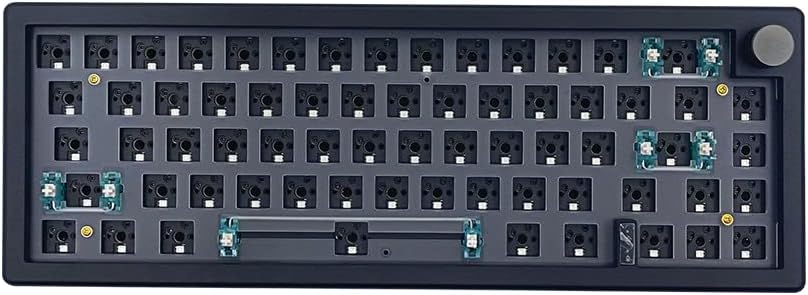
BOYI GMK67 Barebones Keyboard Kit, Black
4.3Editor score
65% compact size
Hot-swap PCB
Affordable pricing
This guide compares the best Barebones Keyboard Kits available in October 2026, evaluating build quality, customization options, and connectivity features for
Barebones keyboard kits offer enthusiasts a canvas to build fully customized mechanical keyboards. These kits provide the essential chassis, PCB, and mounting systems without switches or keycaps. Users gain the freedom to tailor every aspect of typing feel, sound, and aesthetics to their exact preferences for a truly personal setup.
We analyzed ten top-rated barebones kits based on build quality, software support, connectivity options, and user feedback. Our evaluation prioritizes gasket mounting, hot-swap compatibility, and robust programmability via QMK or VIA. This list covers various layouts including full-size, TKL, and compact 65% designs for different workspace needs.
Each pick showcases specific strengths like wireless tri-mode connectivity, smart screens, or premium gasket structures. You will find detailed reviews highlighting real-world performance and customization potential. Please note that prices and availability change frequently, so verify current stock before making your final purchasing decision today.
4.3Editor score

4.8Editor score

4.6Editor score
This side-by-side comparison highlights the key differences between the top ten barebones keyboard kits. We evaluate layout size, connectivity modes, mounting style, and unique features like screens or knobs to help you identify the perfect foundation for your custom build.


The GMK104 Barebones Keyboard Kit stands out as a top choice for enthusiasts wanting full-size versatility. With a high rating and robust features, it combines traditional mechanical keyboard utility with modern smart enhancements like an integrated display and knob.
We may earn a commission when you buy through this link, at no additional cost to you.
Its standout qualities include the tri-mode connectivity supporting Bluetooth 5.0 and 2.4GHz wireless alongside wired Type-C. The gasket-mounted design ensures a cushioned typing experience while hot-swap compatibility simplifies switch upgrades without soldering.
While the smart display offers unique customization potential, it requires some initial setup time to personalize images and layouts. Additionally, the price point is higher than basic barebones kits, though the added features justify the investment for power users.
This kit is perfect for users seeking a premium full-size experience with multimedia controls. If you value connectivity options and want a screen for customization, this is the recommended pick for a refined mechanical keyboard build.
The metal knob and multimedia buttons allow precise volume control and screen customization for a premium feel.
Full QMK/VIA programmability enables complex macros and key remapping for a personalized input experience.
We may earn a commission when you buy through this link, at no additional cost to you.
The BOYI GMK67 Barebones Kit delivers exceptional value for budget-conscious builders seeking a compact 65% layout. It balances cost and performance effectively with strong features like gasket mounting and tri-mode wireless connectivity.
We may earn a commission when you buy through this link, at no additional cost to you.
Its construction includes ample foam pre-installed to minimize cavity sound and vibration. The polycarbonate plate is easy to install, and the hot-swappable terminals support both 3-pin and 5-pin mechanical switches for flexibility.
The layout omits a numpad which suits space-saving needs but may not appeal to data entry users. Also, it does not support optical switches, so standard mechanical switches must be used for compatibility.
This kit is ideal for gamers and typists wanting a portable yet customizable keyboard. If you need a compact, wireless option at a great price, the GMK67 is the top choice for your DIY setup.
The 65% layout retains arrow keys and essential functions while saving desk space for modern setups.
South-facing RGB LEDs offer over 16 million colors and can be remapped via VIA software.
We may earn a commission when you buy through this link, at no additional cost to you.
The GMK104 Barebones Kit in White holds the highest user rating for its premium build and feature set. It mirrors the black version but offers a clean aesthetic that appeals to those seeking a refined visual style.
We may earn a commission when you buy through this link, at no additional cost to you.
Its key strengths lie in the integrated smart display and metal knob which provide real-time customization and precise volume control. The 4000mAh battery ensures extended wireless use without frequent recharging.
The higher price reflects the added components and premium materials used in the construction. Some users may find the screen configuration slightly involved initially but the customization benefits outweigh the setup time.
This kit is best for enthusiasts willing to invest in top-tier features and aesthetics. If you want a full-size keyboard with high-end customization and wireless reliability, this white version is the recommended premium choice.
The white finish combined with metal accents creates a visually appealing and durable typing platform.
The large capacity battery supports long wireless sessions for work and gaming without interruption.
We may earn a commission when you buy through this link, at no additional cost to you.
The GMK108 Barebones Mechanical Keyboard Kit offers a full-size experience with essential features for productivity. It focuses on reliable connectivity and standard mechanical keyboard performance without extra multimedia gimmicks.
We may earn a commission when you buy through this link, at no additional cost to you.
Its strengths include a full 108-key layout that supports NKRO for seamless typing. The gasket-mounted design and hot-swap PCB make it easy to customize switches and enjoy a comfortable typing experience.
Unlike other models, it does not include a smart display or rotary knob. This keeps the design simpler but limits customization options for users who want those extra interactive elements.
This kit is suited for users prioritizing full-size functionality over smart features. If you need a standard full layout with reliable wireless support and gasket comfort, the GMK108 is a solid choice.
The inclusion of arrow keys and function keys ensures comprehensive input options for work.
Tri-mode Bluetooth 5.0 and 2.4GHz support ensures stable connections across multiple devices.
We may earn a commission when you buy through this link, at no additional cost to you.
The BOYI GMK67 Barebones Kit in Black is a top contender for gamers seeking a compact 65% layout. It delivers solid build quality and essential features like gasket mounting and tri-mode wireless at a reasonable price.
We may earn a commission when you buy through this link, at no additional cost to you.
Its strengths include ample pre-installed foam and a polycarbonate plate that enhance typing acoustics. The rotary knob adds convenience for volume control without taking up extra space on the layout.
While versatile, the kit only supports mechanical switches and not optical ones. This limitation means you must choose standard switches compatible with the hot-swap PCB for compatibility.
This kit is perfect for gamers needing a compact setup with wireless flexibility. If you want to optimize desk space without sacrificing customizability or sound quality, the GMK67 black version is a great option.
Pre-installed foam and gaskets work together to reduce unwanted noise and echo during typing.
The 4000mAh battery provides extended use without frequent recharging for gaming sessions.
We may earn a commission when you buy through this link, at no additional cost to you.
The GMK87 Keyboard Barebones Kit offers a balanced 80% TKL layout for users needing functionality and space efficiency. It distinguishes itself with a TFT screen and tri-mode connectivity for modern versatility.
We may earn a commission when you buy through this link, at no additional cost to you.
Its key features include a smart display for real-time image updates and a metal knob for precise volume control. The gasket-mounted structure supports a satisfying typing experience with reduced vibrations.
Some users note the TFT screen setup can be slightly complex and battery life is shorter than larger models at 3000mAh. These factors may impact users seeking maximum simplicity or extended battery duration.
This kit is ideal for those wanting a TKL layout with smart features. If you value a compact design with a display for customization and multi-device support, the GMK87 is a solid DIY solution.
The TFT screen allows customization of images and time display for a personalized setup experience.
Bluetooth 5.0 and 2.4GHz wireless plus USB-C wired ensure flexible connection options for various devices.
We may earn a commission when you buy through this link, at no additional cost to you.
The M87 Kit Black is designed for users prioritizing a quiet typing experience. It features high-quality silencing pads and a gasket-mounted design to absorb keystrokes and minimize noise.
We may earn a commission when you buy through this link, at no additional cost to you.
Its strengths include the hot-swap PCB compatible with 3-pin and 5-pin switches. The South-facing RGB provides backlighting while maintaining a compact 75% footprint for standard desks.
A notable trade-off is the wired-only connection which limits mobility compared to wireless models. Additionally, it relies on standard software customization rather than VIA or QMK for advanced programming.
This kit is best for office environments or quiet spaces where noise reduction is critical. If you need a silent wired keyboard that supports switch customization, the M87 Kit is a reliable choice.
High-quality silencing pads ensure each press feels comfortable without disruptive noise.
The 75% layout retains essential function keys while providing a streamlined look for your desk.
We may earn a commission when you buy through this link, at no additional cost to you.
The GMK87 Keyboard Barebones Kit in Black mirrors the white version with TKL functionality and smart features. It offers a blend of wireless connectivity and interactive display options for enthusiasts.
We may earn a commission when you buy through this link, at no additional cost to you.
Its main features include a TFT screen for customization and a metal knob for precise control. The hot-swappable PCB supports 3-pin and 5-pin mechanical switches for easy DIY modifications.
Battery capacity is 3000mAh which is slightly less than full-size models. Users may need to charge more often during heavy use compared to higher capacity batteries.
This kit suits those wanting a compact TKL layout with smart capabilities. If you value a display and wireless connection, the GMK87 provides the features needed for a customized setup.
Programmable macros and RGB settings can be managed easily through VIA software.
Dual-stage foldable kickstand allows height adjustment for better typing posture.
We may earn a commission when you buy through this link, at no additional cost to you.
The BOYI GMK67Pro Kit is tailored for users who need both QMK and VIA programmability. It combines a compact 65% layout with premium materials to deliver a refined typing experience.
We may earn a commission when you buy through this link, at no additional cost to you.
Its key strengths include PORON gaskets that significantly minimize cavity sound and enhance acoustics. The integrated rotary knob and 4000mAh battery support practical daily usage and convenience.
The kit does not support optical or magnetic switches which may limit enthusiasts with specific preferences. Also, the design requires mechanical switches for proper function which is standard for the market.
This kit is ideal for power users seeking advanced programmability. If you need a compact wireless keyboard with top-tier customization options and premium gasket support, the GMK67Pro is a strong choice.
Full support for QMK and VIA allows deep customization of keys and macros for workflows.
PORON gaskets and pre-installed foam ensure a quiet and satisfying typing sound.
We may earn a commission when you buy through this link, at no additional cost to you.
The M87 Kit White offers an affordable entry point for silent barebones builds. It features a clean white aesthetic with high-quality silencing pads for a quiet typing experience.
We may earn a commission when you buy through this link, at no additional cost to you.
Its strengths include compatibility with 3-pin and 5-pin switches and a 75% layout that fits standard desks. The gasket-mounted design helps reduce vibration and improve comfort.
While economical, it lacks wireless connectivity and advanced software features like VIA. This means customization is limited compared to higher-tier models in the lineup.
This kit is best for budget-focused users who want a wired silent keyboard. If you need a quiet setup with switch customization at a low price, the M87 Kit White is a practical option.
Provides essential barebones features without premium add-ons like screens or wireless support.
Hot-swap terminals allow quick switch replacement without soldering for easy DIY.
We may earn a commission when you buy through this link, at no additional cost to you.
Choosing the right barebones keyboard kit depends on your layout preferences, connectivity needs, and desired features. This guide outlines key factors to consider before making your selection.
Layout size determines desk space usage and key availability. Full-size kits include a numpad for data entry. TKL and 75% kits omit the numpad but save space. 65% kits are compact and portable but lack dedicated navigation keys. Choose based on your work habits and desk size.
Select the layout that matches your need for numbers and navigation keys.
Connectivity modes determine how the keyboard connects to your devices. Wired-only kits are simpler and stable. Tri-mode kits offer Bluetooth 5.0 and 2.4GHz wireless alongside wired USB-C. Wireless provides flexibility while wired ensures zero latency. Consider your device switching needs and power preferences.
Prioritize tri-mode kits if you need to switch between multiple devices seamlessly.
Mounting style affects typing comfort and acoustics. Gasket mounting uses silicone gaskets to isolate the PCB and reduce vibration. This results in a softer, more consistent typing feel. Plate mounting is rigid and responsive. For most users, gasket mounting offers superior comfort.
Choose gasket-mounted kits for a premium cushioned typing experience.
Hot-swap compatibility allows switch replacement without soldering. Look for PCBs supporting both 3-pin and 5-pin switches. This ensures maximum switch availability for customization. Always verify switch compatibility to avoid installation issues.
Always select kits with hot-swap sockets for easy future upgrades.
Software support enables key remapping and macro creation. QMK and VIA are open-source standards for deep customization. Native drivers may be simpler but less flexible. If you plan complex macros ensure VIA support is available.
Verify VIA or QMK support for advanced customization capabilities.
Additional features like smart displays and rotary knobs enhance functionality. Screens allow real-time image updates. Knobs provide precise volume control. These features add convenience but may increase price. Decide if extra interactivity is worth the cost for your use case.
Assess if screens and knobs justify the higher price for your needs.
Battery capacity determines wireless usage time before recharging. Look for at least 4000mAh for extended use. Smaller batteries may require frequent charging. Wired use avoids this but limits portability. Check capacity based on your daily usage duration.
Choose higher capacity batteries for longer wireless independence.
Build quality impacts longevity and aesthetics. High-quality foam and polycarbonate plates improve sound. Metal knobs add durability. Check user reviews for construction consistency. A solid build ensures satisfaction over time.
Look for solid construction materials like metal and polycarbonate.
First assemble the case and PCB ensuring gaskets are correctly placed to avoid damage. Insert switches into hot-swap sockets gently to prevent bending pins. Attach keycaps and connect via USB for initial programming.
Update firmware using VIA or QMK tools to customize keymaps and lighting. Adjust backlighting modes and brightness through FN key combinations for personalization. Test all functions to ensure stable operation before daily use.
Clean regularly with compressed air to remove dust between keys. Avoid spills and store in a dry environment. Update software periodically for bug fixes. Handle the knob and display gently to extend lifespan.
A barebones keyboard kit includes the case PCB, and mounting materials but excludes switches and keycaps. It provides a foundation for DIY enthusiasts to build a fully customized mechanical keyboard tailored to their preferences.
Many kits support tri-mode connectivity including Bluetooth 5.0 and 2.4GHz wireless alongside wired USB-C. Always check specific product details to confirm supported modes before purchasing for your needs.
Most kits support both 3-pin and 5-pin mechanical switches via hot-swap sockets. Optical and magnetic switches may not be compatible so verify switch type requirements before buying.
Many kits support VIA and QMK for open-source key mapping and macro creation. Some use native drivers so check the product description to confirm software compatibility for customization.
Hot-swap PCBs have sockets that hold switches directly without soldering. Simply press the switch pins into the socket. Ensure the switch is aligned correctly to prevent damage to the PCB.
Most kits offer compatibility with both Windows and macOS systems. Function key layouts may differ but can be remapped via software. Verify OS support in product details before purchase.
The top picks include the GMK104 with screen for premium features and the BOYI GMK67 for budget value. Each kit offers distinct strengths suited to different workspace needs and customization preferences for DIY builders.
Prioritize layout size and connectivity based on your daily workflow. Gasket mounting and hot-swap support are essential for comfort and future upgrades. Verify software compatibility for advanced key customization before finalizing your choice.
Always check current prices and stock availability as they vary frequently. Compare features against your specific requirements to ensure the best fit. This guide provides a reliable overview to assist your selection process.