
Artisul D16
5.0Editor score
15.6 inch full-laminated screen
8192 levels pressure sensitivity
7 customizable hotkeys and dial
Finding a cheap drawing tablet with screen can be challenging for beginners and professionals alike. You need a device that offers accurate color, pressure sensitivity, and a comfortable drawing experience without breaking the bank. This guide helps you navigate the options available in the current market.
We have carefully compared ten real products based on their specifications, user ratings, and overall value. Our analysis focuses on key aspects such as screen quality, pen technology, connectivity options, and software compatibility. This ensures you get a comprehensive view of what each device offers.
Each pick in this list highlights specific strengths and potential trade-offs to help you decide. Remember that prices and availability can change frequently online. We recommend checking the current links for the most up to-date offers before making your final purchase decision today.
5.0Editor score

4.4Editor score

4.5Editor score
As an Amazon Associate we earn from qualifying purchases.
The following table provides a side-by-side comparison of all ten products featured in this guide. It highlights the most important technical specifications and features to help you quickly identify which device fits your specific creative needs and budget requirements.




The XP-PEN Artist12 stands out as a top choice for artists looking for an affordable entry into digital art. It offers a crisp 11.6 inch display with solid color reproduction and a battery-free pen that feels comfortable during long sessions.
We may earn a commission when you buy through this link, at no additional cost to you.
Its standout feature is the balanced combination of screen quality and pen responsiveness. The 8192 levels of pressure sensitivity allow for detailed line work, while the anti-reflective screen protector reduces glare significantly. This makes it suitable for both sketching and photo editing tasks.
However, you need to be aware that it is not a standalone device. It requires a connection to a computer, which means portability is limited to where your laptop is. Some users might need extra adapters depending on their laptop ports like which is a minor inconvenience.
For students and hobbyists wanting to start digital art without spending too much, this tablet is highly recommended. It provides all the essential tools needed to learn and create professional-quality work efficiently and comfortably.
The hexagonal pen design and textured grip ensure you maintain control without slipping during detailed strokes.
Works seamlessly with popular applications like Photoshop and Clip Studio, making integration into your workflow easy.
We may earn a commission when you buy through this link, at no additional cost to you.
The VEIKK VK1200 V2 is an impressive device for those on a tight budget. It offers full-laminated technology which is often found in more expensive models. This means the cursor matches your pen tip closely, eliminating the distraction of visual offset.
We may earn a commission when you buy through this link, at no additional cost to you.
One of its best features is the inclusion of two pens and a large supply of replacement nibs. This ensures you never run out of supplies unexpectedly. The USB-C connectivity also simplifies your desk setup by reducing cable clutter significantly.
While the color gamut is standard at 72% NTSC, it is still sufficient for most digital art and illustration tasks. The build quality is compact and stylish, though some might find the metal body feels a bit lighter compared to premium alternatives.
If you need a reliable starter screen that minimizes parallax without costing a fortune, this is an excellent pick. It delivers solid performance for students and beginners who prioritize function over high-end color specs.
The seamless integration of glass and screen ensures your strokes appear exactly where you draw them on the display.
Single-cable connection via USB-C makes setup quick and keeps your workspace organized and tidy.
We may earn a commission when you buy through this link, at no additional cost to you.
The GAOMON PD1161 offers a robust set of features for the price. Its eight physical shortcut keys give you quick access to essential tools without needing to switch back and forth using your mouse. This can significantly speed up your creative workflow.
We may earn a commission when you buy through this link, at no additional cost to you.
The tilt function is a nice addition that allows for more natural shading and stroke variation similar to traditional pencils. The matte film on the screen reduces glare effectively, making it comfortable to use under various lighting conditions for long periods.
One limitation is the connectivity requirement for separate HDMI and USB ports. If your modern laptop only has USB-C, you will need an adapter. This adds a slight complexity to setup compared to models that support single USB-C cables.
For artists who rely on speed and shortcut customization, this tablet is a strong contender. It balances performance and usability well, making it a practical choice for daily creative work and design projects.
Eight physical buttons let you map frequent actions like zooming or brushing to your physical keys for faster access.
Tilt support allows you to change brush opacity by angling the pen, mimicking traditional drawing techniques.
We may earn a commission when you buy through this link, at no additional cost to you.
The Artisul D16 provides a larger creative space compared to most options in this price range. A 15.6 inch screen allows you to see more of your canvas and interface elements without constant zooming. This is particularly beneficial for detailed illustration work.
We may earn a commission when you buy through this link, at no additional cost to you.
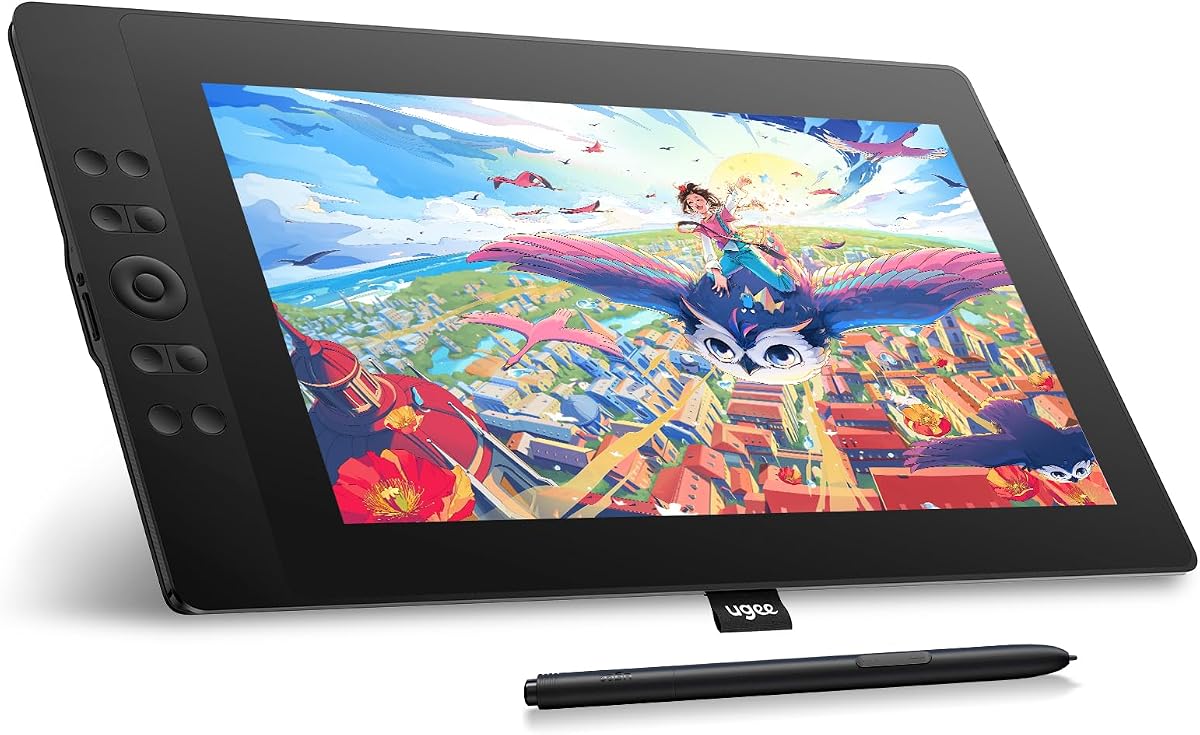
A unique feature is the quick dial, which lets you rotate your brush or zoom in and out smoothly. Combined with seven customizable hotkeys, it offers extensive control over your software tools. The full-laminated screen ensures accurate cursor positioning as well.
It is important to note that this listing is for a refurbished unit. While it offers great value, you should check the seller's warranty and return policy. Also, ensure your power outlet is close by as it requires a power adapter to function fully.
Artists who need more screen real estate for a reasonable price will appreciate this device. The additional size and dial control make it a powerful tool for production work and complex designs.
A 15.6 inch display gives you ample room to work comfortably without crowding your art or interface tools.
The quick dial allows you to adjust brush size or scroll pages without reaching for the mouse, improving efficiency.
We may earn a commission when you buy through this link, at no additional cost to you.
The HUION Kamvas 13 Gen 3 brings premium features to a mid-range device. With 16384 pressure levels, the pen response is incredibly fluid, allowing for very subtle control over line weight. This makes it feel close to professional-grade tablets.
We may earn a commission when you buy through this link, at no additional cost to you.
The dual dial system is a standout feature that lets you assign two different shortcuts simultaneously. This increases your workflow speed significantly. The anti-sparkle glass reduces glare while maintaining a smooth surface, improving visibility and drawing comfort.
The color accuracy is top-notch with 99% sRGB coverage and factory calibration. This is vital for designers who need precise color matching. However, the price is higher than basic models, and it may require newer operating systems for full compatibility.
For professionals or serious hobbyists who want the best drawing experience without buying top-tier expensive brands, this is a great choice. The combination of precision and color fidelity justifies the investment.
The high pressure levels and fast read rate ensure no lag, making your strokes appear instantly and naturally.
Factory calibration ensures what you see on screen matches your prints or final digital outputs closely.
We may earn a commission when you buy through this link, at no additional cost to you.
The UGEE UE16 impresses with its exceptional color gamut coverage of 143% sRGB. This allows for vibrant and accurate colors that stand out compared to standard tablets. It is particularly useful for illustrators and designers who prioritize visual impact.
We may earn a commission when you buy through this link, at no additional cost to you.
The full-laminated screen ensures that your pen feels connected to the cursor without visual gaps. It also includes a scroll wheel and physical shortcut keys to help you manage large projects efficiently. The larger 15.4 inch screen provides ample space for creation.
While the features are excellent, you may need to manage the cables carefully as it includes a separate 3-in-1 cable. Additionally, spending time customizing the keys is recommended to get the most out of the hardware.
For creators focused on rich color output and a large drawing surface, this tablet delivers excellent value. It balances performance and affordability well, making it a strong candidate for professional use.
The wide color gamut ensures your art looks vivid and true to life on the screen.
A dedicated scroll wheel and keys allow you to navigate and edit quickly without interrupting your creative flow.
We may earn a commission when you buy through this link, at no additional cost to you.
The VEIKK VK1200 is a straightforward and budget-friendly device ideal for students. It includes two pens and enough replacement nibs to last through a school year or personal practice. This makes it very convenient for educational purposes.
We may earn a commission when you buy through this link, at no additional cost to you.
The tilt function allows you to experiment with shading techniques similar to traditional drawing. The six shortcut keys are easy to map for basic tasks like undoing or zooming. It keeps the interface clean and user-friendly for beginners.
However, the color gamut is standard which means it might not be the best for professional color-critical work. But for learning digital art or taking notes, it provides all the necessary tools without overwhelming you with complex features.
If you are a student looking for a reliable and affordable tool to practice digital illustration, this is a solid choice. It offers a gentle introduction to pen displays without a steep learning curve.
Designed with simplicity in mind, it helps new users focus on creativity rather than complicated settings.
Includes an artist glove and extra nibs, ensuring you have everything needed to start drawing immediately.
We may earn a commission when you buy through this link, at no additional cost to you.
The RubensTab T11 Pro is unique because it does not require a computer to work. It has a built-in battery and pre-installed drawing apps, allowing you to create anywhere you go. This portability is a significant advantage for travelers.
We may earn a commission when you buy through this link, at no additional cost to you.
The multi-touch support allows for natural gestures like zooming and panning with your fingers. This makes the device feel more like a modern tablet while still providing pressure-sensitive pen capabilities. It is great for casual sketching and note-taking.
The screen size is smaller than most dedicated pen displays, which might limit detailed work. Also, you will need to charge it occasionally if you plan to use it for long sessions away from a power source.
For artists who need flexibility and want to draw on a couch or while traveling, this is a fantastic option. It simplifies the setup by removing the need for external hardware connections entirely.
The ability to draw without a computer means you can start creating wherever inspiration strikes.
Multi-touch support makes navigating your artwork intuitive and efficient without needing a mouse.
We may earn a commission when you buy through this link, at no additional cost to you.
The VEIKK VK1200V2 is an upgraded version offering higher pressure sensitivity levels. With 16384 levels, you get finer control over your strokes which helps in creating more detailed and expressive artwork. It is a good step up from standard models.
We may earn a commission when you buy through this link, at no additional cost to you.
The screen boasts 120% sRGB coverage ensuring vibrant visuals and rich colors. The full-laminated design minimizes parallax so your pen tip aligns perfectly with the cursor. This improves accuracy and reduces eye strain during long sessions.
It is important to note that you will need to use the drivers for full functionality. Keeping the drivers updated ensures smooth performance. Also, like most devices in this list, it relies on a computer connection to operate.
If you want better pen sensitivity and color performance without paying premium prices, this model is worth considering. It offers a strong balance of technical specs and usability for daily creative tasks.
The upgraded pressure levels allow for smoother transitions between thick and thin lines with minimal effort.
Full-laminated technology ensures your strokes appear exactly where you intend them to on the screen.
We may earn a commission when you buy through this link, at no additional cost to you.
The XPPen Artist 12 Pro Lite is designed for artists who value portability and ease of use. The red dial provides quick access to common functions which helps speed up your workflow without cluttering the interface with too many buttons.
We may earn a commission when you buy through this link, at no additional cost to you.
Tilt support allows for natural shading and brush variation enhancing your creative options. The 3-in-1 cable design simplifies connections meaning you do not need extra adapters for many modern laptops. It keeps your setup clean and manageable.
However, the customization options are slightly limited compared to models with more shortcut keys. If you prefer extensive key mapping, you might find it basic. But for straightforward drawing tasks, it performs reliably and consistently.
For travelers or those with limited desk space, this compact tablet is a great choice. It offers essential high-quality features in a smaller package making it perfect for casual creators and on-the-go sketching.
The red dial allows for quick adjustments to brush size or zoom without disrupting your drawing flow.
Integrated cable design reduces the need for adapters making setup quick and hassle-free.
We may earn a commission when you buy through this link, at no additional cost to you.
Selecting the right pen display involves understanding key features that impact your creative workflow and comfort. This guide breaks down the essential factors to consider before making your purchase decision.
Screen size dictates how much visual space you have for your work. A 11.6 inch screen is portable and sufficient for most learners, while 15.6 inches offers more room for complex details. Resolution affects sharpness and clarity of your lines.
Look for Full HD 1080p resolution as a minimum standard to ensure your artwork looks crisp and detailed without pixelation.
Pressure sensitivity determines how well the pen responds to how hard you press. Higher numbers like 8192 or 16384 allow for smoother transitions between thin and thick strokes. This is crucial for natural shading and line variation.
Choose a model with at least 8192 levels to get a professional feel and precise control over your brush strokes.
Color accuracy is vital if you plan to publish your work for print or web. Look for wide color gamuts like sRGB or Adobe RGB coverage. Good color ensures what you see on screen matches your final output reliably.
Target a device with at least 72% NTSC or 90% sRGB coverage to avoid washed-out colors in your digital art.
Battery-free pens are preferred because they do not require charging. Look for features like tilt support which mimics real pencil usage. Also check if the pen includes customizable buttons for shortcuts to improve your workflow speed.
Ensure the pen feels comfortable in your hand and includes enough replacement nibs to maintain its texture over time.
Most pen displays connect via HDMI and USB-A but newer models support USB-C single cable connections. This reduces cable clutter and simplifies setup significantly. If your laptop lacks traditional ports, you might need an adapter.
Prioritize USB-C compatible models if you want a cleaner and more portable setup for your workspace.
Physical shortcut keys on the side of the tablet allow quick access to tools like eraser or undo. This reduces reliance on keyboard shortcuts and keeps your hands focused on drawing. More keys mean better customization options.
Select a model with at least six programmable keys to streamline your workflow and increase efficiency.
Check that the tablet supports your computer's operating system like Windows macOS or Linux. Driver support is key for full functionality. Also verify if the device works with Android if you plan to connect to a phone or tablet.
Ensure the manufacturer provides regular driver updates to maintain stability and compatibility with your software.
While looking for cheap options balance cost with essential features. Sometimes spending slightly more gets you better durability or color accuracy. Consider refurbished units carefully as they can offer great value with warranties.
Set a budget based on your needs and compare specs to find the best value without overpaying for unnecessary extras.
Start by installing the latest drivers from the manufacturer's website before connecting the device. This ensures all buttons and pressure settings function correctly. Connect the cables firmly to your computer and monitor to avoid connection issues.
Keep the screen clean by using a soft microfiber cloth to wipe away fingerprints and dust. Avoid using harsh chemicals that can damage the anti-reflective coating. Regular cleaning maintains optimal visibility and prevents scratches on the display.
Store the stylus in a safe place when not in use to prevent tip damage. Avoid placing heavy objects on top of the tablet which can crack the screen. Proper storage ensures longevity and consistent performance for your creative work.
Most cheap drawing tablets with screens need a computer to work because they do not have an internal operating system. However, some standalone models like the RubensTab allow you to draw directly without a PC. Check the product details to confirm if it supports standalone usage.
Laminated screens have the glass fused directly to the display panel reducing the gap between the pen and the cursor. This minimizes parallax making drawing feel more natural. Non-laminated screens have a slight air gap which can cause a visible offset.
Yes most of the tablets listed support macOS versions 10.12 or later. You will need to download the specific drivers for your Mac to enable all features. Ensure your Mac has the necessary ports or use adapters for connectivity.
Battery-free pens use electromagnetic resonance technology so they do not run out of power. They last indefinitely as long as the device is connected to the host computer. You only need to replace the nibs over time as they wear out.
Yes pen tablets with tilt support and pressure sensitivity are excellent for 3D sculpting and modeling software like Blender or ZBrush. The ability to control brush strength and direction precisely helps in detailed shaping and texture work.
Some tablets come with trial versions of drawing software but you can use them with free tools like Krita or GIMP. Most creative software allows you to use any pen tablet after installing the drivers. Check what is included in the box before buying.
Most manufacturers offer a one-year hardware warranty for defects and issues. Some may provide lifetime technical support for drivers and setup. Always register your product on the official website to ensure you receive valid warranty coverage.
Yes pen displays are great for taking notes and writing digitally during meetings or lectures. They support PDF annotation tools and note-taking apps. Some standalone tablets allow you to save files directly to the device.
We have reviewed ten excellent options that balance affordability with quality for digital artists. Whether you choose the XP-PEN Artist12 for its versatility or the Artisul D16 for screen size there is a device for everyone.
Prioritize factors like screen quality and pressure sensitivity based on your specific needs. Beginners might prefer simplicity while professionals may need higher color accuracy and shortcut customization for efficient workflows.
Prices and availability change regularly so check the current links for the latest deals before buying. Investing in the right tool today can help you grow your skills and creativity effectively for years to come.