
ASRock DeskMeet X300
4.8Editor score
AMD AM4 Socket Support
500W Power Supply
Dual M.2 Slots
Discover the top barebone gaming PCs for October 2026. Compare compact builds, performance specs, and features to find the perfect custom gaming desktop.
Barebone gaming PCs offer enthusiasts the freedom to customize every component of their build. These compact systems provide a solid foundation for high-performance setups without the bulk of traditional towers.
We evaluated ten top models based on processing power, graphics capabilities, and expansion options. Our guide highlights systems that balance size, cooling, and connectivity for serious gamers and creators alike.
Each selection includes detailed specifications, pros, cons, and expert insights. Keep in mind that availability and configurations may vary. Always check current listings before making your final purchase decision today.
4.8Editor score
4.1Editor score

5.0Editor score
This side-by-side comparison highlights the key specifications and features of the top ten barebone gaming PCs available today. Use this table to quickly identify the system that matches your specific gaming and productivity needs.



The AOOSTAR GEM12+ PRO stands out as a premier choice for enthusiasts seeking a compact yet powerful barebone gaming PC. With a 4.1-star rating from verified buyers, this model delivers exceptional value through its high-end specifications and thoughtful design features.
We may earn a commission when you buy through this link, at no additional cost to you.
Powered by the AMD Ryzen 7 PRO 8845HS processor, this system offers 8 cores and 16 threads capable of handling demanding gaming and productivity workloads. The integrated Radeon 780M graphics provide solid performance for casual gaming, while the dedicated OCuLink port ensures minimal performance loss when connecting external GPUs like RTX 4070 models.
While the barebone nature requires separate purchases for RAM and storage, the dual DDR5 slots and two M.2 PCIe 4.0 slots offer immense flexibility for customization. The vapor chamber cooling system effectively manages thermals even under sustained loads, maintaining system stability during extended gaming sessions.
This PC is ideal for users who want a sleek, powerful setup without the bulk of a traditional tower. Whether you are a content creator, a competitive gamer, or a professional needing multi-screen productivity, the GEM12+ PRO delivers the reliability and performance you need.
The vapor chamber cooling system transfers heat efficiently to the heat sink, lowering temperatures under high load to extend the machine's lifespan.
Support for four 4K displays simultaneously makes this an excellent choice for multi-monitor trading setups or immersive creative workflows.
We may earn a commission when you buy through this link, at no additional cost to you.
The ASRock DeskMeet X300 earns its spot as the best budget option with an impressive 4.8-star rating. This barebone kit provides a reliable foundation for users who want to build a high-performance PC without paying a premium for pre-installed components.
We may earn a commission when you buy through this link, at no additional cost to you.
Its AMD AM4 socket supports a wide range of processors including the Ryzen 5000 and 4000 G-Series, allowing for versatile CPU choices. The included 500W 80+ Bronze power supply simplifies the build process by ensuring you have adequate power from the start.
While it uses PCIe 3.0 which limits some graphics card bandwidth, the dual M.2 slots and four DIMM slots offer great expandability for storage and memory. This model is perfect for budget-conscious gamers who prioritize value and customization over bleeding-edge speeds.
For those looking to maximize every dollar, the DeskMeet X300 offers an excellent balance of features and flexibility. It accommodates standard desktop components in a compact 8-liter chassis, making it a versatile choice for home offices and small gaming rigs.
Included 500W power supply reduces total cost of ownership and ensures sufficient wattage for discrete graphics cards.
Four DDR4 DIMM slots support up to 128GB of RAM for heavy multitasking and large file editing workflows.
We may earn a commission when you buy through this link, at no additional cost to you.
With a perfect 5.0-star rating, the BRENUC NUC 11 Extreme represents the pinnacle of high-end barebone gaming systems. It combines industrial-grade build quality with premium features that appeal to professionals and serious enthusiasts alike.
We may earn a commission when you buy through this link, at no additional cost to you.
The Intel Core i9-11900KB processor delivers exceptional performance with 8 cores and 16 threads, reaching turbo speeds up to 4.9 GHz. This processing power ensures smooth performance in demanding games and creative applications that require significant computational resources.
Two Thunderbolt 4 ports offer versatile connectivity for high-speed data transfer and daisy-chaining peripherals. The PCIe 4.0 x16 gold finger slot supports discrete graphics cards up to 12 inches long, providing the flexibility needed for custom gaming builds.
This premium system is designed for users who demand the best performance and connectivity without compromise. Whether you need a powerful workstation or a compact gaming rig, the NUC 11 Extreme delivers top-tier reliability and features.
Dual Thunderbolt 4 ports enable high-speed data transfer and support for multiple high-resolution external displays.
Built-in support for discrete graphics cards allows for significant performance boosts beyond integrated graphics limits.
We may earn a commission when you buy through this link, at no additional cost to you.
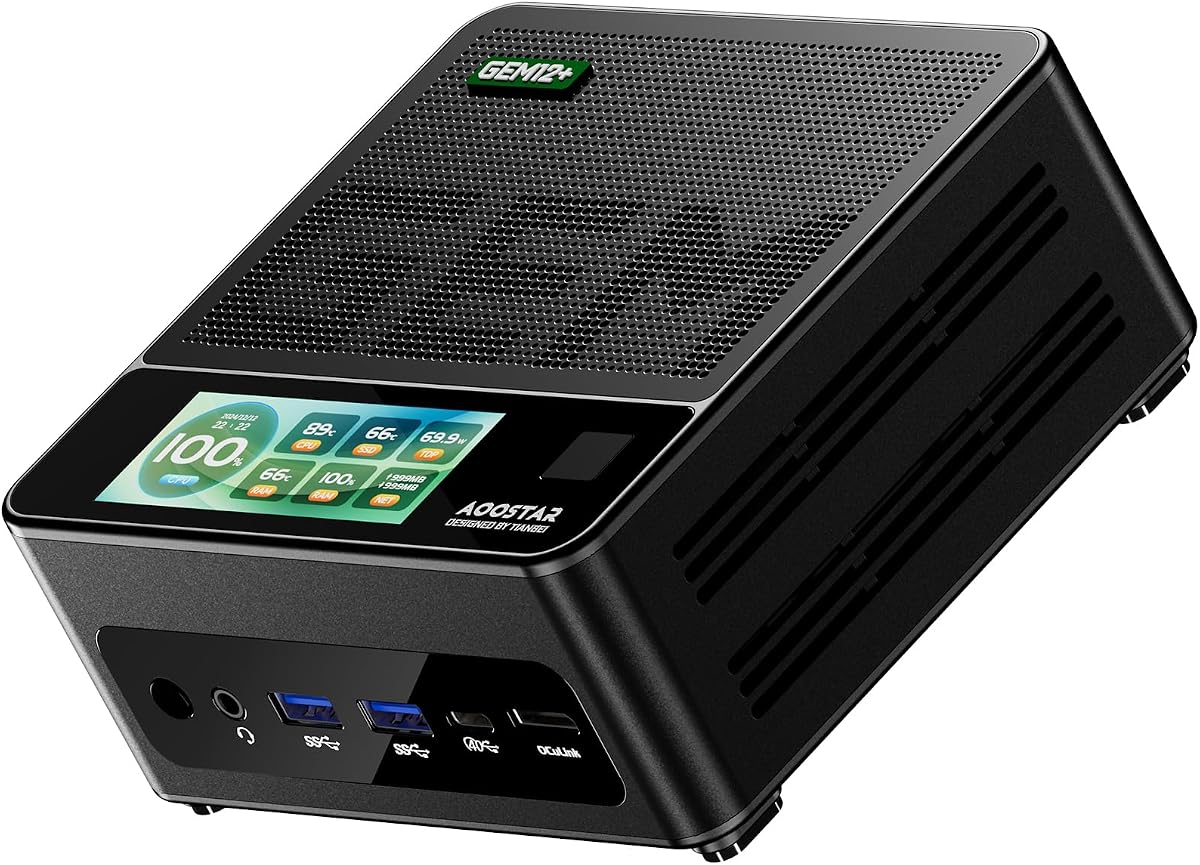
The AOOSTAR GEM12+ offers a compelling balance of performance and value, earning a solid 4.5-star rating from users. This barebone mini PC is packed with high-end features that make it suitable for both gaming and professional workloads.
We may earn a commission when you buy through this link, at no additional cost to you.
Powered by the AMD Ryzen 7 PRO 8845HS processor, this system delivers efficient power consumption without compromising performance. The integrated Radeon 780M graphics provide capable performance for modern titles at lower settings, while the OCuLink port enables external GPU connections for higher frame rates.
Advanced cooling technology featuring a vapor chamber ensures the system stays cool under sustained loads. With dual M.2 PCIe 4.0 slots, you can expand storage significantly for large game libraries or project files.
This model is an excellent choice for users who want premium performance without paying for pre-installed components. Whether you are building a compact gaming station or a multi-screen workstation, the GEM12+ delivers the flexibility you need.
OCuLink port allows external GPU connections with virtually no performance loss compared to internal solutions.
VAT architecture saves up to 20% power consumption compared to standard mini PC designs for lower energy costs.
We may earn a commission when you buy through this link, at no additional cost to you.
The AOOSTAR MACO 8845HS brings a unique eco-friendly approach to barebone gaming PCs with a chassis made from 100% recycled aluminum. Despite its compact size, it delivers robust performance suitable for gaming and intensive multitasking.
We may earn a commission when you buy through this link, at no additional cost to you.
The AMD Ryzen 7 PRO 8845HS processor ensures efficient power consumption with adjustable BIOS modes for Silent, Balanced, or Performance usage. Dual USB4 ports enable 8K display outputs and high-speed data transfer, making it versatile for modern workflows.
Its advanced cooling system featuring a VC heat spreader maintains stable temperatures even during prolonged gaming sessions. The dual 2.5G LAN ports provide redundant networking options, which is valuable for users requiring reliable connectivity.
This model appeals to environmentally conscious gamers who still want high performance in a small form factor. Whether for home office use or portable gaming, the MACO 8845HS offers a sleek and powerful solution.
Constructed with 100% recycled aluminum except the bottom cover, reducing carbon emissions by 75%.
Dual 2.5G LAN ports allow for redundant connections or separate public and private network setups.
We may earn a commission when you buy through this link, at no additional cost to you.
The ASRock DeskMeet B760 is an ideal choice for Intel enthusiasts looking to build a custom gaming PC. With a perfect 5.0-star rating, this barebone kit offers a robust platform for modern computing needs.
We may earn a commission when you buy through this link, at no additional cost to you.
Supporting 12th, 13th, and 14th Gen Intel Core processors, it provides a solid foundation for high-performance gaming and productivity. The PCIe 4.0 x16 slot ensures compatibility with the latest graphics cards for maximum gaming performance.
The compact 8-liter design saves space without compromising on expandability. Four DDR4 DIMM slots support up to 128GB of memory, while the included 500W power supply simplifies the build process for users.
This system is perfect for users who prefer Intel architecture and want a reliable, customizable solution. Whether for gaming or professional work, the B760 delivers excellent performance and build quality.
Compatible with latest 14th Gen Intel Core processors for cutting-edge performance and efficiency.
8-liter compact form factor saves desk space while supporting full-size desktop components and expansion.
We may earn a commission when you buy through this link, at no additional cost to you.
The MINISFORUM X1 Lite-255 offers a lightweight and efficient barebone gaming PC for users prioritizing portability. Its 3.9-star rating reflects solid functionality despite lower performance limits compared to flagship models.
We may earn a commission when you buy through this link, at no additional cost to you.
Powered by the AMD Ryzen 7 255, this system handles everyday tasks and lightweight gaming smoothly. The triple display output supports HDMI2.1, USB4, and DP1.4 for versatile multi-monitor setups.
A full-blood USB4 port provides high-speed data transfer and supports PD power input. The OCuLink support allows for external GPU connections, expanding gaming capabilities without internal modifications.
This compact PC is ideal for students or travelers who need a versatile machine on the go. With a three-year warranty, it offers peace of mind for budget-conscious buyers.
PCM phase-change material in CPU fan and bottom fan ensure memory and SSD run at full speed.
Support for three independent displays facilitates collaborative work environments and multi-screen entertainment.
We may earn a commission when you buy through this link, at no additional cost to you.
While not strictly a barebone kit, the CyberPowerPC Gaming PC serves as a convenient alternative for users avoiding DIY builds. With a 4.0-star rating, it offers immediate usability right out of the box.
We may earn a commission when you buy through this link, at no additional cost to you.
Equipped with an AMD Ryzen 5 5500 CPU and Radeon RX 6500 XT graphics, this system delivers capable performance for casual gaming. The 8GB DDR4 RAM and 500GB NVMe SSD provide a solid starting point.
Custom RGB lighting and a tempered side panel enhance the aesthetic appeal of the system. Included accessories like a keyboard and mouse further streamline the setup process for new users.
This option suits those seeking a ready-to-use solution with technical support included. Whether for a first gaming PC or an office workstation, it offers simplicity and value.
Pre-assembled system includes keyboard, mouse, and essential cables to simplify immediate setup.
Free lifetime tech support ensures assistance is available for setup and troubleshooting needs.
We may earn a commission when you buy through this link, at no additional cost to you.
The ASRock DESKMINI 310W is designed for users prioritizing ultra-compact form factors. Its 4.2-star rating highlights reliability and functionality in a tiny 2-liter chassis.
We may earn a commission when you buy through this link, at no additional cost to you.
Supporting Intel 8th and 9th Gen LGA1151 processors, it provides a stable platform for basic gaming and office tasks. Two DDR4 SO-DIMM slots allow up to 64GB of memory for responsive multitasking.
Triple video outputs allow flexible multi-monitor productivity while the Micro SD card reader adds convenient storage expansion. The VESA mount readiness enables clean setups behind displays or on walls.
This mini PC suits users with extreme space constraints like dorms or small apartments. Despite its age, it remains a practical choice for entry-level barebone builds.
Ultra-compact 2-liter design saves maximum desk space for users with limited workspace.
VESA mount ready design allows for versatile installation behind displays for clean cable management.
We may earn a commission when you buy through this link, at no additional cost to you.
The ASRock DeskMini B760 combines modern connectivity with an ultra-compact footprint. Its 4.3-star rating reflects solid performance and build quality for users seeking a high-tech mini PC.
We may earn a commission when you buy through this link, at no additional cost to you.
Featuring a Blazing M.2 PCIe 5.0 slot, it offers next-generation storage speeds for faster boot times and file transfers. USB 3.2 Gen2x2 Type-C ports enable high-speed data transfer and device charging.
Triple display outputs support versatile productivity setups while the LGA1700 socket ensures compatibility with recent Intel processors. The compact design makes it ideal for tight spaces or wall-mounted installations.
This system is perfect for tech enthusiasts who want cutting-edge features in a tiny package. Whether for gaming or professional work, it delivers impressive speed and flexibility.
Blazing M.2 PCIe 5.0 slot provides incredible transfer speeds for NVMe SSDs and faster system responsiveness.
USB 3.2 Gen2x2 Type-C enables rapid data transfer for external drives and peripherals.
We may earn a commission when you buy through this link, at no additional cost to you.
Selecting the right barebone gaming PC requires careful consideration of processor architecture, connectivity options, and expansion capabilities to match your specific gaming and productivity needs.
Choose between AMD AM4 sockets for broad compatibility and cost-effectiveness or Intel LGA1700 for the latest generation performance. AMD Ryzen 7000 series CPUs offer integrated Radeon 780M graphics suitable for casual gaming without a dedicated card, while Intel Core i9 options provide raw power for heavy multitasking.
Match the processor to your workload; gaming prioritizes single-core speed while content creation benefits from higher core counts.
Check for PCIe slots or OCuLink ports if you plan to install a discrete graphics card later. OCuLink offers lower latency than Thunderbolt for external GPUs but requires a dedicated adapter plate.
Prioritize systems with OCuLink if you need high-end gaming performance without committing to an internal GPU upgrade immediately.
Look for systems supporting up to 128GB RAM for future-proofing heavy workloads. DDR5 memory offers higher bandwidth than DDR4 for smoother multitasking in games and productivity software.
Ensure the system supports the latest DDR5 standards if you intend to use multiple memory modules simultaneously.
Prioritize USB4 or Thunderbolt 4 ports for high-speed data transfer and multi-monitor setups. Dual LAN ports are useful for professional users needing redundant connections.
Confirm your system supports the USB or Thunderbolt generations required by your peripherals and displays.
Vapor chamber cooling systems maintain stable performance under sustained loads better than traditional fans. Check the thermal design power (TDP) ratings to ensure the chassis can handle your chosen processor.
Select systems with advanced cooling to prevent throttling during long gaming sessions or rendering tasks.
Ensure the system supports multiple 4K displays if you need a multi-monitor workspace. HDMI 2.1 and DP 1.4 ports allow for high refresh rates and resolutions.
Verify that your monitor inputs match the ports provided by the barebone system for seamless integration.
Some kits include a 500W power supply while others require separate purchases. Including a PSU simplifies the build process and ensures adequate wattage.
Check the wattage rating of included power supplies to ensure they meet the needs of your graphics card and CPU.
Measure your workspace to ensure the compact design fits comfortably. Ultra-compact systems range from 2 liters to 8 liters depending on expansion needs.
Select the smallest form factor that still accommodates your required storage and cooling solutions.
Install compatible RAM and SSDs into the designated slots before connecting power. Ensure components are firmly seated to prevent connection issues during operation.
Regularly clear dust from ventilation openings using compressed air to maintain optimal cooling efficiency. Keeping the interior clean extends the lifespan of internal components.
Update BIOS settings periodically to ensure compatibility with new hardware and optimal performance. Enable XMP profiles for memory to achieve rated speeds efficiently.
Yes, they offer excellent value for users who prefer customizing their builds. You save money by avoiding pre-installed components and gain flexibility to choose exact parts for your needs.
Most barebone kits do not include an operating system. You will need to purchase a license and install Windows or another OS separately to complete your setup.
Yes, models with PCIe slots or OCuLink ports allow graphics upgrades. Verify the physical clearance and power requirements before purchasing a new GPU.
Most modern barebone kits support up to 128GB of RAM via dual-channel DDR5 or DDR4 slots. Check the specific model specifications for exact capacity limits.
Yes, most models support up to four 4K displays via HDMI, DP, and USB4 ports. Ensure your monitors match the available output types.
Assembly requires basic technical skills but is manageable with clear manuals. If unsure, consult online tutorials or seek help from local computer repair shops.
Many kits include fans or vapor chamber systems depending on the model. Check the specifications to confirm cooling capabilities match your usage intensity.
The AOOSTAR GEM12+ PRO leads our list with its powerful specs and OCuLink support. It balances performance and features better than any other model in our review.
Prioritize systems that match your specific needs whether it is portability, maximum power, or budget efficiency. Customization remains the key advantage of barebone gaming PCs.
Prices and availability change frequently so check current listings before finalizing your purchase. Always verify compatibility with your existing peripherals before ordering.