
SUPVAN T50M Pro
4.5Editor score
Bluetooth connectivity
Free mobile app
No ink required
Finding the right barcode label printer can transform how you manage inventory, shipping, and organization. A good machine offers reliable connectivity, crisp print quality, and flexibility with label sizes. Whether you need speed for retail or simplicity for home use, there is a solution tailored to your workflow.
We compared ten leading models based on performance, ease of setup, and long-term value. Our analysis covers direct thermal technology, Bluetooth versus USB connectivity, and software capabilities. We also considered how each printer handles different label widths and whether it locks you into proprietary consumables.
Each pick below highlights specific strengths like budget friendliness or industrial durability. You will see detailed specs, pros, and cons to guide your decision. Keep in mind that pricing and availability fluctuate, so check current listings before purchasing to ensure you get the best deal available.
4.5Editor score

4.0Editor score

4.7Editor score
As an Amazon Associate we earn from qualifying purchases.
This side by side comparison breaks down the key specifications and capabilities of each model. Look closely at label width support, connection types, and software features to find the best match for your daily tasks.




The iDPRT SP310 stands out as a top contender for those needing reliable desktop performance. With a solid 4.0 rating from users, it balances speed and versatility effectively for small business needs.
We may earn a commission when you buy through this link, at no additional cost to you.
Its ability to handle labels from 1 to 3.35 inches wide makes it extremely flexible for various tasks. The included HereLabel software allows for custom designs and bulk imports without any hidden subscription costs.
While it lacks wireless connectivity, the USB connection ensures stable printing without dropouts. The smart sensors for calibration mean you spend less time troubleshooting alignment issues during label changes.
This model is ideal for office environments or online stores requiring consistent high volume output. If you prioritize speed and open media compatibility over portability, this printer delivers strong value.
Supports 1 to 3.35 inch widths for various professional needs.
Bypasses proprietary chips to reduce long term operating costs significantly.
We may earn a commission when you buy through this link, at no additional cost to you.
For those seeking an entry point into labeling, the SUPVAN T50M Pro offers exceptional value. Its high 4.5 rating reflects user satisfaction with its ease of use and flexible design capabilities.
We may earn a commission when you buy through this link, at no additional cost to you.
The dedicated app lets you create custom labels using fonts and icons directly from your phone. This wireless approach removes the need for a computer, making it perfect for quick tasks on the go.
While the print width is limited compared to desktop units, it covers most common organizational needs. The inclusion of multiple tape rolls in the set helps you get started immediately without extra purchases.
Choose this model for home organization or small retail where simplicity and low cost matter most. It excels in portability and user friendliness rather than heavy duty industrial performance.
Edit labels directly on phone or tablet with over 600 icons.
Connect via Bluetooth to print without cables or a computer.
We may earn a commission when you buy through this link, at no additional cost to you.
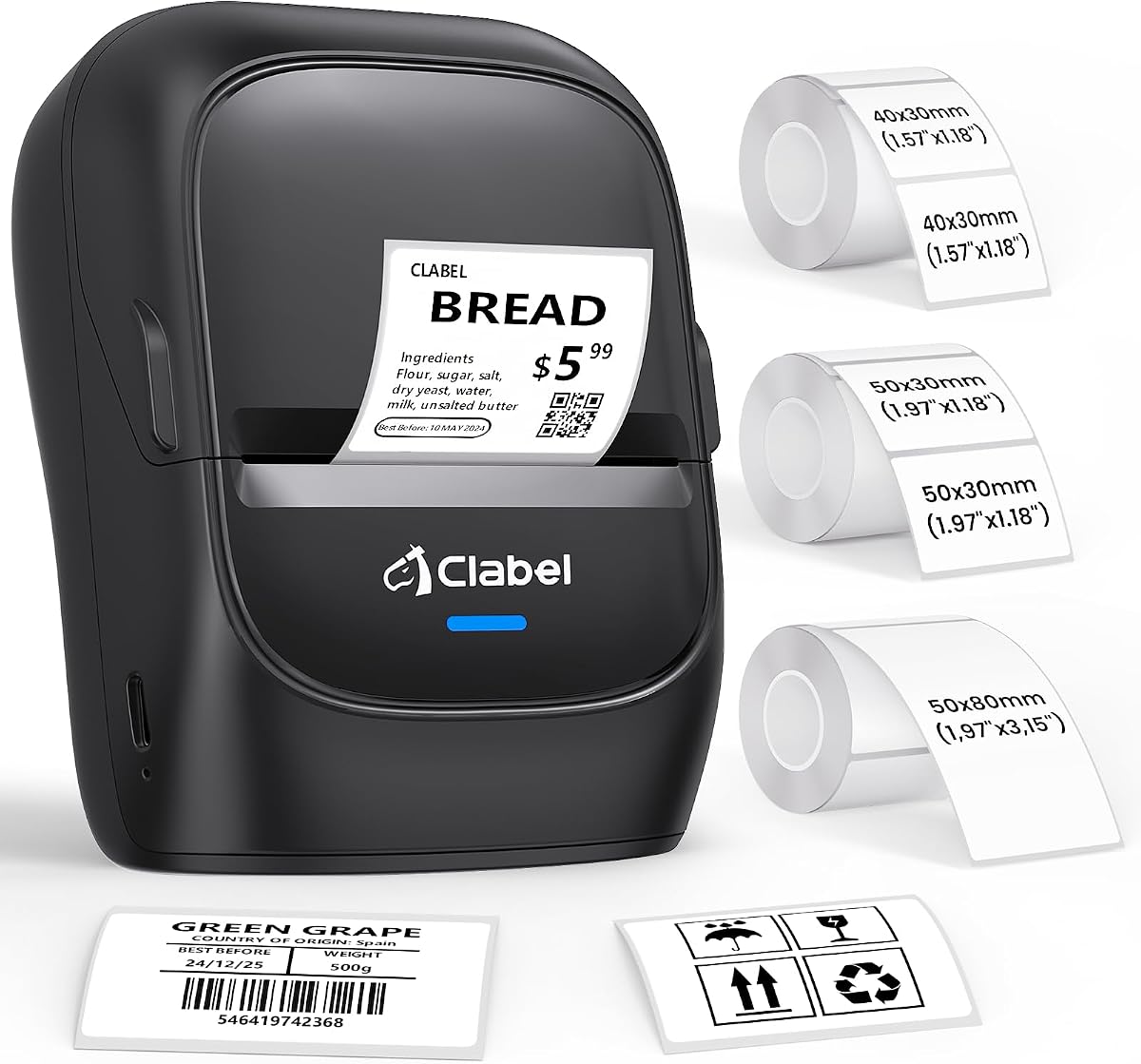
The CLABEL 221D removes the frustration of proprietary labels by accepting any standard thermal roll. With a 4.1 rating, it appeals to budget conscious users who need reliable scanning quality for retail or office tasks.
We may earn a commission when you buy through this link, at no additional cost to you.
You can connect via USB for high volume desktop work or switch to Bluetooth for instant tag design at the counter. The Trade app supports batch printing to reduce manual entry errors and speed up workflow.
This printer focuses on efficient item level labeling rather than large shipping documents. Its direct thermal technology ensures sharp barcodes that scan quickly without needing ink or toner replacements.
Ideal for small businesses that need flexibility without long term supply contracts. If avoiding vendor lock in is a priority, this model provides a straightforward and economical solution.
Eliminates expensive proprietary chips so you can use any budget paper.
Switch between USB for bulk and Bluetooth for instant wireless printing.
We may earn a commission when you buy through this link, at no additional cost to you.
The Phomemo M110 is designed for users who need a highly portable solution. Its 4.3 rating highlights user appreciation for the included display screen which simplifies editing without a phone.
We may earn a commission when you buy through this link, at no additional cost to you.
You can scan text from images using OCR to convert photos directly into editable text. This feature speeds up the process of labeling inventory where you already have images or photos available.
While the app offers many free templates, some advanced options require a paid membership. The battery powered design means you can move anywhere in your home or office without looking for power.
Best for personal organization or light commercial use where portability is key. The compact size and battery operation make it a versatile tool for events or field labeling.
Built in screen allows editing without needing a smartphone connection.
Convert text from images into editable format for quick label creation.
We may earn a commission when you buy through this link, at no additional cost to you.
DYMO continues to be a trusted name in labeling with the LabelWriter 550 series. Its 3.6 rating indicates mixed reviews often stemming from the higher cost of proprietary labels compared to generic options.
We may earn a commission when you buy through this link, at no additional cost to you.
The printer focuses on precision printing to reduce waste of sheets. It uses FSC certified materials which appeals to eco conscious consumers looking for sustainable business practices.
You will find smooth integration with standard operating systems but are locked into specific paper types. This ensures consistent quality but means you cannot switch to cheaper alternatives without voiding the setup.
Choose this if brand consistency and sustainability certifications are your top priorities. It works well for professional environments where supply chain reliability outweighs cost savings.
Uses FSC certified materials to support sustainable packaging practices.
Prints precise quantities to eliminate waste common with sheet labels.
We may earn a commission when you buy through this link, at no additional cost to you.
This desktop version of the CLABEL 221D maintains the flexibility of its mobile cousin while fitting neatly on a desk. A 4.0 rating suggests it meets expectations for basic office and retail labeling tasks.
We may earn a commission when you buy through this link, at no additional cost to you.
The setup is noted to be quick allowing you to start printing within minutes. You can reuse existing rolls to save costs without compromising on the quality of the thermal print.
The Trade app includes extensive customization like barcode and QR code generation. It also supports Excel printing which helps streamline data entry for inventory management.
Ideal for small businesses needing a reliable tool for daily labeling. Its compact size and ease of setup make it a practical addition to any work counter.
Get up and running in under five minutes with simple installation.
Supports Excel printing to streamline data entry for inventory.
We may earn a commission when you buy through this link, at no additional cost to you.
The CLABEL 221B is highlighted for its ability to print on durable and waterproof labels. This makes it suitable for kitchens or environments where labels might encounter moisture or grease.
We may earn a commission when you buy through this link, at no additional cost to you.
It offers a seamless connection experience for smartphone users without complex setup. The open system means you are not restricted to expensive branded rolls which helps control your budget.
The print quality is sharp enough for scanning even in challenging conditions. Users report that the labels resist tearing and remain readable over time.
Choose this model if you need labels that can withstand harsh environments. It is particularly useful for food service or outdoor inventory management.
Waterproof labels withstand moisture and oil in busy kitchens.
No brand locks allow you to choose any standard thermal roll.
We may earn a commission when you buy through this link, at no additional cost to you.
Zebra printers are known for rugged performance and the ZP450 lives up to that reputation. With a 4.7 rating it stands out as the most reliable option for professional environments.
We may earn a commission when you buy through this link, at no additional cost to you.
The hardware is built to withstand daily use in busy receiving areas or offices. Multiple connectivity options ensure it integrates easily with older systems requiring serial or parallel ports.
Its speed and resolution ensure labels are produced efficiently without sacrificing quality. The fixed width design simplifies the operation by reducing setup time for users.
This is the choice for businesses where reliability and uptime are critical. While the price is higher, the durability justifies the investment for high volume needs.
Robust double walled construction handles demanding daily use.
Supports USB serial and parallel for wide system compatibility.
We may earn a commission when you buy through this link, at no additional cost to you.
This model offers a balanced approach with both USB and Bluetooth options for versatile use. Its 4.0 rating reflects solid performance for general small business labeling needs.
We may earn a commission when you buy through this link, at no additional cost to you.
The app is designed to streamline workflows with batch printing capabilities. This reduces the time spent manually entering data for repetitive tasks like inventory management.
You can switch between desktop and mobile printing depending on where the work is happening. The barcodes are clear and sharp ensuring reliable scanning at checkout.
Best for teams that need flexibility between stationary and mobile printing. It is a practical choice for retail counters or warehouses needing reliable item tags.
Save custom layouts to print multiple labels without manual setup.
Switch between USB for high volume and Bluetooth for mobility.
We may earn a commission when you buy through this link, at no additional cost to you.
The iDPRT iD880 is an industrial grade printer designed for heavy duty environments. It supports wider labels up to 4.64 inches which is rare at this price point.
We may earn a commission when you buy through this link, at no additional cost to you.
With a 4.1 rating it is praised for its speed and robust build. The included memory allows it to handle complex data tasks without slowing down during long print jobs.
Maintenance is simplified with easy access to the print head for quick replacement. This minimizes downtime ensuring your business operations continue without interruption.
Ideal for professional workgroups needing wider labels and high throughput. If you require industrial capabilities without the cost of enterprise systems this model fits well.
Handles labels up to 4.64 inches wide for larger shipping.
Ample RAM capacity for handling complex and data intensive tasks.
We may earn a commission when you buy through this link, at no additional cost to you.
Choosing the right printer depends on your specific workflow and budget. We break down the key factors to consider before making a purchase.
Consider the maximum width you need. Most home printers go up to 2 inches while industrial ones can handle 4 inches. Check if the printer supports shipping labels or just small item tags.
Look for printers that support a range of widths to ensure flexibility for different tasks.
Decide between USB and Bluetooth. USB offers stability for desktop use while Bluetooth allows you to print from mobile devices. Some models offer both for maximum versatility.
Choose dual connectivity if you need to print from both a computer and a phone.
Evaluate the available software. Look for free apps that support batch printing and templates. Some apps offer OCR features to convert images to text.
Ensure the software is regularly updated to maintain compatibility and features.
Check if the printer requires proprietary labels. Open systems allow you to use any standard thermal roll which saves money. Avoid models with RFID locks unless you need branded supplies.
Open systems are generally better for long term budget control.
Higher speed is better for high volume tasks. Look for speeds of 4 inches per second or more for efficiency. Resolution should be at least 203 DPI for clear barcodes.
Aim for 203 DPI or higher to ensure your barcodes are scannable.
Industrial models are built to last in busy environments. Check for robust casing and quality components. For office use, a lighter desktop design is sufficient.
Invest in a durable build if the printer will be used daily.
Calculate the long term cost of labels. Generic rolls are much cheaper than branded ones. Check if the printer supports generic thermal paper.
Choose a printer with low operating costs to save money over time.
Look for plug and play models that do not require complex drivers. Some printers have auto calibration to help with label alignment.
Easy setup ensures you can start working immediately without technical hurdles.
Start by selecting the right label rolls. Ensure they are the correct width and type for your printer. If your printer supports generic rolls, you can save significantly on costs.
Download and install the software or app provided. Configure the label size in the settings to match your rolls. This prevents misalignment and wasted labels during printing.
Clean the print head regularly with a lint free cloth and isopropyl alcohol. Dust and adhesive residue can cause poor print quality. Also check the sensor to ensure it detects label gaps accurately.
It depends on the model. Many modern printers support open systems allowing you to use any standard thermal roll. Check if the printer has RFID locks or brand restrictions before purchasing.
No, most use direct thermal technology which requires no ink or toner. The labels are heat sensitive so the print head creates the image by applying heat directly to the paper.
For small businesses, a speed of 4 inches per second is usually sufficient. This allows for efficient printing without being too fast for quality. Industrial needs might require 6 inches or more.
Not always. Many models support Bluetooth connectivity allowing you to print directly from a smartphone or tablet. However, desktop models often benefit from PC software for complex designs.
This can be due to low resolution or label alignment issues. Ensure your printer is set to 203 DPI or higher and that the label is loaded correctly in the guide.
Most models listed support up to 2 inches which is for item tags. For 4×6 shipping labels you will need a dedicated shipping printer that supports wider paper widths.
With proper care a thermal printer can last for years. Industrial models are built for heavy daily use and typically last longer than portable units which are designed for lighter tasks.
We have reviewed ten top models ranging from budget friendly portable options to industrial desktop units. The iDPRT SP310 offers great versatility while the SUPVAN T50M Pro is perfect for simple home tasks.
Consider your label needs and connectivity requirements before deciding. If you want to save on supplies look for models with open systems. If you need speed prioritize printers with higher IPS ratings.
Prices change frequently so check the current listings before buying. We hope this guide helps you find the perfect printer to organize your inventory or shipping efficiently.