
NGTeco Standalone Time Clock
4.3Editor score
True standalone operation zero setup
USB drive data export included
Industrial-grade durable design
This guide compares the top biometric fingerprint scanner time clock options for small businesses, evaluating security, features, and cloud capabilities.
Finding the right biometric fingerprint scanner time clock is essential for modern businesses aiming to reduce errors and prevent time theft. These devices offer secure, efficient ways to track employee attendance without relying on traditional paper cards that can be lost or forged. By automating the clock-in process, you save valuable administrative time and ensure accurate payroll processing.
We have carefully evaluated ten leading models available in the market to help you choose the best system for your specific needs. Our comparison focuses on key factors such as authentication methods, data storage options, connectivity features, and overall ease of use for both managers and employees. This thorough analysis ensures you find a reliable solution that fits your workflow.
Each product pick in this guide highlights unique strengths, from standalone units requiring no internet to cloud-connected systems offering remote access. You will see detailed breakdowns of specifications, pros, cons, and real-world performance insights to inform your decision. Please note that product availability and pricing may change over time, so verify current details before purchasing.
4.3Editor score

4.1Editor score

4.7Editor score
This side-by-side comparison outlines the core specifications and capabilities of each top-rated biometric fingerprint scanner time clock to help you quickly identify the model that aligns with your business requirements.



This biometric time clock stands out as a comprehensive solution for small businesses seeking high-level security and ease of use. With a rating of 4.1 stars, it supports multiple authentication methods including face, palm, finger, badge, and PIN. The system eliminates manual paperwork and reduces errors through automated clock-in and out processes managed via a web-based interface.
We may earn a commission when you buy through this link, at no additional cost to you.
The standout feature is its ability to prevent time theft and buddy punching through precision biometric authentication. Managers can monitor their workforce remotely using the included mobile app which offers geo-fencing and GPS coordinates for location-based tracking. Real-time online reporting and CSV exports streamline payroll processing saving valuable administrative time for business growth.
While the device offers robust features, it requires a subscription after a 30-day free trial which may add to ongoing costs. The reliance on WiFi or LAN connectivity means you must ensure stable internet access for optimal performance. However, the lifetime warranty and free replacements provide peace of mind regarding long-term reliability and risk management.
Business owners prioritizing security and flexible tracking will find this model ideal for their operations. It is best suited for teams that need remote access to attendance data and want to minimize human error in payroll. For those willing to invest in a subscription for premium features, this system delivers efficiency and control.
Using multiple biometric authentication options this device helps eliminate time theft and costly mistakes through automation.
Connect to WiFi or LAN to send punches to the cloud and manage attendance from anywhere with the mobile app.
We may earn a commission when you buy through this link, at no additional cost to you.
The NGTeco Standalone Time Clock offers a cost-effective and straightforward solution for businesses needing reliable tracking without internet dependency. Rated 4.3 stars, this device requires zero setup and eliminates the need for WiFi or complex software installations. Employees can clock in via PIN or fingerprint while managers export data easily via USB for instant payroll integration.
We may earn a commission when you buy through this link, at no additional cost to you.
Its ability to handle up to 500 user profiles and 50,000 punch records makes it scalable for growing teams. The digital system replaces wasteful paper cards cutting supply costs while providing precise records. An internal backup system ensures that attendance data is preserved even during unexpected power loss keeping your records secure.
The lack of cloud features means you cannot access data remotely which might be a limitation for businesses with multiple locations. You must physically connect a USB drive to retrieve attendance reports. Despite this, the durable industrial-grade materials and compact design ensure consistent performance in various workplace environments including retail and warehouses.
This model is perfect for small businesses that prefer simplicity and lower initial costs without sacrificing core functionality. It appeals to organizations that value privacy and data control since all information stays local. If you do not need remote access or advanced reporting this standalone unit provides excellent value and reliability.
Get started in minutes with no WiFi or complex software and easily export attendance data via included USB drive.
Onboard memory supports up to 500 user profiles and handles shifts for growing teams without constant maintenance.
We may earn a commission when you buy through this link, at no additional cost to you.
With a high rating of 4.7 stars this NGTeco model delivers advanced performance and ease of use for small businesses. It features an advanced sensor that authenticates wet or dry fingerprints in just 0.5 seconds ensuring quick and secure clock-ins around the clock. The system includes APP control allowing for real-time syncing and editing of attendance records directly from your phone.
We may earn a commission when you buy through this link, at no additional cost to you.
Streamlined scheduling and auto time tracking simplify admin tasks significantly. Managers can auto-calculate work hours and export timesheets via email or USB for error-free payroll processing. The built-in data protection safeguards records during power outages maintaining continuity. US-based support and a one-year warranty add further reliability and peace of mind for buyers.
While the price point is higher than basic standalone units the features justify the investment for those needing efficiency. You need to be on the same local network for instant sync which might restrict remote editing capabilities. Nevertheless the consistent performance and dedicated support make it a strong contender for businesses prioritizing user experience and accuracy.
This device is ideal for companies that want fast reliable clock-ins without the complexity of full cloud systems. It suits managers who need flexibility in editing punches and syncing data quickly. If you value speed and dedicated support this premium option offers a superior balance of hardware and service quality.
Advanced sensor authenticates wet or dry fingerprints in 0.5 seconds delivering quick secure clock-ins 24/7.
Backed by a 1-year warranty and free lifetime U.S.-based customer service for ongoing assistance and reliability.
We may earn a commission when you buy through this link, at no additional cost to you.
The uAttend JR2000 provides a cloud-based attendance system designed to make employee time tracking effortless and accurate. With a 3.7 rating it focuses on business efficiency by automating payroll tasks handling tax filings and enabling real-time data access from any device. This allows managers to track attendance trends and labor costs effectively.
We may earn a commission when you buy through this link, at no additional cost to you.
A key strength lies in its data security and automatic backup features ensuring employee records stay secure and retrievable anytime. The system is feature-rich with robust reporting tools that provide valuable insights into productivity and trends. Setup is straightforward with an intuitive interface accessible to both first-time users and tech-savvy managers alike.
However the reliance on a subscription service may deter users looking for one-time purchase options. Some users have found the performance less reliable compared to standalone competitors which impacts overall satisfaction. If you prioritize cloud convenience and automated payroll integration this might still be a viable choice for growing businesses.
This model works well for teams that need flexible access to attendance data from multiple devices. It is best for businesses that want to offload tax filing and payroll management tasks. Consider the subscription costs and ensure you are comfortable with cloud-only access before purchasing this all-in-one system.
The uAttend JR2000 makes employee time tracking effortless and accurate powered by a cloud-based system for efficiency.
Keep your employee data secure and always available with automatic cloud backups providing peace of mind.
We may earn a commission when you buy through this link, at no additional cost to you.
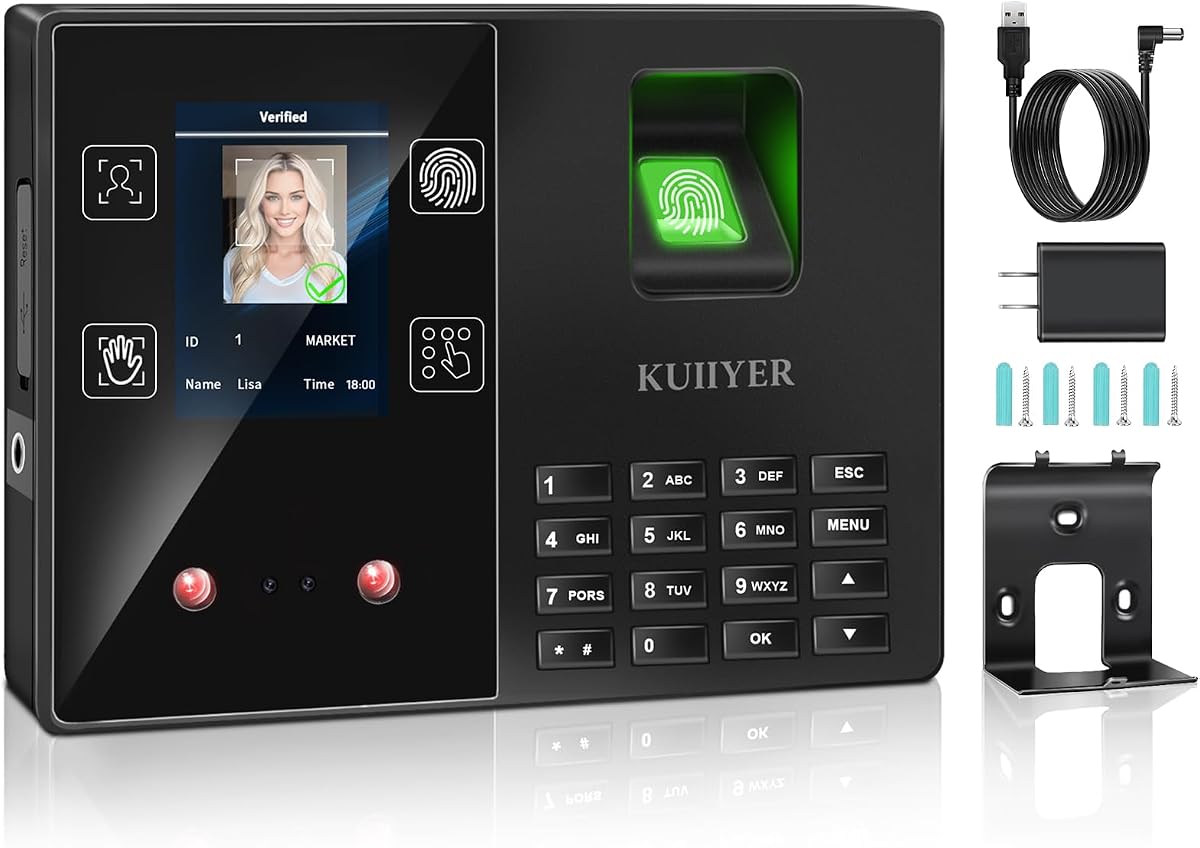
KUIIYER Time Clock adopts latest biometric identification technology to provide responsive and accurate identification of employees face palm and fingerprint. With a 3.7 rating it supports up to 1000 user capacity and includes four different ways to punch clock for flexibility. The infrared camera ensures quick identification even in dim environments enhancing usability for night shifts.
We may earn a commission when you buy through this link, at no additional cost to you.
The device features a 2.8-inch TFT color LCD display with a simple intuitive interface that supports 12 languages and intelligent voice announcements. It records up to 160,000 attendance records and manages 16 departments with 24 shifts. Managers can view and download data reports easily via USB flash drive without needing any apps or network connectivity.
While offering extensive features at a low upfront cost the device lacks included accessories like a USB drive and relies on offline management. Some reviews suggest lower reliability compared to higher-rated models which may impact long-term performance. However the absence of monthly fees makes it an attractive option for budget-conscious small businesses.
This clock is suitable for businesses needing large user capacity without ongoing subscription costs. It works well for offices schools and factories up to 1000 employees. If you need a multifunctional system with no monthly fees this model provides a convenient offline alternative to cloud-based solutions.
Equipped with high performance processor and dual camera for accurate identification of face palm and fingerprint quickly.
Enjoy auto accurate hours calculations and no need for app or network ensuring no monthly subscription costs.
We may earn a commission when you buy through this link, at no additional cost to you.
This compact USB device provides a fast and accurate way to verify users and track attendance using biometric technology. While it lacks a built-in screen it connects easily to computers via a plug-and-play USB interface for quick setup. It supports multiple user enrollments with advanced algorithms to ensure stable and consistent performance in secure environments.
We may earn a commission when you buy through this link, at no additional cost to you.
Its lightweight design makes it convenient for office desktop use and portable access control applications. The device is compatible with most attendance and access control software making it versatile for existing systems. However it requires separate software installation to function fully which may complicate setup for some users.
Given the lack of a standalone interface this unit is best used as an accessory for a computer-based system. It is not suitable as a complete time clock unless paired with appropriate software and a host machine. While reliable in operation it does not offer the same standalone convenience as full punch clock models.
Consider this device if you need a secure scanner for specific office workstations rather than a general attendance solution. It works well where software integration is already managed. For those seeking a standalone device you may need to look for complete models with built-in displays and export options.
Fast and accurate fingerprint recognition ensures secure user verification and efficient attendance tracking on computers.
Plug and play USB interface allows easy connection with computers for quick setup and reliable operation.
We may earn a commission when you buy through this link, at no additional cost to you.
The HapAttend time clock is a standalone device designed with privacy in mind requiring no WiFi or network setup. With a 4.1 rating it allows you to keep data local and secure via USB transfer. This model is ready to use out of the box with no complicated network setup or software installation for immediate start.
We may earn a commission when you buy through this link, at no additional cost to you.
It automatically calculates working hours totaling them to reduce manual errors and costs associated with paper cards. The device supports multiple languages including English Spanish German French and Italian for diverse teams. A one-year warranty and lifetime customer support add further assurance to your purchase ensuring you get help when needed.
While the lack of internet connectivity is a privacy benefit it limits remote management options. You will need to physically retrieve data via USB rather than accessing it online. Despite this limitation the H3 offers solid performance for small businesses that value data security and simplicity over advanced features.
This time clock is ideal for workplaces such as offices factories hotels schools and restaurants needing privacy. It suits businesses with up to 1000 employees that prefer a one-time purchase without subscriptions. If security and ease of use are your priorities this standalone unit meets essential needs effectively.
Designed with privacy in mind this standalone device requires no WiFi or network setup keeping data local and secure.
Working hours are totaled automatically so you no longer have to calculate manually or use costly paper cards.
We may earn a commission when you buy through this link, at no additional cost to you.
This NGTeco Cloud Time Clock allows you to access real-time punch data from anywhere via a free cloud service powered by AWS US servers. With a 3.8 rating it supports up to 200 users and 30,000 logs with offline sync capabilities. The customizable shift configurations suit all team structures from part-time to 24/7 operations.
We may earn a commission when you buy through this link, at no additional cost to you.
Bank-grade data security and compliance ensure your attendance records remain protected with end-to-end encryption. The device connects via 2.4GHz WiFi or LAN and automatically syncs once network is restored to prevent data loss. While some advanced features require a separate subscription the core management features remain free for basic team affairs.
Users may find the interface less intuitive compared to higher-rated models and require a subscription for GPS check-ins. However the combination of cloud access and offline backup provides flexibility for businesses that need remote visibility. The lifetime US technical support adds value for troubleshooting and maintenance issues over time.
This model is well-suited for businesses needing remote access and secure cloud storage for their workforce data. It works best for teams with varied shift requirements that benefit from automated report generation. If you need remote management without high monthly fees this option provides a balanced feature set for growing businesses.
The TC1 Cloud-Connect time clock allows you to access real-time punch data from anywhere via a free cloud service.
Powered by AWS US servers with end-to-end encryption your attendance data is stored securely and compliant.
We may earn a commission when you buy through this link, at no additional cost to you.
The H1 time clock is a standalone device that keeps data private and fully under your control without needing WiFi or internet. With a 3.9 rating it allows you to export records via USB for secure offline management. This model is ready to use right out of the box with no software installation or ongoing fees required.
We may earn a commission when you buy through this link, at no additional cost to you.
It automatically totals employee hours to help reduce payroll errors and eliminate paper time cards and ink ribbons. The device supports multiple languages including English Spanish German French and Italian for diverse teams. A 1-year warranty and lifetime customer support provide confidence and reliability for small to mid-sized businesses.
While the simplicity is a major advantage for some users it lacks cloud access or remote management capabilities. You must physically connect a USB drive to view or transfer attendance data which may be inconvenient for remote managers. However for local offices needing a basic secure system this model offers straightforward functionality.
This clock is designed for growing teams that prefer simple local management without subscriptions. It is suitable for offices restaurants retail shops and schools needing basic tracking. If you prioritize cost-effectiveness and security over advanced cloud features this device delivers essential services efficiently.
Keep your data private and fully under your control with a standalone device requiring no internet or network setup.
Skip subscriptions and hidden costs with this time clock ready to use right out of the box as a one-time purchase.
We may earn a commission when you buy through this link, at no additional cost to you.
The NGTeco Cloud Time Clock delivers remote access and auto reporting via an intuitive mobile app and web portal for busy managers. With a 4.2 rating it features dual-band WiFi for stable connectivity and a 2000mAh backup battery to maintain tracking during power cuts. This model generates detailed reports and tracks attendance on the go for seamless management.
We may earn a commission when you buy through this link, at no additional cost to you.
Flexible shift customization and overtime rule configuration allow this clock to adapt to diverse business workflows. Data is protected by AWS cloud storage with end-to-end encryption ensuring secure and private business information. The device supports 8 languages and comes with 1-year warranty and free lifetime technical support for ongoing assistance.
While it requires a subscription for full access to features like GPS check-ins and smart reminders it offers robust core capabilities. The reliance on WiFi means internet outages may affect real-time sync though offline data syncs later. Overall the device balances advanced cloud features with reliability for modern business needs.
This clock is ideal for businesses needing real-time monitoring and comprehensive reporting tools. It works well for companies requiring flexible shift management and secure data storage. If remote access and dual-band connectivity are priorities this model provides advanced functionality to streamline operations.
Manage your small business attendance effortlessly from anywhere with our intuitive mobile app and web portal.
Equipped with both 2.4GHz and 5GHz WiFi this cloud time clock delivers fast stable connectivity for performance.
We may earn a commission when you buy through this link, at no additional cost to you.
Choosing the right biometric time clock involves weighing features like connectivity storage and authentication methods against your business needs.
Decide whether you need a standalone device that stores data locally or a cloud-connected model for remote access. Standalone units often save money on subscriptions but limit remote management. Cloud systems provide real-time updates but rely on internet stability.
Look for models supporting multiple authentication methods such as fingerprint face palm or PIN codes. More options provide flexibility for employees who may have issues with one method. Ensure the device supports enough user profiles for your current team size.
Prioritize systems with strong data protection features like encryption automatic backups and power outage recovery. Your attendance records are critical for payroll and legal compliance. Check for internal backup systems or cloud redundancy to avoid data loss.
Consider whether the device integrates seamlessly with your payroll software or allows easy exports like CSV or Excel. Smooth data transfer reduces manual work and errors in payroll processing. Verify that the export format matches your accounting requirements.
Choose models that offer intuitive interfaces and straightforward setup processes for managers and employees alike. A user-friendly system reduces training time and encourages adoption. Look for clear on-screen instructions and multi-language support if needed.
Check the warranty period and availability of customer support to ensure help is accessible if issues arise. A longer warranty indicates confidence in product quality. Prefer vendors offering US-based support for faster resolution of technical problems.
Balance upfront hardware costs with any recurring subscription fees required for cloud features or advanced reporting. While free models exist they may lack remote access. Calculate total cost of ownership over several years to find the best value.
Regularly update the device firmware if available to improve performance and security. Clean the sensor with a soft cloth to avoid dust interfering with readings. Back up data frequently using USB or cloud options to protect against unexpected failures.
A biometric fingerprint scanner time clock is a device that tracks employee attendance using fingerprint recognition or other biometric methods. It replaces traditional time cards to prevent buddy punching and ensure accurate records. These systems are used in businesses to simplify payroll and manage shifts.
No, many standalone models do not require internet connection and store data locally. However, cloud-based models need internet to sync data to servers. Choose based on whether you need remote access or prefer offline security.
Fingerprint data is typically stored as encrypted templates rather than raw images enhancing security. Devices often use local storage or secure cloud servers to protect records. Always verify the vendor uses encryption and complies with data protection standards.
Many modern models support multiple methods such as fingerprint face palm or PIN codes. This flexibility helps if one method fails or employees prefer alternatives. Check the device specs to confirm supported options before purchasing.
Most devices have internal backup systems or battery backups to preserve data during power outages. Some models sync to the cloud to prevent loss of records. Verify backup features in the product details to ensure reliability.
Standalone models usually have no monthly fees while cloud-connected systems often require subscriptions for full access. Some providers offer free basic features with paid tiers for advanced capabilities. Check pricing plans to avoid unexpected costs.
Remember to verify current pricing and availability before purchasing as market conditions change. Compare your final selection against your specific needs to ensure satisfaction. Investing in a reliable time clock will streamline your operations and protect your workforce data.