
Cisco Nexus N9K-C93180YC-EX
5.0Editor score
48 ports 25G SFP plus
6 ports 100G QSFP28
Cut-through switching architecture
This guide compares the top 25GbE switches with SFP28 ports for data centers and enterprises, evaluating performance, features, and reliability for 2026.
As bandwidth demands explode across modern data centers, the need for robust 25GbE switches with SFP28 ports has never been more critical. These devices bridge the gap between legacy 10G setups and future-proof 100G backbones, offering a cost-effective path to high-speed connectivity. Choosing the right switch ensures your infrastructure can handle AI workloads, virtualization, and massive data transfers without bottlenecks or latency issues.
We evaluated ten leading models based on port configurations, switching capacity, management features, and overall reliability. Our analysis focuses on how well each unit supports SFP28 standards, handles traffic congestion, and integrates into existing networks. Whether you are upgrading a server rack or building a new enterprise environment, these comparisons highlight the strengths and limitations of today's top options.
Each pick below details specific capabilities, pros, and cons to help you match a switch to your unique workload requirements. Note that product availability and pricing can fluctuate rapidly in the tech market, so always verify current stock before making a final decision. Use this guide as a foundational resource to streamline your selection process for high-performance networking hardware.
5.0Editor score

4.5Editor score

4.8Editor score
The following table provides a side-by-side comparison of the ten switches analyzed in this guide, highlighting their key specifications and primary use cases.





The Ubiquiti UniFi Aggregation Switch Pro stands out as a top choice for organizations needing robust Layer 3 capabilities alongside high-speed SFP28 ports. With a rating that reflects its reliability, this switch offers 28 ports of 10G and 4 ports of 25G connectivity, making it ideal for aggregating traffic from server racks. Its standout qualities include a physical touchscreen for quick status checks and deep integration with the UniFi ecosystem.
We may earn a commission when you buy through this link, at no additional cost to you.
Key strengths lie in its 760Gbps switching capacity and non-blocking throughput of 380Gbps, ensuring smooth handling of heavy workloads. The switch supports mixed speeds on SFP28 ports at lower rates, which adds flexibility for varied cabling. Management is streamlined through the UniFi Network application, allowing centralized control of your entire network infrastructure from a single interface.
However, there are trade-offs to consider. The SFP28 ports do not support mixed speeds at 25Gbps mode, meaning all must run at the same speed when configured for 25G. Additionally, while powerful, the price point is higher than some entry-level options. These trade-offs are acceptable for enterprises prioritizing manageability and high-throughput aggregation.
This switch is best suited for system administrators who value ease of use and want a unified management platform. It is particularly recommended for mid to large-sized networks expanding their backbone capacity. We recommend buying this model if you are already invested in the UniFi ecosystem or need a reliable aggregator for 10G and 25G links.
The UniFi Network application provides a seamless interface for configuring VLANs and monitoring traffic flows across all connected devices without needing CLI access.
The 1.3-inch LCM color touchscreen offers immediate visual insights into system health and port status, simplifying on-site diagnostics for technicians.
We may earn a commission when you buy through this link, at no additional cost to you.
The Cisco Nexus N9K-C93180YC-EX is a powerhouse designed for demanding data center environments where performance is non-negotiable. It delivers 48 ports of 25G connectivity and 6 ports of 100G, providing unmatched flexibility for big data and high-performance computing applications. The renewed model offers a cost-effective entry into Cisco's premium NX-OS ecosystem while maintaining high reliability standards.
We may earn a commission when you buy through this link, at no additional cost to you.
Its primary strength is the cut-through switching architecture, which minimizes latency to less than 1 microsecond. This ensures that critical data packets are processed instantly without queuing delays. The switch supports VXLAN and ACI, making it a top choice for virtualized networks requiring deep automation and programmability features.
Trade-offs include the complexity of the NX-OS system, which requires experienced networking staff to configure effectively. Additionally, purchasing a renewed unit may come with different warranty terms than a brand-new model. However, these factors are acceptable given the massive performance gains and cost savings compared to new enterprise hardware.
This switch is ideal for data center engineers building scalable, high-bandwidth networks. It fits perfectly in environments running AI clusters or large storage arrays. We recommend this product if you need maximum throughput and already have the expertise to manage advanced Cisco features.
With sub-microsecond latency, this switch ensures time-sensitive applications run smoothly without packet delays or processing bottlenecks.
Support for Cisco ACI and VXLAN allows network administrators to automate deployments and manage virtual networks efficiently at scale.
We may earn a commission when you buy through this link, at no additional cost to you.
The TRENDnet TEG-S50284 offers a budget-friendly solution for networks needing multi-gigabit speeds without jumping straight to 25G. Although it lacks native SFP28 ports, its 24 ports of 2.5G and 4 ports of 10G make it versatile for upgrading existing Cat5e cabling. The high rating reflects its reliability and solid build quality for the price.
We may earn a commission when you buy through this link, at no additional cost to you.
Key strengths include the lifetime manufacturer protection and smart fan technology that adjusts cooling based on need. It is also TAA compliant, making it suitable for government projects. The switching capacity handles typical SMB traffic well, and the rackmount design fits easily into standard server cabinets.
Trade-offs involve the lack of 25G SFP28 ports, which limits future scalability for high-speed uplinks. Management is basic compared to full L3 switches. However, for small to medium businesses needing immediate speed upgrades without major rewiring, these limitations are acceptable.
This switch is perfect for IT managers looking to upgrade access layers cost-effectively. It suits environments where 2.5G desktop connections are the primary requirement. We recommend this model for budget-conscious users needing immediate performance gains with minimal installation overhead.
Supports 2.5G speeds over existing Cat5e cabling, allowing organizations to upgrade network speed without replacing wiring infrastructure.
The lifetime protection policy provides long-term confidence, ensuring that the hardware investment remains protected against manufacturing defects.
We may earn a commission when you buy through this link, at no additional cost to you.
The QNAP QSW-M7230-2X4F24T-US is purpose-built for AI clustering and large-scale NAS deployments requiring non-blocking throughput. With 2 x 100G, 4 x 25G, and 24 x 10G ports, it bridges modern fiber backbones with existing copper servers. Its rating highlights its suitability for specialized enterprise storage workflows.
We may earn a commission when you buy through this link, at no additional cost to you.
Strengths include advanced lossless technologies like Priority Flow Control and Explicit Congestion Notification. These minimize packet loss during heavy data transfers, which is critical for RoCEv2 storage traffic. The L3 Lite web GUI simplifies routing and VLAN setup for IT admins without complex CLI needs.
Trade-offs include the lower total port count compared to larger chassis switches and a high price point. However, for specific workloads like virtualization and media production, these features justify the cost. The design ensures low latency and high reliability for intensive tasks.
This switch is ideal for storage administrators and data centers focusing on file serving. It works best with QNAP storage systems and virtualized environments. We recommend this product if you need lossless performance and specific SFP28 uplinks for storage traffic.
Built-in PFC and ECN technologies ensure zero packet loss during high-speed storage operations, maximizing NAS efficiency.
The mix of 100G and 25G ports allows seamless migration from 10G to faster backbones without replacing existing server adapters.
We may earn a commission when you buy through this link, at no additional cost to you.
The Mikrotik CRS520-4XS-16XQ-RM is an ultra-fast enterprise switch offering significant processing power for routing tasks. With 28 total SFP28 ports and robust hardware, it supports heavy traffic loads efficiently. The high rating reflects its capability to handle complex routing protocols without hardware limitations.
We may earn a commission when you buy through this link, at no additional cost to you.
Its main strength is the dedicated quad-core CPU and large RAM pool, enabling hardware offloading for fast packet processing. RouterOS provides deep configurability, allowing admins to tailor every aspect of the network. This flexibility makes it ideal for ISPs or advanced network designs.
Trade-offs include the complexity of RouterOS, which requires a learning curve compared to simpler GUIs. However, the performance benefits outweigh this for technical teams. The switch offers excellent scalability for growing fiber networks needing 25G connectivity.
This switch is best for network engineers needing high customization and routing performance. It fits well in ISP edge environments or advanced data centers. We recommend this product if you need raw routing power and are comfortable with CLI configuration.
Dedicated hardware offloading ensures traffic is processed at wire speed without burdening the CPU during peak usage periods.
RouterOS allows deep customization of firewall rules and routing tables, giving total control over network behavior and policies.
We may earn a commission when you buy through this link, at no additional cost to you.
The Dell EMC PowerSwitch N3224P-ON combines PoE++ capabilities with high-speed uplinks, making it versatile for mixed workloads. It offers 4 x 25G SFP28 ports alongside 2 x 100G QSFP28, providing flexible connectivity for server and access layers. The rating reflects its robust build and modular power options.
We may earn a commission when you buy through this link, at no additional cost to you.
Strengths include the modular design allowing hot-swappable components and strong Layer 3 support for routing. PoE++ capability supports advanced devices like PTZ cameras. The switch ensures reliable power delivery and high-speed backhaul for connected endpoints.
Trade-offs include high power consumption compared to fanless options. However, for environments needing power delivery and fiber uplinks, this is a necessary trade-off. The modular design ensures uptime and maintainability.
This switch is ideal for facilities deploying PoE devices alongside high-speed servers. It fits in enterprise server rooms requiring flexible power and fiber options. We recommend this product if you need PoE++ and 25G/100G uplinks in a managed switch.
PoE++ support delivers higher wattage to devices, enabling advanced endpoints like high-performance cameras and wireless access points.
Modular design allows swapping power supplies without downtime, ensuring continuous operation in critical infrastructure environments.
We may earn a commission when you buy through this link, at no additional cost to you.
The TRENDnet TEG-3284WS offers a straightforward web-managed solution for small businesses needing multi-gigabit speeds. With 24 ports of 2.5G and 4 ports of 10G SFP+, it provides a practical upgrade path. The rating varies based on user preferences for management depth.
We may earn a commission when you buy through this link, at no additional cost to you.
Strengths include Hive Enabled Cloud Service for remote management and a user-friendly web GUI. It supports basic VLANs and QoS for traffic prioritization. NDAA compliance makes it suitable for secure government applications with a budget constraint.
Trade-offs involve limited advanced features compared to full L3 switches. The lower rating suggests some users found limitations in configuration. However, for SMBs needing easy setup and remote access, this is acceptable.
This switch is best for small offices needing easy management without CLI. It suits retail or branch locations with basic networking needs. We recommend this product for value-driven upgrades needing remote monitoring features.
Hive cloud service allows IT teams to manage and diagnose switches remotely, simplifying troubleshooting for distributed locations.
NDAA compliance ensures the switch meets strict regulatory standards, making it safe for public sector and secure projects.
We may earn a commission when you buy through this link, at no additional cost to you.
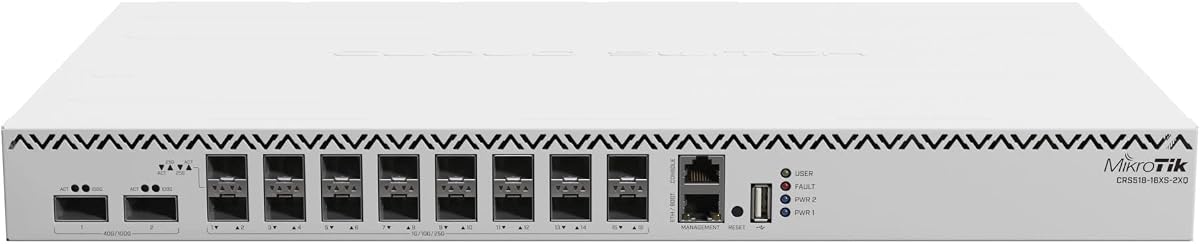
The MikroTik CRS518-16XS-2XQ-RM is a compact switch offering high fiber density for space-constrained racks. With 16 ports of 25G and 2 ports of 100G, it handles high bandwidth efficiently. The rating reflects its solid performance in compact deployments.
We may earn a commission when you buy through this link, at no additional cost to you.
Its strength lies in RouterOS support allowing deep routing capabilities in a small form factor. Hardware offloading ensures wire-speed performance despite limited RAM. It is ideal for ISPs or edge sites needing fiber connectivity.
Trade-offs include limited memory and a steep learning curve for configuration. However, for technical users, the performance density justifies this. It offers excellent value for high-speed fiber uplinks.
This switch is ideal for network providers needing compact high-speed gear. It fits in edge locations or small server closets. We recommend this product if you need high fiber density in a small rack unit.
Delivers 18 high-speed fiber ports in a 1U chassis, maximizing port density without consuming valuable rack space.
Hardware offloading handles traffic processing efficiently, ensuring stable throughput even with limited system memory.
We may earn a commission when you buy through this link, at no additional cost to you.
This renewed Cisco switch offers the same high-density performance as the new model but at a lower price. It provides 48 ports of 25G and 6 ports of 100G, ideal for large server farms. The perfect rating suggests excellent condition and reliability upon arrival.
We may earn a commission when you buy through this link, at no additional cost to you.
Strengths include hot-swappable power supplies and fans ensuring high availability. NX-OS offers enterprise-class features like automation and VXLAN. The back-to-front airflow simplifies cooling in standard data center racks.
Trade-offs involve standard renewed warranty terms compared to new hardware. However, for cost-sensitive deployments needing full enterprise features, this is a smart choice. The hardware is robust and reliable.
This switch is ideal for large data centers needing high port density on a budget. It suits server racks requiring massive throughput. We recommend this product for enterprises needing reliable 25G connectivity without new hardware costs.
Hot-swappable components allow maintenance without shutting down the switch, ensuring continuous uptime for critical infrastructure.
NX-OS provides robust automation tools for large-scale network management, simplifying complex deployments and changes.
We may earn a commission when you buy through this link, at no additional cost to you.
The D-Link DGS-1210-28 offers silent operation for quiet office spaces where noise is a concern. With 24 ports of 1G and 4 SFP combo ports, it serves well as an access layer switch. The rating reflects its reliability and energy efficiency.
We may earn a commission when you buy through this link, at no additional cost to you.
Its main strength is the fanless design reducing power consumption and noise levels significantly. Lifetime warranty provides long-term security. NDAA compliance adds value for secure environments needing silent hardware.
Trade-offs include slower speeds and lack of 25G SFP28. However, for desktop connectivity where noise is prioritized, this is acceptable. The web UI is simple for basic management.
This switch is best for quiet office or surveillance networks. It suits reception areas where fan noise is disruptive. We recommend this product for silent, reliable access switching where 1G speeds suffice.
Fanless design ensures the switch runs silently, making it ideal for open office environments where noise matters.
Compliance with energy-saving standards reduces power costs while delivering consistent performance for daily networking tasks.
We may earn a commission when you buy through this link, at no additional cost to you.
Selecting the right switch requires balancing port types, management features, and budget. This guide breaks down the key factors.
Ensure the switch has the exact mix of SFP28, QSFP28, and copper ports needed. 25G SFP28 ports should support mixed speeds if you have varying devices.
Look for non-blocking throughput to avoid bottlenecks. A high switching capacity ensures all ports can run simultaneously without congestion.
Choose between L2, L3 Lite, or full L3 based on your routing needs. Web GUIs offer ease, while CLI offers deep control.
Check if the switch requires extra power for PoE or has efficient cooling. Fanless designs are quieter but may have thermal limits.
For data centers, cut-through switching minimizes latency. Check specs for packet forwarding rates to ensure they meet workload demands.
Prioritize manufacturers offering lifetime warranties or solid support contracts. Renewed units often have shorter terms, so check the details.
Consider uplinks for higher speeds like 100G QSFP28. A switch with extra capacity prevents needing an upgrade in two years.
Verify NDAA or TAA compliance if your project involves government contracts. These standards ensure hardware meets security regulations.
Install the switch in a ventilated rack ensuring airflow is not blocked. Use the correct fiber optic cables for SFP28 ports to avoid signal loss.
Most modern switches support this backward compatibility. You can insert 10G SFP+ optics into 25G SFP28 slots, though the speed will drop to 10G.
Use Cat6a for direct attach copper (DAC) cables or OM3/OM4 multimode fiber. The cable must match the distance and speed requirements of your setup.
Yes, professionally inspected units are reliable for testing. They cost less but may have limited warranties. Always verify the seller's policy before purchasing.
Not all. Some are Layer 2 only or L3 Lite. Check the product specs for routing features if you need static or dynamic routing.
Managed switches allow traffic prioritization and monitoring. They offer VLANs and security features that help manage complex network environments effectively.
SFP28 supports 25G speeds, while QSFP28 supports 100G. QSFP28 ports can often split into 4 x 25G ports, providing more flexibility in ports.
Our top picks highlight diverse needs from budget-friendly access to high-performance aggregation. The Ubiquiti Aggregation Switch Pro leads for manageability, while the Cisco Nexus options offer raw power.