
Creality Ender 3 V3 SE
3.8Editor score
CR Touch auto leveling
250mm/s print speed
Simple 3 step setup
This guide compares the best auto bed leveling 3D printers for beginners, evaluating speed, ease of use, and reliability for flawless first layers every time.
Starting in 3D printing journey requires the right tools to ensure success from the very first layer. Auto bed leveling technology removes the guesswork and manual adjustments that often frustrate newcomers to the hobby.
We have carefully evaluated ten top-rated models based on speed, build volume, material compatibility, and user feedback. Our analysis focuses on features that make printing accessible and enjoyable for those just starting out.
Each pick highlights specific strengths like one-click calibration or fast print speeds. Prices and availability change frequently, so verify details on the product pages before making your final decision today.
3.8Editor score

4.3Editor score

4.3Editor score
This side-by-side comparison highlights key specifications across all ten models to help you find the perfect match for your specific printing needs and budget constraints.


The FLASHFORGE Adventurer 5M stands out as a top choice for beginners needing reliability and speed. With a 4.3 rating, users praise its ability to produce consistent results without manual tuning.
We may earn a commission when you buy through this link, at no additional cost to you.
Its one-click auto leveling ensures perfect first layers every time, which is crucial for new users. The 600mm/s speed reduces wait times significantly, making it ideal for prototyping and learning.
While it lacks a fully enclosed chamber, the robust design supports a wide range of filaments including PETG and TPU. The quick detachable nozzle simplifies maintenance, reducing downtime for busy makers.
This printer is best for those who want high performance without complex setup. The combination of speed and ease of use makes it a strong recommendation for anyone starting their 3D printing journey today.
The 600mm/s max speed allows projects to finish in a fraction of the time compared to standard printers.
Auto leveling and power loss recovery eliminate common points of failure that frustrate new users.
We may earn a commission when you buy through this link, at no additional cost to you.
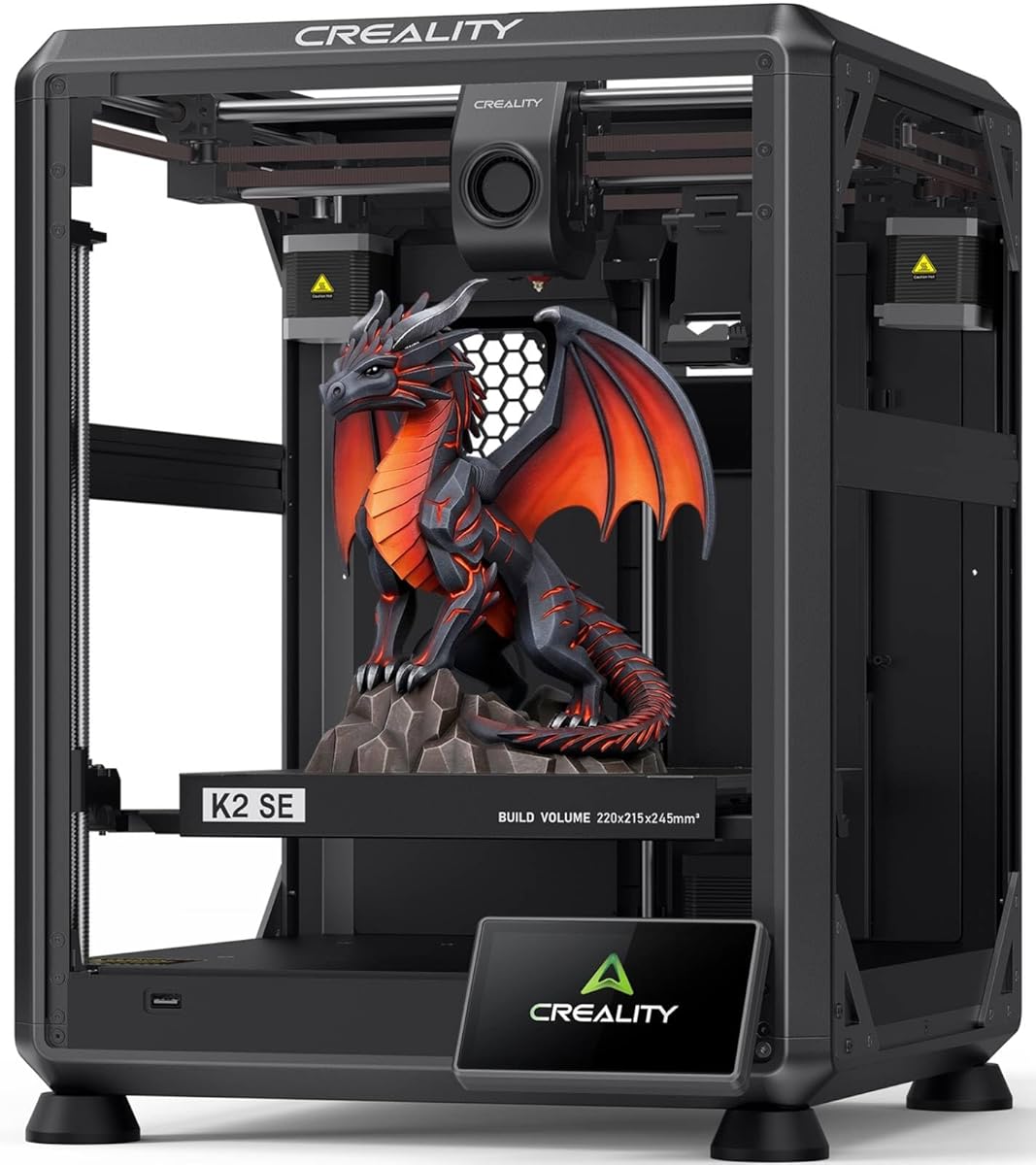
The Creality K2 SE offers a solid metal build that ensures stability during high-speed prints. While rated 3.8, its features like vibration compensation make it a serious contender for quality results.
We may earn a commission when you buy through this link, at no additional cost to you.
Its direct drive extruder and quick-swap nozzle allow for easy maintenance and material switching. The 220x215x245mm build volume accommodates most standard projects for hobbyists and small businesses.
Multicolor printing support via CFS is a unique advantage for creative projects. However, users should be aware of the learning curve involved in firmware updates and setup configurations.
This model suits users looking to grow into multicolor printing without buying a new machine later. The touchscreen guide helps beginners navigate initial setup with confidence and minimal frustration.
Compatibility with the Creality CFS system opens up vibrant multi-material projects seamlessly.
Die-cast aluminum frames reduce flex, ensuring better dimensional accuracy on larger prints.
We may earn a commission when you buy through this link, at no additional cost to you.
The E-Leveler 2 is a specialized tool designed to simplify manual bed leveling for existing printers. It provides clear visual feedback through an LED system, making the process much easier for new users.
We may earn a commission when you buy through this link, at no additional cost to you.
Its improved design features better battery holders and a simplified nozzle target. This accessory is perfect for those who have older printers without built-in auto leveling but still want precision.
While it is not a printer itself, it ensures accurate first layers for manual setups. The balancing end cap makes it stable on most build plates, reducing the need for repeated adjustments.
We recommend this tool for users looking to enhance their current setup without replacing the printer. It bridges the gap between manual adjustment and automatic systems effectively.
The LED indicators show when the bed is level, removing guesswork from the calibration process.
Designed for most 3D printers with manually adjustable beds for broad compatibility.
We may earn a commission when you buy through this link, at no additional cost to you.
The FLASHFORGE AD5M combines speed and precision with an all-metal CoreXY structure. Its auto calibration system ensures accurate prints without manual intervention, making it highly user-friendly for beginners.
We may earn a commission when you buy through this link, at no additional cost to you.
With a 280C nozzle and fast speed, it handles various materials reliably. The 3-second nozzle swap feature simplifies maintenance, allowing users to switch between fine details and large prints quickly.
The flexible PEI plate aids in removing prints effortlessly. While it is open frame, it remains stable during operation due to its robust mechanical design and vibration compensation features.
This printer is ideal for those needing a balance of speed and quality. Its straightforward interface supports both novice and expert users effectively across different project requirements.
The CoreXY motion structure ensures stable movement even at high speeds for better layer adhesion.
Nozzle swaps take seconds, minimizing downtime between different filament projects easily.
We may earn a commission when you buy through this link, at no additional cost to you.
The QIDI Q2 redefines what a beginner printer can achieve with professional features like a 65C heated chamber. This unlocks advanced materials like PPS-CF, normally difficult for entry-level users to process effectively.
We may earn a commission when you buy through this link, at no additional cost to you.
Its unique nozzle acts as a leveling sensor, ensuring unmatched first-layer accuracy without extra parts. The 1.5GT synchronous belt reduces vibration, leading to smooth surfaces even at high speeds.
Safety features include a triple filtration system and flame-retardant chamber, making it safe for indoor use. While more expensive, the reliability and material range justify the investment for serious hobbyists.
This printer is best for those who plan to print functional parts and engineering plastics. Its ability to handle up to 16-color printing with accessories makes it future-proof for growing needs.
The 65C chamber reduces warping, ensuring consistent adhesion even on larger, complex parts.
Supports everything from PLA to carbon fiber, expanding the range of possible projects.
We may earn a commission when you buy through this link, at no additional cost to you.
The FLASHFORGE 5M Pro offers an enclosed design with a quiet mode under 50dB, making it suitable for home environments. It includes auto calibration and dual filtration for safer indoor operation.
We may earn a commission when you buy through this link, at no additional cost to you.
The HEPA13 filter blocks harmful particles, which is essential for classrooms or small spaces. Its CoreXY structure ensures stability, while the included camera allows for remote monitoring via app.
With a dual filament bundle, users can experiment with different nozzle sizes for detail or speed. The app provides real-time status updates, giving users peace of mind during long print jobs.
This model is best for those prioritizing noise reduction and safety. Its enclosed build makes it versatile for both functional parts and creative classroom projects efficiently.
Low-speed silent mode allows printing during study or work hours without disturbance.
HEPA and carbon filters capture 99% of particulates, ensuring clean indoor air quality.
We may earn a commission when you buy through this link, at no additional cost to you.
The Creality Ender 3 V3 SE is an affordable upgrade that brings auto leveling to budget users. With a 3-step assembly and CR Touch sensor, it simplifies setup significantly for new hobbyists.
We may earn a commission when you buy through this link, at no additional cost to you.
The Sprite direct extruder ensures smooth filament feeding, even for flexible materials like TPU. Its dual Z-axis design reduces wobbling, leading to more consistent layers across the print height.
Automatic filament loading and unloading save time and reduce manual effort during changes. While the print volume is standard, the speed improvements over older models make it a solid entry point.
This printer is best for beginners on a tight budget who still want modern features. Its reliability and ease of use make it a recommended starting point for learning the basics.
Affordable entry point with essential auto leveling and quick setup to reduce friction.
Pre-assembled components mean printing can start in as little as 20 minutes.
We may earn a commission when you buy through this link, at no additional cost to you.
The Creality CR Touch Kit allows users to add auto leveling to existing printers like the Ender 3 series. It is a highly rated accessory that transforms manual calibration into an automated process.
We may earn a commission when you buy through this link, at no additional cost to you.
It performs multi-point detection to map the bed surface accurately. The system then compensates for tilt angles, ensuring the nozzle height is consistent across the entire build plate.
Installation involves mounting brackets and a firmware update, which may require technical skills. However, the result is a significantly smoother workflow for users who already own compatible machines.
This kit is best for upgrading older printers without buying a new device. Its stability and compatibility make it a popular choice for maintaining consistent print quality.
Recording multiple points allows for precise bed mapping and automatic compensation of tilt.
Transforms manual printers into auto-leveling ones without the cost of a new machine.
We may earn a commission when you buy through this link, at no additional cost to you.
The FLASHFORGE AD5X brings multi-color capabilities to beginners with a simple 4-color system. It features fully auto leveling and a 600mm/s speed, making complex designs accessible to new users.
We may earn a commission when you buy through this link, at no additional cost to you.
The Intelligent Filament System manages refills automatically, reducing interruptions. The all-metal CoreXY structure ensures stability during high-speed printing, delivering accurate results for detailed models.
Users can create vibrant models without manual color changes. While the setup is slightly more involved than single-nozzle printers, the creative possibilities justify the learning curve for hobbyists.
This model is best for artists and designers wanting colorful prototypes. Its balance of speed and multi-color support makes it a powerful tool for creative projects.
Creates vibrant, detailed models with up to four colors simultaneously without extra hardware.
Intelligent Filament System detects refills to keep prints running without manual intervention.
We may earn a commission when you buy through this link, at no additional cost to you.
The Creality Ender 3 V3 SE offers a straightforward auto leveling setup designed specifically for beginners. With CR Touch leveling and a 32-bit silent board, it ensures a quiet and smooth printing experience.
We may earn a commission when you buy through this link, at no additional cost to you.
It is engineered to deliver consistent performance at 250mm/s without complex tuning. The Sprite direct drive extruder provides reliable feeding, while the flexible build plate makes model removal effortless.
Dual synchronized Z-axis lead screws reduce vibration, ensuring consistent quality over time. The simple workflow minimizes manual steps, allowing users to focus on design rather than calibration or debugging.
This printer is best for those wanting a no-fuss entry into 3D printing. Its focus on reliability and ease of use makes it a practical choice for learning quickly.
Designed specifically to reduce setup time and maximize first print success rates.
Dual Z-axis and linear shafts ensure smooth motion even during long print sessions.
We may earn a commission when you buy through this link, at no additional cost to you.
Choosing the right printer involves balancing features like speed, size, and ease of use. This section explores key factors to consider before you buy.
Auto leveling is essential for beginners as it ensures a perfect first layer without manual adjustments. Look for systems that use sensors or touch probes to map the bed automatically.
Prioritize printers with one-click or fully automatic calibration to simplify the setup process significantly.
Higher speeds reduce wait times, allowing you to complete projects faster. Speeds of 250mm/s or higher are recommended for efficient learning.
Ensure the printer maintains quality even at higher speeds by checking for vibration compensation features.
The build volume determines the size of objects you can print in one go. Standard sizes around 220mm x 220mm are versatile for most hobby projects.
Choose a size that fits your intended use, whether it is miniatures or larger functional parts.
Consider the materials you plan to print, such as PLA, PETG, or TPU. Higher nozzle temperatures allow for more advanced materials like ABS or Nylon.
Check if the extruder is direct drive, which works better with flexible materials like TPU and rubber.
Enclosed printers offer better temperature control and safety, especially for ABS or indoor use. Open frames are easier to cool and often cheaper for beginners.
Decide based on your safety needs and whether you will print materials prone to warping.
Beginners benefit from pre-assembled or partially assembled units that require minimal tools. Look for kits that include clear guides or touchscreens for setup.
Quick assembly ensures you can start printing sooner without frustration or long configuration periods.
Features like run-out sensors and automatic loading prevent print failures mid-job. These add convenience and peace of mind for new users.
Ensure the printer supports filament storage solutions to prevent moisture damage to your supplies.
User-friendly slicing software and remote monitoring apps make printing easier. Cloud connectivity allows you to manage prints from your phone.
Look for models with active communities and reliable technical support for troubleshooting.
Start by placing your printer on a stable, level surface and ensuring proper ventilation. Run the auto-leveling routine using the provided menu to calibrate the bed before the first print.
Regularly clean the build plate with alcohol to maintain adhesion and check the nozzle for clogs. Keep the printer firmware updated to access the latest features and bug fixes.
Store filament in a dry, sealed container to prevent moisture absorption. Monitor prints during the first few layers to ensure the nozzle height is correct.
Generally, auto leveling handles the calibration automatically. However, you may occasionally need to perform a coarse manual level if the bed is significantly tilted.
Auto leveling uses a sensor or touch probe to measure the distance between the nozzle and the bed at multiple points. The printer then adjusts the Z-height to compensate for uneven areas.
Yes, modern auto leveling systems provide high accuracy suitable for detailed prints. They ensure the first layer is consistent, which is crucial for overall print quality.
Yes, you can often upgrade older printers with aftermarket kits like the CR Touch. Check compatibility with your motherboard and model before purchasing an upgrade.
Auto leveling works with all filament types because it calibrates the bed, not the material. However, ensure your nozzle temperature is appropriate for the filament you are using.
If the sensor fails, you can revert to manual leveling temporarily. Contact the manufacturer for support or replacement parts to restore full functionality quickly.
Most models are safe, especially those with enclosures and filtration. Always ensure proper ventilation to handle any fumes produced during the printing process.
Calibrate the printer every few weeks or after moving it. This ensures the bed remains level and print quality stays consistent over time.
The FLASHFORGE Adventurer 5M and Creality Ender 3 V3 SE lead the pack for speed and value. Select based on your budget and material needs for the best results.
Prioritize auto leveling features to avoid frustration during your early prints. These features save time and ensure success, letting you focus on creativity.
Prices and availability fluctuate frequently. Always check current offers on the product pages before making your final purchase decision today.